Jun 27

Eassiy Android Data Recovery 5.1.10

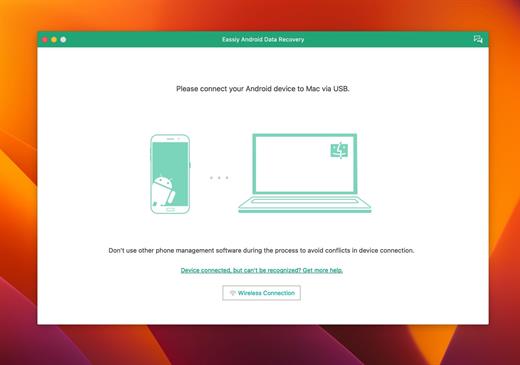
Eassiy Android Data Recovery has the industry’s highest recovery success rate for photos and videos. So whether your Android phone is jailbreaked or not, and whether you lost data in any of the following situations, Eassiy Android Data Recovery will help you get them back effortlessly.
Features
Highest Android data recovery rate for photo and video in the industry.
Restore deleted WhatsApp messages and WhatsApp attachments on Android.
3 recovery modes: Recover directly from Android devices, Android SD card and SIM card.
Support 16+ file types, industry-leading in the supported file types.
Faster scan: Scan 1000+ deleted files in seconds
Support with 6000+ Android devices including Samsung, Huawei, HTC, Google, LG, Sony, etc.

3 Modes to Restore Android Data without Any Loss
Recover Data from Android Device Directly
Scan and recover your lost/deleted data directly from your Android smartphone without a backup.

Recover from Android SD Card
Scan then recover the lost data from the SD card inserted into the Android phone.

Recover from SIM Card
Scan the inserted SIM card to get back your contacts in the SIM card without any loss.

Recover WhatsApp Data on Android Without Backup
Recovery of WhatsApp messages and WhatsApp attachments, including videos, photos, voice, stickers, and documents without backup

What’s New

Version 5.1.10:

  • Release notes were unavailable when this listing was updated.

Compatibility

macOS 10.10 or later


Release Name: Eassiy Android Data Recovery 5.1.10
Size: 60.1 MB
Links: HOMEPAGE – NFO – Torrent Search

Download: FiKPERUPLOADGiGNiTROFLARERAPiDGATOR

7 Comments
Jun 27

Pixelmator Pro 3.3.8

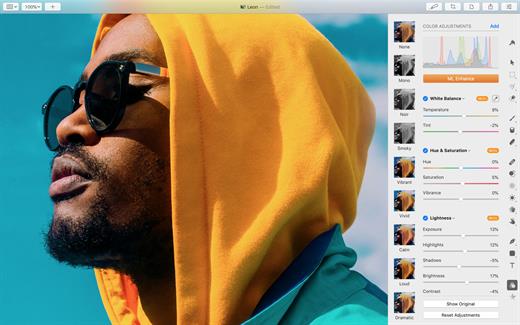
Pixelmator Pro is an incredibly powerful, beautiful, and easy to use image editor designed exclusively for Mac.

With a wide range of professional-grade, nondestructive image editing tools, Pixelmator Pro lets you bring out the best in your photos, create gorgeous compositions and designs, draw, paint, apply stunning effects, design beautiful text, and edit images in just about any way you can imagine. And thanks to its intuitive and accessible design, Pixelmator Pro is delightfully easy to use – whether you’re just starting out with image editing or you’re a seasoned pro.

The modern, single-window interface is designed exclusively for working with images on a Mac. An intuitive and accessible design makes it easy for anyone to edit images – from complete beginners to design professionals.

The new ML Super Resolution feature lets you increase the resolution of images without blurriness or reduced quality using state-of-the-art machine learning.

What’s New

Version 3.3.8:
Pixelmator Pro 3.3.8 adds all-new Frequency Separation and Low Pass effects, improves performance, and adds a few other improvements and fixes.

  • Easily smooth out fine details or remove noise in images with the Low Pass effect.
  • Use the new Frequency Separation effect to adjust fine details and overall tones in images separately.
  • Enjoy faster and smoother editing thanks to performance optimizations.
  • It would not be possible to import custom LUTs if Final Cut Pro was installed on the same device. Fixed.

Compatibility

macOS 11.0 or later
Apple Silicon or Intel Core processor


Release Name: Pixelmator Pro 3.3.8
Size: 566.4 MB
Links: HOMEPAGE – NFO – Torrent Search

Download: FiKPERUPLOADGiGNiTROFLARERAPiDGATOR

5 Comments
Jun 27

Script Debugger 8.0.6

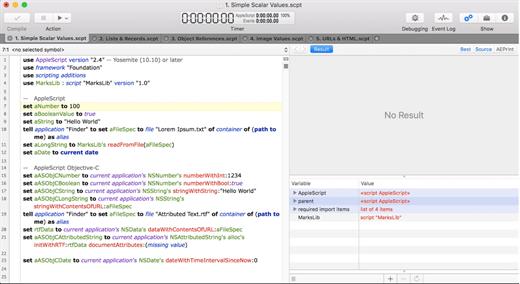
Script Debugger provides everything you need to quickly and easily author AppleScripts that work. No other scripting tool can match Script Debugger’s capabilities for creating, editing and debugging AppleScripts. Its sophisticated Dictionary browser provides far more information than any other tool can and eliminates guesswork and needless experimentation. Simply put, Script Debugger makes AppleScript easy.

What’s New

Version 8.0.6:

  • 1790: Fixed scripting issue when saving run-only scripts.
  • 1789: Fixed issue where clippings sometimes introduced unnecessary blank lines.
  • 1785: Fixed an issue with .scptd files saved with the version-control-friendly setting on.
  • 1788: Fixed issues when using application-related directives in clippings.
  • 1787: Improved Event Log result legibility, especially in Dark Mode.
  • 1786: The stepper for the Build Number field was erroneously decrementing below build number 1. Minimum is now 1.
  • 1776: Added an event text result property to the event log entry class,. This property returns the entry’s result as a string, as it appears in Script Debugger’s Event Log.
  • 1781: Fixed issue where AppleScript format colors could not be changed by entering numerical values.
  • 1777: Fixed regression where script library dictionaries were not appearing in the dictionary list under newer versions of macOS.

Compatibility

OS X 10.10 or later, 64-bit processor


Release Name: Script Debugger 8.0.6
Size: 70.4 MB
Links: HOMEPAGE – NFO – Torrent Search

Download: FiKPERUPLOADGiGNiTROFLARERAPiDGATOR

6 Comments
Jun 27

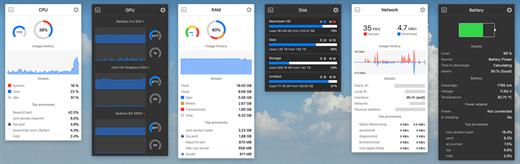
Stats 2.9.0

Stats is a application which allows you to monitor your macOS system.

  • CPU Usage
  • Memory Usage
  • Disk utilization
  • Sensors information (Temperature/Voltage/Power)
  • Battery level
  • Network usage

What’s New

Version 2.9.0:

New features

  • feat: added telemetry module
  • feat: added new macs released on WWDC 2023
  • feat: adjusted CPU line chart height in the popup view
  • feat: moved from the HEX colors to the RGB
  • feat: dropped macOS 10.14 support. From now the minimum supporting version is macOS 10.15.

Localization

  • feat: updated Taiwan Traditional Chinese translation (#1531)
  • lang: updated Simplified Chinese localization (#1528)
  • lang: updated Italian localization (#1525)
  • lang: renamed tabs in the module settings lang: added translation for telemetry

Compatibility

macOS 10.14 or later, 64-bit processor


Release Name: Stats 2.9.0
Size: 7.6 MB
Links: HOMEPAGE – NFO – Torrent Search

Download: FiKPERUPLOADGiGNiTROFLARERAPiDGATOR

5 Comments
Jun 27

AltTab 6.60.0

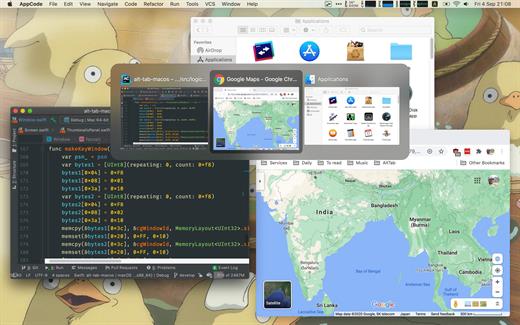
AltTab brings the power of Windows’ “alt-tab” window switcher to macOS.

Usage

  • Press ⌥ option + ⇥ tab to shows the thumbnails.
  • Hold ⌥ option and press ⇥ tab to select the next thumbnail.
  • Hold ⌥ option and press ⇧ shift + ⇥ tab to select the previous thumbnail.
  • Release ⌥ option to switch focus to the window.

The app is available in: Bahasa Indonesia, Deutsch, English, Español, Français, Italiano, Lëtzebuergesch, Magyar, Nederlands, Português (Brasil), العربية, Suomi, Türkçe, Русский язык, 中文 (简体), 中文 (繁体), 日本語, 한국어

What’s New

Version 6.60.0:

Bug Fixes:

  • Prevent flickering when switching to a previewed window

Features:

  • Improve support for color-slurp windows
  • User can change window order in preferences

Compatibility

macOS 10.12 or later, 64-bit processor


Release Name: AltTab 6.60.0
Size: 11.3 MB
Links: HOMEPAGE – NFO – Torrent Search

Download: FiKPERUPLOADGiGNiTROFLARERAPiDGATOR

6 Comments
Jun 27

Dato 4.7.1

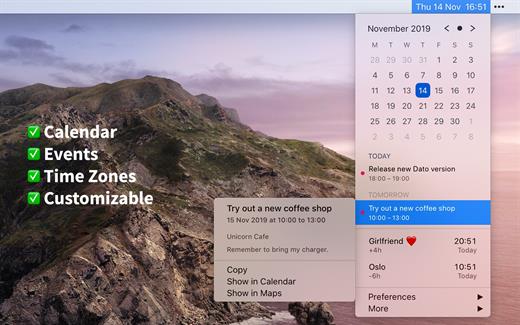
Dato is a replacement for the system menu bar clock.

By default, it looks exactly the same, but when you click it, you get a small calendar, calendar events for the next week, the current time in various time zones (even with custom names), week number, and more. You can customize what to show in the menu and the menu bar.

Dato supports all the locales and languages that macOS supports for dates, times, and the calendar, but the menus are English-only.

Features

  • Calendar, optionally with week numbers. Your upcoming events for the next week at a glance (customizable).Time zones, optionally with custom names.Search time zones by city (15K cities included).Customizable.Double-click a day in the calendar to open that day in the default calendar app.
  • (Supports: Calendar, Fantastical 2, BusyCal).Fully offline with no network entitlements, for your privacy benefit.Supports calendar events with HTML formatted notes.Lots of keyboard shortcuts for power users.”Join Zoom Meeting” button on Zoom meeting calendar invites.

What’s New

Version 4.7.1:

  • Bug fixes.

Compatibility

macOS 10.14.4 or later, 64-bit processor


Release Name: Dato 4.7.1
Size: 19.4 MB
Links: HOMEPAGE – NFO – Torrent Search

Download: FiKPERUPLOADGiGNiTROFLARERAPiDGATOR

6 Comments
Jun 27

AnyDroid 7.5.0.20230626

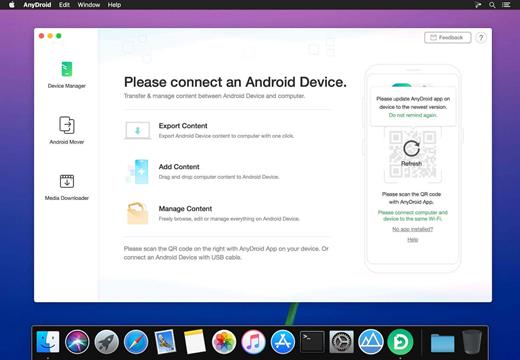
Easily Transfer Music, Videos and Photos from / to Your Android. AnyDroid manager that breaks the sync boundary and consolidates every access to all your content in one place, including music, videos, photos and etc.

  • Manages Android phone’s music library by transferring songs to / from computer
  • Adds, deletes and exports movie videos on Android phone
  • Moves photos on Android phone, views pictures on computer and sets images as wallpaper
  • One-click design to manage Android phone media content without browsing file system

Android Phone Series:

  • SAMSUNG, Google, HTC, SONY, LG, MOTOROLA, HUAWEI, ZTE, Xiaomi, OPPO, SHARP, ViVo, LENOVO, MEIZU, OnePlus, TCL, Gionee, Meitu, Nubia, Smartisan, etc.

Android Pad Series:

  • SAMSUNG, Google, SONY, HUAWEI, LG, Lenovo, Xiaomi

What’s New

Version 7.5.0.20230626:

  • Release notes were unavailable when this listing was updated.

Compatibility

OS X 10.10 or later, 64-bit processor


Release Name: AnyDroid 7.5.0.20230626
Size: 74.8 MB
Links: HOMEPAGE – NFO – Torrent Search

Download: FiKPERUPLOADGiGNiTROFLARERAPiDGATOR

6 Comments
Jun 27

iNet Network Scanner 2.9.81

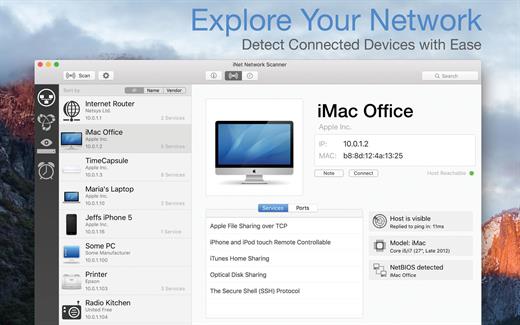
iNet Network Scanner provides you with information about networks your Mac is connected to. Its very easy and user friendly design allows even the unexperienced user to get a profound and understandable overview of a network and the running services. iNet is also available as iPhone and iPad app via the iTunes Store.

What’s New

Version 2.9.81:

  • [Updated] All databases
  • [Added] New 2023 Apple devices
  • [Added] Some better translations

Compatibility

macOS 11.0 or later


Release Name: iNet Network Scanner 2.9.81
Size: 227.3 MB
Links: HOMEPAGE – NFO – Torrent Search

Download: FiKPERUPLOADGiGNiTROFLARERAPiDGATOR

6 Comments
Jun 26

Mimestream 1.0.3

Mimestream combines your favorite Gmail features with the power of a native macOS app so you can move through your email effortlessly

Made for Mac, optimized for Gmail

As a native app written in Swift, Mimestream leverages the full power of macOS to deliver a lightning-fast and instantly familiar experience. Instead of using the IMAP protocol, Mimestream utilizes the Gmail API to enable an enhanced set of features that let you work with ease.

Work smarter, email faster

  • Rise above the noise and focus on the work that matters most. Mimestream makes it easy to keep your inbox organized with confidence.
  • Categorized Inbox – with support for Gmail’s categories, focus on what matters most and triage the rest at your leisure.
  • Multiple Accounts
  • Label Management

Committed to Privacy

Your data and credentials are stored only on your device, and the app only makes direct connections to Gmail. There are no intermediary servers, and Mimestream does not collect or sell your email.

Key Features

  • Lightweight and Fast – Mimestream is built for speed, and only uses a minimal amount of disk space to cache recent messages
  • Offline Access – Fully functional when offline and on the slowest connections-perfect for business travelers and whenever you’re on the go
  • System Notifications – Receive macOS system notifications when you receive new messages, so you never fall behind on important threads
  • Aliases – Your email aliases are automatically synced from Gmail without any setup and are used for replies when appropriate
  • Signatures – Signatures set up in Gmail are automatically synced with Mimestream
  • Robust Search – Enter any Gmail search query into Mimestream and get consistent results. Search while offline, too
  • Swipe Gestures – Use familiar macOS swipe gestures to quickly triage and archive your email
  • Tracking Prevention – Read your email privately – Mimestream blocks tracking pixels from 50+ of the most common tracking services
  • Keyboard Shortcuts – Triage your email quickly using keyboard shortcuts, including the option to use familiar Gmail or Apple Mail shortcut sets

Fixed

  • Regression: Mentions sometimes aren’t suggested when typing

Cleanup

  • Holding Option and clicking “Sign in with Google” opens the browser directly instead of using Authentication Services

Compatibility

macOS 10.15.0 or later


Release Name: Mimestream 1.0.3
Size: 14.4 MB
Links: HOMEPAGE – NFO – Torrent Search

Download: FiKPERUPLOADGiGNiTROFLARERAPiDGATOR

5 Comments
Jun 26

Wondershare Recoverit 12.0.4.2

Wondershare Recoverit is a comprehensive data recovery suite to recover Mac data lost due to accidental deleting, formatting, virus infection, improper operation, unexpected power failure, and other unknown reasons.

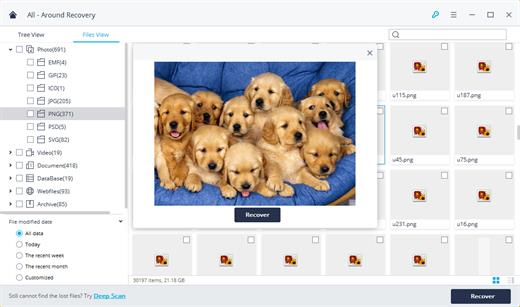
It can recover Mac data from lost, deleted, logical corrupted and formatted Mac hard drive, iPod, USB drive, SD card, digital camera, mobile phone, MP3, and MP4 player. Compatible with HFS+, FAT16/32, and NTFS file system volumes, this non-destructive Mac file recovery software ensures safe Mac file recovery without modifying the original data saved on your Mac machine or any other storage media. Versatile preview lets you enjoy Mac data recovery in advance.

Features

  • Safety First:
    • Read-only and risk-free Mac data recovery program. No any writing operation to your original data.
  • Versatile Preview Ability:
    • For images, real-time and direct scan results is displayed during the scan process to let users stop scanning once the target images are found.
    • For other Mac files such as videos, audio files, archives and documents, they are displayed as a text in a Hex mode for preview to let users enjoy file recovery on Mac in advance.
  • Precise File Recovery for Mac:
    • Before data recovery on Mac, you can choose the target file types to scan, which saves you much time especially when there are tons of files on your Mac machine.
    • Restore deleted files for Mac with original file names, shooting date, and storage paths.
    • Support file names search for scanning results to provide you precise Mac file recovery.
  • Easy-to-use and Clean Interface:
    • Complete wizard and easy-to-use interface let you perform Mac data recovery in a breeze.

What’s New

Version 12.0.4.2:

  • Release notes were unavailable when this listing was updated.

Compatibility

macOS 10.10 or later


Release Name: Wondershare Recoverit 12.0.4.2
Size: 126 MB
Links: HOMEPAGE – NFO – Torrent Search

Download: FiKPERUPLOADGiGNiTROFLARERAPiDGATOR

7 Comments