Jul 20

Compressor 4.6.5

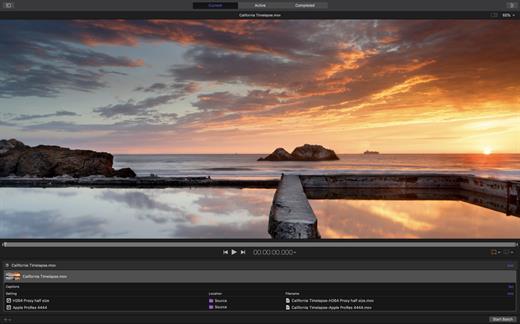
Compressor adds power and flexibility to Final Cut Pro X export. Customize output settings, work faster with distributed encoding, and tap into a comprehensive set of delivery features.
Powerful Encoding for Final Cut Pro

  • Use Compressor to customize encoding settings available in Final Cut Pro.
  • Choose from a wide array of codecs, sizes, frame rates, and other parameters.
  • Save your custom settings in Compressor; they automatically appear in Final Cut Pro.
  • Share settings with other editors, even if Compressor isn’t installed on their workstations.

Time-Saving Encoding Workflow

  • Experiment freely with encoding options, using real-time feedback in the Preview window.
  • Find exactly the setting you need in just a few clicks in the updated settings library.
  • Set up batch processes to streamline the encoding of large numbers of files.
  • Build batch templates to combine encoding with tasks such as moving or copying files.
  • Create self-contained Droplets to encode on the desktop with drag-and-drop ease.

Industry-Standard Encoding Support

  • Use one-step settings for Apple devices and websites such as Vimeo, YouTube, and Facebook.
  • Work with a choice of themed menus to encode and burn a DVD or Blu-ray disc.
  • Add chapter markers for discs or podcasts distributed on iPad, iPhone, iPod, or Apple TV.
  • Encode to a broad range of industry-standard formats, such as MPEG-2, H.264, and ProRes.
  • Generate files for HTTP live streaming in a single step.
  • Import Targa, DPX, TIFF, PSD, or PNG image sequences and encode them to any setting.
  • Tap into advanced encoding features for adding closed captioning, metadata, and more.

Pristine Format Conversions

  • Convert any file from its source format to another format, such as NTSC to PAL or SD to HD.
  • Clean up and customize your content using image filters, a timecode overlay, and watermarks.
  • Speed up video, slow it down, or adjust the frame rate to make the duration match a runtime.

Distributed Encoding

  • Save time by distributing encoding work among multiple cores and workstations.
  • Install Compressor on any Mac to activate it as a cluster node for distributed encoding.
  • Speed up encoding in Final Cut Pro by choosing a Compressor cluster for output processing.
  • Activate QuickCluster for dynamic configuration of nodes based on available resources.

What’s New

Version 4.6.5:

  • Changed the Settings and Locations sidebar to now be resizable when the Inspector is open.
  • Improves reliability when processing 4:2:2-based H.264 media on Mac computers with Apple silicon.
  • Addresses an issue where the color space of a Photo-JPEG source was incorrect when Color space was set to Automatic.
  • Fixes an issue where an exported IMF supplemental package was one frame shorter than the original package.

Compatibility

macOS 12.6 or later.
Apple Silicon or Intel Core processor


Release Name: Compressor 4.6.5
Size: 341.5 MB
Links: HOMEPAGE – NFO – Torrent Search

Download: FiKPERUPLOADGiGNiTROFLARERAPiDGATOR

3 Comments
Jul 20

Motion 5.6.5

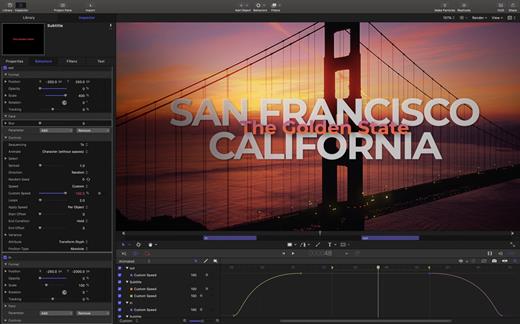
Motion is designed for video editors, Motion 5 lets you customize Final Cut Pro titles, transitions, and effects. Or create your own dazzling animations in 2D or 3D space, with real-time feedback as you work.

Features

  • Breakthrough Speed and Quality
    • New 64-bit architecture supports deeper, multilayered effects for use in Final Cut Pro.
    • ColorSync-managed color pipeline produces accurate, consistent color across applications.
    • Shared Render Engine provides consistent quality with Final Cut Pro and Compressor.
    • Rendering uses floating-point, linear-light color space for exceptionally realistic results.
    • Motion taps the GPU on the graphics card for high-speed rendering and exporting.
  • Editor-Friendly Design Tools
    • Work fast using a single-window interface with a familiar look and feel.
    • Customize Final Cut Pro titles, effects, and transitions by opening them in Motion.
    • Create Smart Motion Templates with simple controls for making changes as you edit.
    • Build stunning 2D and 3D compositions with more than 1900 Apple-designed elements.
    • Make adjustments to any parameter during playback and instantly see results.
  • Easy Animated Text and Titles
    • Design dramatic text effects with complete control over position, opacity, rotation, and more.
    • Animate text instantly by choosing from more than 200 text behaviors such as Type On.
    • Build a credit roll by importing a text file; the Scroll behavior optimizes the speed for you.
    • Move, scale, or rotate a single character with the Adjust Glyph tool.
    • Ripple text one character, word, or line at a time with the Sequence Text behavior.
  • Stunning Effects
    • Choose from more than 230 behaviors for natural-looking motion without programming.
    • Enhance your 2D or 3D animations with more than 130 filters using the FxPlug 2 standard.
    • Track a moving object in a video clip with the point tracking and match move feature.
    • Create an accurate chroma key in a single step with the new Keying filter.
    • Apply the Linking behavior to make parameters for one object animate related objects.
    • Use SmoothCam to eliminate camera jitters, and image stabilization to smooth bumpy shots.
  • Effortless 3D
    • Transition from 2D to 3D space by adding a camera or cameras to any 2D project.
    • Set up realistic shadows that animate dynamically with the movement of cameras and lights.
    • Turn any shape, video plane, or paint stroke into a reflective surface.
    • Highlight or de-emphasize various objects by defining a range of focus.
    • Track objects or groups of objects with the Camera Framing behavior.
  • Quick, High-Quality Output
    • Export projects to Apple devices and popular websites such as Vimeo and YouTube.
    • Choose to output the ProRes 4444 format for uncompressed quality at small file sizes.

What’s New

Version 5.6.5:

  • Improves stability with FxPlug 4 plug-ins.
  • Improves stability when dragging a group that contains an FxPlug plug-in to the Favorites folder.
  • Improves performance when using the Sequence Text behavior with Anchor Point set to Line (in the Layout pane of the Text Inspector).

Compatibility

macOS 11.5.1 or later.
Apple Silicon or Intel Core processor


Release Name: Motion 5.6.5
Size: 2.2 GB
Links: HOMEPAGE – NFO – Torrent Search

Download: FiKPERUPLOADGiGNiTROFLARERAPiDGATOR

2 Comments
Jul 19

AirRadar 7.2.0

With AirRadar, scanning for wireless networks is now easier and more personalized! It allows you to scan for open networks and tag them as favourites or filter them out. View detailed network information, graph network signal strength, and automatically join the best open network in range.

Whether you are driving around looking for wireless networks, stuck in traffic, sitting on the beach, or if you are curious how strong your wireless signal is at home, AirRadar provides a more linear approach to network hunting. Setup a scan frequency, and have new open or closed networks have their name spoken, play alerts, or display notifications.

Various other options allow you to customize your network list further, including assigning colors to best open networks and sound cues. Download it today, and take the hardship out of getting an Internet connection at a critical time.

What’s New

Version 7.2.0:

  • Release notes were unavailable when this listing was updated.

Compatibility

macOS 10.13.0 or later, 64-bit processor


Release Name: AirRadar 7.2.0
Size: 51.3 MB
Links: HOMEPAGE – NFO – Torrent Search

Download: FiKPERUPLOADGiGNiTROFLARERAPiDGATOR

6 Comments
Jul 19

OmniGraffle Pro 7.21.5

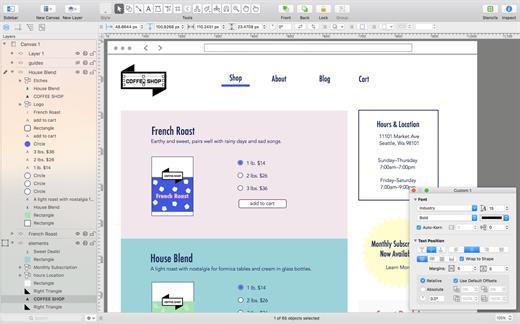
OmniGraffle Pro helps you draw beautiful diagrams, family trees, flow charts, org charts, layouts, and (mathematically speaking) any other directed or non-directed graphs. We’ve had people use Graffle to plan plotlines for a story, make an overview of an operating system, show the evolution of computers, and even show how diseases can spread in a closed population. If you want to organize your thoughts, your projects, or even your friends graphically, using boxes and lines, OmniGraffle is your tool.

OmiGraffle Professional has all of the great features in the standard version, plus a powerful toolset for advanced document creation and editing options. For the pro user who’s looking for an in-depth diagramming application that’s still priced below the competition, you’ve come to the right place.

What’s New

Version 7.21.5:

  • Cloud Storage Providers: Improved compatibility with linked resource folders stored in OneDrive.

Compatibility

macOS 11.0.0 or later
Apple Silicon or Intel Core processor


Release Name: OmniGraffle Pro 7.21.5
Size: 61.6 MB
Links: HOMEPAGE – NFO – Torrent Search

Download: FiKPERUPLOADGiGNiTROFLARERAPiDGATOR

5 Comments
Jul 15

Boxy SVG 4.00

SVG is the standard format for storing vector graphics such as icons, banners, charts and illustrations.

Boxy SVG project goal is to create the best SVG editor for non-technical users as well as for professional designers and developers.

CORE FEATURES

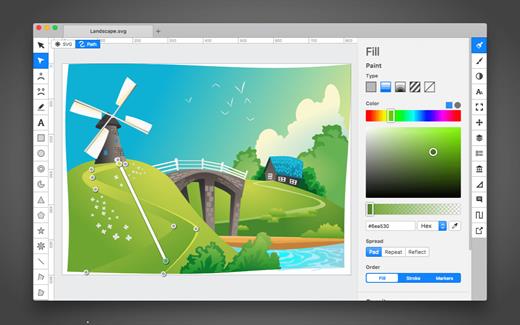
• Clean and intuitive UI heavily inspired by Inkscape, Sketch and Adobe Illustrator
• Extensive support for on-canvas editing of object geometry, transform, paint and other properties
• Save to SVG and SVGZ formats, export to PNG, JPG, WebP, PDF and HTML5
• Open Clip Art Library integration with thousands of free stock vector arts
• Google Fonts integration with hundreds of free fonts
• Configurable keyboard shortcuts for over 100 commands
• Manual guides, smart guides and grid
• Path operations (unite, intersect, subtract, exclude, close, reverse, etc.)
• Arrangement operations (align to, rotate, flip, order, group, etc.)

FOR WEB DEVELOPERS

• Chromium-based rendering engine
• SVG and CSS code inspector similar to Chrome Dev Tools
• Clean SVG output that preserves IDs, classes, titles and other metadata
• SVG sprites editing support

What’s New

Version 4.00:

  • Release notes were unavailable when this listing was updated.

Compatibility

OS X 10.9.0 or later, 64-bit processor


Release Name: Boxy SVG 4.00
Size: 168.8 MB
Links: HOMEPAGE – NFO – Torrent Search

Download: FiKPERUPLOADGiGNiTROFLARERAPiDGATOR

4 Comments
Jul 15

Reader 4.8.1

Reader is Fast & Minimalist PDF viewer with powerful controls.

This is the full version of Reader, which includes basic annotations including highlighting and writing yellow notes.

Speedy & Interactive
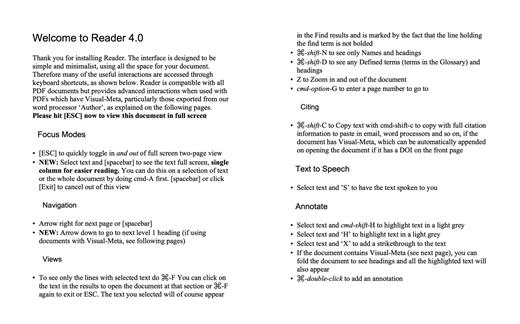
• ‘ESC’ to go in and out of full screen
• Highlight. Select and ‘h’ to highlight
• View Highlighted Text. ‘h’ without highlighted text to see all the highlights

Augmented PDF’s from Author
• Reader will display any valid PDF documents but is optimised for viewing PDF documents which have Visual-Meta attached.

→ Visual-Meta Interactions:

Fold.
A document with Visual-Meta can be folded into a table of contents with cmd-

Copy as Citation.
Copy text from the PDF in Reader and go to our writing application Author and paste. Since Author understands that this is a citation, when you export you will have the citation automatically appended to the Reference section, saving you a lot of time

Powerful Navigation.
Right and left arrow for next and previous page and down and up arrow for next and previous level 1 heading (section)

View Highlighted Text in context.
‘h’ will also show headings so you know where the highlighted text is

More Useful Find.
Select text and cmd-f to see only the lines in the document with the selected text (plus headings so you know where the text is) and if there is a glossary term created for the document, it will automatically appear at the top of the screen

Click on a Citation to see Reference Information.
If the PDF has Visual-Meta applied when creating the document in Author, you can also click on citations in the document to get a pop-up with the Reference information and Endnotes to get the notes

Minimalist design with powerful tools for reading, particularly academic documents
• Select text and cmd-F to see only the sentences in the document with the selected text
• Selet text and ‘H’ for yellow highlight
• Select text and cmd-shift-h for grey highlight
• ‘h’ without selecting text to see all highlights
• Select text and ‘X’ to strikethrough with red line. ‘
• ESC to go in and out of fullscreen
• Single page in regular view, two pages in full screen view
• Spacebar for page down (arrow keys can also be used)
• White background in full-screen view since documents are usually white and therefore provides a clean reading space without a harsh black border
• Integrated with the Author word processor to provide instant citations through simply copying and pasting text using the Visual-Meta method as shown in the last screenshot and as described athttp://visual-meta.info
text to see all highlighted text

  • ’n’ to see any Names in the document
    • cmd-shift-c to copy as citation

What’s New

Version 4.8.1:

  • Release notes were unavailable when this listing was updated.

Compatibility

macOS 10.14 or later
Apple Silicon or Intel Core processor


Release Name: Reader 4.8.1
Size: 10.7 MB
Links: HOMEPAGE – NFO – Torrent Search

Download: FiKPERUPLOADGiGNiTROFLARERAPiDGATOR

7 Comments
Jul 15

Money Pro – Personal Finance 2.9.1

Money Pro is the next generation of Money app (over 2 million downloads worldwide).

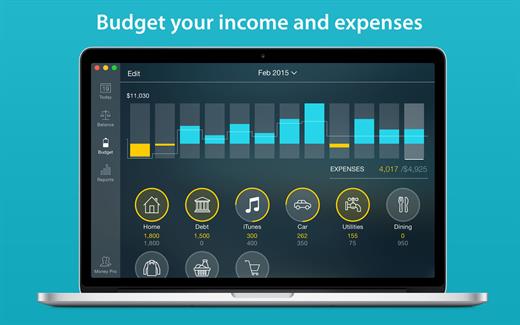
Money Pro is the one place for bill planning, budgeting and keeping track of your accounts. Easy sync with iPhone/iPad versions. Money Pro works great for home budgeting and even for business use.

Features:

  • Calendar
  • Today view
  • Bills due notifications
  • Budgets
  • Budget rollover
  • Checkbook register
  • Account reconciliation
  • Import of bank statements
  • Split transactions
  • Calculator and currency converter
  • Search
  • Detailed reports
  • Lots of options for customization
  • iCloud
  • Multiple profiles
  • Data export
  • Notification Center widget

What’s New

Version 2.9.1:

  • Bug fixes and performance improvements

Compatibility

macOS 10.12.0 or later
Apple Silicon or Intel Core processor


Release Name: Money Pro – Personal Finance 2.9.1
Size: 50.8 MB
Links: HOMEPAGE – NFO – Torrent Search

Download: FiKPERUPLOADGiGNiTROFLARERAPiDGATOR

8 Comments
Jul 15

4K Video Downloader Plus Pro 1.0.0

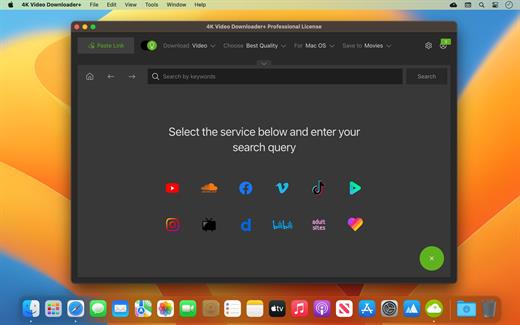
4K Video Downloader allows to download video, audio and subtitles from YouTube in high-quality and as fast as your computer and connection will allow. If you want that video on your iPad, iPhone or other device we’ve got you covered. Downloading is simple and straightforward: just copy the video link from your browser and click ‘Paste Url’. Done!

Proxy Connection for Unrestricted Access

  • Bypass restrictions set by your Internet service provider and get around your school or workplace firewall. Connect through an in-app proxy to access and download from YouTube and other sites.

All Popular Sites Support

  • Save video and audio from YouTube, Vimeo, TikTok, SoundCloud, Bilibili, Niconico, Flickr, Facebook, Instagram, DailyMotion, Naver TV, Likee and Tumblr. Download recorded streams from Twitch and YouTube Gaming.

New YouTube Video Auto-Download

  • Subscribe to the download of your favorite YouTube playlists and creators. Save whole channels and playlists in one go. Get new videos downloaded automatically as soon as they are uploaded to YouTube.

3D Video Download

  • Get a one of a kind experience by watching stereoscopic 3D videos on your computer or TV. Download 3D Youtube videos in MP4, MKV, FLV, 3GP and other formats

360° Video Download

  • Feel the action all around you with virtual reality videos. Download 360° videos to relive the mind-blowing VR experience as many times as you want.

Easy Downloads Management

  • Sort and filter downloads by type, name and date. Import and export all files as a single JSON file. Easily track and control the progress of both individual downloads and entire groups of downloading files.

What’s New

Version 1.0.0:

  • Release notes were unavailable when this listing was updated.

Compatibility

macOS 10.13 or later


Release Name: 4K Video Downloader Plus Pro 1.0.0
Size: 204.8 MB
Links: HOMEPAGE – NFO – Torrent Search

Download: FiKPERUPLOADGiGNiTROFLARERAPiDGATOR

8 Comments
Jul 15

Disk Drill Enterprise 5.3.1310

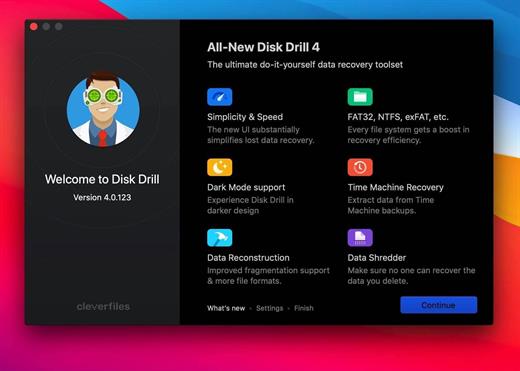
Disk Drill is a Mac data recovery software designed natively for Mac OS: easily protect your files from accidental deletion with Recovery Vault and recover lost data from Mac disks. Most storage devices, file types, and file systems are supported. You can recover deleted files from iPhone and Android devices! Disk Drill offers helpful and free tools for disk management like duplicate file finder, byte-to-byte backups, disk cleanup, and space visualization, bootable data recovery drive, disk health monitoring, etc.

When something is deleted Recovery Vault makes it possible to recover not only the file itself but also its properties, such as original file name, location, etc. So you will always be able to recover data from the Mac files system (HFS/HFS+) and FAT32 partitions. Disk Drill also includes powerful S.M.A.R.T. disk monitoring right out of the box; you can monitor your disks’ hardware status and get automatic notifications of potential failures or other issues. If a disk or partition is failing, you can easily backup it into a disk image (DMG) which can later be mounted for recovery.

Disk Drill PRO also features a number of advanced scanning modes for data recovery of FAT, NTFS, HFS/HFS+, other file systems, and formatted (initialized) drives. Using Quick Scan you can locate deleted items on FAT and NTFS disks, this scanning method is fast and accurate but is unlikely to find data deleted long ago. With Deep Scan you can try to recover data from any disk or memory card regardless of their file system. This recovery method is long and thorough, it scans your disk in a binary mode and is capable of finding deleted files even after formatting.

You need to disable the System Integrity Protection (SIP) to perform the selected Application.

What’s New

Version 5.3.1310:

  • Release notes were unavailable when this listing was updated.

Compatibility

macOS 10.11 or later
Apple Silicon or Intel Core processor


Release Name: Disk Drill Enterprise 5.3.1310
Size: 63.5 MB
Links: HOMEPAGE – NFO – Torrent Search

Download: FiKPERUPLOADGiGNiTROFLARERAPiDGATOR

7 Comments
Jul 15

Downie 4.6.21

A simple download manager that offers you the possibility to quickly save videos from different websites to your own disk drive.

If you are using a poor internet connection, trying to visualize videos streamlined online might not work properly since the content is loaded too slowly. Downie is a simple Mac app that can help you download those videos to your computer, and then watch them by using your default media player.

User friendly video downloader featuring support for drag and drop actions

Working with Downie is extremely straightforward: simply drop the video URL on top of the app’s main window or on the Dock icon. Downie adds the video to your downloads list, so all you have to do next is start the process by pressing the appropriate button. Of course, you can also remove items from the list.

By default, Downie downloads MP4 files and places them in your default Downloads folder, but you can easily change this via the Preferences window. The same area allows you to setup notifications, or post processing actions (convert to MP4 if necessary, or extract audio only).

Effortlessly download videos from a wide collection of hosting websites

Downie provides support for more than 400 different websites that host video content, among which there are the most popular choices, such as YouTube, Apple, LiveLeak, Vimeo, BBC, and so on. If a certain website is not included, within the app you can send a request email to the Downie developers.
Moreover, Downie also provides matching extensions for various popular web browsers, such as Firefox, Safari, Google Chrome or Chromium. The add-ons are not installed by default: open the Preferences window and install only the ones you plan to use.

Straightforward solution for downloading video content hosted online

Downie is a great tool for saving videos posted on various websites to your Mac for offline playback. The application is extremely useful especially if you have a slow internet connection.

What’s New

Version 4.6.21:

  • Improved: afreecatv.com, crunchyroll.com, itv.com, kuaishou.com, mlb.com, twitch.com, twitter.com, youtube.com.

Compatibility

macOS 10.12 or later
Apple Silicon or Intel Core processor


Release Name: Downie 4.6.21
Size: 57.1 MB
Links: HOMEPAGE – NFO – Torrent Search

Download: FiKPERUPLOADGiGNiTROFLARERAPiDGATOR

7 Comments