Jul 27

Pixelmator Pro 3.3.10

Pixelmator Pro is an incredibly powerful, beautiful, and easy to use image editor designed exclusively for Mac.

With a wide range of professional-grade, nondestructive image editing tools, Pixelmator Pro lets you bring out the best in your photos, create gorgeous compositions and designs, draw, paint, apply stunning effects, design beautiful text, and edit images in just about any way you can imagine. And thanks to its intuitive and accessible design, Pixelmator Pro is delightfully easy to use – whether you’re just starting out with image editing or you’re a seasoned pro.

The modern, single-window interface is designed exclusively for working with images on a Mac. An intuitive and accessible design makes it easy for anyone to edit images – from complete beginners to design professionals.

The new ML Super Resolution feature lets you increase the resolution of images without blurriness or reduced quality using state-of-the-art machine learning.

What’s New

Version 3.3.10:
Pixelmator Pro 3.3.10 adds the ability to import LUTs as color adjustment presets and import entire LUT folders. This update also fixes an issue where the capture date of compressed Fujifilm RAWs would not be preserved after import, and adds a few other stability improvements and fixes.

Compatibility

macOS 11.0 or later
Apple Silicon or Intel Core processor


Pixelmator Pro is an incredibly powerful, beautiful, and easy to use image editor designed exclusively for Mac.

With a wide range of professional-grade, nondestructive image editing tools, Pixelmator Pro lets you bring out the best in your photos, create gorgeous compositions and designs, draw, paint, apply stunning effects, design beautiful text, and edit images in just about any way you can imagine. And thanks to its intuitive and accessible design, Pixelmator Pro is delightfully easy to use – whether you’re just starting out with image editing or you’re a seasoned pro.

The modern, single-window interface is designed exclusively for working with images on a Mac. An intuitive and accessible design makes it easy for anyone to edit images – from complete beginners to design professionals.

The new ML Super Resolution feature lets you increase the resolution of images without blurriness or reduced quality using state-of-the-art machine learning.

What’s New

Version 3.3.10:
Pixelmator Pro 3.3.10 adds the ability to import LUTs as color adjustment presets and import entire LUT folders. This update also fixes an issue where the capture date of compressed Fujifilm RAWs would not be preserved after import, and adds a few other stability improvements and fixes.

Compatibility

macOS 11.0 or later
Apple Silicon or Intel Core processor


Release Name: Pixelmator Pro 3.3.10
Size: 583 MB
Links: HOMEPAGE – NFO – Torrent Search

Download: FiKPERUPLOADGiGNiTROFLARERAPiDGATOR

7 Comments
Jul 27

CloudMounter 4.2

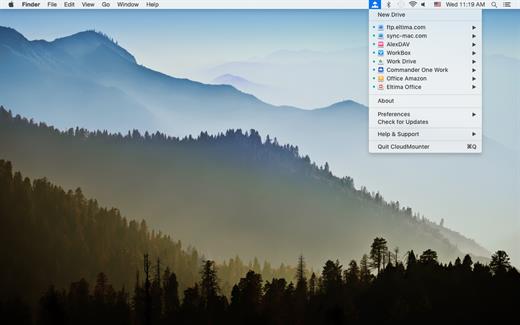
CloudMounter is a cloud manager for easy work with data stored on multiple cloud services.

CloudMounter makes working with multiple cloud storage services easy by letting you access and manage your data through your Mac’s Finder. CloudMounter works with all popular services such as OneDrive, Google Drive, OpenStack Swift, Amazon S3 and Dropbox. Not only that – the app also allows you to connect to remote FTP, SFTP, FTPS and WebDAV servers the way you would connect to any shared location in your local network.

You can also increase cloud security with data encryption. Encrypted files cannot be read without a decryption key, so even if someone gets ahold of your data, they won’t be able to get into its contents. With CloudMounter your login data is protected as well, credentials you enter are stored in Mac OS Keychain and sent directly to the servers and storage accounts.

What’s New

Version 4.2:

  • Improved: work with SFTP servers.
  • Fixed: file permissions when saving files to an SFTP server.
  • Fixed: displaying of icons for mounted disks on the desktop.
  • Fixed: errors during online disk encryption.
  • Fixed: open at system logon issue on macOS 13.
  • Fixed: error when copying folders to the local disk from online disks.
  • Fixed: crash during disk mounting.

Compatibility

macOS 10.14 or later


Release Name: CloudMounter 4.2
Size: 60.2 MB
Links: HOMEPAGE – NFO – Torrent Search

Download: FiKPERUPLOADGiGNiTROFLARERAPiDGATOR

7 Comments
Jul 27

Wondershare Recoverit 12.0.6.1

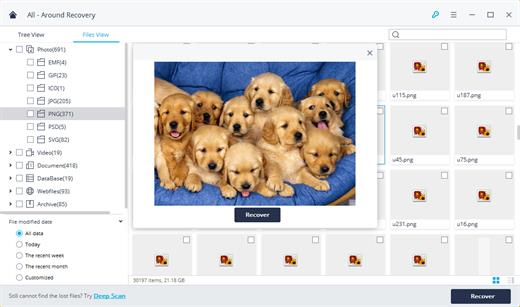
Wondershare Recoverit is a comprehensive data recovery suite to recover Mac data lost due to accidental deleting, formatting, virus infection, improper operation, unexpected power failure, and other unknown reasons.

It can recover Mac data from lost, deleted, logical corrupted and formatted Mac hard drive, iPod, USB drive, SD card, digital camera, mobile phone, MP3, and MP4 player. Compatible with HFS+, FAT16/32, and NTFS file system volumes, this non-destructive Mac file recovery software ensures safe Mac file recovery without modifying the original data saved on your Mac machine or any other storage media. Versatile preview lets you enjoy Mac data recovery in advance.

Features

  • Safety First:
    • Read-only and risk-free Mac data recovery program. No any writing operation to your original data.
  • Versatile Preview Ability:
    • For images, real-time and direct scan results is displayed during the scan process to let users stop scanning once the target images are found.
    • For other Mac files such as videos, audio files, archives and documents, they are displayed as a text in a Hex mode for preview to let users enjoy file recovery on Mac in advance.
  • Precise File Recovery for Mac:
    • Before data recovery on Mac, you can choose the target file types to scan, which saves you much time especially when there are tons of files on your Mac machine.
    • Restore deleted files for Mac with original file names, shooting date, and storage paths.
    • Support file names search for scanning results to provide you precise Mac file recovery.
  • Easy-to-use and Clean Interface:
    • Complete wizard and easy-to-use interface let you perform Mac data recovery in a breeze.

What’s New

Version 12.0.6.1:

  • Release notes were unavailable when this listing was updated.

Compatibility

macOS 10.10 or later


Release Name: Wondershare Recoverit 12.0.6.1
Size: 126 MB
Links: HOMEPAGE – NFO – Torrent Search

Download: FiKPERUPLOADGiGNiTROFLARERAPiDGATOR

8 Comments
Jul 23

Elmedia Video Player Pro 8.16

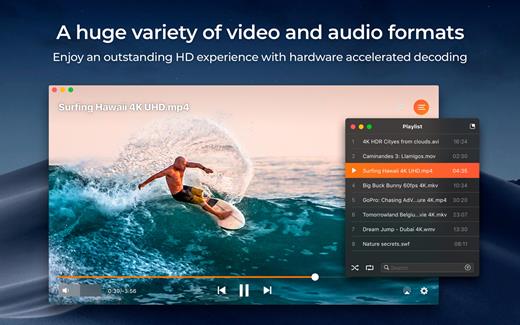
Elmedia Video Player is a free media player that supports virtually any file type, whether it is MP4, AVI, FLV, WMV, MKV, MP3, or something else. You won’t need to look for codecs to install, no need for additional plugins – Elmedia Video Player has it all covered. You get a fantastic HD experience, smooth and even, no tearing or jerking of the video. Thanks to special hardware-accelerated decoding that helps to unload the processor significantly, you get the best experience.

Highlights

  • ‘Open Online Video’ is for watching YouTube and other online videos without intrusive ads
  • Convenient full-screen mode — nothing to distract you
  • Pin the player on top of all apps — never miss a moment of your movie
  • Works great with various subtitles files. Supports Eastern Asian languages, Arabic, Hebrew, etc.
  • Multiple audio tracks support including external
  • Elmedia Video Player has its own volume control
  • Create and manage playlists up to your tastes
  • Fit image to your screen
  • Adjustable playback speed
  • Decrease/increase audio and subtitles delay in case they are not synced with the video
  • Open a DVD or a video that was copied from DVD without conversion

Elmedia Video Player PRO is now available via in-app purchase, offering the following benefits:

  • Video color, brightness, and contrast adjustment. Adjust brightness, contrast, saturation, and other color settings during playback for enhanced performance.
  • Audio equalizer with presets. Customize the sound for different genres, rooms at home, or specific speakers. Choose presets out of existing (Large Hall, Party, etc.) or create custom ones.
  • Make a screenshot of your favorite moment or turn the entire video into a set of pictures. You can set the interval between taking screenshots.
  • Adjust audio settings. Enjoy virtual surround and speakers emulation, and set output device for audio; for profound users: transmit AC-3/DTS through S/PDIF
  • A couple of other convenient playback possibilities:
  • Select the language for the sound and subtitles;
  • Set up which monitor will show fullscreen;
  • Flip, rotate and mirror the video;
  • Loop any part of movie or music video continuously;
  • Deinterlace and image enhancement
  • AirPlay! Elmedia Video Player can stream and receive AirPlay content. Send any music and videos from an AirPlay device to Elmedia Video Player or vice versa from Mac with player installed to another Mac with Elmedia Video Player or other AirPlay app. Subtitles and external sound tracks are supported for streaming as well as the playlist repeat and shuffle options.

What’s New

Version 8.16:

  • Release notes were unavailable when this listing was updated.

Compatibility

macOS 10.12 or later.


Release Name: Elmedia Video Player Pro 8.16
Size: 103.7 MB
Links: HOMEPAGE – NFO – Torrent Search

Download: FiKPERUPLOADGiGNiTROFLARERAPiDGATOR

4 Comments
Jul 23

DiskSlim – Disk Cleanup Pro 9.8.12

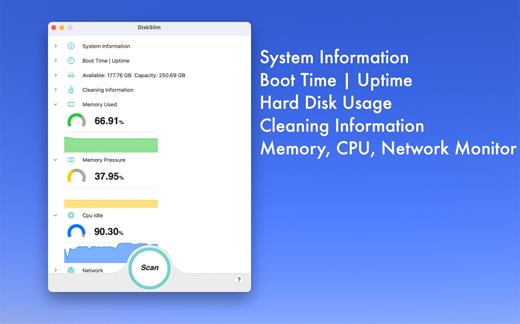
Clean up unnecessary files to free up a lot of disk space. Clean up the download folder frequently, which can free up a lot of disk space.

Listed file categories

  • Images
  • Videos
  • Audio files
  • Archives
  • Folders
  • PDF Documents
  • Other
  • Recents

Recommended files for cleaning

  • Old Files
  • Big Files
  • Zero-byte Files
  • Empty Folders

What’s New

Version 9.8.12:

  • Release notes were unavailable when this listing was updated.

Compatibility

macOS 10.15 or later


Release Name: DiskSlim – Disk Cleanup Pro 9.8.12
Size: 7.8 MB
Links: HOMEPAGE – NFO – Torrent Search

Download: FiKPERUPLOADGiGNiTROFLARERAPiDGATOR

4 Comments
Jul 23

Integrity Pro 12.7.7

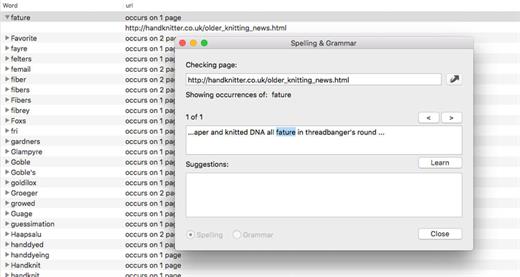
Integrity Pro builds on Integrity Plus. It has the new v12 crawling engine, it checks links and generates a sitemap with all the searching, filtering and exporting functionality of the Plus version. It adds SEO details and a sitewide spellcheck. It isn’t intended to replace Scrutiny, but to be pitched between Integrity Plus and Scrutiny, a more affordable step for Integrity Plus users. There will, of course, be an upgrade from Integrity Plus, but this early public beta is simply free until the stable version is released.

What’s New

Version 12.7.7:

  • Release notes were unavailable when this listing was updated.

Compatibility

macOS 10.10 or later


Release Name: Integrity Pro 12.7.7
Size: 9.4 MB
Links: HOMEPAGE – NFO – Torrent Search

Download: FiKPERUPLOADGiGNiTROFLARERAPiDGATOR

6 Comments
Jul 23

Invisor 3.23

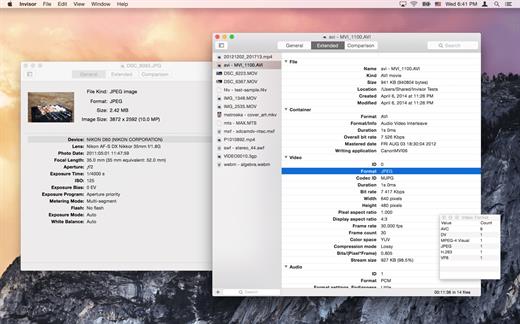
Invisor displays technical information about your video, audio and photo files with ability to export and compare collected data. Video and audio: detailed info about file’s container and data streams including subtitles and chapters using MediaInfo library. Photo: EXIF, IPTC, GPS and MakerNote tags.

What’s New

Version 3.23:

  • MediaInfo library updated to v23.04

Compatibility

macOS 10.7.3 or later


Release Name: Invisor 3.23
Size: 19.8 MB
Links: HOMEPAGE – NFO – Torrent Search

Download: FiKPERUPLOADGiGNiTROFLARERAPiDGATOR

5 Comments
Jul 23

RAR Extractor Max – Unzip File 11.7

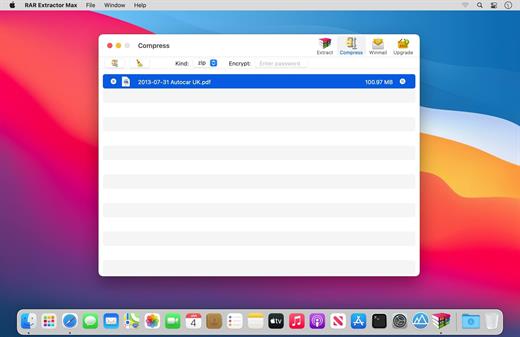
“RAR Extractor Max” inherited the advantages of “RAR Extractor Pro”, we redesigned the UI and added more powerful functionalities.

  • Support unarchive RAR, winmail.dat, ZIP, 7z, tbz, sti, tar, xar, lha, lzh, hqx, bin, bz2, bzip2, bz, xz, iso, cid, nrg, mdf, taz, lzma, exe, msi, cpio, lzx, jar, swf, xip, ace, arj, pak, pkg, apk, lbr, lqr, cab, rpm, cpt, sea, pdf, nsa, dcs, now, spk…
  • Support archive files and folder to encrypted zip&7z
  • Quicklook files in archive before extraction.

MAIN FEATURES

  • Extract extract compressed files in all most formats(over 50 formats).
  • Unzip, unrar encrypted archives.
  • Preview and open the file in winmail.dat sent from Microsoft Outlook
  • Easy view of an archive’s file list.
  • Quicklook files in archive before extraction.
  • Unarchive & unrar the selected individual file or folder in the archive.
  • Double click to display or extract directly after setting this APP as default archiver.
  • Drag archives to the dock icon to extract or display directly.
  • Batch decompress many archives
  • Create password-protected ZIP & 7Z archives.
  • AES256 encryption algorithm to create ZIP & 7Z archives.
  • Drag the file in archive to the desktop to extract directly

What’s New

Version 11.7:

  • Release notes were unavailable when this listing was updated.

Compatibility

OS X 10.10 or later, 64-bit processor


Release Name: RAR Extractor Max – Unzip File 11.7
Size: 16 MB
Links: HOMEPAGE – NFO – Torrent Search

Download: FiKPERUPLOADGiGNiTROFLARERAPiDGATOR

6 Comments
Jul 20

Dynamic Wallpaper 15.1

Dynamic Wallpaper Engine allows you to use live wallpapers on your desktop/screensaver. It provides thousands of live wallpapers in the Workshop while taking as little system resources as possible. It’s the Wallpaper Engine for Mac.

Features
• 2000+ hand-picked videos which are updated every day.
• Multiple types of 4K Ultra HD videos, anime, scenery, cute, game, creative, Beauty, Ancient, Movie, etc.
• Supports “keyword searching” in videos.
• Supports “Dynamic-ScreenSaver”, personalize your lock screen.
• Easy to import local video.
• Supports The playlist, list loop, shuffle loop.
• Supports multiple screen aspect ratios and video native resolutions.
• Supports global hotkeys to control wallpaper, hide desktop icons and show screensaver.
• Set different wallpapers on different displays.
• Manual control, video pause, resume and mute.
• Break reminders, with flexible customization if you want it.
• Auto mode, pause the video when other apps are active, not disturbed at work.
• Auto mode, pause the video when Power Disconnected.
• Support for hiding desktop icons.
• Dynamic Wallpaper Engine is designed to provide an interesting experience while consuming as little system resources as possible.

What’s New

Version 15.1:

  • Release notes were unavailable when this listing was updated.

Compatibility

macOS 10.12 or later
Apple Silicon or Intel Core processor


Release Name: Dynamic Wallpaper 15.1
Size: 29.4 MB
Links: HOMEPAGE – NFO – Torrent Search

Download: FiKPERUPLOADGiGNiTROFLARERAPiDGATOR

4 Comments
Jul 20

System Toolkit 6.0.0

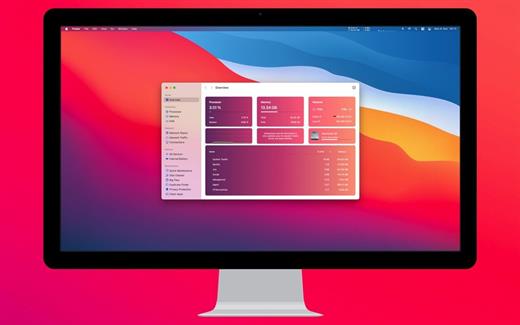
The System Toolkit is an all-in-one information and maintenance app designed for macOS.

Information:

  • System Information
  • Menu Bar Extra
  • Info Panel
  • Overlay Window
  • Hardware Sensors
  • Bluetooth Device Battery Levels
  • Battery Information

Besides the information pages, the System Toolkit also offers the following maintenance features:

  • Fast Maintenance: Clean your Mac System with a single click!
  • Disk Cleaner
  • Duplicate Finder
  • Big Files Finder
  • Privacy Protector
  • Memory Cleaner
  • App Cleaner

What’s New

Version 6.0.0:

  • Release notes were unavailable when this listing was updated.

Compatibility

macOS 11.5 or later
Apple Silicon or Intel Core processor


Release Name: System Toolkit 6.0.0
Size: 11.9 MB
Links: HOMEPAGE – NFO – Torrent Search

Download: FiKPERUPLOADGiGNiTROFLARERAPiDGATOR

5 Comments