Oct 3

SponsorBlock 5.4.22

SponsorBlock lets you skip over sponsors, intros, outros, subscription reminders, and other annoying parts of YouTube videos. SponsorBlock is a crowdsourced browser extension that let’s anyone submit the start and end time’s of sponsored segments and other segments of YouTube videos.

Once one person submits this information, everyone else with this extension will skip right over the sponsored segment.

What’s New

Version 5.4.22:

  • Release notes were unavailable when this listing was updated.

Compatibility

macOS 10.14 or later


Release Name: SponsorBlock 5.4.22
Size: 7.5 MB
Links: HOMEPAGE – NFO – Torrent Search

Download: FiKPERUPLOADGiGNiTROFLARERAPiDGATOR

5 Comments
Oct 3

Bartender 5.0.31

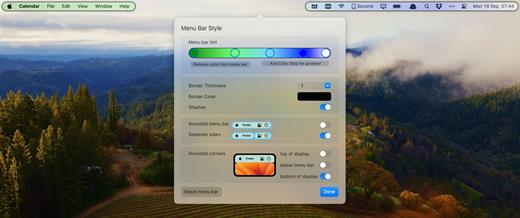
Bartender lets you organize your menu-bar apps by hiding them, rearranging them, or moving them to Bartender’s Bar. You can display the full menu bar, set options to have menu-bar items show in the menu bar when they have updated, or have them always visible in Bartender’s Bar.

Features:

  • Lets you tidy your menu-bar apps how you want.
  • See your menu-bar apps when you want.
  • Hide the apps you need to run, but do not need to see.
  • Have the clean looking menu bar you want.
  • Rearrange your menu-bar items as you wish.

Bartender 5 requires macOS Sonoma. For all other systems, choose Bartender 4.

What’s New

Version 5.0.31:

  • Release notes were unavailable when this listing was updated.

Compatibility

macOS 14.0 or later


Release Name: Bartender 5.0.31
Size: 11.2 MB
Links: HOMEPAGE – NFO – Torrent Search

Download: FiKPERUPLOADGiGNiTROFLARERAPiDGATOR

2 Comments
Oct 3

Yoink 3.6.87

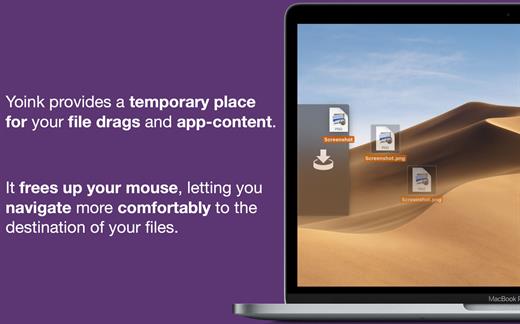
Yoink helps by making drag-and-drop between Spaces or full-screen apps easier.

Every time you start dragging a file, Yoink fades in a tiny window on the left edge of your screen so you can drag files to it. This frees up your mouse so you can comfortably navigate to the destination of the drop and resume the drag from Yoink’s window.

What’s New

Version 3.6.87:

  • Sometimes dragging a file from Yoink to apps other than the Finder would fail

Compatibility

macOS 10.12 or later.
Apple Silicon or Intel Core processor


Release Name: Yoink 3.6.87
Size: 24.6 MB
Links: HOMEPAGE – NFO – Torrent Search

Download: FiKPERUPLOADGiGNiTROFLARERAPiDGATOR

4 Comments
Oct 3

Fission 2.8.5

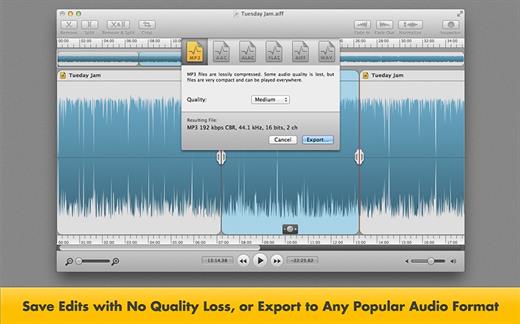
Fission can crop and trim audio, paste in or join files, or just rapidly split one long file into many. It’s streamlined for fast editing. Plus, it works without the quality loss caused by other editors, so you can get perfect quality audio even when editing MP3 and AAC files.

If you need to convert formats, Fission can do that too! You can rapidly export or batch convert files to the MP3, AAC, Apple Lossless, FLAC, AIFF, and WAV formats.

Key Features:

  • Edit MP3, AAC, Apple Lossless, and AIFF files with no quality loss
  • Quickly split a long audio file into smaller files
  • Remove unwanted content, such as commercials, from your audio file
  • Re-arrange audio in a single file, copy audio from one file to another, or merge with a quick drag and drop
  • Create great-sounding MP3 or AAC ringtones for your cell phone.

What’s New

Version 2.8.5:

  • Release notes were unavailable when this listing was updated.

Compatibility

macOS 10.14 or later


Release Name: Fission 2.8.5
Size: 19.6 MB
Links: HOMEPAGE – NFO – Torrent Search

Download: FiKPERUPLOADGiGNiTROFLARERAPiDGATOR

4 Comments
Oct 3

Keep It 2.3.0

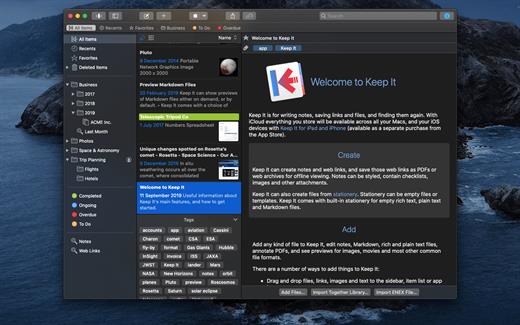
Keep It is for writing notes, saving web links, storing documents, and finding them again. Available on Mac, and as a separate app for iPhone and iPad, changes are automatically made available to all your devices with iCloud. Keep It is the destination for all those things you want to put somewhere, confident you will find them again later.

Features

  • Create, edit, view and save:
    • Notes with styles, checklists and attachments that look good and read well on all your devices
    • Web links with live previews, or saved as PDFs for offline viewing
    • Rich and plain text files, and Markdown documents
    • Add any other kind of file, and see previews for most images, documents, web pages, and more
    • See summaries and thumbnails in the list for most files
    • Use the Recents list to see things you’ve added or viewed lately
    • Share items with iCloud
  • Organize:
    • Folders let you organise things hierarchically – select a folder to see everything it and its subfolders contain
    • Use bundles to gather items into one place – items can be in more than one bundle at a time
    • Use labels to color-code items for quick visual recognition
    • Add searchable tags and comments
    • Make items favorites and drag lists to the Favorites Bar for quick access
  • Search and Filter:
    • Search everything in Keep It: names, tags, file contents, dates, kinds and more
    • Choose suggestions as you search to create complex searches with ease
    • Use keywords and natural language for dates while searching
    • Save searches for later reuse
    • Use the Tag Filter to see all items with a tag and any other relevant tags; choose another tag to drill down further
  • Use Keep It with other apps:
    • Compact Mode reduces the app to a single column, ideal for using alongside other apps
    • Drag pretty much anything to Keep It
    • Copy clickable links to items in Keep It
    • Share extension can add links, text, images and other files, and append text to notes from within other apps
    • Save files to Keep It’s folders to automatically add them to the library
    • Use a bookmarklet to add links from web browsers that don’t use Share extensions

*** You need to disable the System Integrity Protection (SIP) to perform the selected Application.

What’s New

Version 2.3.0:

  • Release notes were unavailable when this listing was updated.

Compatibility

macOS 11.3.0 or later


Release Name: Keep It 2.3.0
Size: 34.9 MB
Links: HOMEPAGE – NFO – Torrent Search

Download: FiKPERUPLOADGiGNiTROFLARERAPiDGATOR

1 Comment
Oct 3

AnyGo 6.6.1

With AnyGo you can do the following:

  • Spoof to anywhere in LBS(Location Based Service) games without actually moving or walking
  • Easily access any videos, music, movies and services that may be restricted to you based on your location
  • Share a virtual location on social media to trick your friends
  • Easily test LBS and games
  • Easily hide your location from apps and services
  • Set your real location if GPS are unable to find it

What’s New

Version 6.6.1:

  • Release notes were unavailable when this listing was updated.

Compatibility

macOS 10.12 or later 64-bit


Release Name: AnyGo 6.6.1
Size: 110.9 MB
Links: HOMEPAGE – NFO – Torrent Search

Download: FiKPERUPLOADGiGNiTROFLARERAPiDGATOR

1 Comment
Oct 3

RAW Power 3.4.16

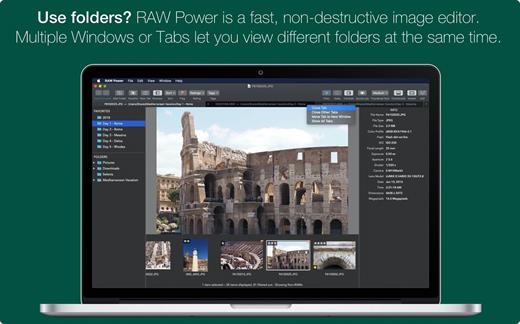
RAW Power unlocks the power of Apple’s RAW engine with simple, easy-to-use controls. Use it as an editing extension inside Apple Photos, or as a standalone, non-destructive RAW photo editor. If you loved Aperture’s advanced RAW processing adjustments, you’ll feel right at home with RAW Power. Using adjustments like Boost, previously only available in Aperture, you can improve your images in ways that simply can’t be done in any other application. RAW Power takes advantage of RAW processing improvements in macOS Sierra.

Features

  • Extends Apple’s Photos app for macOS Sierra
  • Control over Apple’s Boost filter to achieve unparalleled highlight recovery
  • Real-time control of all of Apple’s RAW engine, including noise reduction, and black point, RAW sharpen, and more
  • Hot-pixels overlay with clipping indicators
  • Advanced curves adjustment with auto curves, linear, and Lab modes
  • Recovery slider for targeted control over highlights
  • White-balance sampling
  • Luminance-oriented sharpen
  • All sliders are real-time and GPU accelerated
  • Highlights, shadows, vibrancy, and more
  • Support for hundreds of RAW cameras
  • Images are displayed the same way as in Photos, Aperture, or iPhoto
  • Also works with JPEGs, TIFFs, and other image formats

What’s New

Version 3.4.16:

  • Release notes were unavailable when this listing was updated.

Compatibility

macOS 10.14 or later, 64-bit processor


Release Name: RAW Power 3.4.16
Size: 60.4 MB
Links: HOMEPAGE – NFO – Torrent Search

Download: FiKPERUPLOADGiGNiTROFLARERAPiDGATOR

5 Comments
Oct 3

Text Workflow 1.6.7

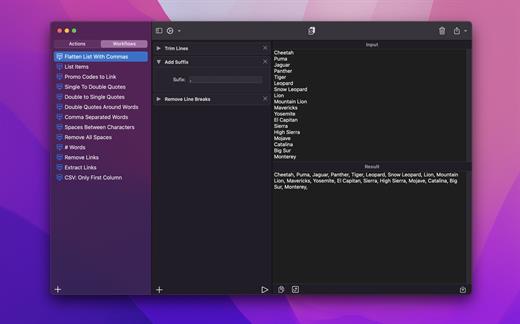
A powerful and easy to use tool that will help you transform your text. Text Workflow removes the need to perform repetitive tasks manually on your text.

Combine transformation actions to create powerful automations for your text. Save your transformation workflows to use them any time you want.

Available text transformation actions

• Add prefix
• Add suffix
• Replace text
• Sort lines

  • alphabetically
  • reverse
  • shuffle
  • by length
    • Trim Lines
    • Add line number
    • Break lines
  • after every word
  • after every sentence
  • after text
  • before text
    • Convert Case
  • uppercase
  • lowercase
  • title case
  • camel case
  • pascal case
    • Delete Characters
  • selected characters
  • non-alphanumeric
  • numeric characters
  • non numeric
  • tabs
  • spaces
  • characters after position
  • characters before position
  • last characters
  • emojis
  • characters after text
  • characters before text
    • Insert Text
  • at first line
  • at last line
  • every line (position)
  • before every word
  • after every word
  • before text
  • after text
  • after every character
    • Delete Lines
  • containing text
  • starting with text
  • not containing text
  • not starting with text
    • Remove line breaks
    • Remove multiple spaces
    • Remove duplicates lines
    • Remove duplicates words
    • Remove empty lines
    • Delete/Filter words
  • containing text
  • starting with text
  • not containing text
  • not starting with text
    • Spell out lines
    • Get Statistics
  • count characters
  • count words
  • count lines
    • Encode/Decode
  • Base64
  • URL
    • Encrypt/Decrypt Text with password
    • Beautify JSON
    • Beautify XML

You can combine all these actions to create your custom transformation workflows!
Export your workflows to file and share them easily with other users!

What’s New

Version 1.6.7:

  • Release notes were unavailable when this listing was updated.

Compatibility

macOS 11.2 or later


Release Name: Text Workflow 1.6.7
Size: 13.2 MB
Links: HOMEPAGE – NFO – Torrent Search

Download: FiKPERUPLOADGiGNiTROFLARERAPiDGATOR

5 Comments
Oct 3

Serial Box 10-2023

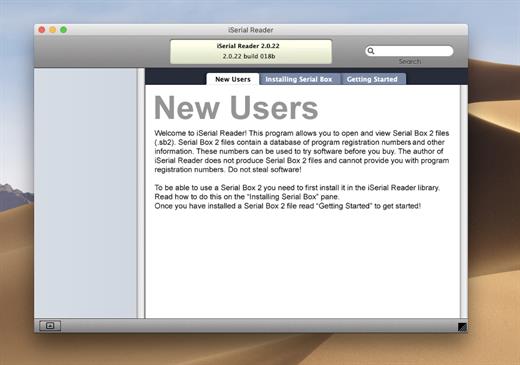
The base of serial numbers project iSerial as of 2022. It contains information on how to activate (serial numbers, information about other methods of activation) for the PowerPC platform programs so and Intel.

Just open the dmg file, drag and drop the app where you like. However, there is no way to view what serials, cracks and patches are new in this issue as compared to the previous. Thanks to all contributors and supporters!

Include

  • Serial Box 10-2023
  • SerialSeeker 1.3.19 (C5) = Intel/PPC – 32-bit – OS 10.5 – 10.14
  • SerialSeeker 2.3 (235) = Intel 64-bit or Silicon/ARM – OS 10.13+

What’s New

Version 10-2023:

  • official site does not provide any info about changes in this version.

Compatibility

OS X 10.7 or later


Release Name: Serial Box 10-2023
Size: 14.8 MB
Links: HOMEPAGE – NFO – Torrent Search

Download: FiKPERUPLOADGiGNiTROFLARERAPiDGATOR

5 Comments
Oct 3

Fotomagico 6.5.2

FotoMagico lets you create professional slideshows from your photos and music with just a few, simple mouse clicks. It sports a very clean and intuitive yet powerful user interface. High image quality, fast performance, and user flexibility were some of the design goals for this application.

Features:

  • Create the most spectacular slideshows
    • Scale, move, rotate, zoom or pan around your images to highlight that part that matters the most.
    • Your slides fit together perfectly with the new, gorgeous transitions.
    • Provide more meaning with subtle titles here and there.
  • Present a breathtaking show
    • Your slideshow uses the best possible resolution of your presentation device.
    • Use large displays, HDTV screens and other high resolution devices.
    • Even on a VGA projector, your photos will look better with FotoMagico.
  • Your audience will want to take it home
    • Burn DVDs of your slideshow with iDVD or Roxio Toast.
    • Put your slideshow on the new iPod.
    • Export in almost any QuickTime format.

What’s New

Version 6.5.2:

  • Release notes were unavailable when this listing was updated.

Compatibility

macOS 10.15.2 or later


Release Name: Fotomagico 6.5.2
Size: 50 MB
Links: HOMEPAGE – NFO – Torrent Search

Download: FiKPERUPLOADGiGNiTROFLARERAPiDGATOR

5 Comments