Sep 30

SpectraLayers Pro 10.0.30

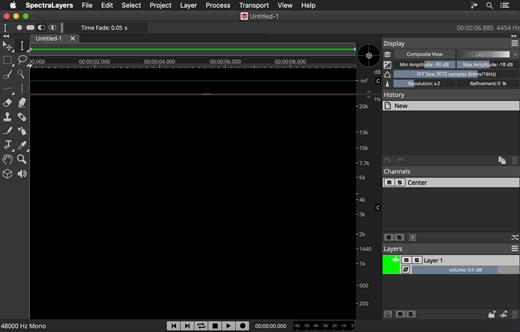
SpectraLayers is a new approach to audio editing, with new concepts to transform the way you work. For the first time you can directly edit spectral data, opening advanced sonic worlds, and use innovative enhancements to traditional techniques. Visualize audio in astonishing new ways, including 3D. Work with mixes like they were tracks. Integrate these abilities into your DAW and other tools. And all in a familiar interface that you didn’t realize you already knew.
The Advanced Tool You Already Know

SpectraLayers is the first completely visual editing system for audio. It extends the traditional visualization of spectral editors to every aspect of editing sounds, including how they mix together. To make this approach intuitive, SpectraLayers employs the model of high-end image editors – not just the interface, but what you can do with sound and how you do it. So, despite its advanced technology, SpectraLayers is immediately familiar and instantly powerful.

Features
Retouch Audio

The most natural, powerful and precise editing is made directly in the medium. Paint and brushes, retouching and photographs, video and frames. SpectraLayers introduces this way of editing to audio. Start with the spectral domain, where time, frequency and amplitude are all visible. Use the power of 22 advanced tools – modification, drawing, selection, measurement, marking and listening with your mouse, or a pressure-sensitive stylus.

Advanced Selection Engine

Transcend traditional audio editing with the industry’s most advanced selection engine. Create any selection shape – drawn freehand, with geometry-based tools or automatically based on audio features. Add fully visualized crossfade masks and real-time previews. Use selections for spectral playback, selection-based effects, and our Visual Transformation Engine. Alternatively, use selections to protect audio from modification, extract selections to other Layers, and compose 2D soundscapes. Even save and recall them.

Selection-Based Effects: Re-Imagined

SpectraLayers re-imagines selection-based processing, the editing technique most common in other spectral tools. It starts with our Advanced Selection Engine (ASE). Apply SpectraLayers’ industry-standard restoration effects, such as spectral noise reduction and audio healing. In another industry first, you can also use External Editor Processing to use the effects in your other audio tools, such as WaveLab, iZotope RX® and Melodyne® with full ASE compatibility. Undo and redo these edits like any other – instantly.

Transpose the Way You Transform

SpectraLayers employs the industry’s only visual transformation system for sound. And it’s real-time, with full-resolution previewing. Move, scale and stretch audio as you drag your mouse (or stylus) to align musical features while you transform, and measure your changes with markers and timelines. Of course, you can also do it how everyone else does, using numbers. Either way, all transformations are powered by the Advanced Selection Engine.

Tracks and Regions, Evolved

Layers are at the heart of SpectraLayers. They’re compatible with regions and tracks, but more powerful. Seeing them shows you how they sound – both individually and mixed with other Layers. You can edit them while seeing how your changes affect other tracks – in real-time. Using any editing method, instantly previewed with every tool.

What’s New

Version 10.0.30:

  • Release notes were unavailable when this listing was updated.

Compatibility

macOS 10.12 or later, 64-bit processor


Release Name: SpectraLayers Pro 10.0.30
Size: 2.9 MB
Links: HOMEPAGE – NFO – Torrent Search

Download: FiKPERUPLOADGiGNiTROFLARERAPiDGATOR

6 Comments
Sep 30

EdgeView 4.3.2

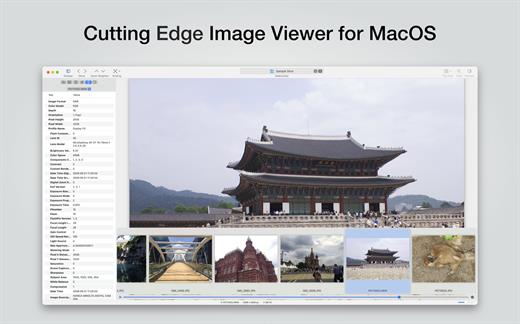
EdgeView 4 is fast image viewer has elegant user interface. EdgeView 3 is developed and designed for modern MacOS. It can open various image files such as JPEG, PNG, TIFF, BMP, and RAW file of DSLR, EPS and PDF, AI(Adobe Illustrator). Can open image files in archive directly without extraction.

User can open files, rename files, delete files from EdgeView’s file browser. Also can access to SMB/AFP/FTP network volume.

User can navigate images quickly by using keyboard shorcut, mouse wheel, trackpad gesture. EdgeVew show EXIF information, play animation GIF/PNG/WebP smoothly. Save last status to history, and restore when reopen file.

EdgeView 4 will be the best choice when viewing and managing image files.

What’s New

Version 4.3.2:

  • Release notes were unavailable when this listing was updated.

Compatibility

macOS 11.1 or later
Apple Silicon or Intel Core processor


Release Name: EdgeView 4.3.2
Size: 39.5 MB
Links: HOMEPAGE – NFO – Torrent Search

Download: FiKPERUPLOADGiGNiTROFLARERAPiDGATOR

6 Comments
Sep 30

WidsMob AI Retoucher 3.17

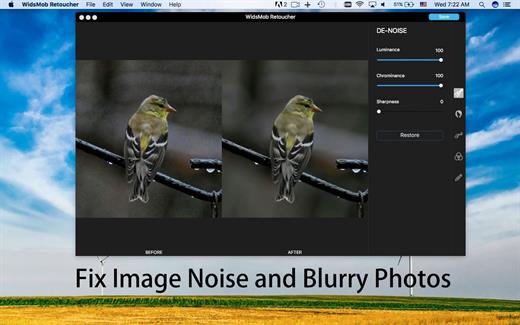
WidsMob Retoucher is a photo editor which allows you to discover the magic of artistic photo effects. It is noise reduction software to fix blurry photos first. WidsMob Retouch eliminates image noise while preserving image detail. What is more, WidsMob Retoucher also removes some selfie imperfections, such as minimize freckles, whiten teeth, and smooth skins. It also provides dozens of revolutionary camera profiles to rediscover the magic of stunning

What’s New

Version 3.17:

  • Release notes were unavailable when this listing was updated.

Compatibility

OS X 10.10 or later, 64-bit processor


Release Name: WidsMob AI Retoucher 3.17
Size: 356.6 MB
Links: HOMEPAGE – NFO – Torrent Search

Download: FiKPERUPLOADGiGNiTROFLARERAPiDGATOR

6 Comments
Sep 30

Geekbench 6.2.1

Geekbench provides a comprehensive set of benchmarks engineered to quickly and accurately measure processor and memory performance. Designed to make benchmarks easy to run and easy to understand, Geekbench takes the guesswork out of producing robust and reliable benchmark results.

What’s New

Version 6.2.1:

  • Release notes were unavailable when this listing was updated.

Compatibility

macOS 11.0 or later


Release Name: Geekbench 6.2.1
Size: 283 MB
Links: HOMEPAGE – NFO – Torrent Search

Download: FiKPERUPLOADGiGNiTROFLARERAPiDGATOR

6 Comments
Sep 30

Ghost Buster Pro 2.4.1

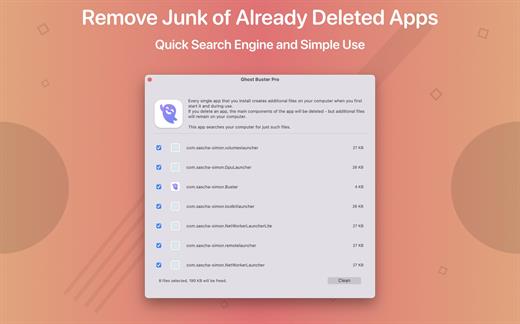
Ghost Buster Pro finds and deletes files from apps you’ve already uninstalled. The app is lightning fast and frees memory in no time.

Many apps are installed on a computer, but they usually only stay on your computer for a short time. Each app creates files, but deleting the app does not remove them.
This leads to a large number of files accumulating over time, which take up valuable storage space.
Ghost Buster Pro searches your computer for exactly such files and can also delete them directly if you wish.

Ghost Buster Pro offers the following features:
Fast Search

Ghost Buster Pro quickly scans your computer for data from previously deleted apps. You can have them deleted with one click.

Extremely easy handling

Ghost Buster Pro couldn’t be simpler. The search is started immediately after the app is started. You can now delete files with just one click.

No automatic deletion

Ghost Buster Pro does not delete any data without your consent. Choose for yourself which data is deleted and which you want to keep.

What’s New

Version 2.4.1:

  • Release notes were unavailable when this listing was updated.

Compatibility

macOS 11.5 or later
Apple Silicon or Intel Core processor


Release Name: Ghost Buster Pro 2.4.1
Size: 8.4 MB
Links: HOMEPAGE – NFO – Torrent Search

Download: FiKPERUPLOADGiGNiTROFLARERAPiDGATOR

5 Comments
Sep 30

Soulver 3.9.1

Soulver 3 is a smart notepad with a built-in calculator. It gives instant answers to any calculations it finds in your text. It’s a better way to work stuff out than with a traditional calculator, and a more lightweight tool for quick calculations than a spreadsheet.

Math Features

  • Instant calculations, no equals required
  • Use words alongside numbers, so calculations make sense
  • Quick totals of all your lines, and subtotals
  • Calendar calculations (June 9 + 3 weeks, 3:35 pm + 6 hours 27 minutes)
  • Easy percentages (“$300 – 10%”, “30 as a % of 200”)
  • Unit conversions (“10 kg in pounds, “25 meters in feet”)
  • 168 live real-world and cryptocurrency rates.
  • Line references to build little calculating documents
  • Variables & variable autocompleting
  • Global variables & custom units

App Features

  • Dark mode
  • Sidebar for organising your sheets and the ability to make folders
  • Headings (#), comments (//) & labels (:)
  • Customize your syntax coloring & font
  • Automatic number formatting, with spaces around operators and thousand separators
  • Number scrubbing (hold shift and hover over a number)
  • Deep macOS system integration: Touch Bar support, Quicklook, Calculate anywhere services
  • Automation tools: a command-line interface, Alfred workflow, Automator action

What’s New

Version 3.9.1:

  • Release notes were unavailable when this listing was updated.

Compatibility

macOS 10.14.4 or later, 64-bit processor


Release Name: Soulver 3.9.1
Size: 2.9 MB
Links: HOMEPAGE – NFO – Torrent Search

Download: FiKPERUPLOADGiGNiTROFLARERAPiDGATOR

5 Comments
Sep 30

PDF Reader Pro 2.9.7

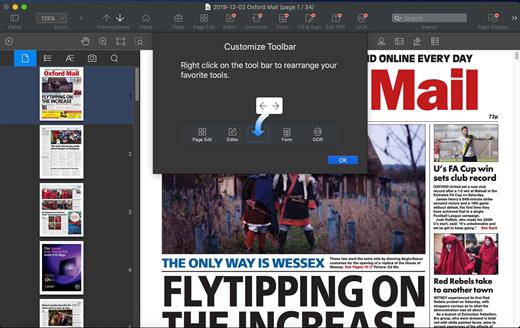
PDF Reader Pro is a PDF editing application that has a wide variety of tools. Building on solid features such as annotation, comment, OCR, Convert, form filling and bookmarking, PDF Reader Pro allows you to maneuver through your PDF files. PDF Reader Pro Edition offers even more – combining multiple documents, splitting your PDF into several files, inserting pages from another PDF and PDF files. The app has Text-to-Speech functionality that can read the doc to you in six different languages. You can simply sync your files with Dropbox to make the best use of PDF Reader Pro Edition. The app has a presentation mode that will allow you to showcase your PDF document to others.

Now you can enjoy the best PDF to Office Converter! Export from PDF to Microsoft Word (.docx), PowerPoint (.pptx), Excel (.xlsx), RTF, HTML, Text, Image, CSV, and more Offline

Support free trials and special education discounts

Main features:

  • Annotate PDFs with highlights, underlines, lines, circles, freehand writing, and so much more.
  • Create & Edit & Fill PDF Forms. Create fillable PDF Forms from interactive field objects, such as buttons, check boxes, radio buttons, list boxes, and drop-down lists.
  • Create tables. A table consists of rows and columns of cells. A cell is like a text frame in which you can add text, or other tables. You can use headers or footers to repeat the information at the top or bottom of each divided portion of the table.
  • Sign – Create multiple signatures for any situations with trackpad, keyboard or images
  • Insert stamps, comments and notes.
  • Link – Add hyperlinks to redirect other destinations, and edit your links as you like
  • Export from PDF to Microsoft Word (.docx), PowerPoint (.pptx), Excel (.xlsx), RTF, HTML, Text, Image, CSV, and more Offline
  • PDF to Image. Convert PDFs to JPG, PNG, bmp, gif, tiff, tga and jp2
  • OCR (Optical Character Recognition). Convert scanned PDF & images into editable and searchable PDFs or TXT files. 50+ languages supported!
  • Annotation history – Access important sections of documents instantly.
  • Edit pages with headers, footers, or page numbers
  • Add PDF watermarks to the background of pages
  • Bates number
  • Combine multiple files into one document
  • Insert another file (entire files or specific page ranges) into the existing file
  • Replace PDF pages from another PDF file
  • Merge, Split, Extract, Append, Rotate, delete, replace, and crop pdf pages
  • Directly present your PDFs with annotations
  • Supports radio boxes, check boxes, combo boxes, and list boxes
  • Reading modes: full-screen, page-fit, horizontal or vertical orientation, continuous and page break
  • Bookmark specific pages or sections of PDFs
  • Create, Edit and Search outlines to easily navigate through the whole file
  • Night mode supported
  • Reduce PDF size to make your documents much lighter
  • Create a new PDF by importing your clipboard content
  • Select a passage or document to be read aloud by the TTS engine
  • Set a password and authorization to edit, modify or print PDFs

What’s New

Version 2.9.7:

  • Release notes were unavailable when this listing was updated.

Compatibility

macOS 10.10 or later


Release Name: PDF Reader Pro 2.9.7
Size: 2.9 MB
Links: HOMEPAGE – NFO – Torrent Search

Download: FiKPERUPLOADGiGNiTROFLARERAPiDGATOR

6 Comments
Sep 25

Data Guardian 7.6.5

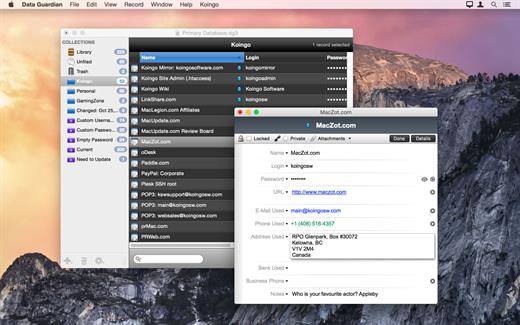
Data Guardian is a secure database application. Security and privacy are two of the most important issues in today’s world; leaving passwords on sticky notes around your computer simply will not cut it anymore. Data Guardian is a secure database application with up to 448-bits of Blowfish encryption – regardless of how sensitive your data is. Create multiple databases in Data Guardian for a variety of purposes such as an address book, customer database, christmas shopping list, journal, password manager, or even notepad.

Easily create categories to store records, and even apply custom color labels and icons! Change the view options for each category to see the information you want, and even add your own custom data fields. Do not be stuck with a program which forces you to input your information into predefined fields. Enter the data you need to, not what you are forced to.

Aside from Data Guardian’s easy to use Keychain integration to autofill passwords on Web sites, it also offers a variety of other tools and features to enhance each record. Dial phone numbers through your modem with a single click, create new e-mail messages, generate secure passwords (based on an algorithm of your choosing), and even synchronize two databases.

What’s New

Version 7.6.5:

  • Release notes were unavailable when this listing was updated.

Compatibility

macOS 10.13.0 or later, 64-bit processor


Release Name: Data Guardian 7.6.5
Size: 53.3 MB
Links: HOMEPAGE – NFO – Torrent Search

Download: FiKPERUPLOADGiGNiTROFLARERAPiDGATOR

8 Comments
Sep 25

OmniReader Pro 2.5.0

Read EPUB,CHM,MOBI… use it.. OmniReader is a fully functional book Reader with a simple and beautiful interface and a good reading experience.

Features

  • Supports reading EPUB, CHM and Kindle files.
  • Support single page search and full text search, and highlight search results.
  • Support the forward and backward browsing history.
  • Supports page turning, zooming, and sidebar shrinking.
  • Support page printing.
  • Support to view the basic information of the file.
  • Supports file export to EPUB, PDF.
  • Support to extract all images in the file.
  • Support file coding, deal with the problem of garbled code.
  • Support image adaptive, automatically adjust the size of the picture.

Bookrack

  • All the files you have read will be saved in the bookshelf for quick review next time.
  • Supports file drag and drop addition.

What’s New

Version 2.5.0:

  • Release notes were unavailable when this listing was updated.

Compatibility

macOS 10.13 or later


Release Name: OmniReader Pro 2.5.0
Size: 13.9 MB
Links: HOMEPAGE – NFO – Torrent Search

Download: FiKPERUPLOADGiGNiTROFLARERAPiDGATOR

6 Comments
Sep 25

Commander One PRO 3.7.0

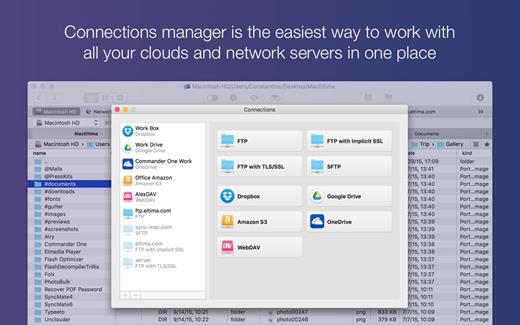
Commander One PRO is a dual-pane file manager for OS X based on Swift, which allows you to manage your files in the best possible way. It allows you to see all hidden files on your Mac, you can change the name of any file or folder when moving it, work with local and network drives. Program also offers you the Brief Mode, so you could see and manage multiple files and folders at once. For your utter convenience, Commander One has a built-in Terminal emulator with all needed options, but without jumping between the apps. You can also use various color themes created by us to personalize your Commander One and tune your very own for unique appearance.

You will get the dual-pane interface for easy moving and copying files from one place to another; multi-tab browsing for eliminating clutter; advanced search for locating files quickly by name or content plus Spotlight search; file operations queueing, hotkeys setup for any action, ZIP support with compressing, extracting and full access, preview multiple types of files incl. binary and hex.

PRO Pack of the application offers additional benefits: built-in fast FTP client that enables you to connect to remote server through FTP, SFTP or FTPS; easy access to data on your devices, both iOS and Android; compression and extraction of ZIP, RAR, TBZ, TGZ, 7z files; integration of any number of Dropbox accounts.

What’s New

Version 3.7.0:

  • Improved: work with dropbox.

Compatibility

macOS 10.12 or later, 64-bit processor


Release Name: Commander One PRO 3.7.0
Size: 54.9 MB
Links: HOMEPAGE – NFO – Torrent Search

Download: FiKPERUPLOADGiGNiTROFLARERAPiDGATOR

6 Comments