Oct 18

AnyTrans for iOS 8.9.8.20231016

AnyTrans is the iPhone manager that breaks the sync boundary and consolidates every access to all your content in one place, including music, videos, photos, messages, books, Safari history, voice memo, etc.
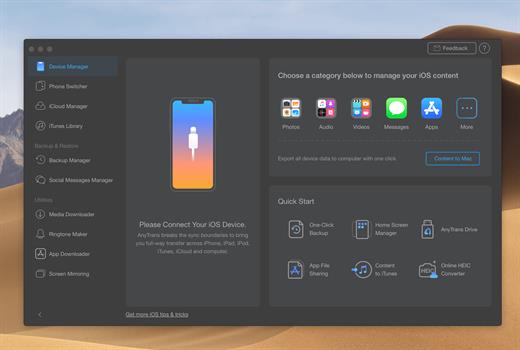
Features

  • Flash-Sync Makes the fastest data transfer in market – By largely improving the data loading and transferring speed, AnyTrans gives you lightning-fast experience.
  • Two-way Transfer between iOS devices, iTunes, iCloud and computer – Whether you want to transfer contacts from iPhone to Mac, messages from old iPhone to new iPhone 7, music and playlists from iPhone back to iTunes library, or videos from PC to iPad, AnyTrans gets anything transferred freely between your iPhone, iPad, iPod touch, iTunes, iCloud and computer.
  • Easily manage all your contents on iPhone, iPad, and iPod touch – Browse, edit and export important contacts, messages, notes, and more personal data from iPhone; well organize your photos and music in iPhone and iPad by building up your own collections and playlists – you get full control over all your iOS data and files with ultra ease.
  • Migrate everything to your new iPhone 7 within one click clone – Upon just one simple click, everything from your old iPhone, even from iPad – will be cloned to your new iPhone 7. The game-level you just conquered, the photos you took yesterday, the note you plan for shopping and the music you favors will all be there waiting for you.
  • Navigate your iTunes and iCloud backup contents with even more ease – Instead of making a guess on whether your iTunes/iCloud backup contains the notes, messages, contacts, voice memos, or Safari bookmarks you need, AnyTrans lets you peek right into your backups, and grab any piece of data you need freely without a full restore.

What’s New

Version 8.9.8:

  • Release notes were unavailable when this listing was updated.

Compatibility

macOS 10.10 or later


Release Name: AnyTrans for iOS 8.9.8.20231016
Size: 275.9 MB
Links: HOMEPAGE – NFO – Torrent Search

Download: FiKPERUPLOADGiGNiTROFLARERAPiDGATOR

2 Comments
Oct 18

Arturia V Collection 9 v18.10.2023

V Collection 9
Reference instruments for music makers
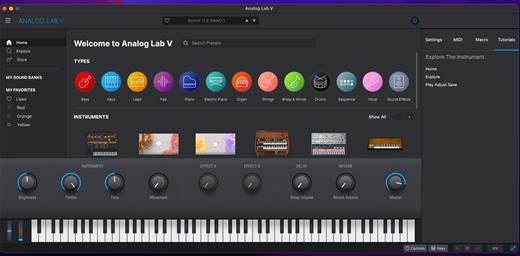
A premium suite of professional software instruments ranging from modern hybrid synth engines to emulations of the most evocative instruments ever made, enhanced for today’s production workflow.

This is V Collection 9
Immerse yourself in the perfect music-making experience with essential tools and sounds to fit your flow. 33 instruments, thousands of world-class presets, and a creative experience like no other.

The ultimate selection
A focused, hand-picked, expertly-engineered line-up of instruments that are essential for modern music production. The most iconic synths, blissful keyboards, and evocative hybrids to keep your creativity on track.

14,000 presets
Find the crucial mix-finishing sounds you need in a few clicks with V Collection 9’s expansive library of expertly-designed sounds, complete with easy browsing. Tap right into any style, any instrument, any time.

Perfected for you
The high-performance features that you can count on, the premium sound quality you deserve; V Collection 9 is the result of over 20 years of engineering expertise, musical exploration, and a passion for audio excellence.

Easy to use
You don’t need to be an expert to enjoy pro sound. The instruments in V Collection 9 are designed with a fluid workflow in mind, with easy interfaces, in-app tutorials, and intelligent features to deliver inspiring results without hassle.

Included

  • Acid_V__1_0_0_3840.pkg
    Analog_Lab_V__5_7_4_371.pkg
    ARP_2600_V3__3_12_0_3420.pkg
    Augmented_BRASS__1_0_1_3949.pkg
    Augmented_GRAND_PIANO__1_5_1_3949.pkg
    Augmented_STRINGS__1_5_1_3943.pkg
    Augmented_VOICES__1_5_1_3942.pkg
    B-3_V2__2_8_0_3420.pkg
    Buchla_Easel_V__1_12_0_3420.pkg
    Clavinet_V__1_12_0_3420.pkg
    CMI_V__1_12_0_3420.pkg
    CS-80_V4__4_2_0_3420.pkg
    CZ_V__1_8_0_3420.pkg
    DX7_V__1_12_0_3421.pkg
    Emulator_II_V__1_5_0_3420.pkg
    Farfisa_V__1_12_0_3420.pkg
    Jun-6_V__1_5_0_3420.pkg
    Jup-8_V4__4_5_0_3420.pkg
    KORG_MS-20_V__1_2_0_3420.pkg
    Matrix-12_V2__2_12_0_3420.pkg
    Mellotron_V__1_8_0_3420.pkg
    Mini_V3__3_12_0_3422.pkg
    MiniFreak_V__1_0_1_385.pkg
    Modular_V3__3_12_0_3420.pkg
    OP-Xa_V__1_6_0_3420.pkg
    Piano_V3__3_2_0_3420.pkg
    Pigments__4_1_1_3513.pkg
    Prophet-5_V__1_2_0_3420.pkg
    Prophet-VS_V__1_2_0_3420.pkg
    SEM_V2__2_12_0_3420.pkg
    Solina_V2__2_12_0_3420.pkg
    SQ80_V__1_5_0_3420.pkg
    Stage-73_V2__2_5_0_3420.pkg
    Synclavier_V__2_12_0_3420.pkg
    Synthi_V__1_8_0_3420.pkg
    Vocoder_V__1_5_0_3420.pkg
    VOX_Continental_V2__2_12_0_3420.pkg
    Wurli_V2__2_12_0_3420.pkg

What’s New

Version 18.10.2023:

  • Release notes were unavailable when this listing was updated.

Compatibility

macOS 10.13 or later


Release Name: Arturia V Collection 9 v18.10.2023
Size: 31.2 GB
Links: HOMEPAGE – NFO – Torrent Search

Download: FiKPERUPLOADGiGNiTROFLARERAPiDGATOR

1 Comment
Oct 15

Mimestream 1.1.2

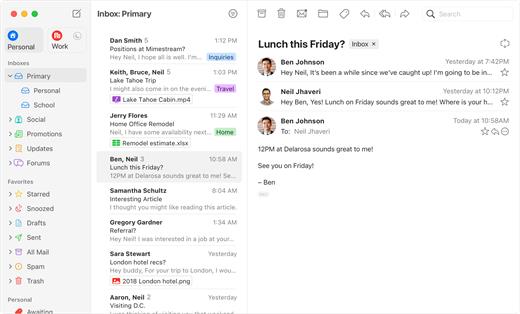
Mimestream combines your favorite Gmail features with the power of a native macOS app so you can move through your email effortlessly

Made for Mac, optimized for Gmail

As a native app written in Swift, Mimestream leverages the full power of macOS to deliver a lightning-fast and instantly familiar experience. Instead of using the IMAP protocol, Mimestream utilizes the Gmail API to enable an enhanced set of features that let you work with ease.

Work smarter, email faster

  • Rise above the noise and focus on the work that matters most. Mimestream makes it easy to keep your inbox organized with confidence.
  • Categorized Inbox – with support for Gmail’s categories, focus on what matters most and triage the rest at your leisure.
  • Multiple Accounts
  • Label Management

Committed to Privacy

Your data and credentials are stored only on your device, and the app only makes direct connections to Gmail. There are no intermediary servers, and Mimestream does not collect or sell your email.

Key Features

  • Lightweight and Fast – Mimestream is built for speed, and only uses a minimal amount of disk space to cache recent messages
  • Offline Access – Fully functional when offline and on the slowest connections-perfect for business travelers and whenever you’re on the go
  • System Notifications – Receive macOS system notifications when you receive new messages, so you never fall behind on important threads
  • Aliases – Your email aliases are automatically synced from Gmail without any setup and are used for replies when appropriate
  • Signatures – Signatures set up in Gmail are automatically synced with Mimestream
  • Robust Search – Enter any Gmail search query into Mimestream and get consistent results. Search while offline, too
  • Swipe Gestures – Use familiar macOS swipe gestures to quickly triage and archive your email
  • Tracking Prevention – Read your email privately – Mimestream blocks tracking pixels from 50+ of the most common tracking services
  • Keyboard Shortcuts – Triage your email quickly using keyboard shortcuts, including the option to use familiar Gmail or Apple Mail shortcut sets

What’s New

🔧 Fixed

  • (macOS 14) Tokens sometimes don’t draw in address fields
  • (macOS 14) The entire sidebar sometimes flashes during syncing activity
  • (macOS 14) Editing Gmail Filter fields can insert smart quotes, creating invalid filters
  • (macOS 14) Hoving over Labels with colors in the Menus can cause them to turn black
  • (macOS 14) Choosing a mention suggestion doesn’t actually add the address
  • App goes into a crash loop because the Gmail API is now occasionally not returning the Starred label
  • Control-click on some areas of message list cells doesn’t work
  • Mentions sometimes don’t appear if typed mid-sentence
  • The Mentions suggestions menu is incorrectly positioned when app text size preference is large
  • Pressing enter inside a list element after an inline code doesn’t continue the list
  • Text size adjustments via Command +/- don’t always work correctly
  • Attachments dragged from the compose window are locked
  • Message list header unread/spam/trash counts can go negative

🧹 Cleanup

  • Reset trials to allow returning users to re-try the app

Compatibility

macOS 10.15.0 or later


Release Name: Mimestream 1.1.2
Size: 14.5 MB
Links: HOMEPAGE – NFO – Torrent Search

Download: FiKPERUPLOADGiGNiTROFLARERAPiDGATOR

5 Comments
Oct 15

Wondershare PDFelement Pro 10.0.4

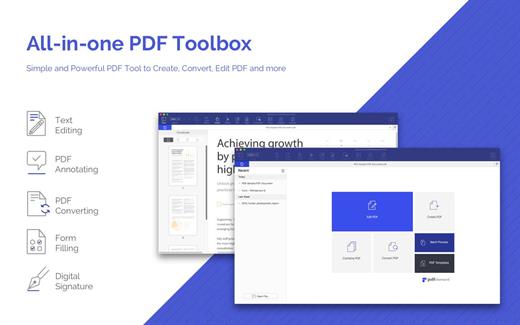
Wondershare PDFelement is a self-explanatory OS X application that makes it easier for your to preview, edit, join, split and convert PDF documents using a Mac.

The Wondershare PDFelement also features a simple, clean and intuitive interface that provide instantaneous access to all the tools and features you might need to complete your daily tasks.

Powerful and user-friendly PDF editor for everyday use

Moreover, with Wondershare PDFelement’s help, you can effortlessly edit PDF documents created using text files, web pages or scanned documents.

Consequently, you can add, remove or edit text, move and rearrange pages, insert or remove images and more.

Wondershare PDFelement’s top toolbar helps you hide, show and customize the sidebar in order to display the items and information you are interested in. In addition, you can browse through the loaded document, zoom in or out, print it or email it with just a couple of mouse clicks.

Advanced OCR capabilities make text editing a breeze

Furthermore, you can choose between the “Hand”, “Select” and “Edit” tool, use the advanced OCR feature and convert your source file into plain text or RTF document, ePUB, HTML, as well as file formats compatible with Microsoft Word, Excel, and PowerPoint.

The context menu also helps you switch between the “Move”, “Select” and “Touchup” tool, change the display mode and open the Inspector window to view detailed information about the loaded document.

As an added bonus, by accessing the Document menu, you have the option to add, update or remove an watermark, extract, insert and delete pages, split, merge or convert your document and crop or rotate a page with ease.

Full-featured tool designed to help you stamp, watermark, encrypt and decrypt PDF documents on a Mac

The complete list of all available editing tools, bookmark features, annotation tools and stamp options can be found under the Tools menu.

From here you can easily insert text boxes, add sticky notes, highlight, strike-through and underline text, insert various shapes and use the handy pencil or erase.

On the whole, Wondershare PDFelement comes with the right set of features to help you edit and annotate PDF documents using a Mac, as well as effortlessly add password protect and convert them other formats for easier sharing with your friends and colleagues.

What’s New

Version 10.0.4:

  • Release notes were unavailable when this listing was updated.

Compatibility

macOS 10.14 or later, Apple Silicon or Intel Core processor


Release Name: Wondershare PDFelement Pro 10.0.4
Size: 57.2 MB
Links: HOMEPAGE – NFO – Torrent Search

Download: FiKPERUPLOADGiGNiTROFLARERAPiDGATOR

5 Comments
Oct 13

Dropshare 5.39

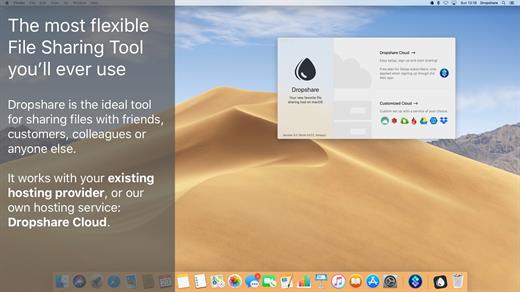
Dropshare is a menu bar application for drag & drop upload files, screenshots and even directories to your own server, Amazon S3, Backblaze B2 Cloud Files, Rackspace Cloud Files, Microsoft Azure Blob Storage, Google Drive or Dropbox. Additionally, Dropshare offers a file sharing provider called Dropshare Cloud, which is perfectly suitable to start uploading in just minutes. Sharing files with friends, customers, colleagues or anyone else has never been so easy an professional! Dropshare supports Multiple Connections: You can set up different upload destinations at the same time and switch between them using user-defined keyboard shortcuts, or by holding ⌘ while dragging & dropping a file No matter if files, folders, text or screenshots – Dropshare uploads every file and data to your selected destination – also from clipboard or other applications like Safari. Share Extension included Set up your own keyboard shortcuts for fullscreen or selection-based screenshots that’ll be uploaded automatically with Dropshare. Set up a custom keyboard shortcut for taking a screenshot and annotating it afterwards with Dropshare itself, or an app you already like: Preview.app, Skitch.app, Napkin.app or Annotate.app Take & upload Screen Recordings directly with Dropshare, both fullscreen and selection-based recordings are available, as well as GIF conversion Choose from a number of free designs or craft an individual design on your own using HTML, CSS and JavaScript, including upload previews Synchronize your upload history across all your devices, supports both iOS and macOS. Your upload history will automatically be synchronized across all your Apple devices with iCloud Dropshare supports URL shorteners as well, e.g. dsh.re or Rebrandly, or configure your very own URL shortener service like bit.ly or YOURLS.

Technical requirements:

  • A working SSH user account is required on the server. A password or SSH key pair is also required. To have the uploaded file displayed in a web browser, a web server needs to be installed and configured on the server
  • Dropshare supports services like OpenStack Swift. Check User Guide for more information
  • A regular Google account is required in order to use Google Drive
  • A regular Dropbox account is required in order to use Dropbox
  • Microsoft Azure Blob Storage, Backblaze B2 Cloud Files, Amazon Simple Storage Service (S3), Rackspace Cloud Files. A subscription may be neccessary in order to use Dropshare with one of these providers. Please check out the terms of use and payment information at the website of the selected provider

What’s New

Version 5.39:

  • Screen Recordings: Fixed an issue that would lead to failing video conversion when using a specific configuration

Compatibility

macOS 12.3 or newer
Apple Silicon or Intel Core processor


Release Name: Dropshare 5.39
Size: 50.2 MB
Links: HOMEPAGE – NFO – Torrent Search

Download: FiKPERUPLOADGiGNiTROFLARERAPiDGATOR

6 Comments
Oct 13

Rocket Typist Pro 3.0.0

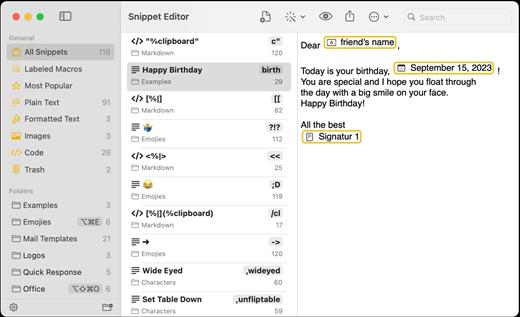
Rocket Typist is a modern Mac application, created with simplicity in mind. During a regular day, most of us type the same text over and over again, wasting an enormous amount of time in the process. Why not let your computer do some of that work for you? Once you have collected your snippets, you will never have to type them again. Here are just a few examples:

  • Commonly repeated phrases such as “How are you?”
  • Signatures with or without images
  • Current date and time
  • Names, addresses and other contact details
  • Hard to remember technical terms
  • Support replies to your customers
  • Code snippets for developers

Features:

  • Type an abbreviation and expend it into a snippet
  • Sync your snippets and category across all your devices using iCloud
  • Use macros to make your snippets more dynamic
  • Snippets can either be plain or rich text
  • Select snippets from your Mac’s Touch Bar
  • Export and import snippets

What’s New

Version 3.0.0:

  • Release notes were unavailable when this listing was updated.

Compatibility

macOS 13 or later
Apple Silicon or Intel Core processor


Release Name: Rocket Typist Pro 3.0.0
Size: 12.6 MB
Links: HOMEPAGE – NFO – Torrent Search

Download: FiKPERUPLOADGiGNiTROFLARERAPiDGATOR

5 Comments
Oct 13

Marked 2.6.29

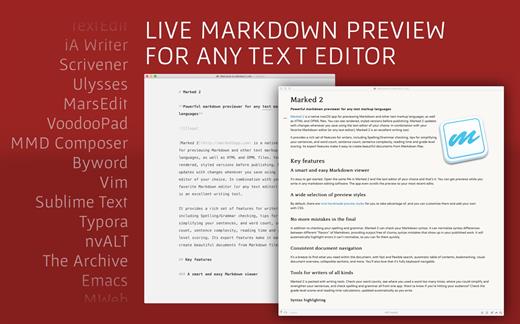
Marked allows you to preview your Markdown (in any flavor) as you write in your favorite text editor. It tracks your file changes and updates the preview as you go, even automatically scrolling to the point in the file where you’re currently working

Marked 2 includes a rewrite of the file-watching system for speed and accuracy. It speeds up just about every part of the app, making it even easier to get your work done without worrying about how it’s going to look or waiting for your preview to update

What’s New

Version 2.6.29:

  • Release notes were unavailable when this listing was updated.

Compatibility

macOS 10.10 or later.


Release Name: Marked 2.6.29
Size: 28 MB
Links: HOMEPAGE – NFO – Torrent Search

Download: FiKPERUPLOADGiGNiTROFLARERAPiDGATOR

6 Comments
Oct 13

Permute 3.11.0

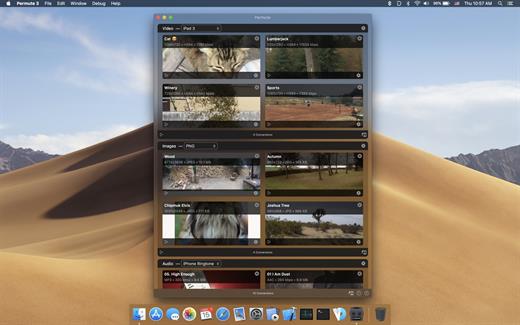
Permute offers easy-to-use drag-and-drop video conversion.

Features:

  • Easy to Use – built from the ground up, Permute is a perfect example of what a Mac app should be. With a gorgeous interface and drag & drop simplicity no need for complicated options.
  • Insanely Fast – Permute was engineered to be incredibly fast. Let us take care of the hard stuff. Just select the video format you want and it’ll be done faster than you can say “hardware acceleration” – MP4 and HEVC presets now take advantage of your machine’s hardware acceleration capabitlities, speeding up HEVC conversions more than 3 times over previous versions of Permute!
  • PDF Support – Permute 3 now includes support for stitching multiple images into a single PDF.
  • Everything Included – It doesn’t matter if you’re converting home movies or processing images. Permute can do it all. We support nearly every format and have plenty of device presets to choose from.
  • Looks Amazing – Whether you use dark mode or not, Permute will look amazing. Taking advantage of the modern technologies, Permute will even change its icon in dark mode.
  • Keep the Schedule – Video re-encoding is quite demanding on computer resources. This is why you can now schedule Permute to convert videos e.g. at night when you’re not using your computer.
  • And so much more! – There are so many other great features in Permute – adjust volume of an audio file or an audio track in a video. Batch-resize, rotate and flip images and videos. And more!

What’s New

Version 3.11.0:

  • Release notes were unavailable when this listing was updated.

Compatibility

macOS 10.12.0 or later


Release Name: Permute 3.11.0
Size: 79.4 MB
Links: HOMEPAGE – NFO – Torrent Search

Download: FiKPERUPLOADGiGNiTROFLARERAPiDGATOR

3 Comments
Oct 13

BetterMouse 1.5 (4166)

BetterMouse is a macOS utility improving external mouse performance and functionalities, aiming for replacing bulky, intrusive, and resource-hungry mouse drivers like Logitech Options. It’s feature-rich, light-weighted, efficiency-optimized, and perfectly privacy safe, trying to meet all your needs for using a 3rd-party mouse on macOS.

Features:

Scroll

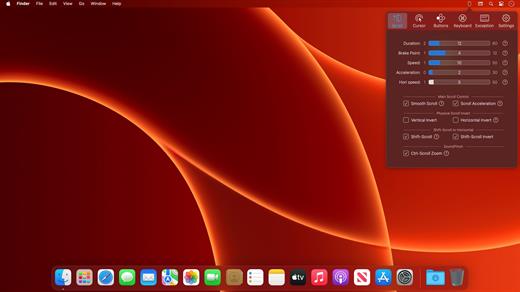
  • Butter smooth scroll, with fully configurable settings of duration, direction, acceleration, etc.
  • Precise configurable discrete scroll with or without acceleration.
  • Shift-scroll to horizontal on/off, with configurable speed, direction.
  • Ctrl-scroll to zoom/pinch.
  • Thumbwheel zoom for hi-res thumbwheel.

Cursor

  • Separated cursor acceleration & speed control, acceleration can be completely eliminated.
  • Precise mouse fps counter.

Button/gesture mapping

  • Mapping every extra mouse button to any keyboard shortcuts & extensive special actions.
  • Up/down/left/right gestures mapping for every extra mouse buttons.
  • Modifier keyed button/gesture mapping.
  • Click-through feature for left/right click for direct actions to inactive window with one click.
  • Click-through option for every mapping independently.
  • Right click free pan view.

Exception apps

  • Per-app independent settings for scroll setting & button/gesture mapping.

App

  • Menu bar app with hide-able app icon.
  • Clean & safe, with no custom network access, no file access.
  • Fully optimized algorithm with extremely low CPU & power usage.
  • Full functional free trial, one-time purchase for lifetime.

What’s New

Version 1.5:

  • Release notes were unavailable when this listing was updated.

Compatibility

macOS 11.0 or later.
Apple Silicon or Intel Core processor


Release Name: BetterMouse 1.5 (4166)
Size: 8.1 MB
Links: HOMEPAGE – NFO – Torrent Search

Download: FiKPERUPLOADGiGNiTROFLARERAPiDGATOR

6 Comments
Oct 13

SketchUp Pro 23.1.341

SketchUp is an easy-to-learn 3D modeling program that enables you to explore the world in 3D. With just a few simple tools, you can create 3D models of houses, sheds, decks, home additions, woodworking projects – even space ships.

Programming, diagramming, design development, detailing, documentation, RFIs—wherever you need drawings, you need SketchUp Pro. A great mix of our classic desktop software, our shiny new SketchUp for Web modeler, and all sorts of things you’ve been asking for over the years — including the ability to publish, share, and store projects in the cloud with Trimble Connect.

Tools for your 3D modeling toolbox:

SketchUp Pro for Desktop

Fast, easy 3D modeling for anything you can imagine.

SketchUp for Web

Our powerful web modeler, with all the features you need to turn your designs into real things.

Unlimited cloud storage

Share, collaborate, and store your projects in the cloud. Gain flexibility and peace of mind.

2D design documentation

Create scaled drawing sets in 2D with LayOut.

VR model viewing

Wow your clients with a walkthrough of their project on Microsoft HoloLens, HTC Vive, or Oculus, on your phone or tablet.

Features that make your projects yours

Make your project look like only you can with custom Styles, Materials, and Outliner. And, make that work smooth and easy with Dynamic Components.

What’s New

Version 23.1.341:

  • Release notes were unavailable when this listing was updated.

Compatibility

macOS 10.13 or later


Release Name: SketchUp Pro 23.1.341
Size: 910.6 MB
Links: HOMEPAGE – NFO – Torrent Search

Download: FiKPERUPLOADGiGNiTROFLARERAPiDGATOR

7 Comments