Oct 20

SnippetsLab 2.3.3

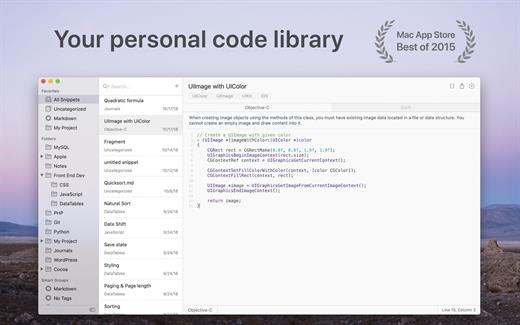
SnippetsLab is an easy-to-use snippets management tool. It helps you to collect and organize valuable code snippets, and makes sure that you have easy access to them whenever you want.

Features

  • Beautiful user interface, optimized for OS X 10.10 Yosemite
  • Create shortcuts for your most commonly used folders
  • Add multiple fragments in one snippet
  • Use full-text search to find your snippets instantly
  • Supports syntax highlighting for over 100 languages
  • Use iCloud to synchronize your database across multiple devices
  • Import from other services to your database
  • Use the SnippetsLab Assistant to search, browse and create snippets right from the menu bar

What’s New

Version 2.3.3:

  • Release notes were unavailable when this listing was updated.

Compatibility

macOS 10.12 or later, 64-bit processor


Release Name: SnippetsLab 2.3.3
Size: 76.8 MB
Links: HOMEPAGE – NFO – Torrent Search

Download: FiKPERUPLOADGiGNiTROFLARERAPiDGATOR

5 Comments
Oct 20

Movie Thumbnails Maker 4.4.0

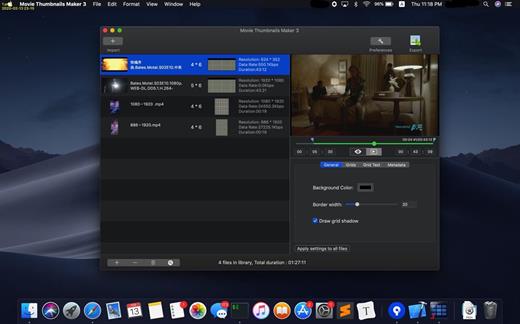
Movie Collage Creator lets you catch the content of the latest movies at first glance. How about creating an amazing overview for all the latest movies? Movie Collage Creator is the all-in-one solution, you don’t need guess the content of the movie any more.

Key Features:

  • Support various formats such as AVI, WMV, RM, MPG, TS, MKV, MOV, FLV, MP4, RMVB, etc;
  • Fast and easy to use, you can get the amazing overview with one click;
  • Custom settings for background color,border color, position of metadata​,etc;
  • Batch process several movie files at onece, with one setting for each movie;
  • Various output image formats such as BMP, PNG, TIFF,JPEG.

What’s New

Version 4.4.0:

  • Release notes were unavailable when this listing was updated.

Compatibility

OS X 10.11 or later, 64-bit processor


Release Name: Movie Thumbnails Maker 4.4.0
Size: 42.7 MB
Links: HOMEPAGE – NFO – Torrent Search

Download: FiKPERUPLOADGiGNiTROFLARERAPiDGATOR

5 Comments
Oct 20

Sublime Text 4.0 Build 4159 Dev

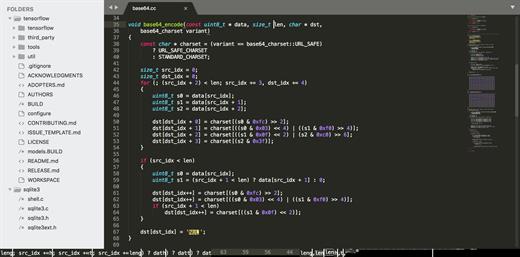
Sublime Text is a sophisticated text editor for code, markup, and prose. You’ll love the slick user interface, extraordinary features, and amazing performance.

Features

  • Goto Anything. Use Goto Anything to open files with only a few keystrokes, and instantly jump to symbols, lines, or words. Triggered with ⌘P, it is possible to:
    • Type part of a file name to open it
    • Type @ to jump to symbols, # to search within the file, and : to go to a line number

    These shortcuts can be combined, so tp@rf may take you to a function read_file within a file text_parser.py. Similarly, tp:100 would take you to line 100 of the same file.

  • Multiple Selections. Make ten changes at the same time, not one change ten times. Multiple selections allow you to interactively change many lines at once, rename variables with ease, and manipulate files faster than ever. Try pressing ⇧⌘L to split the selection into lines and ⌘D to select the next occurrence of the selected word. To make multiple selections with the mouse, take a look at the Column Selection documentation.
  • Command Palette. The Command Palette holds infrequently used functionality, like sorting, changing the syntax, and changing the indentation settings. With just a few keystrokes, you can search for what you want, without ever having to navigate through the menus or remember obscure key bindings. Show the Command Palette with ⌘⇧P.
  • Distraction-Free Mode. When you need to focus, Distraction-Free Mode is there to help you out. Distraction-Free Mode is full-screen, chrome-free editing, with nothing but your text in the center of the screen. You can incrementally show elements of the UI, such as tabs and the find panel, as you need them. You can enter Distraction Free Mode using the View/Enter Distraction Free Mode menu.
  • Split Editing. Get the most out of your wide-screen monitor with split-editing support. Edit files side-by-side, or edit two locations in the one file. You can edit with as many rows and columns as you wish. Take advantage of multiple monitors by editing with multiple windows, and using multiple splits in each window. Take a look at the View/Layout menu for split-editing options. To open multiple views into the one file, use the File/New View into File menu item.
  • Instant Project Switch. Projects in Sublime Text capture the full contents of the workspace, including modified and unsaved files. You can switch between projects in a manner similar to Goto Anything, and the switch is instant, with no save prompts. All your modifications will be restored next time the project is opened.
  • Plugin API. Sublime Text has a powerful, Python-based plugin API. Along with the API, it comes with a built-in Python console to interactively experiment in real time.
  • Customize Anything. Key bindings, menus, snippets, macros, completions and more – just about everything in Sublime Text is customizable with simple JSON files. This system gives you flexibility as settings can be specified on a per-file type and per-project basis.
  • Cross-Platform. Sublime Text is available for OS X, Windows and Linux. One license is all you need to use Sublime Text on every computer you own, no matter what operating system it uses. Sublime Text uses a custom UI toolkit, optimized for speed and beauty, while taking advantage of native functionality on each platform.

What’s New

Version 4159:

  • Release notes were unavailable when this listing was updated.

Compatibility

macOS 10.9 or later


Release Name: Sublime Text 4.0 Build 4159 Dev
Size: 45.4 MB
Links: HOMEPAGE – NFO – Torrent Search

Download: FiKPERUPLOADGiGNiTROFLARERAPiDGATOR

2 Comments
Oct 20

Project Office X Pro 1.1.10

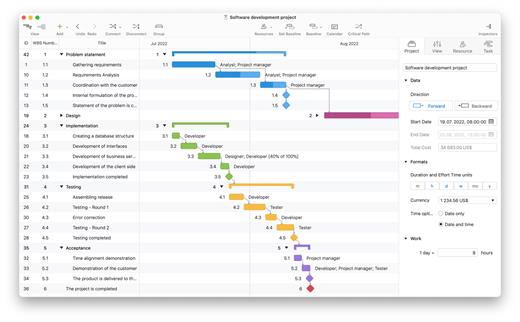
Project Office X is a full featured project management app designed to help you managing both simple and complex projects on your iOS and macOS devices

Features

  • Add resources to your project: people or materials, modify work hours, identify bottlenecks, distribute workloads fairly and create a realistic plan
  • Send Project Office file, export and import files with Microsoft Project® (XML) format, save project as PDF file and make HTML reports of tasks and resources

What’s New

Version 1.1.10:

  • Release notes were unavailable when this listing was updated.

Compatibility

macOS 10.12 or later
Apple Silicon or Intel Core processor


Release Name: Project Office X Pro 1.1.10
Size: 19.1 MB
Links: HOMEPAGE – NFO – Torrent Search

Download: FiKPERUPLOADGiGNiTROFLARERAPiDGATOR

5 Comments
Oct 20

Folder-Factory 7.5.0

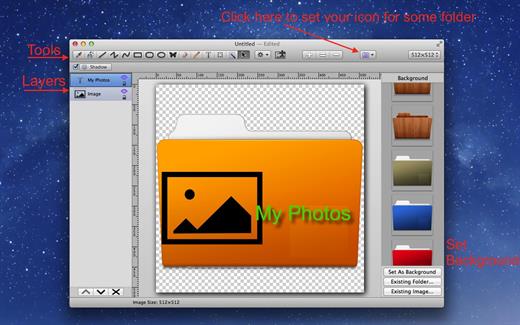
Folder-Factory is a basic icon tool for OS X which help you to customize, design and enhance your folder icons. With it you can combine folder icon with images, text, sketch, and shape. This will improve your system’s appearance, keep your Mac organized and improve your working productivity. You’ll no longer need to read folder names as you can now easily identify them. And at last, it has a friendly and clean UI and it’s really easy to use.

Key features:

  • Support retina display.
  • Customize, design and enhance your folder icons.
  • Support all kinds of tools. For example eyedropper, fill, line, rectangle, ellipse, pen, eraser, text, image, round rectangle and so on.
  • Config line width, pen color and fill color and so on.
  • Full support for transparency.
  • Add text on image.
  • Full support for undo/redo, cut/copy/paste.
  • Support drag and drop any files and folders.

What’s New

Version 7.5.0:

  • Release notes were unavailable when this listing was updated.

Compatibility

macOS 10.10 or later


Release Name: Folder-Factory 7.5.0
Size: 17.3 MB
Links: HOMEPAGE – NFO – Torrent Search

Download: FiKPERUPLOADGiGNiTROFLARERAPiDGATOR

5 Comments
Oct 20

VMware Fusion Pro 13.5 (Build 2258379)

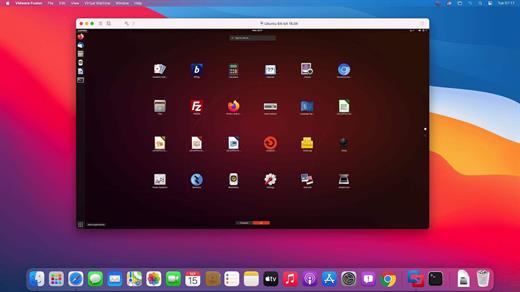
VMware Fusion and Fusion Pro – virtualization software for running Windows, Linux, and other systems on a Mac without rebooting. The latest version includes full support for Windows 10, macOS Mojave, and the latest Macs, including the 18-core iMac Pro and MacBook Pro with 6-core Intel i9 CPU.. VMware Fusion support DirectX 10.1 and Enhanced Metal Graphics Rendering Engine. The virtual machine platform also delivers full 64-bit support with up to 16 vCPUs, up to 3072 MB graphics memory, 64GB RAM, and an 8TB hard drive for a single virtual machine.

What’s New

Version 13.5:

  • Release notes were unavailable when this listing was updated.

Compatibility

mac OS 10.12 or later, 64-bit processor


Release Name: VMware Fusion Pro 13.5 (Build 2258379)
Size: 693.5 MB
Links: HOMEPAGE – NFO – Torrent Search

Download: FiKPERUPLOADGiGNiTROFLARERAPiDGATOR

6 Comments
Oct 20

SoundSource 5.6.3

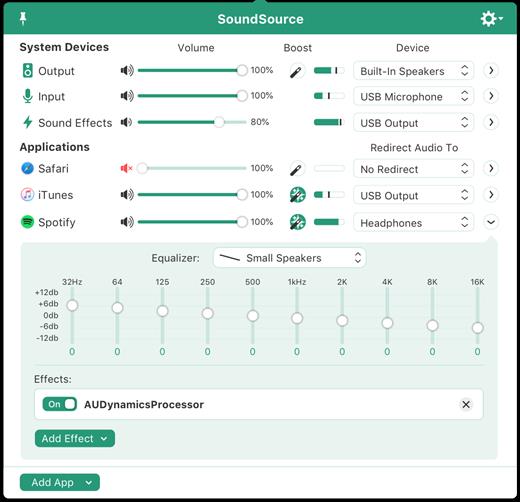
SounceSource lets you adjust your input, output, and sound-effects devices and volume settings in mere moments, right from the menu bar. Enable soft play-thru of input devices to your desired output, so you can hear sound coming in through any microphone or other source. With SoundSource, you get fast access to your Mac’s most important audio settings.

  • Instant Audio-Device Switching – With just two clicks, you can switch the audio devices your Mac is using for input, output, and even sound effects.
  • Fast Volume Control – SoundSource provides easy access to the volume controls for your audio devices as well.
  • Audio Play-Thru, Too – SoundSource’s Play-Thru window makes it easy to monitor the audio coming from any input device.
  • Comprehensive – SoundSource gives you one place to go for all Mac’s most important audio controls.
  • At Your Fingertips – With SoundSource running in your menu bar, your audio controls are always available.
  • Lightweight – When you don’t need SoundSource, it stays out of your way.

What’s New

Version 5.6.3:

  • Release notes were unavailable when this listing was updated.

Compatibility

macOS 10.14.0 or later
Apple Silicon or Intel Core processor


Release Name: SoundSource 5.6.3
Size: 33.9 MB
Links: HOMEPAGE – NFO – Torrent Search

Download: FiKPERUPLOADGiGNiTROFLARERAPiDGATOR

5 Comments
Oct 20

Debit & Credit Premium 6.2.1

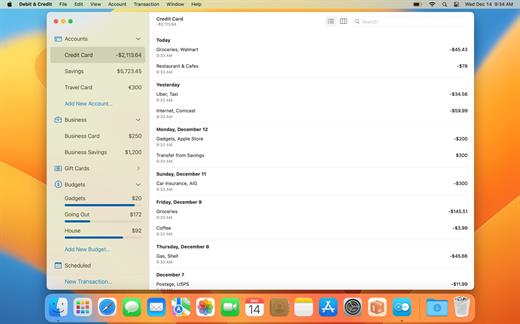
Debit & Credit can help you better manage your finances by providing the most relevant reports possible. It is designed with simplicity and convenience in mind. Based on the reports generated by the app, you can get a clear understanding of what is happening to your financial position and what you need to do to improve it.

*** You need to disable the System Integrity Protection (SIP) to perform the selected Application.

What’s New

Version 6.2.1:

  • Release notes were unavailable when this listing was updated.

Compatibility

macOS 10.14.5 or later


Release Name: Debit & Credit Premium 6.2.1
Size: 14.9 MB
Links: HOMEPAGE – NFO – Torrent Search

Download: FiKPERUPLOADGiGNiTROFLARERAPiDGATOR

5 Comments
Oct 20

Audio Hijack 4.2.5

Audio Hijack (was Audio Hijack Pro) drastically changes the way you use audio on your computer, giving you the freedom to listen to audio when you want and how you want. Record and enhance any audio with Audio Hijack – it’s the cornerstone of your digital audio experience.
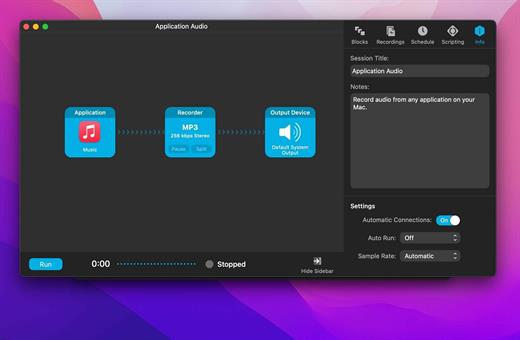
Audio Hijack will allow you to record any application’s audio, from Internet streams to DVD audio and everywhere in between. If your machine can play it, Audio Hijack can record it. And that’s not all – Audio Hijack will also enhance any audio, unsing industry-standard VST and AudioUnit audio effects to make your music sound incredible. Record. Enhance. Enjoy!

More Great Features

Record to All Major Formats
Record to the world’s most popular audio formats, including MP3 and AAC, or save in perfect-fidelity AIFF, WAV, ALAC or FLAC.

Reusable Sessions
Once you’ve configured a Session to your liking, you can re-use it over and over. With one click, you’ll be recording exactly as desired.

Easy File Organization
Find all of your recordings sorted by Session in the Recordings tab, where you can quickly pass files to an audio editor, add them to iTunes, or share them.

Timed Recordings
Use the Schedule tab to set up timed recordings for when you’re not around. Your audio will be waiting for you when you return.

Silence Monitoring
When silence is detected, Audio Hijack can automatically stop recording, split to a new file, or remove audio.

Bulletproof Recording
Bulletproof recording means that even if the power goes out or your computer crashes, you’ll never lose a recording.

A Thoughtful Interface
Audio Hijack’s intuitive audio grid provides a terrific pipeline-style view of exactly how your audio flows, so you can easily understand it.

Gorgeous Audio Effects
The included audio effects are easy to use and easy on the eyes. Their functionality is now accessible to all.

Time Shift Your Audio
Now you can pause, delay, and rewind live audio on your Mac. It’s perfect for transcribing audio and more!

What’s New

Version 4.2.5:

  • Release notes were unavailable when this listing was updated.

Compatibility

macOS 10.14.4 or later
Apple Silicon or Intel Core processor


Release Name: Audio Hijack 4.2.5
Size: 40.9 MB
Links: HOMEPAGE – NFO – Torrent Search

Download: FiKPERUPLOADGiGNiTROFLARERAPiDGATOR

5 Comments
Oct 18

Camtasia 2023.3.1

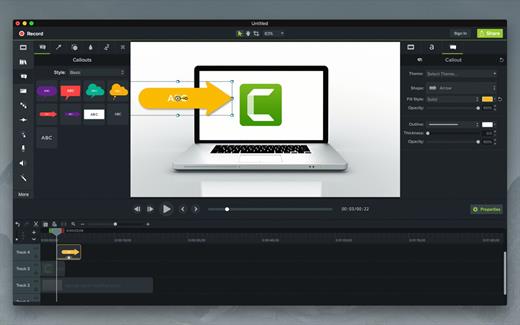
Camtasia for remarkable screencasts made easy. Create eye-catching training, presentation, and demo videos…the easy way. Camtasia screen-recording software is streamlined, intuitive, and makes you look like a pro.

Easily record onscreen activity, Keynote slides, camera video, microphone, or system audio – all with sparkling clarity. Record in front of a live audience or at your desk. Edit to perfection. Turn it into a stunning, HD-quality video at the perfect size to share on popular video sites, Apple devices, your website, blog, or anywhere you like. Make them wonder how you did it.

What’s New

Version 2023.3.1:

  • Release notes were unavailable when this listing was updated.

Compatibility

macOS 10.15.0 or later
Apple Silicon or Intel Core processor


Release Name: Camtasia 2023.3.1
Size: 368.3 MB
Links: HOMEPAGE – NFO – Torrent Search

Download: FiKPERUPLOADGiGNiTROFLARERAPiDGATOR

5 Comments