Nov 2

UniConverter 15.0.4 (ARM/INTEL)

Wondershare UniConverter (was Wondershare Video Converter Ultimate) for Mac The Most Powerful Video Converter Ever. Use this complete all-in-one video toolbox to convert, edit, enhance, download, burn, organize, capture, and play any videos on your Mac.

Full Quality, High Speed Video Conversion to Any Format

Wondershare UniConverter Ultimate accomplishes your conversion tasks with handy features.
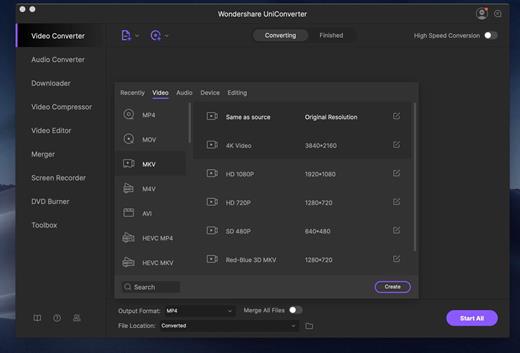
  • Convert Any Video to Over 1,000 Formats
  • Convert Videos for All Kinds of Devices
  • 30X Faster Video Conversion Speed
  • Add Videos from Different Sources

Easy-to-Use Video Editor, Makes Your Video Stand Out

You can customize home movies through advanced editing features and get professional-looking works in minutes.

A Flawless DVD Experience Anywhere

Powerful DVD toolkit of Video Converter Ultimate helps you to create and edit DVD files in an easy way.

  • Burn Videos to DVD
  • Convert Any Format to DVD
  • Provide Free DVD Templates
  • Edit DVD Files with Builtin Editor

Save Videos From Over 10,000 Sites With One Click

Download or record your favorite 4K/HD videos from video sharing sites like YouTube, Dailymotion, and more for enjoyment without Internet connection; Or convert them to compatible formats for playback on TV, smartphone or other devices.

  • Download Videos from YouTube and Other UGC Sites.
  • Download YouTube to MP3 in One Click.
  • Download Entire YouTube Playlist at One Go.
  • Record Videos from Streaming Sites.

Transfer Videos to Devices & External Hard Drives

With just one click, you can download or record your favourite 4K/HD videos from many popular online sites like YouTube, Dailymotion and enjoy them anytime – without an Internet connection.

All-Purpose Video Toolbox

Wondershare Video Converter Ultimate also offers a full set of optimized video tools which will come in handy sometime.

Fix Video Metadata

Fix metadata info for videos.

VR Converter

Convert any video to VR format.

DVD Copy (Only for Mac)

Copy DVD to ISO or DVD folder directly.

GIF Maker

Convert a video or photos to a GIF picture.

Cast Video to TV

Cast videos to TV as a media server.

Screen Recorder

Record all desktop activities with voice.

What’s New

Version 15.0.3:

  • Release notes were unavailable when this listing was updated.

Compatibility

macOS 10.11 or later


Release Name: UniConverter 15.0.4 (ARM/INTEL)
Size: 581.1 MB
Links: HOMEPAGE – NFO – Torrent Search

Download: FiKPERUPLOADGiGNiTROFLARERAPiDGATOR

6 Comments
Oct 27

Luminar Neo 1.15.0 (16133)

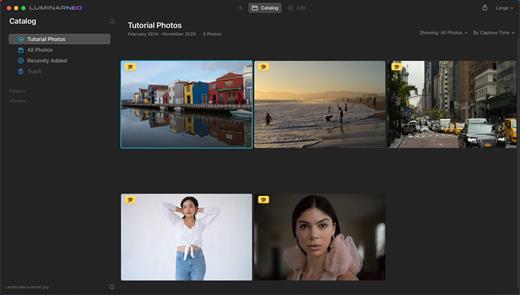
Luminar Neo, a new creative image editor which empowers visual storytellers to bring their boldest ideas to life. Luminar Neo builds upon the unique, purpose-driven, AI editing technologies for which Skylum has become known for.

“As the latest member of the Luminar family, we designed Luminar Neo to allow artists to take on more challenging image creation work and achieve results which often seem unattainable,” said Dima Sytnik, co-founder and CPO of Skylum.

Luminar Neo is meant to be an application that offers more customizability, and that builds upon the company’s LuminarAI software. The two programs will be sold side-by-side.

Luminar Neo will ship with several new features, including image layers, background replacement, relighting options, dust removal and more. The software analyzes each image to recognize the depth of the scene and its contents, which allows for precise control.

What’s New

Version 1.15.0:

  • Release notes were unavailable when this listing was updated.

Compatibility

macOS 10.14.6 or later
Apple Silicon or Intel Core processor


Release Name: Luminar Neo 1.15.0 (16133)
Size: 4.7 GB
Links: HOMEPAGE – NFO – Torrent Search

Download: FiKPERUPLOADGiGNiTROFLARERAPiDGATOR

4 Comments
Oct 27

Caffeinated 2.0.4

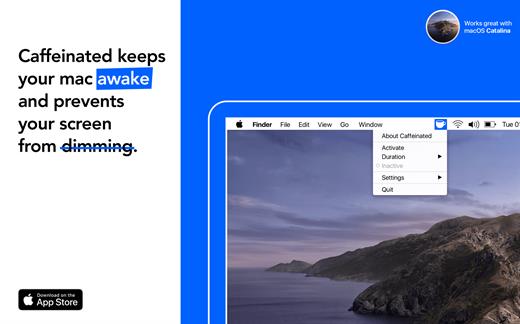
Caffeinated prevents your mac from going to sleep, dimming your screen or starting the screensaver.

Your screen gets dark when you don’t want it? Then Caffeinated is the perfect tool for you. Caffeinated was developed based on the helpful tool Caffeine. Caffeinated brings back the classical features on your Mac. Caffeinated is not only very convenient but also easy to use. Just one click on the icon in your menu bar to prevent your screen from going to sleep. Within the menu, you find all the important timer options and settings.

I always use Caffeinated, when …
… hosting a presentation at work
… watching videos at home
… reading books on my mac
… chatting with my friends

Features

  • One-Click-Activation (optional Left- or Right-Click)
  • Managable via the icon in the Menu Bar
  • Integrated timer with optional Notification
  • Optimized for Retina Screens
  • Compatible with Dark Mode
  • Gentle on your RAM and Processor
  • Option to allow Display to sleep while System stays awake
  • Option to Auto-Activate when Connecting to Charger
  • Option to Auto-Deactivate when Battery drops below 20%
  • Option to Auto-Deactivate when Disconnecting from Charger
  • Syncs with system accent colors
  • Compatible with all modern macOS versions
  • Optimized for macOS Catalina
  • Translated to many languages

What’s New

Version 2.0.4:

  • Release notes were unavailable when this listing was updated.

Compatibility

macOS 10.14 or later.
Apple Silicon or Intel Core processor


Release Name: Caffeinated 2.0.4
Size: 10.2 MB
Links: HOMEPAGE – NFO – Torrent Search

Download: FiKPERUPLOADGiGNiTROFLARERAPiDGATOR

4 Comments
Oct 27

Downie 4.6.32

A simple download manager that offers you the possibility to quickly save videos from different websites to your own disk drive.

If you are using a poor internet connection, trying to visualize videos streamlined online might not work properly since the content is loaded too slowly. Downie is a simple Mac app that can help you download those videos to your computer, and then watch them by using your default media player.

User friendly video downloader featuring support for drag and drop actions

Working with Downie is extremely straightforward: simply drop the video URL on top of the app’s main window or on the Dock icon. Downie adds the video to your downloads list, so all you have to do next is start the process by pressing the appropriate button. Of course, you can also remove items from the list.

By default, Downie downloads MP4 files and places them in your default Downloads folder, but you can easily change this via the Preferences window. The same area allows you to setup notifications, or post processing actions (convert to MP4 if necessary, or extract audio only).

Effortlessly download videos from a wide collection of hosting websites

Downie provides support for more than 400 different websites that host video content, among which there are the most popular choices, such as YouTube, Apple, LiveLeak, Vimeo, BBC, and so on. If a certain website is not included, within the app you can send a request email to the Downie developers.
Moreover, Downie also provides matching extensions for various popular web browsers, such as Firefox, Safari, Google Chrome or Chromium. The add-ons are not installed by default: open the Preferences window and install only the ones you plan to use.

Straightforward solution for downloading video content hosted online

Downie is a great tool for saving videos posted on various websites to your Mac for offline playback. The application is extremely useful especially if you have a slow internet connection.

What’s New

Version 4.6.32:

  • New: nick.com
  • Improved: iview.abc.net.au, atv.at, dr.dk, douyin.com, tubitv.com, vk.com, wsj.com.
  • Improved: DASH Stream downloads that refer a single file with byte ranges.
  • Improved: HLS Stream downloads that refer a single file with byte ranges.
  • Fixed: Crash on macOS 14.2.

Compatibility

macOS 10.12 or later
Apple Silicon or Intel Core processor


Release Name: Downie 4.6.32
Size: 47.6 MB
Links: HOMEPAGE – NFO – Torrent Search

Download: FiKPERUPLOADGiGNiTROFLARERAPiDGATOR

4 Comments
Oct 22

Calibre 6.29.0

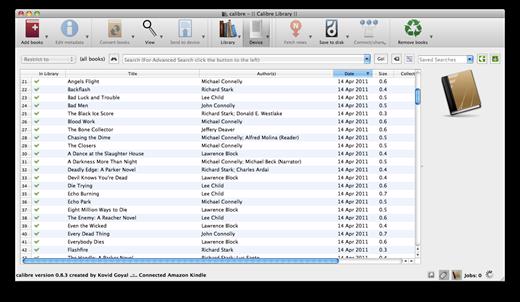
Calibre is a complete e-book library manager. Organize your collection, convert your books to multiple formats, and sync with all of your devices. Let Calibre be your multi-tasking digital librarian.

Manage, convert, sync, and more

  • Library management. Calibre keeps things orderly by creating single entries for books that contains multiple formats. Add tags and comments for better searchability.
  • Format conversion. Calibre’s robust conversion options support

New Features

  • E-book viewer: Add a command line flag –new-instance to force the viewer to open a new window even if the option to always use a single viewer window is set
  • E-book viewer: Image popup: Add a checkbox to remember the last used zoom level

Bug Fixes

  • Annotations browser: Fix exporting highlights in markdown not including all chapter titles for books with only a single highlight per chapter or a multi level ToC
  • E-book viewer: Fix a regression that could cause the viewer to enter an infinite loop when displaying the result of a search that has only one match that is not found
  • E-book viewer: Fix the occasional search result being marked as not found even though it is found
  • TXTZ Output plugin: Only keep images if the text format is one that can reference images
  • TXTZ Output: Fix cover not being properly identified in the generated TXTZ metadata
  • FB2 Input: Fix the “Annotations” section not showing up in the Table of Contents
  • Linux: Content server: Do not call listen on pre-activated sockets
  • Fix sort order of similarly-named hierarchical categories
  • Fix a regression that broke reading of covers from HTMLZ and TXTZ files

Compatibility

macOS 10.14 or later


Release Name: Calibre 6.29.0
Size: 286.6 MB
Links: HOMEPAGE – NFO – Torrent Search

Download: FiKPERUPLOADGiGNiTROFLARERAPiDGATOR

8 Comments
Oct 22

Music Tag Editor Pro 7.5.1

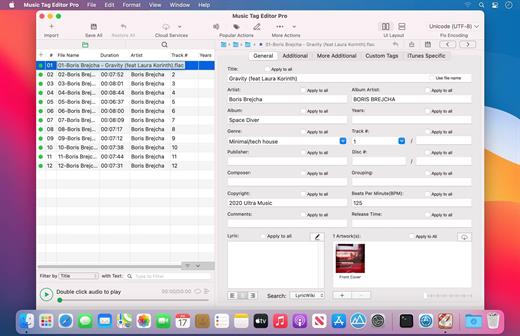
Music Tag Editor can help you edit your music-tag info easily and effectively. You can also use it to convert the text encoding of music tags. It can repair the messy code in music tags. You also can download the album image for MP3 files.

Supported music formats: MP3, M4A (Apple lossless), FLAC, MP4.

Features:

  • Supports ID3v1, ID3v2, iTunes tags, which include title, artist, album, genre, copyright, description, lyric, and album image. Lyrics saved to audio file will display on iPhone or iPod music player.
  • Supports batch processing of music files.

What’s New

Version 7.5.1:

  • Release notes were unavailable when this listing was updated.

Compatibility

macOS 10.11 or later, 64-bit processor


Release Name: Music Tag Editor Pro 7.5.1
Size: 32.1 MB
Links: HOMEPAGE – NFO – Torrent Search

Download: FiKPERUPLOADGiGNiTROFLARERAPiDGATOR

5 Comments
Oct 22

iShowU Instant Advanced 1.4.16

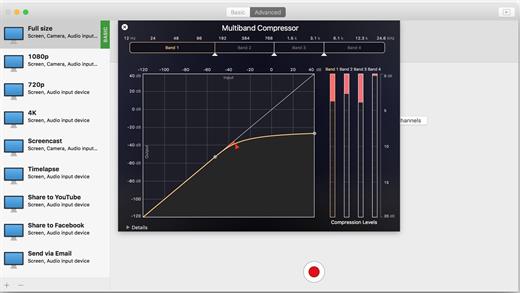
iShowU Instant gives you real-time screen recording like you’ve never seen before! It is the fastest, most feature-filled real-time screen capture tool from shinywhitebox yet. All of the features you would expect are here, and probably some you don’t!

  • Record from any screen
  • Enhance your microphone audio through the use of a dynamics processor, compressor and/or equaliser*
  • Record from iOS devices
  • Add text and/or an overlay
  • Enhance your recording with mouse and click visualization
  • Trim front/back after recording
  • Create time-lapse recordings
  • Share to a wide range of online services
  • And more!

What’s New

Version 1.4.16:

  • Added additional debugging output to identify all connected screens

Compatibility

macOS 10.14.0 or later
Apple Silicon or Intel Core processor


Release Name: iShowU Instant Advanced 1.4.16
Size: 39.1 MB
Links: HOMEPAGE – NFO – Torrent Search

Download: FiKPERUPLOADGiGNiTROFLARERAPiDGATOR

6 Comments
Oct 22

n-Track Studio Suite 10.0.0 (8098)

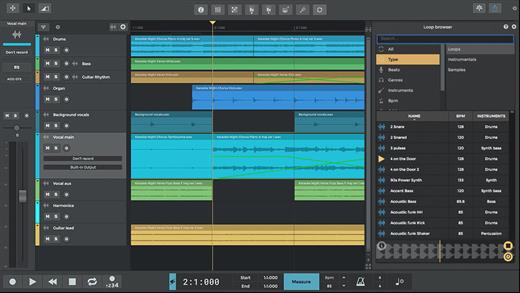
n-Track Studio is an audio and MIDI multitrack recorder that turns your Mac into a full-fledged recording studio. You can record and playback a virtually unlimited number of tracks. The program supports simultaneous recording from multiple 16- and 24-bit soundcards, and real-time audio effects can be applied non-destructively to each track. Built-in effects include multiband compression, delay, graphic EQ, pitch shift and time stretch, parametric EQ and spectrum analyzer with guitar tuner.

Studio edition features

  • Unlimited audio and MIDI tracks
  • Unlimited plugins (VST, VST3, DirectX, AU, Rewire)
  • 32 bit and 64 bit version
  • Free soundbacks

What’s New

Version 10.0.0:

  • Release notes were unavailable when this listing was updated.

Compatibility

macOS 10.12 or later
Apple Silicon or Intel Core processor


Release Name: n-Track Studio Suite 10.0.0 (8098)
Size: 239.8 MB
Links: HOMEPAGE – NFO – Torrent Search

Download: FiKPERUPLOADGiGNiTROFLARERAPiDGATOR

7 Comments
Oct 22

Keysmith 1.18.6

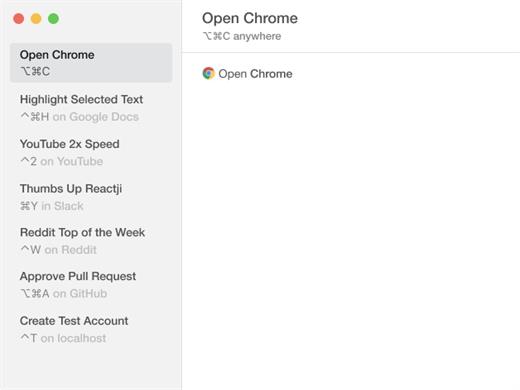
Keysmith lets you create keyboard shortcuts for any string of actions you can do with your mouse and keyboard. And Keysmith is smart. It isn’t just clicking on coordinates, it’s aware of apps, windows, buttons, lists, and more.

What’s New

Version 1.18.6:

  • Updated for macOS Sonoma

Compatibility

macOS 10.15 or later


Release Name: Keysmith 1.18.6
Size: 20.6 MB
Links: HOMEPAGE – NFO – Torrent Search

Download: FiKPERUPLOADGiGNiTROFLARERAPiDGATOR

6 Comments
Oct 22

iNet Network Scanner 3.0.3

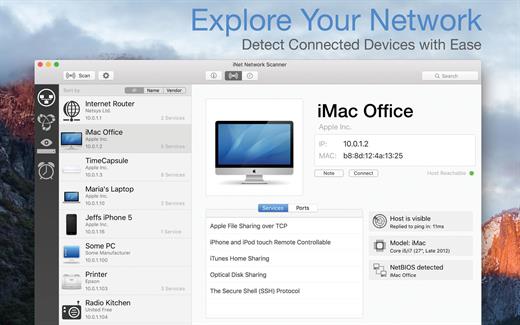
iNet Network Scanner provides you with information about networks your Mac is connected to. Its very easy and user friendly design allows even the unexperienced user to get a profound and understandable overview of a network and the running services. iNet is also available as iPhone and iPad app via the iTunes Store.

What’s New

Version 3.0.3:

  • [Added] Latest Apple devices
  • [Added] Enhanced Preferences display
  • [Updated] All databases

Compatibility

macOS 11.0 or later


Release Name: iNet Network Scanner 3.0.3
Size: 251.8 MB
Links: HOMEPAGE – NFO – Torrent Search

Download: FiKPERUPLOADGiGNiTROFLARERAPiDGATOR

7 Comments