Dec 1

Logic Pro X 10.8.1

Logic Pro X is the most advanced version of Logic ever. Sophisticated new tools for professional songwriting, editing, and mixing are built around a modern interface that’s designed to get creative results quickly and also deliver more power whenever it’s needed. Logic Pro X includes a massive collection of instruments, effects, and loops, providing a complete toolkit to create amazing-sounding music.
Powerful Interface

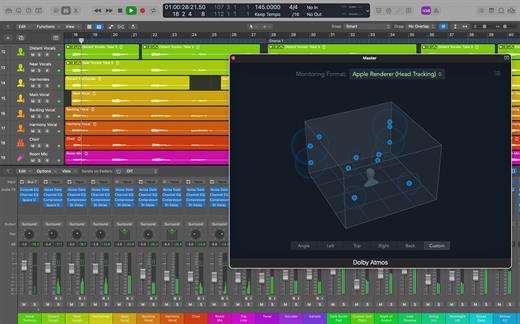
  • Consolidate and control multiple tracks or create rich, layered instruments with Track Stacks
  • Smart Controls allow you to manipulate multiple plug-ins and parameters with a single move
  • An enhanced Mixer lets you move, copy, and bypass channel inserts more efficiently
  • Quickly re-order song sections and try new ideas using Arrangement Markers
  • Autosave keeps your work safe and sound
  • 64-bit architecture supports large projects containing hundreds of tracks and sampled instruments

Professional Music Production

  • Fix out-of-tune vocals and change the melodies of recorded audio with Flex Pitch
  • Manipulate the timing and tempo of any recording with ease using Flex Time
  • Record and seamlessly punch in and out of one or multiple tracks
  • Keep takes organized with take folders and build comps quickly with Quick Swipe Comping
  • Automation can be part of a region, not just the track, which makes it easier to use effects creatively
  • Create and mix music from anywhere in the room using Logic Remote on iPad
  • Produce simple lead sheets or orchestral scores with built-in Score editor
  • Create and edit MIDI using a comprehensive set of editors and tools

Drum Production

  • Create authentic acoustic, electronic, or hip hop drum tracks using Drummer, a virtual session player and beat producer
  • Choose among 28 distinct drummers that can take your direction and perform millions of unique grooves
  • Build your own acoustic drum kits with Drum Kit Designer using a diverse collection of deeply sampled, professionally mixed snares, toms, kicks, hi-hats, and cymbals
  • Customize the sound of your electronic beats using Drum Machine Designer

Keyboards and Synths

  • Get inspired by collection of synths that provide analog, wavetable, FM, additive, granular, spectral, and modeling synthesis
  • Quickly find sounds or create unique new ones with Alchemy, the ultimate sample manipulation synthesizer
  • Play or create a wide variety of rich sampled instruments with the EXS24 Sampler
  • Instantly turn a simple chord into a rich performance with the Arpeggiator
  • Transform simple ideas into elaborate performances using nine MIDI plug-ins
  • Create classic ’70s- and ’80s-style synthesizer tracks using Retro Synth
  • Play faithful models of vintage keyboards with Vintage B3, Vintage Electric Piano, and Vintage Clav

Guitar and Bass Gear

  • Build your own guitar or bass rig with Amp Designer using vintage and modern amps, cabinets, and mics
  • Design a custom Pedalboard from a collection of delay, distortion, and modulation stompboxes
  • Access the Tuner with just a click to quickly get in tune

Creative and Production Effects

  • Play your sounds through realistic acoustic spaces using Space Designer convolution reverb
  • Use a range of multi-tap, vintage tape, and stereo delays
  • Add movement to your tracks with a variety of modulation effects

Sound Library

  • Over 1800 instrument and effect Patches
  • More than 750 meticulously sampled instruments
  • 4600 Apple Loops in modern urban and electronic genres

Compatibility

  • Expand your instrument and effects library with third-party Audio Units-compatible plug-ins
  • Import and export XML to support Final Cut Pro X workflows
  • Export and share your songs directly to SoundCloud
  • Open projects from Logic 5 or later

What’s New

Version 10.8.1:

  • This update includes stability improvements and bug fixes

Compatibility

macOS 12.3 or later


Release Name: Logic Pro X 10.8.1
Size: 1.1 GB
Links: HOMEPAGE – NFO – Torrent Search

Download: FiKPERUPLOADGiGNiTROFLARERAPiDGATOR

7 Comments
Dec 1

Motion 5.7.0

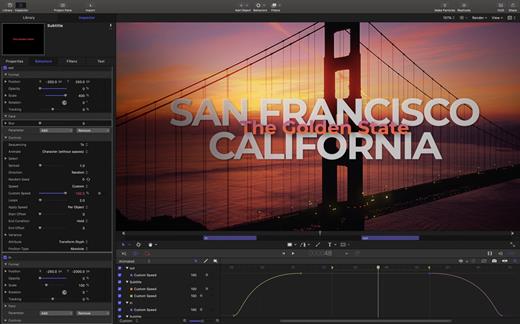
Motion is designed for video editors, Motion 5 lets you customize Final Cut Pro titles, transitions, and effects. Or create your own dazzling animations in 2D or 3D space, with real-time feedback as you work.

Features

  • Breakthrough Speed and Quality
    • New 64-bit architecture supports deeper, multilayered effects for use in Final Cut Pro.
    • ColorSync-managed color pipeline produces accurate, consistent color across applications.
    • Shared Render Engine provides consistent quality with Final Cut Pro and Compressor.
    • Rendering uses floating-point, linear-light color space for exceptionally realistic results.
    • Motion taps the GPU on the graphics card for high-speed rendering and exporting.
  • Editor-Friendly Design Tools
    • Work fast using a single-window interface with a familiar look and feel.
    • Customize Final Cut Pro titles, effects, and transitions by opening them in Motion.
    • Create Smart Motion Templates with simple controls for making changes as you edit.
    • Build stunning 2D and 3D compositions with more than 1900 Apple-designed elements.
    • Make adjustments to any parameter during playback and instantly see results.
  • Easy Animated Text and Titles
    • Design dramatic text effects with complete control over position, opacity, rotation, and more.
    • Animate text instantly by choosing from more than 200 text behaviors such as Type On.
    • Build a credit roll by importing a text file; the Scroll behavior optimizes the speed for you.
    • Move, scale, or rotate a single character with the Adjust Glyph tool.
    • Ripple text one character, word, or line at a time with the Sequence Text behavior.
  • Stunning Effects
    • Choose from more than 230 behaviors for natural-looking motion without programming.
    • Enhance your 2D or 3D animations with more than 130 filters using the FxPlug 2 standard.
    • Track a moving object in a video clip with the point tracking and match move feature.
    • Create an accurate chroma key in a single step with the new Keying filter.
    • Apply the Linking behavior to make parameters for one object animate related objects.
    • Use SmoothCam to eliminate camera jitters, and image stabilization to smooth bumpy shots.
  • Effortless 3D
    • Transition from 2D to 3D space by adding a camera or cameras to any 2D project.
    • Set up realistic shadows that animate dynamically with the movement of cameras and lights.
    • Turn any shape, video plane, or paint stroke into a reflective surface.
    • Highlight or de-emphasize various objects by defining a range of focus.
    • Track objects or groups of objects with the Camera Framing behavior.
  • Quick, High-Quality Output
    • Export projects to Apple devices and popular websites such as Vimeo and YouTube.
    • Choose to output the ProRes 4444 format for uncompressed quality at small file sizes.

What’s New

Version 5.7.0:

  • See improved results when using the Object Tracker’s all-new machine-learning model to analyze the movement of faces and other objects on Mac computers with Apple silicon.
  • Title template backgrounds are now disabled by default.
  • Fixes an issue that caused FxPlug-based plug-ins to stop responding when you cancel an analysis.

Compatibility

macOS 13.5 or later.
Apple Silicon or Intel Core processor


Release Name: Motion 5.7.0
Size: 2.4 GB
Links: HOMEPAGE – NFO – Torrent Search

Download: FiKPERUPLOADGiGNiTROFLARERAPiDGATOR

3 Comments
Dec 1

Final Cut Pro 10.7.0

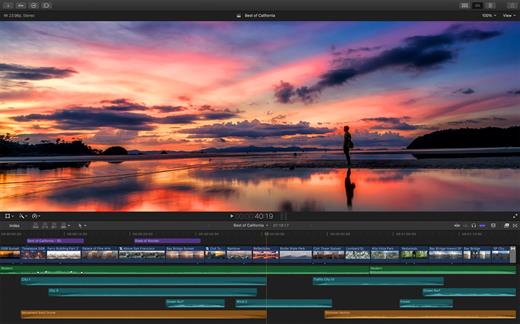
Final Cut Pro X is a professional video editing solution. Completely redesigned from the ground up, Final Cut Pro adds extraordinary speed, quality, and flexibility to every part of the post-production workflow.

Features

  • Revolutionary Video Editing
    • Assemble clips in the Magnetic Timeline without clip collisions or sync problems.
    • Use Clip Connections to attach B-roll, sound effects, and music to the timeline.
    • Reduce clutter by grouping clips into a Compound Clip. Easily expand it back to single clips.
    • Perfect your pacing right in the timeline with the Inline Precision Editor.
    • Cycle through different shots, graphics, or effects at one place in the timeline with Auditions.
  • Powerful Media Organization
    • Import a broad range of formats including native AVCHD, H.264 from DSLRs, and more.
    • Content Auto-Analysis captures camera metadata and analyzes shots in the background.
    • Choose analysis options for stabilization, rolling shutter correction, and audio enhancement.
    • Create and apply custom keywords on the fly as you select ranges in clips.
    • Smart Collections let you dynamically organize content and find any shot in a few clicks.
  • Incredible Performance
    • New 64-bit architecture uses all the RAM in your system for larger projects and richer effects.
    • The Cocoa foundation makes Final Cut Pro more responsive, interactive, and fun to use.
    • Final Cut Pro taps the GPU on the graphics card and all the cores in your Mac for speed.
    • Background processing lets you keep working without interruption.
    • A ColorSync-managed color pipeline produces accurate, consistent color across applications.
  • Compelling, Customizable Effects
    • Preview effects to see how they look with your footage before applying them.
    • Change the look of titles, transitions, and effects using intuitive controls.
    • Control effects with precision using a keyframe editor that appears directly in the timeline.
    • Adjust the Ken Burns effect with simple onscreen arrows for start and end points.
  • Integrated Audio Editing
    • Let Final Cut Pro repair significant audio problems such as hum, excessive noise, and more.
    • Sync DSLR video with separate audio in a single step, with instant audio waveform matching.
    • Enrich your soundtrack with a library of royalty-free sound effects and audio effect plug-ins.
    • Create immersive audio experiences in 5.1 surround.
  • Intuitive Color Grading
    • Improve the look of any clip with the single-click Balance Color feature.
    • Apply the Match Color feature to match the looks of two clips shot under different conditions.
    • Manipulate color, saturation, and exposure with the Color Board.
    • Fine tune color for a specific color range or area of the screen using keying and masks.
  • One-Step, Optimized Output
    • Export projects to Apple devices and websites such as Vimeo, YouTube, and Facebook.
    • Add your content to a set of themed menus, then burn a DVD or Blu-ray disc.
    • Output files for HTTP live streaming in a single step.

What’s New

Version 10.7.0:

  • Fixes an issue that could cause an FxPlug-based title that analyzed a clip to result in an incomplete analysis.
  • Fixes an issue that could cause a Motion template with an applied Align To behavior to display an incorrect animation.

Compatibility

macOS 13.5 or later
Apple Silicon or Intel Core processor


Release Name: Final Cut Pro 10.7.0
Size: 4.7 GB
Links: HOMEPAGE – NFO – Torrent Search

Download: FiKPERUPLOADGiGNiTROFLARERAPiDGATOR

3 Comments
Nov 25

MenubarX Pro 1.6.6

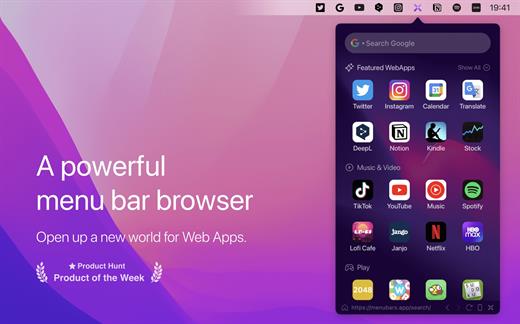
MenubarX is a powerful menu bar browser. Pin any websites to the menu bar just like Native Apps.

It perfectly supports various Web, WPA, and PWA websites. Enjoy all the WebApps services with just one link. You will instantly get various simulators, like iPhone, iPad, Android or even Kindle. It is a great productivity tool for Mac power users, making it possible to do anything in the menu bar, including searching, reading, watching videos, listening to music, and playing games with just one click.

Up to 24+ features:

  • 1. Unlimited Tabs
  • 2. Unlimited Bookmarks
  • 3. Custom Homepage
  • 4. Custom Site Icon
  • 5. Low Memory Usage
  • 6. Plenty of Web Apps
  • 7. Pinned Window
  • 8. Detach Window
  • 9. Devices Simulator
  • 10. Switch User-Agent
  • 11. Resize Responsive
  • 12. Auto Refresh
  • 13. Boss Keys
  • 14. Dark Mode
  • 15. Shortcuts
  • 16. 5 Languages Support
  • 17. Download Manager
  • 18. Colorful Icon Style
  • 19. Web Notifications Push
  • 20. Quick Search
  • 21. Native App Mode
  • 22. Background Audio
  • 23. Local Debugging
  • 24. Third-Part Integration

*** You need to disable the System Integrity Protection (SIP) to perform the selected Application.

What’s New

Version 1.6.6:

  • Release notes were unavailable when this listing was updated.

Compatibility

macOS 10.14 or later.
Apple Silicon or Intel Core processor


Release Name: MenubarX Pro 1.6.6
Size: 7.5 MB
Links: HOMEPAGE – NFO – Torrent Search

Download: FiKPERUPLOADGiGNiTROFLARERAPiDGATOR

4 Comments
Nov 25

Multitouch 1.27.22

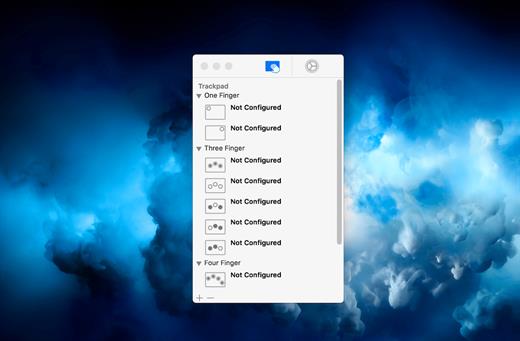
Multitouch (formerly TouchOven) ties a custom action to a specific magic trackpad or magic mouse gesture. For example, a three finger click can execute a paste. Improve your workflow by executing keyboard shortcuts, controlling your browser’s tabs, performing a middle mouse click, and much more.

Features

  • A growing list of gestures and actions.
  • Privacy. No user data is gathered from the app.

*** You need to disable the System Integrity Protection (SIP) to perform the selected Application.

What’s New

Version 1.27.22:

  • The snap windows by dragging setting was decreasing input responsiveness in Catalyst apps. This is now fixed.

Compatibility

macOS 10.12 or later, 64-bit processor


Release Name: Multitouch 1.27.22
Size: 11.1 MB
Links: HOMEPAGE – NFO – Torrent Search

Download: FiKPERUPLOADGiGNiTROFLARERAPiDGATOR

6 Comments
Nov 25

Rectangle Pro 3.0.14

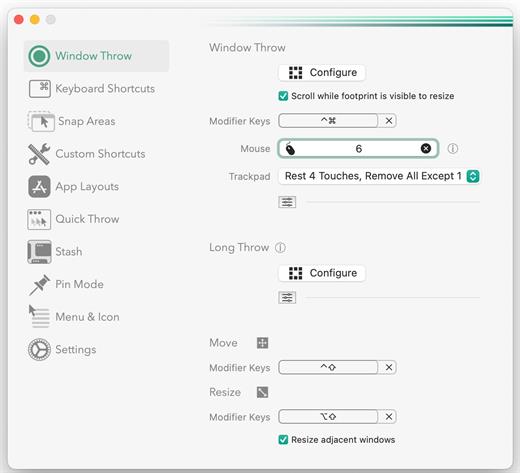
Snap windows faster in this featureful Rectangle superset. Toss windows in the right places with cursor movement, move multiple windows with one command, create custom shortcuts, and more.

One simple key combo
• 16 window sizes & positions
• No need to remember a ton of keyboard shortcuts, but those are all here, too

A Supercharged Rectangle Superset
• Keyboard shortcuts
• Drag windows to screen edges to snap

PRO
• Move and resize by holding a key and moving your cursor
• Snap windows under your cursor, even if not in focus
• Custom shortcuts for any size & position
• Sync your settings over iCloud

The Lightweight Gesture Champ
• Unlike touch gesture based window managers, Rectangle Pro only consumes CPU when configured modifier keys are pressed. Even then it’s minimal
• Rectangle Pro is a breeze to learn, and doesn’t conflict with any built-in macOS behavior
• Use it with any device that moves the cursor

Unmatched Customization and Actions
• Create keyboard shortcuts with any window size and location, and specify what happens on each repeated execution
• Fill left and right actions make it simple to maximize screen usage without overlap
• Match the keyboard shortcut window management of that other OS

Multiple Windows at Once
• Cascade windows
• Move all windows for an app to another display or screen half
• Tile top windows in a 2×2 or 2×3 grid

Additional Efficiency and Speed
• Each window action can be configured with a quick, simple cursor movement and modifier key combination
• Just press and release modifier keys while you move your cursor over the window you want to snap

*** You need to disable the System Integrity Protection (SIP) to perform the selected Application.

What’s New

Version 3.0.14:

  • Release notes were unavailable when this listing was updated.

Compatibility

macOS 10.12 or later
Apple Silicon or Intel Core processor


Release Name: Rectangle Pro 3.0.14
Size: 9.9 MB
Links: HOMEPAGE – NFO – Torrent Search

Download: FiKPERUPLOADGiGNiTROFLARERAPiDGATOR

6 Comments
Nov 25

SILKYPIX Developer Studio Pro 11.1.12.1

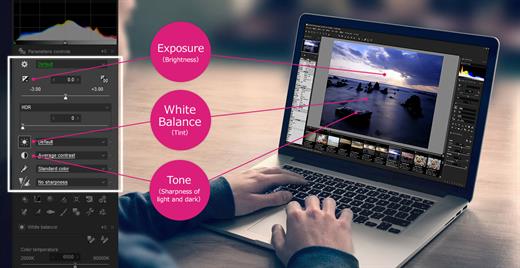
SILKYPIX Developer Studio Pro 11 is equipped with a new function for compositing multiple RAWs which enables the user a previously unprecedented level of creative photographic expression. The latest transformative enhancement to the software’s capabilites is the “Fine detail” mode which enables the optimal noise reduction. In addition, the “Select” section enables high-speed display of a large number of high-resolution images. Professional edition of RAW development software with improved flexibility and ease of use.

SILKYPIX Developer Studio Pro adds new functions that were highly desired in addition to the rich features of SILKYPIX so far.

  • Tone- Dehaze Slider
  • Exposure bias-Highlight / Shadow slider
  • Lens aberration correction – Distortion correction function by lens profile
  • Lens aberration correction – Distortion correction function using simultaneous recording JPEG
  • Effect – Blurred / Sharp periphery
  • Partial correction tool – Curve / Polygon area selection / Select color to be corrected
  • Automatic adjustment button
  • Noise Reduction – Level of shadow noise reduction
  • Search in the thumbnail
  • Independent arrangement of initialization button
  • Add user mark color
  • Open in another application
  • Control Palette
  • Customize toolbar
  • Show / hide information box

What’s New

Version 11.1.12.1:

  • Release notes were unavailable when this listing was updated.

Compatibility

macOS 10.13.0 or later


Release Name: SILKYPIX Developer Studio Pro 11.1.12.1
Size: 855.6 MB
Links: HOMEPAGE – NFO – Torrent Search

Download: FiKPERUPLOADGiGNiTROFLARERAPiDGATOR

5 Comments
Nov 25

Sensei 1.5.8

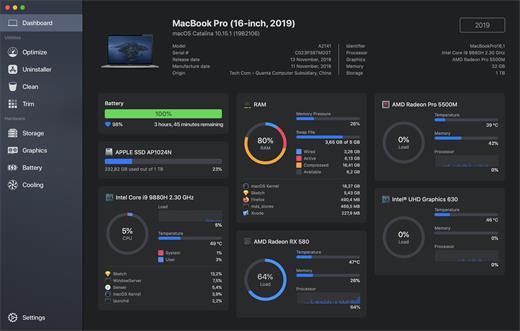
Sensei is an application for any Mac running macOS Catalina or later. Designed to help you optimize, monitor and clean your Mac in order to maximize its performance. Sensei offers several features related to Hardware and Software, such as a super-easy-to-use App Uninstaller, blazing fast Disk Cleaner, Health info for your battery and storage drives, and much more.

The Next Generation Mac performance tool

  • Performance Dashboard
  • Detailed Battery Reporter
  • Disk Cleaner
  • Thermal Dashboard
  • Theme Support
  • App Uninstaller
  • Detailed Hardware Information
  • Temperature Monitor
  • GPU Monitor
  • Performance Optimized
  • CPU Monitor
  • Bespoke Design
  • RAM Monitor
  • Detailed Display Reporter
  • HDD/SSD S.M.A.R.T Reporter
  • 100% Native Code
  • Fan Control
  • Detailed GPU/eGPU Reporter
  • SSD Trim Enabler
  • Accent Color Support
  • Disk Health Analyzer
  • Disk Benchmark
  • Battery Health Analyzer
  • Multiple Localizations
  • Disk Monitor
  • Dark Mode
  • Startup Speed Optimizer
  • Partition Map Explorer

What’s New

Version 1.5.8:

  • Release notes were unavailable when this listing was updated.

Compatibility

macOS 10.15.0 or later
Apple Silicon or Intel Core processor


Release Name: Sensei 1.5.8
Size: 36 MB
Links: HOMEPAGE – NFO – Torrent Search

Download: FiKPERUPLOADGiGNiTROFLARERAPiDGATOR

6 Comments
Nov 25

AlDente Pro 1.24

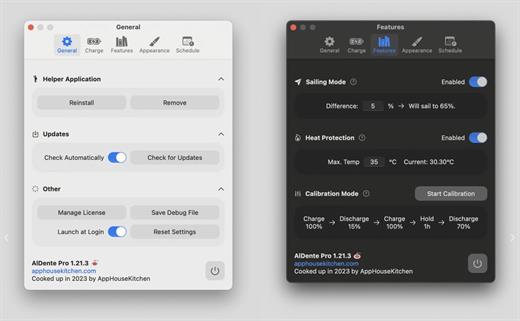
AlDente allows you to limit your MacBook from charging above a certain percentage. This will not only decrease Battery wear but also increase longevity of your Battery.

Features:

  • Charge Limiter allows you to set your maximum charging percentage between 20 and 100 percent. You can either set it by using the slide bar or by typing in the desired percentage in the field above and pressing enter afterwards.
  • Discharge – This feature allows your MacBook to run completely on Battery even if it is plugged in. Therefore, you can actively discharge your MacBook to a more healthy percentage. Unfortunately, while Discharge is activated, clamshell mode is not supported due to technical limitations.

Note:

  • Firewall not needed, but updating the app will invalidate the patch
  • App crashes if your Mac is a non-battery device
  • If your app is not licensed, re-run License.pkg

What’s New

Version 1.24:

  • Release notes were unavailable when this listing was updated.

Compatibility

macOS 11 or later
Apple Silicon or Intel Core processor


Release Name: AlDente Pro 1.24
Size: 5.1 MB
Links: HOMEPAGE – NFO – Torrent Search

Download: FiKPERUPLOADGiGNiTROFLARERAPiDGATOR

5 Comments
Nov 23

MacGPT 3.17

MacGPT is a simple native app for macOS that lets you quickly access chatGPT from your menu bar. With just a click, you can open chatGPT and start chatting with the powerful language model, Assistant.

ChatGPT at your Fingertips

Access ChatGPT from anywhere on your Mac with the Global feature. Simply activate the Global textfield that pops up in the middle of your screen, and start chatting with ChatGPT.

Let ChatGPT do the Typing

Bring ChatGPT directly into your textfields with MacGPT Inline. Just type your trigger phrase and your prompt and ChatGPT will do the rest!

Menu Bar?ChatGPT Bar

Quickly access chatGPT from your menu bar, through the website or natively with the API

What’s New

Version 3.17:

  • Added support for the new GPT-4 Turbo and GPT-3 Turbo models
  • The GPT-4 Turbo model can take 128.000 tokens as input, and 4.000 tokens as output

Compatibility

macOS 12.0 or later


Release Name: MacGPT 3.17
Size: 7.9 MB
Links: HOMEPAGE – NFO – Torrent Search

Download: FiKPERUPLOADGiGNiTROFLARERAPiDGATOR

8 Comments