Dec 6

Hazel 5.3

Hazel is your personal housekeeper, organizing and cleaning folders based on rules you define. Hazel can also manage your trash and uninstall your applications.
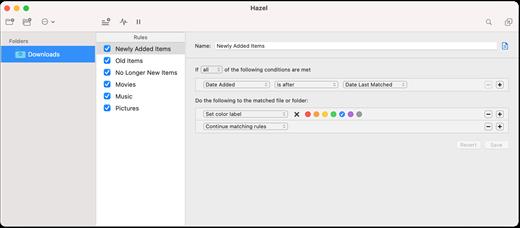
Organize your files using a familiar rule interface. Filter on the file’s name, type, date, the site or email address it came from and more. And do more than just file. You can set color labels, Spotlight keywords and comments and even archive files. Hazel also cleans, sporting options to clean out incomplete and duplicate downloads. All this is done automatically in the background allowing you to focus on your real work.

In addition, Hazel can manage your Trash for you, relieving you of having to empty it yourself.

Interface changes:

  • Added workaround for macOS bug introduced in Ventura where Hazel would not show up in the Notifications list under System Settings. It should now appear as “Hazel Notifier”
  • Should now show full list of tags on Sonoma.
  • Toolbar will show labels by default now.
  • Fixed issue where if there is a custom table attribute on the left hand side of a condition, the first pop-up would appear blank.
  • Fixed multiple banners appearing.
  • Fixed search field in Replace folder window.
  • AppSweep window contents should now resize properly with window.
  • Fixed dark mode with AppSweep window.
  • In the destination folder pop-up, the “Show in Finder” function will now only enable if there is a selected folder.
  • Various tweaks.

Core changes:

  • Now built for Sonoma.
  • Worked around issue with copying/moving from/to iCloud to local drive on Sonoma.
  • Improved handling of Trash, including changes in Sonoma with respect to iCloud Drive.
  • Fixed Upload action not working for cases where non-alphanumeric characters would appear in the URL, like spaces.
  • Tweaks to Set Color Label action to be more consistent.
  • Fixed non-standard numbers (like Arabic-Indic numerals) getting mangled when renaming files.
  • Photos support improved. Photos action should no longer need to bring up the Photos app.
  • Miscellaneous fixes.

Compatibility

macOS 10.15 or later
Apple Silicon or Intel Core processor


Release Name: Hazel 5.3
Size: 22.1 MB
Links: HOMEPAGE – NFO – Torrent Search

Download: FiKPERUPLOADGiGNiTROFLARERAPiDGATOR

5 Comments
Dec 6

Parallels Desktop 19.1.1

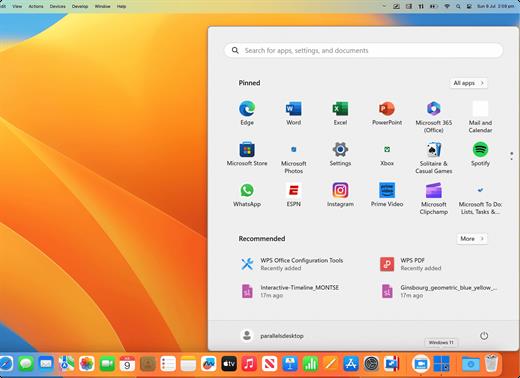
Parallels allows you to run Windows and Mac applications side by side. Choose your view to make Windows invisible while still using its applications, or keep the familiar Windows background and controls on your Mac.

Now Supporting Windows 11 and macOS Monterey

  • Optimized for Windows 11 and macOS Monterey, Parallels Desktop continues to stay up to date so you can keep working without interruption.
  • We make it easy to get all of your files, applications, browser bookmarks, and more from your PC to your Mac; just follow the setup assistant.

Works with Boot Camp®

  • Reuse your existing Boot Camp installation. Converting a virtual machine from Boot Camp is now much easier and more intuitive than ever.

Not just for Windows

  • Run a wide array of operating systems including OS X, Windows 10, 8.1 & 7, Linux, and Google ChromeTM. You can run just about anything on your Mac!

One-click tuning

  • Select productivity, games, design, or development, and Parallels Desktop 11 for Mac will optimize your virtual machine settings and performance for you.

Robust Performance

  • Parallels Desktop Pro Edition gives your virtual machines more processing power. Up to 64 GB vRAM and 16 vCPUs per virtual machine lets you run even the most demanding applications with ease.

Business Class Software

  • Keep IT in control of end user licenses and Windows virtual machines with a Unified Volume License Key, centralized license management, and advanced security features available in Parallels Desktop Business Edition.

What’s New

Version 19.1.1:

  • Fixes an issue where USB devices don’t appear in Windows OS when connected directly;
  • Fixes an issue where a Linux machine display remains blurred after resizing the VM window;
  • Fixes an issue where macOS Sonoma machine on Apple silicon loses network connection.

Compatibility

macOS 12 or later
Apple Silicon or Intel Core processor


Release Name: Parallels Desktop 19.1.1
Size: 296.3 MB
Links: HOMEPAGE – NFO – Torrent Search

Download: FiKPERUPLOADGiGNiTROFLARERAPiDGATOR

6 Comments
Dec 6

Mach Desktop 4K 3.0.6

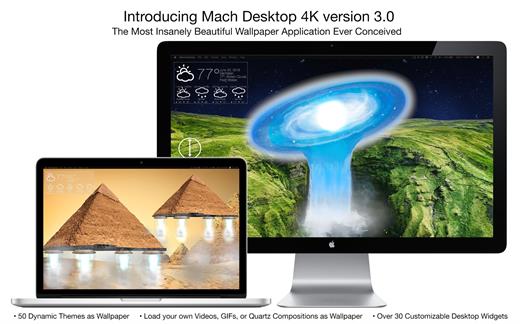
Mach Desktop 4K is the first (and only) 4K dynamic motion wallpaper application. Mach Desktop 4K features 40+ stunning themes, with each theme featuring advanced 3D effects or breathtaking 4K Video, and the most cutting-edge and beautiful “Desklets” ever to grace a Desktop! 3D effects include but are not limited to: Light, Water, Fog, Smoke, Clouds, Fire, Snow, Stars, Galaxies, Quasars, even Black Holes, and more! Mach Desktop 4K also features a super efficient video player foundation that can play full 4K videos while consuming on average 5% CPU per display* Built on tested and proven technology, Mach Desktop 4K is the most advanced and beautiful application to ever live on your Desktop. Mach Desktop 4K works great on Retina (3K) displays as well!

Features

  • 40+ Themes, with the option to automatically add customized Desklets or add no Desklets at all; the choice is yours!
  • All included Quartz compositions and Quicktime videos are full 4K
  • Unlimited display support, with each display being independently customizable
  • 25+ 3D (Quartz) Compositions with stunning rendered effects such as light, water, fog, smoke, clouds, fire, snow, stars, galaxies, quasars, black holes, and more
  • Nearly 20 true 4K videos with a wide variety of nature, architecture, and space themes
  • Choose themes graphically with a single click
  • Add nearly 25 different Desklets with a single click; with each Desklet supporting customized position, size, font, foreground color, and background color
  • Web page Desklets allow to you put multiple web pages on your Desktop, allowing full customizability for position and size
  • Forecast Desklets show temperature, conditions, wind speed, humidity, and pressure for the next 12 hours
  • Works great with Retina (3K) displays
  • Incredibly advanced, yet super easy to use

What’s New

Version 3.0.6:

  • Release notes were unavailable when this listing was updated.

Compatibility

macOS 10.11 or later.


Release Name: Mach Desktop 4K 3.0.6
Size: 1.6 GB
Links: HOMEPAGE – NFO – Torrent Search

Download: FiKPERUPLOADGiGNiTROFLARERAPiDGATOR

5 Comments
Dec 6

CrossOver 23.7.1

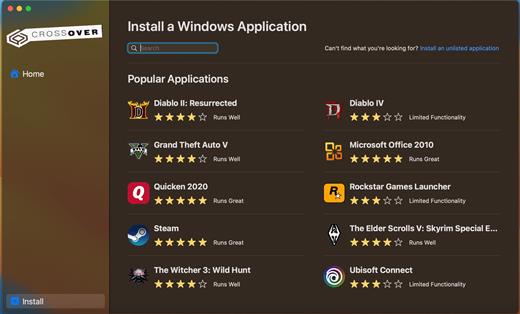
CrossOver allows you to install many popular Windows applications on your Mac. Your applications integrate seamlessly in OS X; just click and run. No rebooting, no switching to a virtual machine, and no Windows Operating System license required.

CrossOver is capable of running a wide range of Windows software. To see if your favorite application works with CrossOver, please check What Runs, or search for it using the search box at the top of this page.

Easy Installs! Many Windows titles can be installed using our CrossTie technology. If you have CrossOver installed, and have the installer for your Windows software, simply click the button in our Compatibility Database, and CrossOver will automatically install your application for you!

*** NOTE: Before installing the Crossover 23.7.1, it is necessary to read README.pdf from the Extra folder

What’s New

Version 23.7.1:

  • Release notes were unavailable when this listing was updated.

Compatibility

macOS 10.13 or later
Apple Silicon or Intel Core processor


Release Name: CrossOver 23.7.1
Size: 425.8 MB
Links: HOMEPAGE – NFO – Torrent Search

Download: FiKPERUPLOADGiGNiTROFLARERAPiDGATOR

5 Comments
Dec 6

AirMail Pro 5.6.15

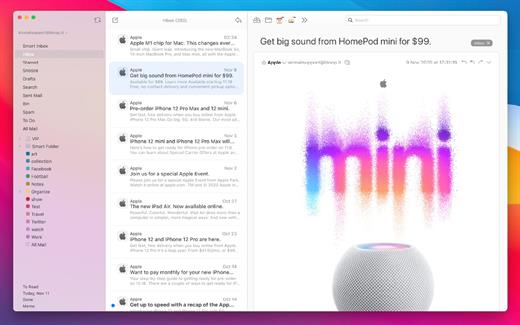
Airmail 4 is a new mail client designed with performance and intuitive interaction in mind optimized for macOS High Sierra! Support for iCloud™, MS Exchange, Gmail™, Google™ Apps, IMAP, POP3, Yahoo!™, AOL™, Outlook.com™, Live.com™

Airmail was designed from the ground UP to retain the same experience with a single or multiple accounts and provide a quick, modern and easy-to-use user experience. Airmail is clean and allows you to get to your emails without interruption – it’s the mail client for the 21st century.

We have taken usability and function to the next level with Airmail and bring a striking-design with support for all major email services. Switch between accounts like a breeze and quick reply to incoming messages within seconds – email has never been so easy and productive.

  • iCloud Account sync
  • iCloud attachment upload and share the link.
  • Handoff support, Composing Draft and folder selection are mirrored on different devices
  • Today Extension, quick access to your inbox.
  • Action Extension, Airmail Compose, Inline create and send messages directly form other apps
  • Action Extension, Airmail Share to quick send messages and attachments.

Accounting:

  • Unified Inbox
  • Alias with custom SMTP
  • Exchange, iCloud™, Gmail™, IMAP, POP3, Google™ Apps, Yahoo!™, AOL™, Outlook.com™, Live.com™
  • Local Accounts
  • Import from Apple Mail, MBOX archive, EML, EMLX, Airmail 1.x

Interactions:

  • Quick Reply
  • Undo History
  • Offline operations
  • Move messages on Different mailboxes
  • Interaction sounds
  • Multi Touch gestures
  • Exchange Meeting Invite

Shortcuts:

  • Gmail Shortcuts
  • Custom global shortcuts
  • Quick Label, Move, Label and Archive
  • Quick folder selection

Attachment:

  • Drag and drop
  • Quick Look preview
  • Google Drive, Dropbox, CloudApp, Box, Onedrive, Droplr, FTP
  • Inline image attachments
  • Winmail.dat preview
  • VCalendar

Conversations:

  • Group by id
  • Group by subject
  • Chronological Reverse
  • Muted CC’d conversation

Visual:

  • Multiple visual themes
  • Minimal and extended Mode
  • Plain Text Rendering

Notifications:

  • Per account notifications
  • Notification center support
  • Notification alerts with custom actions

Address:

  • Gmail, Exchange and OS X contacts
  • Contacts Group
  • Filter by address
  • Open Directory search

Composer:

  • Google App Directory
  • Exchange Global Address List
  • LDAP directory
  • Markdown, Html(Html Source for templates), and text only.
  • Custom settings per single account
  • Bullet and numbered list.

Sending:

  • Auto CC, BCC.
  • Pending operations
  • Send Delay
  • Redirect
  • Send again
  • Bounce

Advanced:

  • Split Screen Support
  • Time Machine friendly
  • Deckles mode
  • EML Import/Export
  • Disable GPU to save battery life
  • Applescript
  • Activity monitor
  • Data Detectors

Signatures:

  • Multiple Account Signatures
  • Markdown, Rich text, Html Source, and text only.
  • Signature above or below the quote

Search & Filtering:

  • Global search for multiple accounts
  • Realtime powerful filters
  • Sort messages, Date, Attachments, Conversations ….
  • Show messages of the same user
  • Flags and filters

Folders, Labels:

  • Nested folders
  • Create, Delete and edit folders
  • Custom colors synced by iCloud
  • Custom folder mappings
  • ToDo, Done, Memo

Send to:

  • Omnifocus
  • Fantastical
  • Evernote
  • Apple Reminder
  • Calendar
  • BusyCal
  • Things
  • 2To
  • Wunderlist
  • Todoist

Privacy:

  • Per user Autoload Remote Images,
  • Disable icon detection

What’s New

Version 5.6.15:

  •  Bugfixed

Compatibility

macOS 10.12 or later.
Apple Silicon or Intel Core processor


Release Name: AirMail Pro 5.6.15
Size: 42.5 MB
Links: HOMEPAGE – NFO – Torrent Search

Download: FiKPERUPLOADGiGNiTROFLARERAPiDGATOR

4 Comments
Dec 6

Nova 11.7

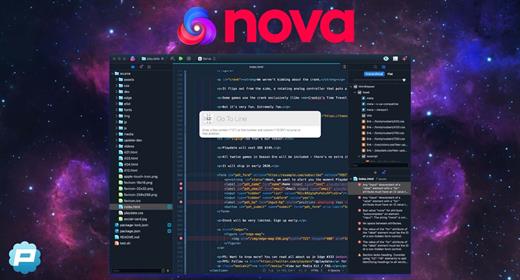
Nova is hyper-fast and flexible code editor with all the features you want: smart autocomplete, multiple cursors, a Minimap, editor overscroll, tag pairs and brackets, and way, way more.

Features:

  • The Editor. It all starts with our first-class text-editor. It’s new, hyper-fast, and flexible, with all the features you want: smart autocomplete, multiple cursors, a Minimap, editor overscroll, tag pairs and brackets, and way, way more.
  • It’s beautiful. And clean. And fun. You can make Nova look exactly the way you want, while still feeling Mac-like. Bright, dark, cyberpunk, it’s all you. Plus, themes are CSS-like and easy to write. Nova can even automatically change your theme when your Mac switches from light to dark mode.
  • Nova doesn’t just help you code. It helps your code run. You can easily create build and run tasks for your projects. We didn’t have them in Coda, but boy do we have them now. They’re custom scripts that can be triggered at any time by toolbar buttons or keyboard shortcuts.
  • Now, this is important. Editing text is just part of what Nova does. We’ve bundled in extremely useful tools to help you get your work done quickly and efficiently. They’re all fast and native too, of course.
  • Nova has a robust extensions API. A Nova extension can do lots of things, like add support for new languages, extend the sidebar, draw beautiful new themes and syntax colors, validate different code, and much more.
  • People have strong editor opinions. And we’re here to help. Nova has a whole host of settings. We have easily customizable key bindings. We have custom, quickly-switchable workspace layouts. And we have loads of editor tweaks, from matching brackets to overscroll.

Fixed

  • Improved text layout performance of very long lines containing differing syntax highlighting attributes when line wrapping is disabled
  • The “Editor” main menu item and its counterparts (“Terminal”, “Preview”, etc.) now resize properly when swapping tab types on macOS 14
  • Multi-line selections are now drawn as expected on macOS 14 “Sonoma” when line wrapping is disabled
  • Code structure headers are no longer misaligned when using specific screen resolutions or font sizes
  • Addressed an issue that could cause code structure headers to become scrambled in some circumstances
  • Improved horizontal sizing of the Language Server Protocol hint hovers in certain cases
  • File Browser: Improved layout of permissions section of the information sidebar/window
  • Remote Terminal: IdentityAgent config directive is now parsed as expected when using jump hosts
  • Terminal: Emulation improvements when using older versions of nano
  • Terminal: Fixed file list rendering when using zsh-interactive-cd
  • Extension Library: The correct license tab content is now displayed when viewing library extensions that are not yet installed.
  • Resolved an issue where editor keyboard shortcuts were not always routed correctly when using macOS 14.2+

Compatibility

macOS 10.14.4 or later


Release Name: Nova 11.7
Size: 58.3 MB
Links: HOMEPAGE – NFO – Torrent Search

Download: FiKPERUPLOADGiGNiTROFLARERAPiDGATOR

5 Comments
Dec 6

Dropshare 5.44

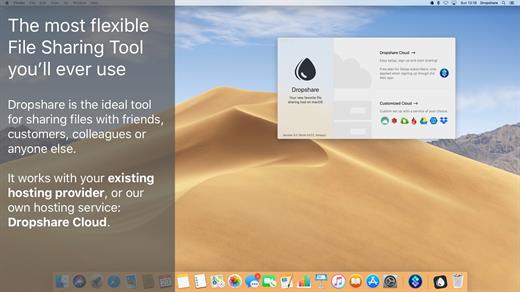
Dropshare is a menu bar application for drag & drop upload files, screenshots and even directories to your own server, Amazon S3, Backblaze B2 Cloud Files, Rackspace Cloud Files, Microsoft Azure Blob Storage, Google Drive or Dropbox. Additionally, Dropshare offers a file sharing provider called Dropshare Cloud, which is perfectly suitable to start uploading in just minutes. Sharing files with friends, customers, colleagues or anyone else has never been so easy an professional! Dropshare supports Multiple Connections: You can set up different upload destinations at the same time and switch between them using user-defined keyboard shortcuts, or by holding ⌘ while dragging & dropping a file No matter if files, folders, text or screenshots – Dropshare uploads every file and data to your selected destination – also from clipboard or other applications like Safari. Share Extension included Set up your own keyboard shortcuts for fullscreen or selection-based screenshots that’ll be uploaded automatically with Dropshare. Set up a custom keyboard shortcut for taking a screenshot and annotating it afterwards with Dropshare itself, or an app you already like: Preview.app, Skitch.app, Napkin.app or Annotate.app Take & upload Screen Recordings directly with Dropshare, both fullscreen and selection-based recordings are available, as well as GIF conversion Choose from a number of free designs or craft an individual design on your own using HTML, CSS and JavaScript, including upload previews Synchronize your upload history across all your devices, supports both iOS and macOS. Your upload history will automatically be synchronized across all your Apple devices with iCloud Dropshare supports URL shorteners as well, e.g. dsh.re or Rebrandly, or configure your very own URL shortener service like bit.ly or YOURLS.

Technical requirements:

  • A working SSH user account is required on the server. A password or SSH key pair is also required. To have the uploaded file displayed in a web browser, a web server needs to be installed and configured on the server
  • Dropshare supports services like OpenStack Swift. Check User Guide for more information
  • A regular Google account is required in order to use Google Drive
  • A regular Dropbox account is required in order to use Dropbox
  • Microsoft Azure Blob Storage, Backblaze B2 Cloud Files, Amazon Simple Storage Service (S3), Rackspace Cloud Files. A subscription may be neccessary in order to use Dropshare with one of these providers. Please check out the terms of use and payment information at the website of the selected provider

What’s New

Version 5.44:

  • Nextcloud: Adding support for Nextcloud connections
  • Backblaze B2: Adding support for placeholders in Backblaze B2 bucket names / folders.

Compatibility

macOS 12.3 or newer
Apple Silicon or Intel Core processor


Release Name: Dropshare 5.44
Size: 45.2 MB
Links: HOMEPAGE – NFO – Torrent Search

Download: FiKPERUPLOADGiGNiTROFLARERAPiDGATOR

5 Comments
Dec 1

Capture One 23 Enterprise 16.3.2.32

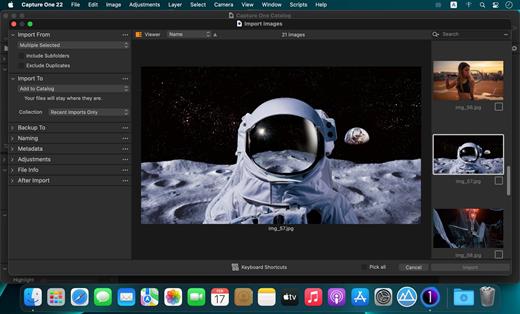
Capture One 23 Enterprise – the photo editing solution for image production studios and e-commerce platforms. Its authentic true-to-life color processing, seamless editing experience, and fastest tethering in the industry gives you total creative control, making it a household name in studios across the world. Based in Copenhagen, Denmark, Capture One empowers photographers with cutting-edge features to keep your photography one step ahead

With an updated processing engine, market-leading performance, and powerful new features, Capture One is the professional choice in imaging software. You get the highly responsive precision tools you need to create stunning images from your camera’s RAW files in a time-saving workflow that can be customized to fit your needs.

What’s New

Version 16.3.2.32:

  • Release notes were unavailable when this listing was updated.

Compatibility

macOS 10.13 or later
Apple Silicon or Intel Core processor


Release Name: Capture One 23 Enterprise 16.3.2.32
Size: 964 MB
Links: HOMEPAGE – NFO – Torrent Search

Download: FiKPERUPLOADGiGNiTROFLARERAPiDGATOR

7 Comments
Dec 1

AirMail Pro 5.6.13

Airmail 4 is a new mail client designed with performance and intuitive interaction in mind optimized for macOS High Sierra! Support for iCloud™, MS Exchange, Gmail™, Google™ Apps, IMAP, POP3, Yahoo!™, AOL™, Outlook.com™, Live.com™

Airmail was designed from the ground UP to retain the same experience with a single or multiple accounts and provide a quick, modern and easy-to-use user experience. Airmail is clean and allows you to get to your emails without interruption – it’s the mail client for the 21st century.

We have taken usability and function to the next level with Airmail and bring a striking-design with support for all major email services. Switch between accounts like a breeze and quick reply to incoming messages within seconds – email has never been so easy and productive.

  • iCloud Account sync
  • iCloud attachment upload and share the link.
  • Handoff support, Composing Draft and folder selection are mirrored on different devices
  • Today Extension, quick access to your inbox.
  • Action Extension, Airmail Compose, Inline create and send messages directly form other apps
  • Action Extension, Airmail Share to quick send messages and attachments.

Accounting:

  • Unified Inbox
  • Alias with custom SMTP
  • Exchange, iCloud™, Gmail™, IMAP, POP3, Google™ Apps, Yahoo!™, AOL™, Outlook.com™, Live.com™
  • Local Accounts
  • Import from Apple Mail, MBOX archive, EML, EMLX, Airmail 1.x

Interactions:

  • Quick Reply
  • Undo History
  • Offline operations
  • Move messages on Different mailboxes
  • Interaction sounds
  • Multi Touch gestures
  • Exchange Meeting Invite

Shortcuts:

  • Gmail Shortcuts
  • Custom global shortcuts
  • Quick Label, Move, Label and Archive
  • Quick folder selection

Attachment:

  • Drag and drop
  • Quick Look preview
  • Google Drive, Dropbox, CloudApp, Box, Onedrive, Droplr, FTP
  • Inline image attachments
  • Winmail.dat preview
  • VCalendar

Conversations:

  • Group by id
  • Group by subject
  • Chronological Reverse
  • Muted CC’d conversation

Visual:

  • Multiple visual themes
  • Minimal and extended Mode
  • Plain Text Rendering

Notifications:

  • Per account notifications
  • Notification center support
  • Notification alerts with custom actions

Address:

  • Gmail, Exchange and OS X contacts
  • Contacts Group
  • Filter by address
  • Open Directory search

Composer:

  • Google App Directory
  • Exchange Global Address List
  • LDAP directory
  • Markdown, Html(Html Source for templates), and text only.
  • Custom settings per single account
  • Bullet and numbered list.

Sending:

  • Auto CC, BCC.
  • Pending operations
  • Send Delay
  • Redirect
  • Send again
  • Bounce

Advanced:

  • Split Screen Support
  • Time Machine friendly
  • Deckles mode
  • EML Import/Export
  • Disable GPU to save battery life
  • Applescript
  • Activity monitor
  • Data Detectors

Signatures:

  • Multiple Account Signatures
  • Markdown, Rich text, Html Source, and text only.
  • Signature above or below the quote

Search & Filtering:

  • Global search for multiple accounts
  • Realtime powerful filters
  • Sort messages, Date, Attachments, Conversations ….
  • Show messages of the same user
  • Flags and filters

Folders, Labels:

  • Nested folders
  • Create, Delete and edit folders
  • Custom colors synced by iCloud
  • Custom folder mappings
  • ToDo, Done, Memo

Send to:

  • Omnifocus
  • Fantastical
  • Evernote
  • Apple Reminder
  • Calendar
  • BusyCal
  • Things
  • 2To
  • Wunderlist
  • Todoist

Privacy:

  • Per user Autoload Remote Images,
  • Disable icon detection

What’s New

Version 5.6.13:

  •  Bugfixed

Compatibility

macOS 10.12 or later.
Apple Silicon or Intel Core processor


Release Name: AirMail Pro 5.6.13
Size: 42.5 MB
Links: HOMEPAGE – NFO – Torrent Search

Download: FiKPERUPLOADGiGNiTROFLARERAPiDGATOR

5 Comments
Dec 1

Compressor 4.7.0

Compressor adds power and flexibility to Final Cut Pro X export. Customize output settings, work faster with distributed encoding, and tap into a comprehensive set of delivery features.

Powerful Encoding for Final Cut Pro

  • Use Compressor to customize encoding settings available in Final Cut Pro.
  • Choose from a wide array of codecs, sizes, frame rates, and other parameters.
  • Save your custom settings in Compressor; they automatically appear in Final Cut Pro.
  • Share settings with other editors, even if Compressor isn’t installed on their workstations.

Time-Saving Encoding Workflow

  • Experiment freely with encoding options, using real-time feedback in the Preview window.
  • Find exactly the setting you need in just a few clicks in the updated settings library.
  • Set up batch processes to streamline the encoding of large numbers of files.
  • Build batch templates to combine encoding with tasks such as moving or copying files.
  • Create self-contained Droplets to encode on the desktop with drag-and-drop ease.

Industry-Standard Encoding Support

  • Use one-step settings for Apple devices and websites such as Vimeo, YouTube, and Facebook.
  • Work with a choice of themed menus to encode and burn a DVD or Blu-ray disc.
  • Add chapter markers for discs or podcasts distributed on iPad, iPhone, iPod, or Apple TV.
  • Encode to a broad range of industry-standard formats, such as MPEG-2, H.264, and ProRes.
  • Generate files for HTTP live streaming in a single step.
  • Import Targa, DPX, TIFF, PSD, or PNG image sequences and encode them to any setting.
  • Tap into advanced encoding features for adding closed captioning, metadata, and more.

Pristine Format Conversions

  • Convert any file from its source format to another format, such as NTSC to PAL or SD to HD.
  • Clean up and customize your content using image filters, a timecode overlay, and watermarks.
  • Speed up video, slow it down, or adjust the frame rate to make the duration match a runtime.

Distributed Encoding

  • Save time by distributing encoding work among multiple cores and workstations.
  • Install Compressor on any Mac to activate it as a cluster node for distributed encoding.
  • Speed up encoding in Final Cut Pro by choosing a Compressor cluster for output processing.
  • Activate QuickCluster for dynamic configuration of nodes based on available resources.

What’s New

Version 4.7.0:

  • Take advantage of the flexibility and dynamic range of log-encoded video shot on iPhone 15 Pro.
  • Fixes an issue where the source/output comparison viewer would not reflect the camera log selection.
  • Addresses an issue where Reveal in Finder was not available for clips with modified audio settings.
  • Fixes an issue where luminance levels could be incorrect when Job inspector color space and Output color space were set to Rec. 709.

Compatibility

macOS 13.5 or later
Apple Silicon or Intel Core processor


Release Name: Compressor 4.7.0
Size: 355.5 MB
Links: HOMEPAGE – NFO – Torrent Search

Download: FiKPERUPLOADGiGNiTROFLARERAPiDGATOR

7 Comments