Dec 6

iA Writer 7.0.2

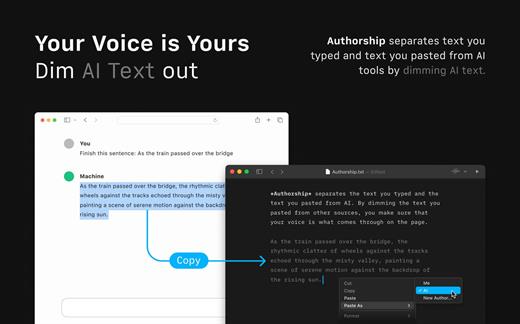
iA Writer (was iA Writer Pro) is a professional writing suite that gives you full control over your notes, drafts and edits.

  • Workflow: Note – Write – Edit – Read. Each stage has a task-specific typeface and color.
  • Syntax Control scans the syntax of English, French, German, Italian, and Spanish text and highlights your adjectives, nouns, verbs, adverbs, prepositions or conjunctions.
  • Precision Writing Tools:
    • Auto Markdown formats text on-screen — your hands stay on the keyboard
    • Syntax Control introduces syntactic markup for natural language text. It covers English, French, German, Italian, and Spanish. Patent pending.
    • Convert Markdown to Microsoft Word 2007 .docx, and back again

Features

  • Workflow states
  • Custom typefaces, carefully set for optimal readability
  • In-app preview
  • Reading time, plus sentence, word, and character count
  • Real-time iCloud sync
  • Ready for Retina displays
  • Full-screen

What’s New

Version 7.0.2:

  • Release notes were unavailable when this listing was updated.

Compatibility

macOS 10.11 or later.
Apple Silicon or Intel Core processor


Release Name: iA Writer 7.0.2
Size: 18.9 MB
Links: HOMEPAGE – NFO – Torrent Search

Download: FiKPERUPLOADGiGNiTROFLARERAPiDGATOR

4 Comments
Dec 6

ScreenSleeves 6.10.6

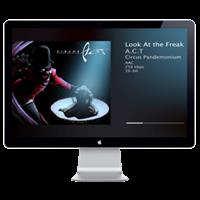
ScreenSleeves detects which music player is playing, and displays cover art and details for the currently-playing track.

ScreenSleeves displays the album artwork(s) for the currently-playing song with some details, even lyrics, in some neat, easy-on-the-eye ways (it has a number of themes). Perfect for downtime or parties.

Important Note Screensleeves has a long history as a screensaver. Security changes within macOS Mojave have made it impossible to continue as a true screensaver (which is a system plugin). The solution has been to put ScreenSleeves within its own ‘standalone’ app which emulates a screensaver. This has other advantages, such as displaying a small floating window when not in full-screen mode which users have asked for throughout its history. This standalone version replaces previous versions which are now unsupported and will not run on Mojave. It has a free trial, after which requires a license key.

Support for Music, iTunes, iTunes internet streams, Swinsian, Spotify, Airfoil Satellite, Snowtape, Ecoute, Rdio, Radium, Audirvana Plus, Hermes (Pandora client). Screensleeves detects which is playing.

What’s New

Version 6.10.6:

  • Adds control to Preferences “No fade” which suppresses the fade transition between repositions or when track changes. This is ‘per theme’, If you switch between themes, you may have to set it for each theme you use.

Compatibility

macOS 10.12 or later
Apple Silicon or Intel Core processor


Release Name: ScreenSleeves 6.10.6
Size: 5.8 MB
Links: HOMEPAGE – NFO – Torrent Search

Download: FiKPERUPLOADGiGNiTROFLARERAPiDGATOR

4 Comments
Dec 6

Coherence X 4.5.3

Coherence X – The perfect middle-ground between websites and apps on your Mac.

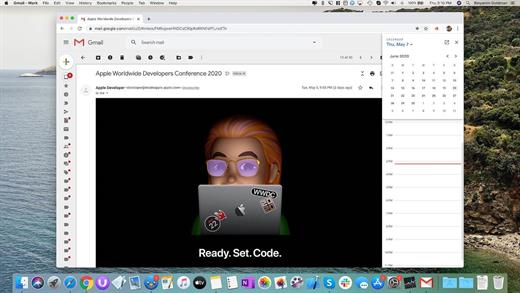
Coherence X is a powerful tool that allows you to turn any websites into a chromium-based, native application on your Mac.

Features:

An isolated app in seconds

Using Chrome as a backend, Coherence Pro allows you to work with Chrome-exclusive experiences like Canary or Spotify web player, and build entirely independent apps. You can batch create programs if you need more than one, transferring settings across apps.

Chrome extensions and profiles

Let Coherence Pro automatically import extensions and profiles from your Chrome instances. So if you create a social media application, you can add 1Password, Pocket, and other useful extensions to enhance your app. Coherence Pro will also keep track of your preferred extensions.

Switch between app modes

The app comes with three different UI modes: a single-window app, traditional Chrome-like appearance, and multi-tab design. Choose the preferred experience, whether it’s a native immersive interface or a space for multitasking. If necessary, copy the same settings across apps.

The power of multi-tab design

Multi-tab apps give you incredible freedom in terms of functionality. For instance, you can create a native email client with the Unite app. But only with Coherence Pro multi-tab design, you can add multiple email accounts and switch between them inside your app. Workspaces inside your app

Coherence Pro gives you space for creative work. Using a set of different functionality, you can create apps that act as workspaces. For example, if you’re tired of toggling across platforms, you can use Coherence Pro’s multi-tabbed interface to bring your top visited sites into an app.

What’s New

Version 4.5.3:

  • Release notes were unavailable when this listing was updated.

Compatibility

macOS 10.12 or later, 64-bit processor


Release Name: Coherence X 4.5.3
Size: 12.2 MB
Links: HOMEPAGE – NFO – Torrent Search

Download: FiKPERUPLOADGiGNiTROFLARERAPiDGATOR

4 Comments
Dec 6

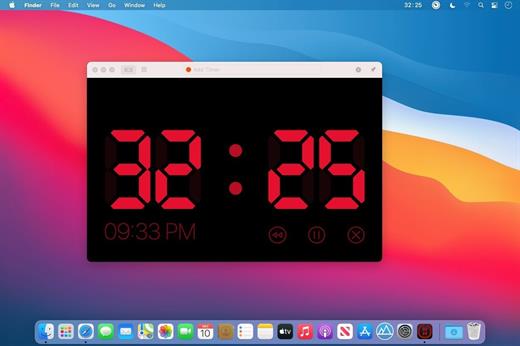
Timer RH Pro 2.14.1

Take Control of Your Time

Capabilities:

  • Set the timer to the specific time or to the exact time interval
  • Multiple timers
  • Repeating timers
  • Text and color labels
  • Combining timers into the scenaries
  • Create shortcuts and set hotkeys for its
  • One-touch timers addeding
  • Display on top over all windows when timer expiring
  • Ability to pin the window on top over all windows when working
  • Fullscreen mode
  • Flexible settings for sound and alerts
  • Count Down or Forward
  • Multiple timers in one window
  • History of timers
  • Timer in the staus bar and on the dock icon

And much more in this universal tool

What’s New

Version 2.14.1:

  • Release notes were unavailable when this listing was updated.

Compatibility

macOS 10.14 or later
Apple Silicon or Intel Core processor


Release Name: Timer RH Pro 2.14.1
Size: 21 MB
Links: HOMEPAGE – NFO – Torrent Search

Download: FiKPERUPLOADGiGNiTROFLARERAPiDGATOR

4 Comments
Dec 6

System Dashboard Pro 1.10.0

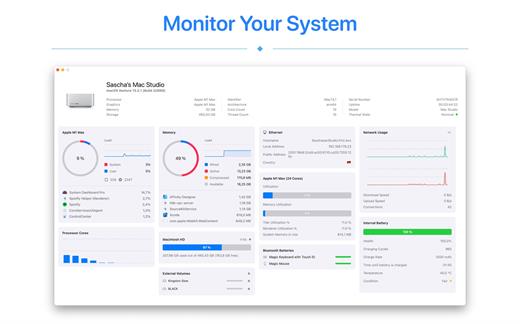
The System Dashboard Pro is a modern reinterpretation of the System Dashboard and offers more information than ever. The app has been completely redeveloped and optimized for the latest systems.

System Dashboard Pro offers the following features

• General System Information
Get an overview of the most important parameters of your system. This includes, for example, the macOS version used or details about your computer.

• Processor Usage
The processor panel shows important details about processor usage. The current load is displayed as well as that of the last few seconds. A list of processes that have the highest processor utilization is also displayed.

• Memory Usage
The Memory panel shows data related to memory. The current load is displayed as well as that of the last few seconds. A list of processes using the most memory is also displayed.

• Network Information
Basic network information such as the local and external IP address or the transfer rate of the WLAN connection is displayed on this panel.

• Network Usage
The network category shows the current download and upload speed and the number of open connections.

• Internal Battery
This panel is available if the app is running on a MacBook and displays basic battery parameters. Among others information, it displays the number of charging cycles and the health of the battery.

• Hard Disk
The computer’s hard drive can be kept under control with this panel. It shows how much space is used and how much is free. The current speed is also displayed.

• External Drives
SD cards and USB sticks are displayed here. The devices can also be ejected – either individually or all at once.

What’s New

Version 1.10.0:

  • Release notes were unavailable when this listing was updated.

Compatibility

macOS 13.0 or later


Release Name: System Dashboard Pro 1.10.0
Size: 6.9 MB
Links: HOMEPAGE – NFO – Torrent Search

Download: FiKPERUPLOADGiGNiTROFLARERAPiDGATOR

4 Comments
Dec 6

iFastZip 8.9

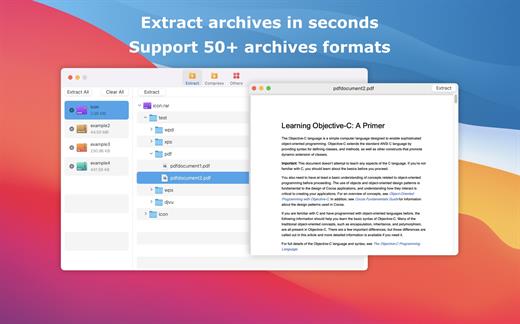
iFastZip can extract compressed files in all most formats(over 50 formats).

「Support RAR, ZIP, 7z, pak, pkg, apk, tbz, sti, tar, xar, lha, lzh, hqx, bin, bz2, bzip2, bz, xz, iso, cid, nrg, mdf, taz,l zma, xip, ace, arj, lbr, lqr, cab, rpm, cpt, sea, exe, msi, cpio, lzx, jar, swf, pdf, nsa, dcs, spk… 」

「Compress files to password-protected ZIP & 7Z archives 」

「Quicklook files in archive before extraction」

「Features」

  • Extract extract compressed files in all most formats(over 50 formats).
  • Unzip, unrar encrypted archives.
  • Easy view an archive’s file list.
  • Quicklook files in archive without extracting.
  • Unarchive & unrar the selected individual file or folder in the archive.
  • Double click to display or extract directly after setting this APP as default archiver.
  • Drag archives to the dock icon to extract or display directly.
  • Batch decompress many archives
  • Create password-protected ZIP & 7Z archives.
  • AES256 encryption algorithm to create ZIP & 7Z archives.
  • Drag the file in archive to the desktop to extract directly

What’s New

Version 8.9:

  • Release notes were unavailable when this listing was updated.

Compatibility

macOS 10.13 or later.


Release Name: iFastZip 8.9
Size: 12.5 MB
Links: HOMEPAGE – NFO – Torrent Search

Download: FiKPERUPLOADGiGNiTROFLARERAPiDGATOR

1 Comment
Dec 6

Sensei 1.5.9

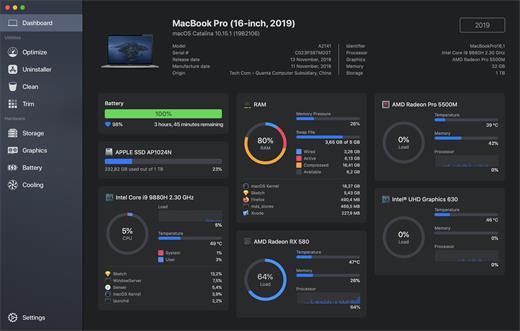
Sensei is an application for any Mac running macOS Catalina or later. Designed to help you optimize, monitor and clean your Mac in order to maximize its performance. Sensei offers several features related to Hardware and Software, such as a super-easy-to-use App Uninstaller, blazing fast Disk Cleaner, Health info for your battery and storage drives, and much more.

The Next Generation Mac performance tool

  • Performance Dashboard
  • Detailed Battery Reporter
  • Disk Cleaner
  • Thermal Dashboard
  • Theme Support
  • App Uninstaller
  • Detailed Hardware Information
  • Temperature Monitor
  • GPU Monitor
  • Performance Optimized
  • CPU Monitor
  • Bespoke Design
  • RAM Monitor
  • Detailed Display Reporter
  • HDD/SSD S.M.A.R.T Reporter
  • 100% Native Code
  • Fan Control
  • Detailed GPU/eGPU Reporter
  • SSD Trim Enabler
  • Accent Color Support
  • Disk Health Analyzer
  • Disk Benchmark
  • Battery Health Analyzer
  • Multiple Localizations
  • Disk Monitor
  • Dark Mode
  • Startup Speed Optimizer
  • Partition Map Explorer

What’s New

Version 1.5.9:

  • Release notes were unavailable when this listing was updated.

Compatibility

macOS 10.15.0 or later
Apple Silicon or Intel Core processor


Release Name: Sensei 1.5.9
Size: 36 MB
Links: HOMEPAGE – NFO – Torrent Search

Download: FiKPERUPLOADGiGNiTROFLARERAPiDGATOR

5 Comments
Dec 6

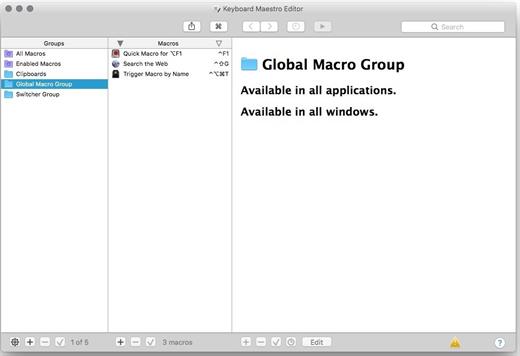
Keyboard Maestro 11.0.2

Keyboard Maestro is the hot-key solution that allows you to perform a multitude of tasks simply by pressing a keystroke! It also incorporates the wildly popular MacOS Classic utility Program Switcher, which allows you to launch, switch, and quit applications with a simple keystroke.

Features:

  • Macro
  • Program and window switcher
  • Clipboard switcher
  • Clipboard history switcher

What’s New

Version 11.0.2:

  • Release notes were unavailable when this listing was updated.

Compatibility

macOS 10.13 or later.
Apple Silicon or Intel Core processor


Release Name: Keyboard Maestro 11.0.2
Size: 37.9 MB
Links: HOMEPAGE – NFO – Torrent Search

Download: FiKPERUPLOADGiGNiTROFLARERAPiDGATOR

9 Comments
Dec 6

Kaleidoscope 4.3.1

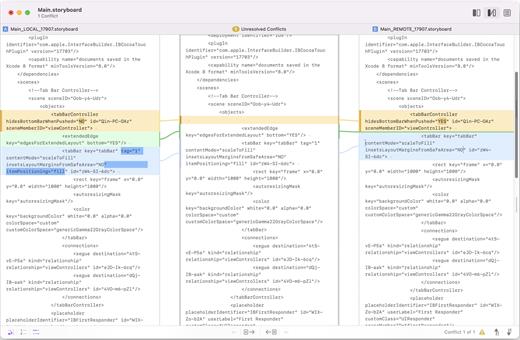
Kaleidoscope spots differences in text and image files.

Kaleidoscope Features

  • General
    • Single window workflow: One tab per comparison
    • Compare two+ files: Add any number of files per tab
    • Always up to date: Auto-refreshes when files change
    • File Shelf: Quickly go from file to file
    • Path Bar: See where your files are
    • Keyboard shortcuts: Every action has a shortcut
  • Text Scope
    • Supports any text file: Plain text, source code, HTML, etc.
    • Clear comparisons
    • Three layouts: Blocks, Fluid, and Unified
    • Compare documents: Imports text from .doc and .rtf files
    • Instant search
    • Change Stepper: Quickly jump from change to change
    • Highlights: Added, deleted and changed text
  • Image Scope
    • All popular image file formats: JPEG, TIFF, PNG, PSD and more.
    • Four connected layouts: Two-Up, One-Up, Split, and Difference
    • Comprehensive image support: RGB/CMYK/LAB, alpha, any size.
    • Multi-touch support: Smooth scrolling and pinch to zoom
    • Customizable environment: Change background color, difference mask and checkerboard settings
    • Two difference mask modes: Spot absolute or relative changes
  • Integration
    • Git, Mercurial, SVN, and Bazaar: Integrate with a couple of clicks
    • Versions
    • TextMate SVN
    • Cornerstone
    • ksdiff Command-line tool: Integrate with practically anything

What’s New

Version 4.3.1:

  • Fix a regression that prevented activating a license through the website.

Compatibility

macOS 11.1.0 or later
Apple Silicon or Intel Core processor


Release Name: Kaleidoscope 4.3.1
Size: 38.5 MB
Links: HOMEPAGE – NFO – Torrent Search

Download: FiKPERUPLOADGiGNiTROFLARERAPiDGATOR

4 Comments
Dec 6

macOS Ventura 13.6.2 (22G320)

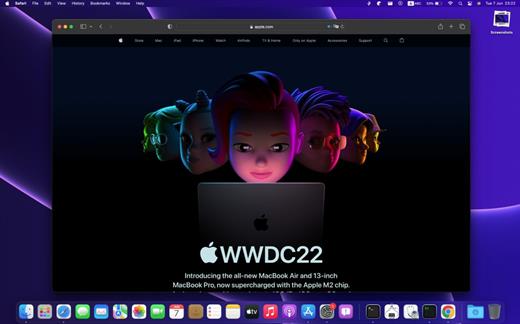
Apple has released the betas for its next major operating systems to the public today, making it relatively easy for adventurous users to download and install rough versions of the software that will begin powering Macs, iPhones, iPads, and other devices starting sometime in the fall.
More rapid, seamless security updates

Apple’s long list of Ventura features is called Rapid Security Response, and it’s pitched as a way for Apple to provide smaller, more timely updates to macOS that don’t require a system restart. But what does this mean, exactly?

To install updates like this, Ventura makes some additions to the Signed System Volume (SSV) security feature from Big Sur. To recap, the SSV encompasses almost all of the macOS system files, and your Mac is only allowed to boot and run if the volume’s signature indicates that nothing on the SSV has been modified or tampered with in any way. When updates are installed, the SSV is mounted in the background, files are patched, a new cryptographic signature is created for verification next time your system boots, and a snapshot of that newly signed volume is created for use next time the computer boots.

To allow for some smaller updates to be installed without a reboot, Ventura uses separate “cryptex” disk images for some apps and operating system files. As described by anonymous Twitter firmware engineer @never_released, cryptex images are treated by macOS as extensions of an existing volume. These images can be opened and modified independently of the SSV, but to macOS and most of its apps, they will appear to be part of the system volume, same as any other system file.

Ventura will be able to patch apps and other system files located in these cryptex images without needing to touch the SSV, including Safari, WebKit and JavaScript-related frameworks, and others. This will remove the need for a lengthy install process and reboot while still retaining the security benefits of the SSV for most system files. Whether this actually leads to faster or more frequent security patches remains to be seen. More wide-ranging updates, including (presumably) major updates like 13.1 or 13.2, will most likely continue to use the current reboot-required approach.

Beyond the System Settings app

A redesigned Print dialog adds a new continuously scrolling preview column on the left, and changes the time-consuming drop-down menu into one continuously scrolling sheet of settings with expandable subsections.

Font Book switches to a tiled UI in Ventura, with a quick visual preview of multiple fonts.

Ventura additionally ushers in the biggest redesign for Font Book since it was introduced back in macOS 10.3, switching from a multi-column design that only previews a single font at a time to a more visually oriented grid of fonts that provide smaller previews of dozens of fonts at a time.

Forehead-slapping imports from iOS

For all the tight integration between Apple’s various hardware and software platforms, there are still a few places where one platform doesn’t offer a feature that other platforms support. I sometimes think of these as “iPad Calculator” problems—as in, “why is there no Calculator app on the iPad?” Ventura solves a fair few of these, partly because Catalyst and SwiftUI have made it easier for Apple to write one app that can work on all its platforms. Case in point, the new Clock app is a mostly direct port of the iPadOS version of the same app, and iPadOS 16’s new big-screened version of the Weather app is coming to Ventura, too. (I especially like Weather, since it’s a much faster, cleaner alternative to heading to the Weather Channel’s own website and enduring multiple pesky messages about cookies, ad blocking, and location access.)

New features for gamers and streamers

The Mac has never been a gaming platform in the way that Windows is. But Apple Silicon Macs offer respectable graphics performance across the board, and Ventura makes changes on the software side that could make the Mac somewhat more appealing for gaming. Metal 3 makes a few changes to Apple’s proprietary low-overhead graphics API, but the most appealing is MetalFX, an upscaling technology along the lines of Nvidia’s DLSS, AMD’s FSR, or Intel’s upcoming XeSS. These kinds of upscaling algorithms are helpful for midrange and low-end GPUs, since they can upscale lower-resolution images without requiring lots of extra GPU power, making it possible to get closer to high-end GPU image quality without actually needing a high-end GPU.

macOS Ventura supports the following models
• MacBook (2017 or newer)
• MacBook Air (2018 or newer)
• MacBook Pro (2017 or newer)
• Mac mini (2018 or newer)
• iMac (2017 or newer)
• iMac Pro (2017)
• Mac Pro (2019 or newer)

What’s New

Version 13.6.2:

  • Release notes were unavailable when this listing was updated.

Compatibility

macOS 10.10 or later


Release Name: macOS Ventura 13.6.2 (22G320)
Size: 9.8 GB
Links: HOMEPAGE – NFO – Torrent Search

Download: FiKPERUPLOADGiGNiTROFLARERAPiDGATOR

Comments Off