Jan 22

JRiver Media Center 32.0.6 (x64) Multilingual

Supports more cell phones, MP3 players, DLNA, and other devices. Powers an HTPC to entertain your family. Even different playback in multiple zones. And it can record high definition TV, and provide a replacement for cable TV. It has a Theater View interface, controllable by a Media Center Remote, an iPad, iPhone, Android, a Windows netbook or Touchscreen. MC is a DirectShow player. Obsessive taggers will be delighted with cover art and metadata options. And MC backs up your work so you can sleep at night.
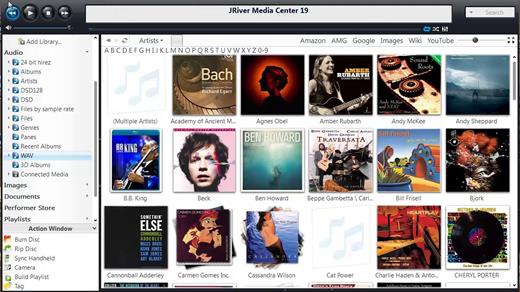
JRiver Media Center has a streamlined user interface designed to make it even easier to organize, find and play your digital files, and to connect to hardware devices. Make a CD of music for your car. Record your favorite shows and watch them on your TV. More than one soundcard? Play different music simultaneously in different rooms. MC’s Media Server can even stream your music to your PC at work!

Audio:
* Native support of DirectShow DSP filters
* Audiophile – WASAPI exclusive output using high-end USB DACs
* Audiophile – Added ability to play files from memory instead of disk
* Audiophile – Support for high end USB DAC’s with WASAPI
* Headphone DSP makes listening more natural and comfortable.
* /SoundcardSwitch command for the launcher (MC14.exe), allows soundcard selection on Vista and W7
* 3D album view adjusts text size to display more tracks when necessary
* 3D album view allows playing, adding, shuffling, and adding as next to play

Images:
* Image Preview allows zoom from a thumbnail to rotate, delete, compare, edit, and more
* Image thumbnail frames (optional)
* Photoshop PSD file support
* Single command copy / send to an editor like Photoshop, and stack new image with original

Video:
* Video tagging using sidecar files
* Chapter Support for MKV and MP4
* Chapters added to On Screen Display
* Info Panel displays metadata

Television:
* Added new “watched” column to metadata
* EPG can automatically retrieve XMLTV data
* Automatic correlation of XML channel names and MC channel names
* Info Panel displays metadata, including TV program art
* TV program art from YADB

Theater View:
* Watch Hulu and YouTube from Theater View
* Customizable nested views in Theater View
* Customizable File Info panel to display metadata
* Speed and quality enhancements
* Custom backgrounds
* Touch screen support
* On screen clock

Remotes and Servers:
* Wiki articles: Remotes and Servers
* Remote Relay using IR transceivers for controlling a set top box or receiver
* Remote Setup Wizard
* Media Center Remote learning and blasting
* Media Center can connect to another Media Center to act as a remote (TRemote)
* New HID remote control plug-in — supports shortcuts with keyboard, mouse, & gamepad
* Remote control with REST based Web Service Interface in Library Server
* Library Server supports read and write to allow for shared, multi-user database access
* DLNA added to the UPnP Server
* Library Server clients can write changes back to server
* Library Server connections allow playback on server as Playing Now zones

Release Name: JRiver Media Center 32.0.6 (x64) Multilingual
Size: 41.5 MB
Links: HOMEPAGE – NFO – Torrent Search

Download: FiKPERNiTROFLARERAPiDGATOR

5 Comments
Jan 22

PDF Extra Ultimate 8.90.54129 (x64) Multilingual

PDF Extra Ultimate Overview

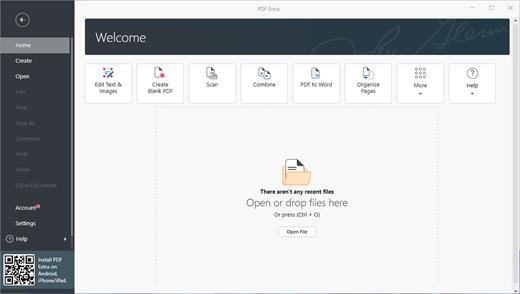
Professional PDF editor. Read & Edit files with advanced PDF features to achieve stunning results. Annotate, secure and convert them to Word, Excel and ePub.

Key Features of PDF Extra Ultimate

Complete PDF editing
Add or modify text and images directly into PDFs. Comment and highlight file sections, work with fillable forms and extract pages from documents.
Protect & sign documents
Sign your documents with a digital signature or use the free drawing tool to draw your own. Add a timestamp to your PDFs and set files editing permissions.
Convert PDFs to editable Word, Excel and ePub files
Convert PDFs to other formats with a single click, while keeping their original formatting intact.
EDIT PDF FILES
Edit PDFs with the all-in-one professional PDF editor. Feel free to change any document aspect you want – texts, pictures, design, signatures, certificates and more.
ORGANIZE PAGES IN PDFs
View and organize pages in PDFs – rotate and delete pages at your convenience.
READ & PRINT
Quickly open and view PDFs. Enjoy the best reading experience with а continuous page mode and print entire documents or just a selection of pages.
CONVERT PDFs
Export PDFs to Word, Excel or ePub while keeping the original layout and formatting. Save Word, Excel and ePub files as PDFs and share them with ease.
VIEW & COMMENT
Make comments on PDFs using sticky notes and drawing tools. Highlight and markup text with the annotation tools.
FILL & SIGN
Put identifiable information such as signatures, dates, checkmarks and more to your documents. The advanced support for fillable PDF forms allows you to make all the changes you need and sign documents with your saved digital signature or simply by drawing a signature on the document. The advanced digital certification allows you to validate a PDF’s authenticity.
PROTECT PDFs
Protect your sensitive documents with passwords to restrict editing, opening, printing, and/or extracting the document. Work with advanced PDF certificates to validate their authenticity.

Release Name: PDF Extra Ultimate 8.90.54129 (x64) Multilingual
Size: 183.3 MB
Links: HOMEPAGE – NFO – Torrent Search

Download: FiKPERNiTROFLARERAPiDGATOR

5 Comments
Jan 22

Typora 1.8.5 (x64) Multilingual

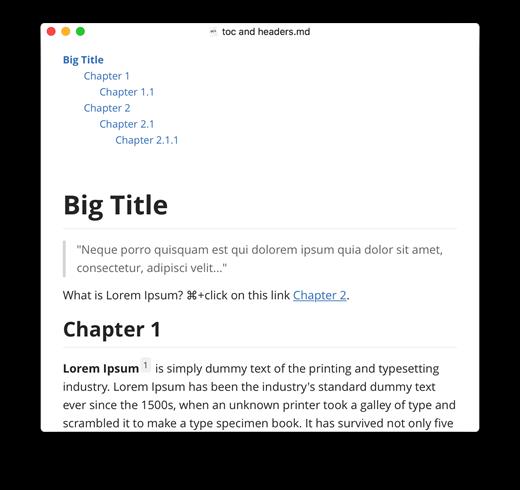
Typora gives you a seamless experience as both a reader and a writer. It removes the preview window, mode switcher, syntax symbols of markdown source code, and all other unnecessary distractions, replacing them with a real-time preview to help you concentrate on the content itself.

Features:
Markdown support including tables, code fences with syntax highlight, LaTeX, table of contents
Cross-platform
The real-time preview and WYSIWYG features
Beautiful interface and custom CSS theme support
Easy export

Release Name: Typora 1.8.5 (x64) Multilingual
Size: 81.8 MB
Links: HOMEPAGE – NFO – Torrent Search

Download: FiKPERNiTROFLARERAPiDGATOR

2 Comments
Jan 22

BlueStacks 5.20.10.1003 Multilingual

Description: BlueStacks is an easy to use and powerful App Player which is designed to run Android OS and apps on Windows PCs with instant switch between Android and Windows. No reboot is required. End consumers can now enjoy their favorite Android apps on Windows PCs. Android apps can appear either as icons on the Windows desktop, or within a full-blown Android environment.​

BlueStacks helps PC manufacturers to ride the Android momentum by enabling Android apps on x86-based tablets, netbooks, notebooks, convertibles and AiO Windows PCs. With the new hybrid convertible form factors, BlueStacks completely eliminates the need to carry two devices. The end consumer benefits from getting both Android and Windows at the price of a single PC.

The seamless user experience, simultaneous use of Android and Windows apps, and multi-touch enablement are built on ground breaking virtualization technology which requires zero configuration and is transparent to the end consumer.

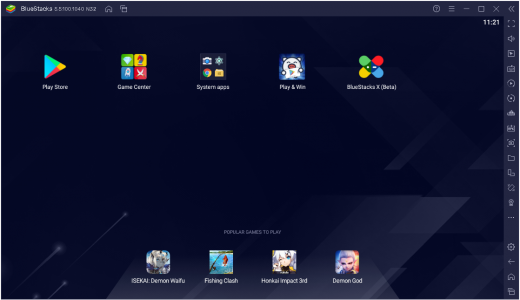
Once installed and launched, this application displays 10 pre-loaded applications, with a dedicated option to allow its users download new ones from the Internet. There is no separate configuration screen, but only a few options, so you shouldn’t spend too much time setting up the program.

BlueStacks can run the Android apps in full-screen, with very fast loading times and with absolutely no errors. Most of the games can be controlled by mouse, just like you’d do on your typical touschscreen mobile phone.

Another feature that’s worth mentioning is the so-called BlueStacks Cloud Connect, a separate tool designed to allow users push their applications from the Android device to the PC and thus access them on the computer.

The software integrates seamlessly with Citrix and Microsoft software delivery infrastructure and with Citrix’s Enterprise App Store. With BlueStacks, enterprise IT can deliver Android apps securely and effortlessly to any end point running Windows.

This app runs on low resources and works just fine on Windows 10, but there are some minor compatibility issues on older systems, which means it may fail to load on Windows XP and Vista.


Release Name: BlueStacks 5.20.10.1003 Multilingual
Size: 2.3 GB
Links: HOMEPAGE – NFO – Torrent Search

Download: FiKPERNiTROFLARERAPiDGATOR

3 Comments
Jan 22

Film Impact Premium Video Effects 5.1.1 (x64)

Description: Premiere Pro Video Effects. Get the fastest native video effects for Adobe Premiere Pro! Rocket-fast plugins with many customization options.

Special Video Effects (FX) Now at Your Disposal
Film Impact special video effects integrate seamlessly with the Premiere Pro application.
Whether you’ve wanted to apply Long Shadows, Rounded Crops or Mesmerizing Strokes & Outlines to your logos, texts & illustrations or you’ve been looking to include stunning special effects in your edits with Premiere Pro, it’s now possible.
And the best of it, without much effort!
By trying out our brand new collections of Essential and Motion FXs, your creativity and ease of work will surely get to another level.
Look, when we say it’s our mission to help you deliver your edits faster and with greater excellence, we really mean it!

Creating the Perfect Stroke Effect in Premiere Pro
That’s close to impossible if you rely only on the default Premiere Pro capabilities, but let’s see if we can spice things up a little.
Imagine if you had complete control over stroke placement, starting with the outer & customizing the inner edges of your chosen element? Choosing position & size of the stroke so you can achieve the perfect feel for your visual & match the style with with the rest of your video. How would that expand your skills?
Furthermore, Stroke FX’s rounding option allows for precision tailoring, perfectly emphasizing the natural contours of your elements – be it rounded corners for circular objects or sharp lines for angular designs.
This is what we create – intelligent effects for creative editors!
Did we hear colors? The duo-color feature adds smooth gradients to your strokes making them stand out, instead of reconciling with a default outline that just doesn’t look professional.
Lastly, the alpha fall-off feature, which we love the most, ensures soft edges that blend seamlessly with the background.
Ensuring perfection, the automatic Edge Color Sampling effortlessly integrates the edge color of your graphics into the Stroke to reveal a unified and professional appearance.

Long Shadow Effect Now Possible in Premiere Pro

Did you ever want to animate long shadows in Premiere Pro, without just defaulting to simplicity…
But instead applying color or gradient options to the shadow of texts, logos and illustrations?
As you can see in the video to the right, that’s now possible!
When you apply Film Impact’s Long Shadow FX on a chosen element, it gives you complete customizability to tailor it specifically to your vision.
What’s more? With our special technology, you can guarantee that your shadow moves seamlessly with the original colors of the text, logo or illustration.
If you look at it, it’s the go-to shadow effect for every professional editor, because it’s created for excellence!
With the highlight functionality that brightens sharp corners and elevates the overall aesthetic of the effect, Long Shadow FX creates a stunning 3D animation with ease and efficiency. Additionally, the alpha fall-off feature smoothly blends your shadow into the background, enhancing the overall composition and making it fit just right in the background frame.
If this sparks your interest already, you can click the button below and create your dreamed-for shadow in Premiere Pro with just a couple of clicks.

Cutomizable Crop Effects Are Easier Than Ever
A rounded Crop Effect with infinite capabilities in Premiere Pro?
Yes, you heard that right!
The times of constraining yourself with conventional cropping are over.
Applying Crop FX on your logos and illustrations allows you to add functionality and flexibility to your video editing workflow like never before.
With a simple drag & drop, and 11 customizable options, you can choose to crop individually from each side, scale, rotate and transform the cropping area as desired. Or tick a box and enjoy the symmetrical cropping feature for uniform results.
The name speaks for itself, but what makes Rounded Crop FX unique, is its ability to effortlessly add roundness to your crops. Another useful addition is the feather slider, which allows you to soften & blur the edges of the cropped area so it doesn’t feel as rough as the conventional crop.
To help you see exactly what you are cropping, the effect offers real-time visual feedback, ensuring that each crop is executed with utmost precision and to your liking.
We wanted to create the ideal cropping tool that will execute all your visions. Giving you elaborate and intuitive controls, Rounded Crop FX is precisely that!
If you want to express your freedom and include specifically-tailored custom effects to your edits, we suggest you give Film Impact a try.


Release Name: Film Impact Premium Video Effects 5.1.1 (x64)
Size: 31.1 MB
Links: HOMEPAGE – NFO – Torrent Search

Download: FiKPERNiTROFLARERAPiDGATOR

6 Comments
Jan 22

Softwarenetz Rechnung 10.22 Multilingual

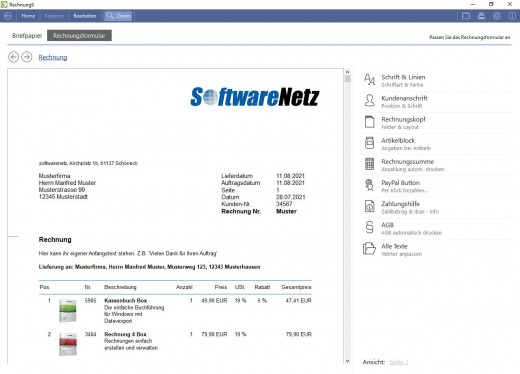
Description: For those self-employed persons, freelancers and small companies, who are in need of a simple and userfriendly program to create invoices.

PDF-invoices and PDF-reminders per e-mail.
PayPal-button on your PDF-invoice for payments.
Integrated designer for writing paper
Create invoice with or without VAT (also suitable for small companies.
Graphical statistics will inform you at any time about your turnover and details.
Photo-invoices: print invoices with the photos of your articles.
Invoices with EU-VAT percentage(MOSS)for private customers in foreign EU-country

Release Name: Softwarenetz Rechnung 10.22 Multilingual
Size: 19.3 MB
Links: HOMEPAGE – NFO – Torrent Search

Download: FiKPERNiTROFLARERAPiDGATOR

2 Comments
Jan 22

Secret Disk Professional 2024.00 Multilingual

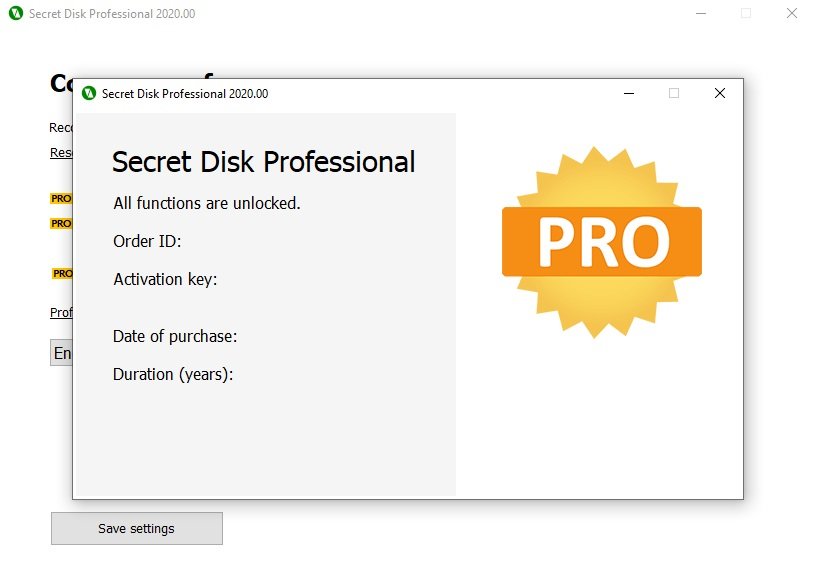
Description: Secret Disk can create additional disk on your PC, which can be invisible and locked with a password within one second. You can make your private files and folders invisible and protected. You don’t need to format your hard disk or make any changes to boot sector. Our program will create new disk automatically very quickly. You can make this disk invisible, including all contents, and protect it with a password. You can store any files and folders on the disk. Secret disk works as usual hard disk and compatible with any other programs which you have installed. You can have more than one secret disk and you can also choose disk letter.

In case of power outage or fatal error of OS Windows your secret disk will be locked and become invisible automatically. It happens automatically because information are stored in the virtual memory. Secret Disk does not encrypt any files, it just limits access to your files (you can use password). Software ties virtual disk to your files. This will provide you enough security to hide your files from any person.

Creates additional hidden disk protected with a password
Additional Secret Disk Secret Disk can create additional disk on your PC, which can be invisible and locked with a password within one second. You can make your private files and folders invisible and protected.

Additional Secret Disk
Secret Disk can create additional disk on your PC, which can be invisible and locked with a password within one second. You can make your private files and folders invisible and protected.

Easy And Fast Creation
You don’t need to format your hard disk or make any changes to boot sector. Our software will create new disk automatically very quickly. You can make this disk invisible, including all contents, and protect it with a password. You can store any files and folders on the disk. Secret disk works as usual hard disk and compatible with any other software which you have installed. You can have more than one secret disk and you can also choose disk letter.

Clever in Any Situation
In case of power outage or fatal error of OS Windows your secret disk will be locked and become invisible automatically. It happens automatically because information are stored in the virtual memory. Secret Disk does not encrypt any files, it just limits access to your files (you can use password). Software ties virtual disk to your files. This will provide you enough security to hide your files from any person.

Release Name: Secret Disk Professional 2024.00 Multilingual
Size: 2.5 MB
Links: HOMEPAGE – NFO – Torrent Search

Download: FiKPERNiTROFLARERAPiDGATOR

4 Comments
Jan 22

Syncovery Premium 10.11.1.161 (x64)

Description: Syncovery is a great application used to back up data and to synchronize PCs, servers, and notebooks. Users can choose the user interface that suits them best: Wizard Mode or Advanced Mode. The settings are stored in multiple profiles, and the software comes with support for FTP and secure FTP servers, SSH, WebDAV, Amazon S3, http, partial file updating, ZIP compression, data encryption, and a scheduler for automated backups. The scheduler can run as a service without users having to log on. On Windows XP or later, locked files can be copied using the Volume Shadow Service.

Here are some key features of “Syncovery”:
· Synchronizes Files and complete folder structures in different locations, such as a PC and a laptop. 64-bit I/O ensures that files sizes greater than 4GB are supported.
· Save complete sets of option settings as Profiles, with instant access to all saved settings. You can even Run Multiple Profiles with one command.
· Detect Moved Files. If you reorganized your folders by moving files to different locations, the Super Flexible File Synchronizer will detect this and quickly perform the same moves, for example, on your laptop. No extraneous copying!
· With Scheduler. Schedule the synchronization of your data on a backup hard disk at a convenient time each day or as frequently as you wish.
· Smart and Flexible. If some files cannot be copied due to other software accessing these files, the synchronizer will continue copying the remaining files, and then retry all those files that were locked, until all files have been copied successfully. A limit for the time spent on retries can be specified. However, during the retry phase, the synchronizer uses only minimal CPU resources.
· Keep Multiple Backup Versions Of Each File (optional) This feature doesn’t overwrite the backup files but renames them, until a selectable number of different backup versions is reached. You can also specify where to put these older backup versions (in the same folder as the original, or in a subfolder thereof, or in just one subfolder for the complete profile).
· Database-Aware. A special technique prevents any data corruption when copying database files, including SQL server database files. The synchronizer will wait with the copying until it has totally exclusive access to the file. During the copying process, the database server will not be able to work with the file. So, a prerequisite for using this software as a backup tool for database files is that they are occasionally not used (for example, at night).
· Can Use Recycle Bin for older versions of files that are overwritten. This is a fairly unique feature because most programs will permanently replace older versions of a file. Using Super Flexible File Synchronizer, you will have a chance of retrieving overwritten files if you select the appropriate options.
· Multiple File Masks (Inclusion and Exclusion) File Masks are transparently (and swiftly!) processed. Even if you specify redundant file masks, there will be no strange side effects.
· Select Base Folder Items. Want to synchronize only some folders? No need for separate runs for each folder. Just specify the base folder containing these folders, and then choose “Only Selected Items From Base Folders…”.
· Minimize Load Using Obsolete File Folders. If you occasionally move obsolete files to a specially designated folder, this usually causes trouble with traditional file synchronizers. They will copy the obsolete files back from your laptop right into the folders where you moved them out of. No longer! If you use the Select Base Folder Items option described above, you can place a grayed checkmark next to each folder for obsolete files. These folders are then taken into account for moving files into them, but not for copying files out. Thus, the synchronizer does the same moving of obsolete files on your laptop that you previously did on the PC, but it does not waste any time copying all obsolete files between the two machines.
· No More Trouble With Daylight Savings Time Since exact 1-hour time differences can be ignored if the file size matches, you won’t have any more problems if the file systems of two computers are off by one hour. If this is true only for some files, fine! The ignoring of the offset is done in a flexible way rather than adding a fixed number to the hours on one side.
· Easy Resuming On Disk Full. You simply make more space and ask the software to continue copying. It can pause right in the middle of a file until additional space is freed.
· Unattended Mode. In this mode, no questions are asked. You can specify beforehand which kinds of files may be overwritten.
· Optionally Create Exact Mirrors. If desired, you can optionally create an exact mirror of your data, even if this means that some files are deleted or replaced with older files.

Release Name: Syncovery Premium 10.11.1.161 (x64)
Size: 47.9 MB
Links: HOMEPAGE – NFO – Torrent Search

Download: FiKPERNiTROFLARERAPiDGATOR

5 Comments
Jan 22

Fast Screen Recorder 1.0.0.48 Multilingual

Description: With the Fast Screen Recorder application, you can record any moment on your screen. Fast Screen Recorder helps record your online conferences, meetings, tutorials, gaming moment, and more. You can record only audio, video, and both also with or without mic voice.

Features:

Record Any Screen Area
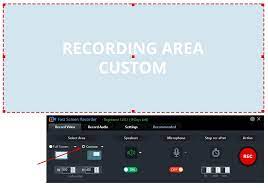
Select the screen area which you want to record. If you want to record the full screen of your pc then select the Full-Screen option button or if you need any specific area of the screen then you choose Custom area.

Record Video with Microphone
Fast Screen Recorder provides an option to on/off your microphone before start recording. So you can create videos with your voice. This is very helpful to record tutorials and presentations.

Record only Audio
With the Fast Screen Recorder, you can also record mp3 files with system audio and microphone. From this feature, you can record music, songs, lectures, etc.

Set Auto Stop Recording
Fast Screen Recorder can auto stop recording. With this feature not required to sit every time when recording running. If you know your recording will stop after some time then you set and start recording. Your recording will auto stop the defined time.

Record Screen without Watermark
With the Fast Screen Recorder registered version you can record your computer screen videos without a watermark.

Unlimited Screen Recording
Fast Screen Recorder registered version not have any limit of video length and number of video recording.

Auto Video Optimization
Fast Screen Recorder manages memory so, the recorded video size is optimized without quality loss.

Play After Record
After recording video or audio from Fast Screen Recorder you will receive an option to play your recorded video.

Disable Record Mouse Activity
If you do not want to record your mouse movement activity then you need to disable the option in the fast screen recorder settings.

Stop Countdown before Recording
When you record a video from Fast Screen Recorder then the countdown is running every time. If you do not need a countdown on recording then disable the option from settings.

Change Shortcut Keys
If you need to change the shortcut key of your screen recording software then you can change settings with the new keys combination. If you want to reset settings then click on “Reset to Default”.

Release Name: Fast Screen Recorder 1.0.0.48 Multilingual
Size: 22.1 MB
Links: HOMEPAGE – NFO – Torrent Search

Download: FiKPERNiTROFLARERAPiDGATOR

4 Comments
Jan 22

EaseUS RecExperts Pro 3.8.0

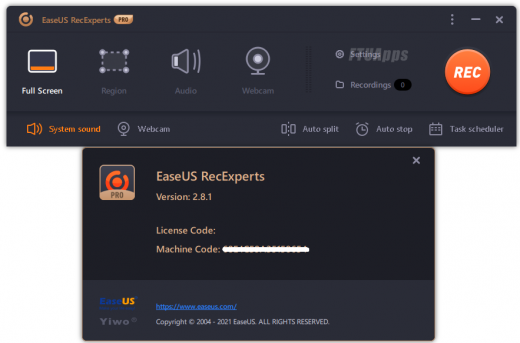
Description: EaseUS RecExperts is a tool designed to provide you with a simple and straightforward way to capture your full desktop, a specific window or area as well as your webcam. The capture can be enhanced with lines, arrows, images and text, so it can be used as guides, instructions or even for educational purposes.

Simple & Smart Screen Recorder:

Capture video, audio, webcam or image for any occasion
Record Zoom meetings, YouTube videos, tutorials, games, etc.
Record screen with internal audio and your voice on Windows

Features:

Flexible Capture Any Area of Your Screen
Flexibly capture your full screen, a selected area of the screen, or a single window.

Record Video and Audio Simultaneously
You can record the background sounds and a voice with your microphone at the same time.

Record Webcam
Record webcam or as a webcam overlay to increase engagement and help viewers connect with your content.

Game Recording Mode
Record various high-quality and popular 2D/3D games in 4K UHD resolution.

Task Scheduler
EaseUS RecExperts supports to create recording tasks automatically. Start Recording at a specific time. What’s more, it allows you to schedule multiple tasks simultaneously conveniently.

Advanced Editing
Add texts, lines, arrows and other real-time editing works. Trim video length, add a watermark and other advanced editing

What’s New:
– Official site does not provide any info about changes in this version.

System Requirements:
– Windows® 7/8/8.1/10/11 (32bit/64bit)

Release Name: EaseUS RecExperts Pro 3.8.0
Size: 84.1 MB
Links: HOMEPAGE – NFO – Torrent Search

Download: FiKPERNiTROFLARERAPiDGATOR

6 Comments