Feb 16

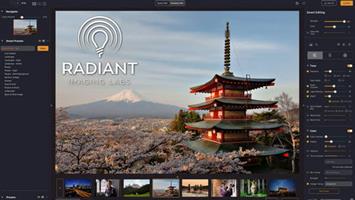
Radiant Photo 1.3.1.405 (x64) Multilingual

Your photos deserve to be radiant. Get superior quality finished photos with perfect color rendition, delivered to you in record time. Your photos — simply RADIANT. The way they are meant to be.

Amazing images. No sweat.
Getting great results with Radiant Photo couldn’t be easier!

The Radiant Photo image pipeline — Enhancement Tools

– Graduated Filter
A linear or a radial gradient can apply adjustments to only part of your image.

– Portrait Tools
Enhance the beauty of your subject with natural edits that enhance eyes, skin, and much more.

– Color Grading
LOOKs offer intelligent style recipes for your photos. Quickly editable for a personal style.

– Finishing Tools
Fine-tuning adjustments that can be applied last in the image pipeline.

The Radiant Photo image pipeline — Quick Edit

– Scene Detection
AI recognizes the content of the photo, as well as analyzes each pixel and chooses the ideal starting point.

– Smart Presets
A starting edit is applied to the photo from our collection, or use your own AI presets. Smart tools automatically adapt to every photo.

– Quick Edit Controls
Refine the edit quickly with seven essential controls – for most, the image is ready to print or share.

The Radiant Photo image pipeline — Detailed Edit

– Radiant Tone
Enhance the dynamic range of the scene without clipping. Get perfect exposure every time.

– Radiant Color
Photo color correction that matches how the human eye sees color — true to life.

– Radiant Details
Enhance sharpness, reveal lost details, and eliminate noise with smart tools. The Radiant Photo image pipeline — Enhancement Tools

System requirements
Hardware: Windows-based hardware PC with mouse or similar input device
Processor: CPU Intel® Core™ i5 or better
OS version: Windows® 10 or Windows® 11 (64-bit editions)
RAM: 8 GB RAM or more (minimum) / 16+ GB RAM (recommended)
Disk space: 1 GB free space; SSD for best performance
Display: 1280 x 800 display (minimum) / 1920 x 1080 display (recommend)
Plugin hosts: Photoshop CS6 or Photoshop Creative Cloud, Lightroom 6 or Lightroom Classic, Corel PaintShop Pro X6, X7, X8, or X9 V22

Release Name: Radiant Photo 1.3.1.405 (x64) Multilingual
Size: 208.2 MB
Links: HOMEPAGE – NFO – Torrent Search

Download: FiKPERNiTROFLARERAPiDGATOR

5 Comments
Feb 15

VueScan Pro 9.8.26 DC 15.02.2024 Multilingual

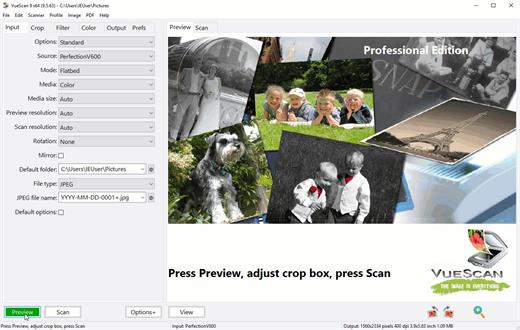
Description: VueScan, the world’s most popular scanner software, is used extensively by photographers, home users, scanning services and corporations. VueScan is a scanning program that works with most high-quality flatbed and film scanners to produce scans that have excellent color fidelity and color balance. It is very easy to use, and also has advanced features for restoring faded colors, batch scanning and other features used by professional photographers. VueScan changes nothing on your system, installs nothing in your operating system and all other scanner software will continue to function. VueScan increases your productivity and saves you money. VueScan has advanced scanning options, powerful features, and greatly improves your scans with superior color accuracy and better color balance. VueScan supports more than 700 scanners and 209 digital camera raw files and takes about 5 minutes to download and install.

Features:
• Works with 1200 flatbed and film scanners
• Runs on Mac OS X, Windows and Linux
• Improves your productivity and quality of scans
• Has been downloaded more than 5 million times
• Create raw scan files
• ICC profiles and color spaces
• IT8 color calibration

Release Name: VueScan Pro 9.8.26 DC 15.02.2024 Multilingual
Size: 43.2 MB
Links: HOMEPAGE – NFO – Torrent Search

Download: FiKPERNiTROFLARERAPiDGATOR

6 Comments
Feb 15

Topaz Photo AI 2.4.0 (x64)

Description: Topaz Photo AI v1.1.4 (x64) Pre-Activated

Sharpen, remove noise, and increase the resolution of your photos with tomorrow’s technology. Topaz Photo AI supercharges your image quality so you can focus on the creative part of photography.

Focus on your creativity rather than your tools.
AI is good at some things but bad at others. It can write sentences but can’t tell a story, and it can recommend songs but can’t compose music. But most importantly for us: AI is exceptionally good at improving image quality, but bad at knowing what to do with it.

We believe that stunning photography comes from artistic vision paired with world-class tools. AI will never replicate human creativity, so it’s still your job to provide the vision. But just like a sharper lens or better camera, Topaz Photo AI empowers you to create images that just aren’t possible with yesterday’s tools.

Your photos at their very sharpest.
You won’t always be able to retake a shot when your subject is blurry. Sometimes you won’t even know until you’re reviewing your photos on your computer.

In these cases, use Topaz Photo AI to ensure that your photos are the sharpest they can possibly be. Instead of artificially increasing edge contrast like traditional sharpening, the Sharpen AI module naturally reverses root causes of blurriness (camera shake, motion blur, misfocus) to create more natural results.

In the absence of blur, sharpness remains – crisp, clear detail that’s free of edge haloes or other artifacts.

What’s New:
– https://community.topazlabs.com/t/topaz-photo-ai-v1-1-4/38319

System Requirements:
– Windows Vista, 7, 8/8.1, 10, 11 (64-bit only)

Release Name: Topaz Photo AI 2.4.0 (x64)
Size: 708.9 MB
Links: HOMEPAGE – NFO – Torrent Search

Download: FiKPERNiTROFLARERAPiDGATOR

7 Comments
Feb 15

OfficeSuite Premium 8.30.54630 (x64) Multilingual

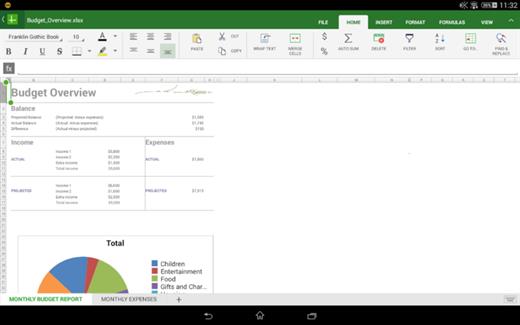
OfficeSuite Premium Crack Download is a powerful and all-in-one office suite software that offers all the necessary tools you need to create documents, compute and analyze data, presentations and more. OfficeSuite Premium includes a powerful word processor, a rich PDF reader and editor, an intelligent spreadsheet editor and an intuitive presentation creator, all equipped with modern and easy-to-use interfaces. OfficeSuite is one of the best alternatives to Microsoft Office. In fact, some of the other features go beyond the standard features offered by Microsoft Office.

OfficeSuite Download is light and it has superior high-overall performance processing and codes. Do not waste period being utilized to a fresh structure, begin operating proper aside. The professional pdf publisher offers complete pdf-modifying skills as proper as what ever adobe highwire artist readers can provide. On the other hand, you will find other options that it is possible to try out, particularly if you happen to be a house user. It is possible to add or Remove PDF FILE pages. Handle text as well as images with relieve, and after that rapidly transform your PDF file to Word, Exceed, or ePub documents with just one click. It facilitates many of the main format requirements which can be broadly used.

Download OfficeSuite Premium Activation Key Features :

  • Running on Android 4.0 and above
  • View, create and edit complex office documents
  • Ability to run on tablets and large phone screens
  • Ability to update the software, to support more formats
  • Full compatibility with Microsoft formats including DOC, DOCX, DOCM, XLS, XLSX, XLSM, PPT,
  • PPS, PPSX, PPTM, PPSM
  • Additional support for common formats like RTF, TXT, LOG, CSV, EML, ZIP
  • Create a profile and sync your settings across all your devices
  • Support Text-to-speech for PDF and Documents
  • Supports 68 languages

What’s new In OfficeSuite Premium Download Crack:

  • official site does not provide any info about changes in this version.

Release Name: OfficeSuite Premium 8.30.54630 (x64) Multilingual
Size: 251.8 MB
Links: HOMEPAGE – NFO – Torrent Search

Download: FiKPERNiTROFLARERAPiDGATOR

7 Comments
Feb 15

Adobe Substance 3D Sampler 4.3.1.4006 (x64) Multilingual

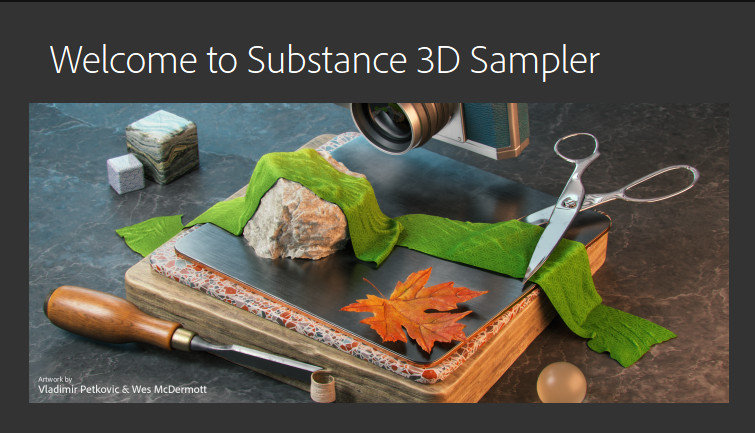
Free Download Adobe Substance 3D Sampler windows standalone offline installer for Windows, with this software, transform real-world pictures into 3D materials. Download Substance 3D Sampler Crack allows you to create and iterate on material collections by tweaking and mixing existing materials, or by extracting new materials from scans (single or multiple images).

A new set of powerful tools combining different technologies and creation methods (procedural-based, capture-based, AI-based and manual) will help you manage entire material libraries, and export them to other applications. Substance 3D Sampler Free Download is at the heart of your 3D workflow. Easily transform a real-life picture into a photorealistic surface or HDR environment. You May Also like Download Adobe Substance 3D Stager Crack

Features of Adobe Substance 3D Sampler

  • Digitize and enrich assets for 3D
  • Transform real-world pictures into 3D materials
  • Combine and mix materials
  • An extensive content library to get you started
  • Heart of your 3D workflow
  • AI-powered scan processing
  • Open ecosystem
  • IBL creation
  • Edit in Photoshop
  • Atlas Splatter
  • Parametric effects

Adobe Substance 3D Sampler System Requirements:

  • OS: Windows 10 (64bit)
  • CPU:Intel Core i7/AMD Ryzen 7
  • GPU:Nvidia Geforce GTX 1060/Nvidia Quadro P2200/AMD Radeon RX 580
  • VRAM: 8GB
  • RAM: 16GB
  • Hard drive: 30 GB SSD

Release Name: Adobe Substance 3D Sampler 4.3.1.4006 (x64) Multilingual
Size: 834.7 MB
Links: HOMEPAGE – NFO – Torrent Search

Download: FiKPERNiTROFLARERAPiDGATOR

7 Comments
Feb 15

PDF Extra Ultimate 9.0.54630 (x64) Multilingual

PDF Extra Ultimate Overview

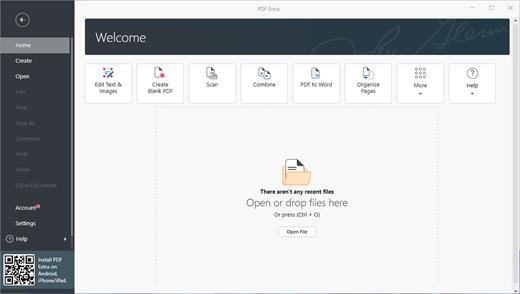
Professional PDF editor. Read & Edit files with advanced PDF features to achieve stunning results. Annotate, secure and convert them to Word, Excel and ePub.

Key Features of PDF Extra Ultimate

Complete PDF editing
Add or modify text and images directly into PDFs. Comment and highlight file sections, work with fillable forms and extract pages from documents.
Protect & sign documents
Sign your documents with a digital signature or use the free drawing tool to draw your own. Add a timestamp to your PDFs and set files editing permissions.
Convert PDFs to editable Word, Excel and ePub files
Convert PDFs to other formats with a single click, while keeping their original formatting intact.
EDIT PDF FILES
Edit PDFs with the all-in-one professional PDF editor. Feel free to change any document aspect you want – texts, pictures, design, signatures, certificates and more.
ORGANIZE PAGES IN PDFs
View and organize pages in PDFs – rotate and delete pages at your convenience.
READ & PRINT
Quickly open and view PDFs. Enjoy the best reading experience with а continuous page mode and print entire documents or just a selection of pages.
CONVERT PDFs
Export PDFs to Word, Excel or ePub while keeping the original layout and formatting. Save Word, Excel and ePub files as PDFs and share them with ease.
VIEW & COMMENT
Make comments on PDFs using sticky notes and drawing tools. Highlight and markup text with the annotation tools.
FILL & SIGN
Put identifiable information such as signatures, dates, checkmarks and more to your documents. The advanced support for fillable PDF forms allows you to make all the changes you need and sign documents with your saved digital signature or simply by drawing a signature on the document. The advanced digital certification allows you to validate a PDF’s authenticity.
PROTECT PDFs
Protect your sensitive documents with passwords to restrict editing, opening, printing, and/or extracting the document. Work with advanced PDF certificates to validate their authenticity.

Release Name: PDF Extra Ultimate 9.0.54630 (x64) Multilingual
Size: 183.8 MB
Links: HOMEPAGE – NFO – Torrent Search

Download: FiKPERNiTROFLARERAPiDGATOR

7 Comments
Feb 15

Global Mapper Pro 25.1.0 Build 021424 (x64)

Description: Global Mapper also includes the ability to directly access multiple online sources of imagery, topographic maps, and gridded terrain data. This includes access to worldwide high resolution color imagery from DigitalGlobe (watermarked access for free) and access to the entire TerraServer-USA database of USGS satellite imagery and topographic maps free-of-charge. Global Mapper also has the ability to easily access WMS data sources, including built-in access to elevation data and color imagery for the entire world, and to view elevatio n data in true 3D with any loaded raster imagery and vector data draped on top of it!

Features:
» Global Mapper supports viewing of dozens of the most common data formats
» Provides direct access to DigitalGlobe high resolution color imagery
» Provides direct access to the complete TerraServer-USA satellite imagery and topographic map archive
» Provides easy, direct access to WMS data sources
» Supports true 3D viewing of loaded elevation data including draping of any loaded imagery and vector data over the 3D surface
» Crop, reproject, and merge any combination of raster data and elevation data, including DRGs
» Digitize new vector (area, line, and point) features by drawing them with the mouse
» Track a compatible GPS device connected to your computer’s serial port or USB port in real-time over any loaded data
» Support accurate conversions between a large list of projection systems and datums
» Export both vector, raster, and elevation data to a variety of formats
» graphically rectify (georeference) any JPG, TIFF, or PNG image and save the results to a new image
» Create contours for any combination of elevation data
» Automatic triangulation and gridding of 3D point data sets
» Support for combining/comparing terrain surfaces
» NASA World Wind Support
» Google Maps Support
» Virtual Earth Support
» Advanced screen capture
» Batch conversion of almost any input data data files to any compatible export type
» Auto-clip collar for DRGs/DOQQs/BSBs
» Advanced measurement capabilities
» Supports the easy creation of geological features
» Advanced drawing capabilities
» Ability to link vector feature attributes to web sites or files
» Support the latest DEM and SDTS DEM formats
» Supports opening DLG-O and DEM files directly from gzipped archives
» Supports keyboard navigation
» Search and edit load vector data by name, attribute value, or description
» Load and display JPG images with embedded EXIF positioning data

Release Name: Global Mapper Pro 25.1.0 Build 021424 (x64)
Size: 495.3 MB
Links: HOMEPAGE – NFO – Torrent Search

Download: FiKPERNiTROFLARERAPiDGATOR

7 Comments
Feb 15

Sante DICOM Editor 10.0.6

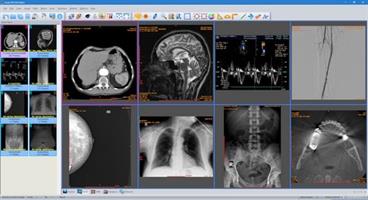
Description: Sante DICOM Editor is a professional DICOM editor, viewer, anonymizer, converter, dicomizer, PACS client, mini PACS server, patient CD/DVD burner (with viewer) and much more.

The unique viewer
Sante DICOM Editor is not a “yet another DICOM viewer” constructed with freely available libraries such as dcmtk, itk and vtk, like hundreds of other DICOM viewers which differ from each other only in the appearance, menus, panels and dialog boxes. It is a unique program with unique capabilities, designed and developed in-house by us, from the ground up, with the most advanced programming tools and it is the result of research and development on DICOM imaging of the last two decades.

The powerful editor
Sante DICOM Editor is the industry-leading post processing application for DICOM file editing, conversion and handling, it is used by almost all the large corporations and medical equipment manufacturers, and it is the DICOM editor of choice of the greatest universities and hospitals of the world. Among others, it lets the user to edit and modify DICOM files, to add and remove attributes, and even edit and modify sequence attributes.

Features and benefits:
Powerful DICOM workstation, viewer and editor
Perpetual license that never expires.
Free updates and free technical support for product’s lifetime
PACS client that supports all the DICOM network services (C-FIND SCU/SCP, C-MOVE SCU/SCP, C-STORE SCU/SCP, C-GET SCU/SCP, C-ECHO SCU/SCP)
It can be used as a mini PACS server as well
(the number of stored patients/studies depends on disk size only)
Command line switches for integration with PACS servers (learn more…)
Support of all charsets (latin, chinese, japanese, korean, cyrillic, arabic, greek, turkish, etc.)
Compatible with all modalities (CT, MR, NM, US, XA, MG, CR etc.), all manufacturers and all DICOM 3.0 and NEMA 2 file types.
Editing and modification of DICOM files (even of sequence attributes)
Simultaneous editing of all DICOM files of a series/study
DICOMDIR editor
Dual monitor support (new in version 6, learn more…)
Structured Report support (new in version 6.3)
Presentation State file editor
Structured Report file editor
Printing to DICOM printers and Windows printers
DICOM to DICOM conversion, DICOM file modification (transfer syntax, image width and height, color depth, frame insertion, removal, sorting, etc.)
Built-in Anonymizer, burned-in annotations removal (Patient data de-identification, suitable as well for avoiding issues with the GDPR regulation 2016/679 of EU)
Built-in Dicomizer: DICOM file creation from video files (avi, wmv) and plain image formats (jpeg, jpeg2000, tiff, bmp, and png)
Ultrasound region calibration module support (calibrated Ultrasound measurements)
Merging of DICOM files
Creation of DICOM CD/DVD disks with viewer
Support of Epson and Primera CD/DVD Disk Publishers (robots)
Contrast Agent Probe

Comparison with Sante DICOM Viewer Pro:
Sante DICOM Editor has all the features of Sante DICOM Viewer Pro plus:
DICOM file editor
Batch modification of headers of DICOM files (insert/modify/delete fields), with use of templates
DICOM to DICOM Converter and DICOM file modification (transfer syntax, image width and height, color depth, frame insertion, removal, sorting, etc.)
Built-in Anonymizer with use of templates (user can define extra fields for anonymizing, and its values, e.g. blank or a specified term like “anonymized”)
Built-in Dicomizer: DICOM file creation from any video source and simple image formats (jpeg, jpeg2000, tiff, bmp and png)
Single multi-frame DICOM file creation from multiple DICOM files of the same series
Splitting of a multi-frame DICOM file to multiple single frame DICOM files
Batch conversion of old NEMA 2 or non-Part 10 files to DICOM 3 Part 10 files
Batch conversion of DICOM 3 files to NEMA 2 format
Batch conversion of non-compressed DICOM files to compressed (JPEG, JPEG Lossless)
Batch conversion of compressed DICOM files to a non-compressed DICOM format
Batch anonymizing with use of templates (user can define extra fields for anonymizing and its values, e.g. blank or a specified term like “anonymized”)
Batch conversion of simple images (jpeg, tiff, bitmap, gif, png) to single frame or multi-frame DICOM files, with use of templates
Batch conversion of movies (avi files) to multi-frame DICOM files, with use of templates
Contrast Agent Probe
Curved Multi-planar Reconstruction (Curved MPR)

Minimum Requirements:
Windows 11/10/8.1/8/7/Vista or Windows Server 2019/2016/2012/2008 (the program is not compatible with Windows XP or earlier)
Intel Core i3 1.3GHz or greater
4 GB memory or more
Monitor that supports resolution 1366×768 or above, and true color (16M Colors)


Release Name: Sante DICOM Editor 10.0.6
Size: 164.4 MB
Links: HOMEPAGE – NFO – Torrent Search

Download: FiKPERNiTROFLARERAPiDGATOR

7 Comments
Feb 15

Rons Renamer Pro 2023.8.11.1527

Description: Rons Renamer is an essential windows utility for organizing and renaming batches of files and folders. Elegant, powerful, safe and fast.

Rons Renamer is a Windows utility for renaming many files in one go, using rules like search and replace. Batches of files can be 10’s to 1000’s, and span multiple directories, with an unlimited number of rules that can be combined to achieve almost any result.

Rons Renamer has been designed from concept to execution to be simple and fast to use, without compromising on power; in short to make a difficult job as easy as possible.

Powerful and Easy
There are 15 easy to use renaming rules. Any number of rules can be combined in any order into rule sets which can be saved to give instant access to frequently used renaming tasks.
Tested with tens of thousands of files, and designed for easy operation the job will be done in no time.

File tag support (Exif and MP3 tags)
Collections of photographs or music can be renamed using Exif and MP3 tags contained in the file. Music files generally contain an album name, song title, band or singer etc., while a pictures contain a date and place where the picture was taken etc.
This valuable information can be extracted and applied to the name.

Safe renaming
Preview of the new file names – know what the application will do before any files are renamed.
Conflict and illegal file name checks built in.
Instant visual display of each file’s state making it easy to see what will be renamed and if conflicts will arise.
Rollback option after rename for that final check.

Command Line Support
Any rule set can be saved and can be exported as a complete script for automation purposes.

Operating System Support:
Windows 11
Windows 10 (x32 and x64)
Windows 8/8.1 (x32 and x64)
Windows 7 (x32 and x64)
Windows Vista (x32 and x64)


Release Name: Rons Renamer Pro 2023.8.11.1527
Size: 5.3 MB
Links: HOMEPAGE – NFO – Torrent Search

Download: FiKPERNiTROFLARERAPiDGATOR

5 Comments
Feb 15

DiskBoss 14.3.12

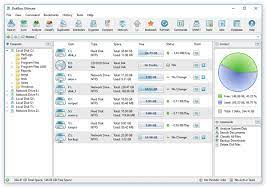
Description: DiskBoss is an automated, rule-based file and disk management solution allowing one to perform disk space utilization analysis, file classification and categorization, duplicate files detection and removal, high-speed file synchronization and data migration, disk change monitoring, rule-based file organizing, data wiping and much more.

DiskBoss is an advanced file and disk management solution allowing one to search and classify files, perform disk space utilization analysis, detect and remove duplicate files, organize files according to user-defined rules and policies, copy large amounts of files in a fault-tolerant way, synchronize disks and directories, cleanup wasted disk space, etc.

All file management operations are integrated in a centralized and easy-to-use GUI application with a built-in file navigator allowing one to execute any required operation in a single mouse click. Frequently used file management operations may be pre-configured as user-defined commands and executed using the GUI application or direct desktop shortcuts.

DiskBoss is a highly extendable and customizable data management solution allowing one to design custom file classification plugins and purpose-built file management operations using an open and easy-to-use XML-Based format. Custom disk space analysis and file management operations may be integrated into the product, executed periodically at specific time intervals, performed as conditional actions in other operations or automatically triggered by one or more changes in a disk or directory.

In addition, IT administrators are provided with extensive database integration capabilities allowing one to submit disk space analysis, file classification, duplicate files detection and file search reports into an SQL database. Reports from multiple servers and desktop computers may be submitted to a centralized SQL database allowing one to display charts showing the used disk space, file categories and duplicate files per user or per host and providing an in-depth visibility into how disk space is used, what types of files are stored and how much space is wasted on duplicate files across the entire enterprise.

Finally, IT professionals and enterprises are provided with DiskBoss Server – a server-based product version, which runs in the background as a service and is capable of executing all disk space analysis and file management operations in a fully automatic and unattended mode. DiskBoss Server can be managed and configured locally or through the network using a free network client GUI application or the DiskBoss command line utility, which provides the user with the ability to integrate DiskBoss’ features and capabilities into other products and solutions.


Release Name: DiskBoss 14.3.12
Size: 51.2 MB
Links: HOMEPAGE – NFO – Torrent Search

Download: FiKPERNiTROFLARERAPiDGATOR

6 Comments