Feb 16

O&O DiskImage Professional / Server 18.5.367

O&O DiskImage 18 lets you back up an entire computer or single files whenever you want – even while the computer is being used. In the event you should lose your personal data it can be quickly restored with just a few mouse clicks – even when Windows is no longer able to start. It also supports SSD drives and the latest UEFI System.
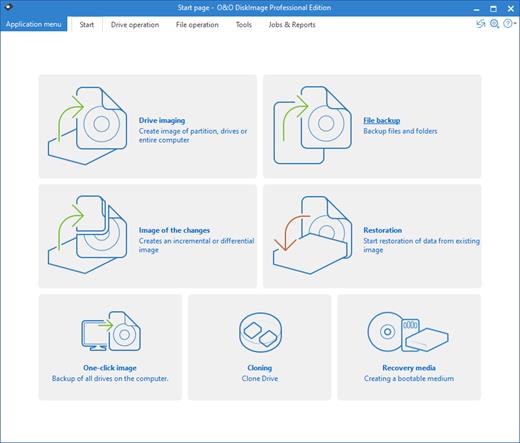
O&O DiskImage lets you carry out a system restore and to duplicate or clone an entire PC or hard drive. You can even restore this backup onto a computer whose hardware is different from the original machine, for instance, where you have changed a motherboard on the target machine or have bought a brand new PC and want to restore an old backup onto it.

A regular backup is still something that many users prefer to avoid. At least that is until they suffer their first loss of important files as a result of software, hardware or user error: that’s when it becomes crystal clear just how valuable a reliable and up-to-date backup really is!

New in O&O DiskImage 18: Comprehensive VHD / VHDX functionality
With the new version 18 it’s possible to convert image files made with O&O DiskImage into Microsoft Virtual Hard Disc (VHDX as well as VHD) image files. This can be especially useful if someone wants to first “rehearse” migrating from Windows 10 to Windows 11 because it can be done using a virtual machine created on the current system.

The new O&O DiskImage 18 can also create incremental and differential images of virtual drives. Combining or mounting these images is also possible. Whenever there’s a backup available, it only takes a few seconds to access any files that are needed. Work on the computer can then be continued without any loss of time or important data.

O&O DiskImage 18 with its own recovery partition
Normally with a backup or imaging program you need to create a boot medium (USB) to boot up your system if something goes awry. This you have to either carry around or store somewhere safe in case disaster strikes.

Thanks to the integration into the system, the O&O DiskImage RecoveryPartition can be accessed immediately so that the last system image can be restored directly. If the Windows operating system does not start or if faulty drivers have to be uninstalled – with the integrated recovery environment, all O&O tools are available to make the system operational again as easily as possible. Not only is this much more comfortable and quicker for the user, it also provides them with an extra level of security as this medium cannot get lost or damaged as easily as a “portable”, external one.

O&O DiskImage To Go
Previously, in addition to regularly backing up your machine, you also had to separately create an O&O DiskImage boot media to restore that backup. Everything is easier now! The new O&O DiskImage To Go function automatically turns an external hard drive (or USB flash drive with enough storage space) into an O&O DiskImage boot medium and marks this disk as the preferred storage medium for future system backups. As soon as you then connect this external USB hard disk to your computer, O&O DiskImage 18 automatically creates a backup. This makes it easy to create a recent backup. And if something really happens to your computer or you want to transfer your system and all your data to a new computer, then with the O&O DiskImage boot medium you can restore the backup stored on it with just one touch of a button. Without the hassle of searching for the boot medium and the external hard drive with the backup.
It has never been so easy to ensure the security of your data!

Further functions of O&O DiskImage:

All default and advanced features are combined in one single product
This backup software is the safest and easiest way to avoid losing important personal files! Options are available for both auto backup and manual settings. Thanks to a unique recovery system that includes additional system recovery tools combined with O&O DiskImage you’ll quickly be able to restore all your important data – even if the backup you’re using was created with an older O&O DiskImage version.

Backup entire PCs, hard drives or files with the push of a button
When you back up a PC, O&O DiskImage saves all personal files as well as hard drive information and individual settings. This not only protects irreplaceable files but, in a worst case scenario, also saves you the trouble of having to carry out a time-consuming new setup of programs and the Windows operating system. O&O DiskImage lets you back up an entire computer, system and hard drives or just individual files and folders. To make sure your backups are always up to date, we recommend creating them at short intervals from one another.

Quick and easy system restore – even onto different hardware
Restoring a backup with O&O DiskImage is as easy as pie: all you have to do is start the program, select the backup you want to restore, and you’re off. Included with the software is our machine independent restoration which means your old backup can be transferred 1:1 onto a new machine. Hardware of a different make will be automatically recognized and Windows settings will be carried out by themselves.

Plug-and-play function
Anyone wanting to save data on an external hard disk has it even easier with the new O&O DiskImage 18. Thanks to the integrated plug-and -play option, selected files and folders can be backed up automatically as soon as, for example, an external hard disk is connected to the computer. This is ideal for users who forget to carry out regular backups or who don’t want to go through the trouble. Once configured, the auto backup function runs by itself.

Create a boot medium directly from within the program
O&O DiskImage can bring a system back to life immediately and with no installation required. It does so by way of a Boot Medium (USB Stick) which is based on the currently installed Windows system and which contains all the standard drivers required.

Product features
Backup an entire computer with the push of a button
Backup system and hard drives, clone drives and entire disks
Brand new file-based backup: now twice as fast as ever before – backup and restore individual files and/or folders
Direct creation of VHD/VHDX
Monitoring and warning of security risks
Incremental/differential backup: back up only the changes
Easily restore files, folders, drives and disks
System restore onto different hardware (M.I.R.)
Create a Windows Boot system directly from within the program with driver integration
Plug-and-play: Selected files and folders are automatically backed up and synchronized
Variable pixel density settings: adjusts to the selected DPI setting of the connected monitor
New and enhanced functions Control via Command Lines

Operating System:
Windows 11, Windows 10 and Windows 8.1


Release Name: O&O DiskImage Professional / Server 18.5.367
Size: 439.8 MB
Links: HOMEPAGE – NFO – Torrent Search

Download: FiKPERNiTROFLARERAPiDGATOR

6 Comments
Feb 16

Nuclear Coffee Recover Keys 12.0.6.309 (x64) Enterprise Multilingual

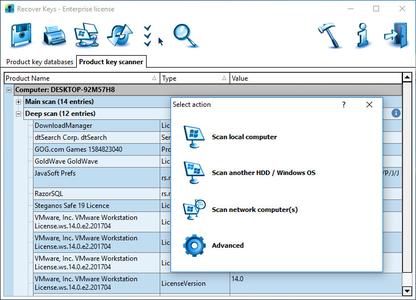
Description: Recover Keys is a simple yet comprehensive Windows application designed to safeguard activation keys for software products installed on your local or remote network computers in the event of a system or hard disk crash. Losing activation keys is a time consuming and expensive experience. In such case you would have to contact the developers of each program or even purchase entirely new versions of all software. Now you can protect yourself and backup your keys! Recover Keys quickly analyzes your system for over 4500+ software programs and produces a list of software activation keys. Then you can save, backup, print, or export (Word, Excel, PDF, HTML, CSV, XML) the license information. Due to friendly interface and solid amounts of options, Recover Keys can used both by professionals and inexperienced users.

Product Key Finder

Recover product keys for Windows, Office, Adobe products, Acronis products, Electronic Arts games, WinZip, Nero and more than 4500+ other programs

Backup activation keys

Losing product keys can be very expensive for your both time and money. You can save your product keys into Text file, Word, Excel, PDF, HTML, CSV, XML or simply send it to printer.

Scan another Windows or HDD

Recover Keys can also scan another Windows operating system or another hard disc drive (HDD) for product keys, bootable or not

Scan remote network computers

Besides scanning your local PC for product keys, Recover Keys can scan remote network computers.

Automatic updates

We provide technical support and regular updates for Recover Keys. Currently, this product key finder retrieves keys for 4500+ software programs and we permanently update the list

System requirements
Windows NT / 2000 / XP / Vista / 7 / 8 / 8.1 / 10 / Windows Server 2003 / 2008 / 2012

Release Name: Nuclear Coffee Recover Keys 12.0.6.309 (x64) Enterprise Multilingual
Size: 70.8 MB
Links: HOMEPAGE – NFO – Torrent Search

Download: FiKPERNiTROFLARERAPiDGATOR

7 Comments
Feb 16

Stellar Photo Recovery Professional / Premium 11.8.0.3 (x64) Multilingual

Description: There’re many photo recovery software and then there’s the one that you really need. Stellar Photo Recovery Premium makes the choice clear! Why— because it recovers photos, videos, and audio files, AND also repairs photos and videos!

• Recovers a vast variety of photos on any Mac and Windows storage
• Recovers videos and audio files on any storage device
• Also Repairs corrupt photos and videos. Extracts thumbnails of corrupt images.
• Retrieves photos and videos from corrupt and formatted storage devices
• Recovers videos and photos taken with all major camera brands and other devices
• Restores pictures and videos with original date-timestamp

Key Features:

Video and Photo Recovery from Corrupt Storage
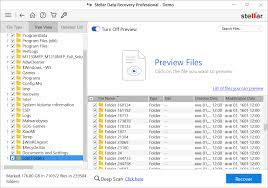
Not just accidental deletion, but photos and videos (& audio files) lost due to corruption in the storage device or drive are also recovered with this powerful photo and video recovery software. The newly introduced Deep Scan feature tops the regular Quick Scan to perform in-depth sector-wise scan on the media to locate files that are seemingly lost. So, the software now practically gets back every photo, video and audio file if it ever was present on the storage media and wasn’t overwritten in the meantime.

Media Recovery from ANY Digital Storage Device
Stellar Photo Recovery Premium gets back photos, videos and audio files from virtually any type of storage drive or device that works with Mac or Windows. So the range of workable storage media that comes within the fold of the software includes everything from hard drives, SSDs, and fusion drives to SD card, USB sticks and more. And with support for storage in all popular camera brands, drones, smartphones, dash cams and also partially burnt or scratched optical media — you get a photo recovery software that can’t be outdone.

All New Interface with Smart Features
The software lets you simply cruise through the entire recovery process in just 3 simple clicks— select, scan and recover. Recovers all the lost photos, videos and audio files in a breeze. There are numerous thoughtfully built features within the interface — Live File Preview, Well-ordered and Sortable Scan Results, Scan Now-Recover Later, Multiple File Saving Options, etc. — that make the software stand out from the usual recovery tools. Add to that a purely user-centric interface, and you get a software that’s not just the most powerful but built inside out for you!

Disk Image for Quick and Safe Recovery
It’s common for drives and storage devices to develop bad sectors over time and with continuous usage. This makes your valuable data – stored on such drives – vulnerable to permanent loss due to chances of drive failure. For such hardware issues, you’d need Stellar Photo Recovery Premium to create sector-wise image of the entire storage device or a selected range. And with this image file and the recovery software, you can then recover the stored videos and photos anytime, without the need to directly work on the hard drive. Plus recovery from image is much faster.

Superior Technology. Innovative Features
Apart from its laundry list of brilliant features that you directly experience through the interface, the photo recovery tool packs in incredible variety of innovation that fuels its matchless performance. To name a few it does recovery of uncompressed RAW images, supports custom file formats, recovers Unicode files, gets back raster and vector images, does full or partial disk scanning, and also supports both HFS+ and Linux file systems apart from the usual FAT, ExFAT and NTFS!

Language Supported

English, German, French, Italian, Spanish

Release Name: Stellar Photo Recovery Professional / Premium 11.8.0.3 (x64) Multilingual
Size: 235.4 MB
Links: HOMEPAGE – NFO – Torrent Search

Download: FiKPERNiTROFLARERAPiDGATOR

6 Comments
Feb 16

Altium Designer 24.2.2 Build 26 (x64)

Description: Altium Designer is the most common PCB design system among electronics engineers and designers. Altium Designer is an affordable, efficient and modern software with a single user interface, with the management of a simple and clear licensing system. A single Altium Designer data model allows you to quickly and efficiently design new electronic products. The optimized unified user interface of all editors (UGO, footprint, circuit, board, design documentation, etc.) increases the productivity of the design process and eliminates the typical difficulties and errors caused by the manual transfer of data between editors.

Key features of Altium Designer:
• A unified platform where all stages of the design of an electronic device are carried out.
• Creating electrical circuits. Altium Designer supports bidirectional communication between the circuit and the board, which ensures the unity of the user interface and data model for the entire design process and increases its efficiency.
• Component management. A single model of each component, in which there are all the necessary components: UGO, seats, 3D-model and behavioral models for the analysis of functioning.
• Verification of the project. The built-in XSPICE mixed analog and digital analysis editor and signal editor allow for AC analysis, transient analysis, calculation of the operating point, sensitivity analysis to parameter changes, Monte Carlo analysis and other types of analysis.
• Designing a topology where the tools have a logical structure and allow you to place and move objects in various modes.
• Supports flex-rigid boards. Altium Designer simplifies the definition and editing of areas with a flexible-rigid stack of layers consisting of different materials and having different thicknesses, which allows you to create flexible-rigid structures on one board.
• Designing devices from several electronic modules. Altium Designer allows you to design an assembly consisting of many connected boards, supports device designs from several electronic modules.
• Interactive tracing. The modern capabilities of the board editor allow tracing of single conductors and differential pairs in various placement modes and adjust the length of the conductors.
• Interaction with mechanical CAD systems. The NATIVE 3D ™ graphics engine provides seamless interaction between the design of the electronic and mechanical parts of the product.
• Data management includes functions of blocking, visual comparison of document changes and revisions.
• Formation of design and production documentation for ESKD. Data for production and assembly are generated in batches using Output Job files. Draftsman tools allow you to quickly get a set of documentation for production and assembly.

Recommended system requirements:
• Windows 7 (64-bit only), Windows 8 (64-bit only) or Windows 10 (64-bit only)
• Intel® Core ™ i7 processor or equivalent
• 16 GB RAM
• 10 GB free hard disk space (installation and user files)
• Solid State Drive (SSD)
• High-performance graphics card (with DirectX 10 or higher), for example GeForce GTX 1060 / Radeon RX 470
• Two monitors with a screen resolution of 2560×1440 (or higher)
• 3D-manipulator for three-dimensional design of printed circuit boards, for example Space Navigator
• Adobe® Reader® (version XI or newer to view 3D PDF)
• Internet connection
• Current version of the web browser
• Microsoft Office: 32-bit or 64-bit version (Microsoft Excel is required to create a BOM, Microsoft Access is required for libraries based on DbLib databases). The 64-bit version of Microsoft Access Database Engine 2010 (required for DbLib) is included in 64-bit Microsoft Office, but not in 32-bit). If you are using 32-bit and 64-bit versions of Altium software for design on the same machine

Release Name: Altium Designer 24.2.2 Build 26 (x64)
Size: 3.2 GB
Links: HOMEPAGE – NFO – Torrent Search

Download: FiKPERNiTROFLARERAPiDGATOR

6 Comments
Feb 16

DiskDigger 1.157.227.3821 Multilingual

Description: DiskDigger is a tool that undeletes and recovers lost files from your hard drive, memory cards, USB flash drives – you name it!​

Whether you accidentally deleted some documents or photos from your computer, reformatted your camera’s memory card, or want to see what files are lurking on an old USB drive, DiskDigger is here for you.
DiskDigger can recover deleted files from most types of media that your computer can read: hard disks, USB flash drives, memory cards, CDs, DVDs, and floppy disks.

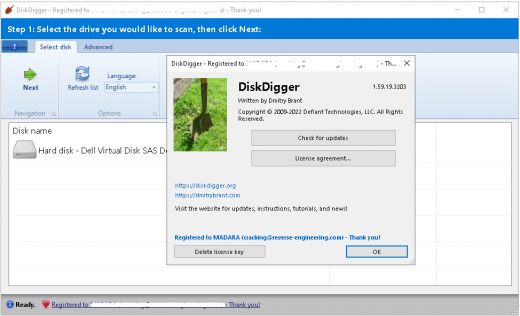
DiskDigger has two modes of operation which you can select every you scan a disk. These modes are called “dig deep” and “dig deeper.” Here is a quick list of features for each mode:

Dig Deep
– Undelete files from FAT (FAT12, FAT16, FAT32), NTFS, and exFAT partitions.

Recover any type of file.
– Filter recoverable files by name and size.
– Sort recoverable files by name, size, date, and directory.

Dig Deeper
– Scan (carve) entire disk for traces of specific file types.

Supported file types include:

Photos and images:
JPG – Pictures stored in digital cameras and on the Web (Joint Photographic Experts Group)
PNG – Portable Network Graphics
GIF – Graphics Interchange Format
BMP – Windows and OS/2 bitmap image
TIFF – Tagged Image File Format
ICO – Windows Icon
ANI – Windows animated cursor
CR2 – Canon raw image
SR2 – Sony raw image
NEF – Nikon raw image
DCR – Kodak raw image
PEF – Pentax raw image
RAF – Fujifilm raw image
RW2 – Panasonic/Lumix raw image
LFP – Lytro raw image
MPO – Images from 3D cameras (Multiple Picture Object)
DNG – Adobe Digital Negative
SVG – Scalable Vector Graphics
HEIC/HEIF – High Efficiency File Format image
PSD – Adobe Photoshop image
RAS – Sun raster image
PSP – Paint Shop Pro image
Thumbcache – Windows thumbnail cache
IFF – Amiga images and other media
ART – AOL Art images
WMF – Windows MetaFile
EMF – Enhanced MetaFile
WMZ, EMZ – Compressed MetaFiles
DICOM – Medical imaging format
WEBP – WebP images
PCX – ZSoft PCX images
CDR – CorelDraw images
INDD – Adobe InDesign documents
CP – Adobe Captivate documents
AI – Adobe Illustrator documents

Video types:
– All video formats, mp4, .wmv, vob, mov, etc!

What’s New:
– Official site does not provide any update yet.

Release Name: DiskDigger 1.157.227.3821 Multilingual
Size: 6.4 MB
Links: HOMEPAGE – NFO – Torrent Search

Download: FiKPERNiTROFLARERAPiDGATOR

5 Comments
Feb 16

Stellar Repair for Video 6.7.0.3 (x64) Multilingual

Stellar Repair for Video Full Version Free Download

Stellar Repair for Video Download  With Crack is the world’s best tool for repairing corrupt, broken or damaged MP4, MOV,AVI, MKV, AVCHD, MJPEG, WEBM, ASF, WMV, FLV, DIVX, MPEG, MTS, M4V, 3G2, 3GP, and F4V file formats. It repairs the videos that got corrupt during shoot, when performing file transfer, while editing, converting or processing.

• Repair multiple videos simultaneously
• Efficiently repairs severely corrupt video files using sample files
• Preview repaired videos before saving
• Fix severely corrupt and compressed videos
• Repair videos recovered from corrupt storage media
• Repair Standard Definition, Full HD as well as 4K resolution Video files

Stellar Repair for Video
Fix all types of visual and audio corruptions in videos that are not playing properly. Easily repair videos that have turned choppy, jerky, grainy, distorted, pixelated or show errors.

Digital Video Repair Solution for Windows users
Support for all widely used video file formats, popular brands of cameras, and storage media, make Stellar Repair for Video a complete video repair utility. The Stellar video repair tool fixes all kinds of corruptions and errors including “error loading media file could not be played”, video not playing, audio video sync issues, grainy video, frozen videos, video blur etc. The software efficiently resolves all types of corruption and errors found in video frames, sound section, header, movement of videos, and video slider.

Repair Multiple Videos Simultaneously
The Stellar Repair for Video software can simultaneously repair unlimited number of video files of same or different formats. And, therefore, serves as a quick and convenient way to repair multiple corrupt, broken or damaged video files.

Preview Repaired Videos before Saving
You can preview the repaired videos before saving them to a defined location. This helps ensure that all the repaired videos are free of corruption before getting saved.

Simple and Easy-to-Use Interface
Stellar Repair for Video brings an intuitive, user-friendly interface to suit users who have a limited proficiency with using software. With its interactive functionality, you do not require any technical expertise for repairing your corrupt video files. It offers quick video repair through its easy to navigate GUI, in just a few clicks.

Stellar Repair for Video Download Crack Key Features

Repair severely corrupt videos using ‘sample file’
The ‘Sample File’ feature allows the user to repair severely corrupt video files. A ‘Sample File’ is a working file of any size created from the same device and of the same format as of your corrupt video file. The software uses the information from the sample file and repairs the corrupt video.

Repair videos shot from phones, drones, digicams, DSLRs & CCTV
The Stellar Repair for Video tool can fix videos shot from DSLRs, digital cameras, drone cameras, surveillance cameras, android mobile phones, iPhone, and iPad. Just transfer the damaged videos from the device, SD cards or other storage media to the Windows or Mac system, download Stellar Repair for Video and fix the corrupt videos with the help of its user-friendly GUI.

Saves repaired files at the desired location
The software allows you to save your repaired videos at the desired location. You can also choose to save the repaired videos at the source location.

Language Supported
English, German, French, Spanish, Italian

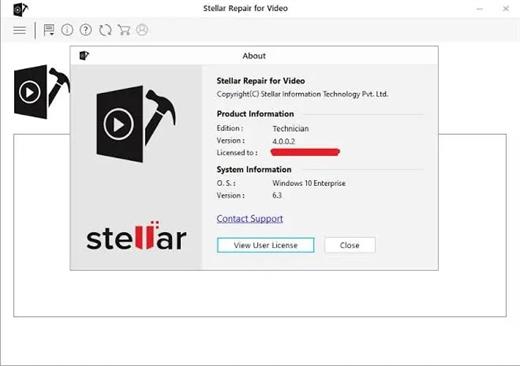
Edition: Standard / Professional / Premium / Technician / Toolkit

Stellar Repair for Video Full Version Free Download

Stellar Repair for Video Download  With Crack is the world’s best tool for repairing corrupt, broken or damaged MP4, MOV,AVI, MKV, AVCHD, MJPEG, WEBM, ASF, WMV, FLV, DIVX, MPEG, MTS, M4V, 3G2, 3GP, and F4V file formats. It repairs the videos that got corrupt during shoot, when performing file transfer, while editing, converting or processing. You May Also Download TunesKit AceMovi Crack

• Repair multiple videos simultaneously
• Efficiently repairs severely corrupt video files using sample files
• Preview repaired videos before saving
• Fix severely corrupt and compressed videos
• Repair videos recovered from corrupt storage media
• Repair Standard Definition, Full HD as well as 4K resolution Video files

Stellar Repair for Video
Fix all types of visual and audio corruptions in videos that are not playing properly. Easily repair videos that have turned choppy, jerky, grainy, distorted, pixelated or show errors.

Digital Video Repair Solution for Windows users
Support for all widely used video file formats, popular brands of cameras, and storage media, make Stellar Repair for Video a complete video repair utility. The Stellar video repair tool fixes all kinds of corruptions and errors including “error loading media file could not be played”, video not playing, audio video sync issues, grainy video, frozen videos, video blur etc. The software efficiently resolves all types of corruption and errors found in video frames, sound section, header, movement of videos, and video slider.

Repair Multiple Videos Simultaneously
The Stellar Repair for Video software can simultaneously repair unlimited number of video files of same or different formats. And, therefore, serves as a quick and convenient way to repair multiple corrupt, broken or damaged video files.

Preview Repaired Videos before Saving
You can preview the repaired videos before saving them to a defined location. This helps ensure that all the repaired videos are free of corruption before getting saved.

Simple and Easy-to-Use Interface
Stellar Repair for Video brings an intuitive, user-friendly interface to suit users who have a limited proficiency with using software. With its interactive functionality, you do not require any technical expertise for repairing your corrupt video files. It offers quick video repair through its easy to navigate GUI, in just a few clicks.

Stellar Repair for Video Download Crack Key Features

Repair severely corrupt videos using ‘sample file’
The ‘Sample File’ feature allows the user to repair severely corrupt video files. A ‘Sample File’ is a working file of any size created from the same device and of the same format as of your corrupt video file. The software uses the information from the sample file and repairs the corrupt video.

Repair videos shot from phones, drones, digicams, DSLRs & CCTV
The Stellar Repair for Video tool can fix videos shot from DSLRs, digital cameras, drone cameras, surveillance cameras, android mobile phones, iPhone, and iPad. Just transfer the damaged videos from the device, SD cards or other storage media to the Windows or Mac system, download Stellar Repair for Video and fix the corrupt videos with the help of its user-friendly GUI.

Saves repaired files at the desired location
The software allows you to save your repaired videos at the desired location. You can also choose to save the repaired videos at the source location.

Language Supported
English, German, French, Spanish, Italian

Edition: Standard / Professional / Premium / Technician / Toolkit

Release Name: Stellar Repair for Video 6.7.0.3 (x64) Multilingual
Size: 90.7 MB
Links: HOMEPAGE – NFO – Torrent Search

Download: FiKPERNiTROFLARERAPiDGATOR

6 Comments
Feb 16

Stellar Repair for Photo 8.7.0.3 (x64) Multilingual

Description: Stellar Repair for Photo software is the best DIY tool to repair corrupt or damaged photos having .JPG or .JPEG file extension. If your JPEG images appear distorted, split, blurred, pixelated, software will help you resurrect your prized memories.

• Repairs Corrupt Header & Invalid JPEG File Structure
• Fix Corrupt JPG Files Recovered From Corrupt Storage Media
• Extracts Thumbnails Of Severely Corrupt JPEG File
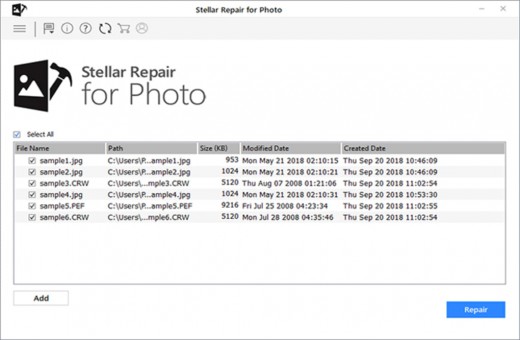
• Repairs Multiple JPEG Files Simultaneously
• Its Risk Free, Trial Version Offers Preview Of Repaired JPEG/JPG

Stellar Repair for Photo
Stellar Repair for Photo software Fixes corrupted, broken or damaged JPEG/JPG image files and restore them with easy and simple steps.​

Repair JPEG File
Repairs corrupted or damaged JPEG image files and recover them back from the flash memory cards, memory sticks, computer hard drives or any other secondary storage media. Stellar JPEG Repair fixes your completely unreadable JPEG files even under the situations of corrupt header, corrupt JPEG data, invalid JPEG file structure, unknown or invalid JPEG marker, missing SOS marker etc.

Extract Thumbnails of Corrupted Files
This JPEG recovery software can easily extract the embedded thumbnail image of severely corrupt JPEG files without compromising its visual fidelity. This feature is particularly important for all JPEG images, which have undergone damages or corruptions beyond repair. With Stellar Repair for Photo, you can get the thumbnail images of those files.

Preview of Repaired JPEG Files
JPEG recovery tool provides an option to preview repaired jpeg files after scan so that you can check for inconsistencies in your repaired images prior to saving. The tool has a knack of repairing all images intact. Once you find that there are no differences, you can choose to save them at any location of your storage media.

Easy to Use Interface
Stellar Repair for Photo software is very easy to use with its straightforward and intuitive GUI. You will find a progress bar that reveals the exact status of a scanning or saving process. After completion of a task, you are provided with appropriate messages to know if the task completed successfully.

What’s new
• official site does not provide any info about changes in this version

Release Name: Stellar Repair for Photo 8.7.0.3 (x64) Multilingual
Size: 43 MB
Links: HOMEPAGE – NFO – Torrent Search

Download: FiKPERNiTROFLARERAPiDGATOR

6 Comments
Feb 16

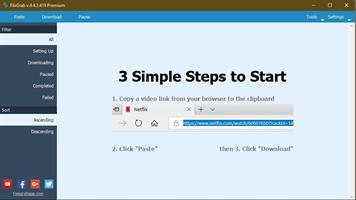
FlixGrab Plus 1.7.0.2089 Premium

FlixGrab Premium Full Crack Free Download is a software tool that allows users to download and watch their favorite movies and TV shows from popular streaming platforms such as Netflix, Hulu, and Amazon Prime. It offers a number of features that make it a convenient and easy-to-use tool for those who want to watch their favorite content offline or on-the-go.

One of the main features of FlixGrab Premium is its ability to download content in high-quality resolution. This means that users can watch their favorite shows and movies with clear, crisp pictures and sound quality, even when they’re not connected to the internet. The software also allows users to choose the video quality and language of their downloaded content, making it easy to customize their viewing experience.

Another feature of FlixGrab Premium is its ability to download multiple items at once. This is especially useful for users who want to download a large number of movies or TV shows in one go, saving them time and effort. The software also has a built-in feature that allows users to schedule their downloads, so they can set it to download content at a specific time and date.

Download FlixGrab Premium Free Download Features

Here are some key features of FlixGrab Premium:

  • High-quality resolution: It allows users to download movies and TV shows in high-quality resolution, ensuring that they can enjoy clear and crisp picture and sound quality when watching their favorite content offline.
  • Customizable options: The software allows users to choose the video quality and language of their downloaded content, making it easy to customize their viewing experience.
  • Multiple downloads:It allows users to download multiple items at once, saving them time and effort.
  • Scheduled downloads: The software has a built-in feature that allows users to schedule their downloads, so they can set it to download content at a specific time and date.
  • Built-in video player: It comes with a built-in video player that allows users to watch their downloaded content directly from the software.
  • Easy to use: The software has a user-friendly interface that makes it easy for users to navigate and find the content they want to download.
  • Fast downloads: It is designed to download content quickly, so users can start watching their favorite shows and movies in no time.
  • Wide range of supported platforms: The software supports a wide range of popular streaming platforms, including Netflix, Hulu, and Amazon Prime, making it easy for users to access and download their favorite content.
  • Regular updates: It is regularly updated to ensure that it is compatible with the latest versions of streaming platforms and to add new features and improvements.

What’s New In FlixGrab Premium Full Version Free?:

  • Updates: official site does not provide any info about changes in this version.

In addition to its downloading capabilities, FlixGrab Premium also comes with a built-in video player that allows users to watch their downloaded content directly from the software. This makes it easy to keep all of their favorite shows and movies in one place, and eliminates the need to switch between different apps or devices to watch them.

Overall, FlixGrab Premium is a powerful and convenient tool for those who want to download and watch their favorite content from popular streaming platforms. It offers high-quality downloads, customizable options, and a built-in video player, making it a great choice for those who want to watch their favorite shows and movies offline or on-the-go.

Release Name: FlixGrab Plus 1.7.0.2089 Premium
Size: 70.6 MB
Links: HOMEPAGE – NFO – Torrent Search

Download: FiKPERNiTROFLARERAPiDGATOR

7 Comments
Feb 16

WYSIWYG Web Builder 19.1 (x64)

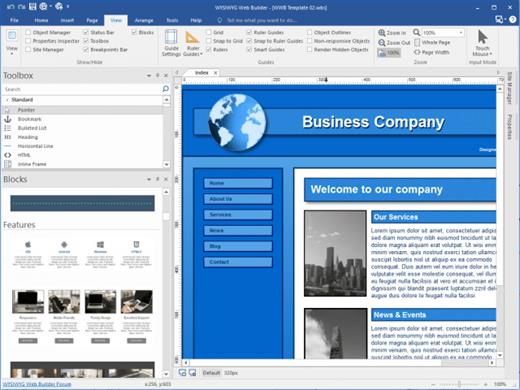
WYSIWYG Web Builder Crack Full Version Free Download is a software tool that allows users to create and design websites without the need for coding knowledge. WYSIWYG stands for “What You See Is What You Get,” which means that the user can see the final result of their design as they work on it.

One of the main benefits of using WYSIWYG Web Builder is that it is user-friendly and easy to use, even for those who have no coding experience. The software provides a drag-and-drop interface that allows users to easily add and customize elements such as text, images, and videos to their website. It also includes a range of pre-designed templates and themes that users can choose from to quickly create a professional-looking website.

WYSIWYG Web Builder Keygen Free Download In addition to its design features, WYSIWYG Web Builder also has a range of tools for optimizing and managing a website. This can include features such as SEO optimization, Google Analytics integration, and the ability to create and manage a blog.

Overall, WYSIWYG Web Builder is a useful tool for those who want to create a website but don’t have the coding knowledge to do so. It provides a user-friendly interface and a range of design and management tools to help users create and maintain a professional-looking website.

WYSIWYG Web Builder Full Version Crack 2020 is an application primarily for beginners because you don’t have to be proficient in HTML to use it. Everything can be controlled with your mouse, so if you don’t code too much, there is no problem. WYSIWYG Web Builder The app supports most of the content you typically see on the internet, such as forms, banners, Flash video players, captchas, images, buttons, YouTube content, photo galleries and much more.

Download WYSIWYG Web Builder Crack Key Features:

Features of WYSIWYG Web Builder

  • Drag-and-drop interface: It provides an easy-to-use interface that allows users to add and customize elements such as text, images, and videos to their website by dragging and dropping them into place.
  • Pre-designed templates and themes: It includes a range of pre-designed templates and themes that users can choose from to quickly create a professional-looking website.
  • SEO optimization: It includes tools to help users optimize their website for search engines, such as the ability to add meta tags and create sitemaps.
  • Google Analytics integration: It allows users to integrate their website with Google Analytics, which can provide valuable insights into website traffic and performance.
  • Blog management: It includes tools for creating and managing a blog, such as the ability to add and edit blog posts, and to categorize and tag them for better organization.
  • Responsive design: Itallows users to create websites that are responsive, meaning they will automatically adjust to the size and resolution of the device they are being viewed on.
  • Customizable design: It provides a range of customization options, such as the ability to change font styles, colors, and backgrounds, to help users create a unique and personalized website.
  • Multi-language support: It is available in multiple languages, allowing users to choose the language that is most comfortable for them.

What’s New In WYSIWYG Web Builder Download Free?

  • Fixed: Issue with Layout Grid height (33vh).
  • Fixed: Incorrect editbox margin with Bootstrap validation.
  • Fixed: Issue with combobox height in floating layout.
  • Fixed: Issue with page events
  • Improved: Template selection dialog background for dark themes.

Release Name: WYSIWYG Web Builder 19.1 (x64)
Size: 18.2 MB
Links: HOMEPAGE – NFO – Torrent Search

Download: FiKPERNiTROFLARERAPiDGATOR

6 Comments
Feb 16

VueScan Pro 9.8.26 DC 16.02.2024 Multilingual

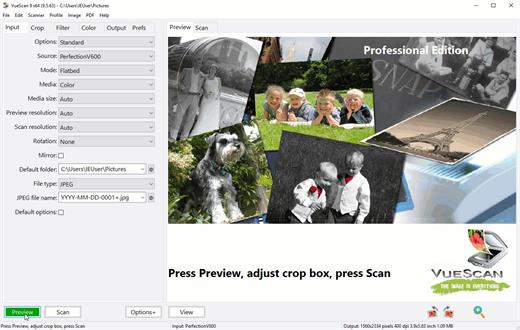
Description: VueScan, the world’s most popular scanner software, is used extensively by photographers, home users, scanning services and corporations. VueScan is a scanning program that works with most high-quality flatbed and film scanners to produce scans that have excellent color fidelity and color balance. It is very easy to use, and also has advanced features for restoring faded colors, batch scanning and other features used by professional photographers. VueScan changes nothing on your system, installs nothing in your operating system and all other scanner software will continue to function. VueScan increases your productivity and saves you money. VueScan has advanced scanning options, powerful features, and greatly improves your scans with superior color accuracy and better color balance. VueScan supports more than 700 scanners and 209 digital camera raw files and takes about 5 minutes to download and install.

Features:
• Works with 1200 flatbed and film scanners
• Runs on Mac OS X, Windows and Linux
• Improves your productivity and quality of scans
• Has been downloaded more than 5 million times
• Create raw scan files
• ICC profiles and color spaces
• IT8 color calibration

Release Name: VueScan Pro 9.8.26 DC 16.02.2024 Multilingual
Size: 43.2 MB
Links: HOMEPAGE – NFO – Torrent Search

Download: FiKPERNiTROFLARERAPiDGATOR

5 Comments