Jun 21

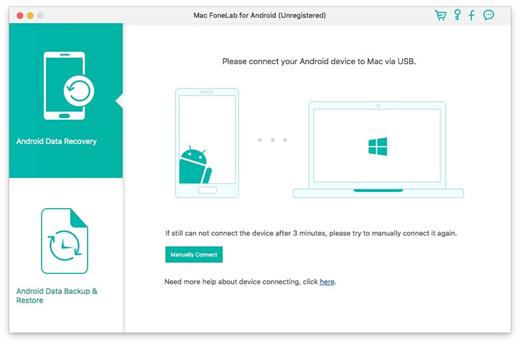
Mac FoneLab Android Data Recovery 3.2.12

Get your files on Android phone lost? Try this fast, powerful and easy-to-use Android files recovery. It enables you to recover the lost deleted contacts, messages, messaging attachment, call history, gallery, picture library, music, video and document on Android phones.

The software can get the lost data back whether your Android device is water damaged, virus attacked, or busted part as long as it can be detected by FoneLab for Android. With this Android data recovery, you can get back all you lost files within minutes.

What’s New

Version 3.2.12:

  • Release notes were unavailable when this listing was updated.

Compatibility

macOS 10.9 or later


Release Name: Mac FoneLab Android Data Recovery 3.2.12
Size: 59 MB
Links: HOMEPAGE – NFO – Torrent Search

Download: FiKPERUPLOADGiGNiTROFLARERAPiDGATOR

2 Comments
Jun 21

PhoneRescue for iOS 4.2.3

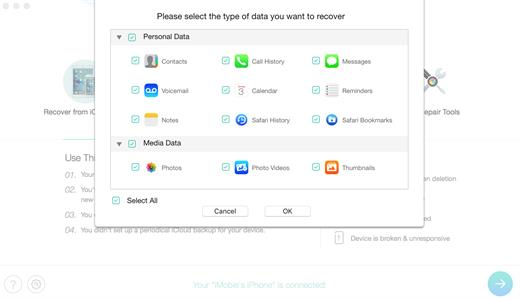
PhoneRescue is an ultimate iOS data recovery program designed for retrieving your lost photos, messages, contacts, notes and more on your iPhone, iPad and iPod touch. Also it can repair an iDevice from any iOS crash error.

Features

  • Focuses on analyzing and recovering the most important 25 types of iOS content
  • Recovers data & files directly back to iPhone for instant use, or to computer for future use
  • Pinpoints your lost contents in the first moment and conjure them back in an eye-blink
  • Retrieves your valued information via 3 safe and reliable ways: from device, iTunes backup, and iCloud
  • Extracts your needed information from iTunes backup – even it has been encrypted
  • Offers options of file types that you intend to scan and recover, making the process more accurate and faster
  • Fixes any iOS error within a single click to revive your broken iPhone

Mistaken deletion of your photos, text messages, contacts or other vital info on your iPhone could be a disaster in your life. That’s why we introduced PhoneRescue, with the promise to get all your lost-but-valued media or text data back in your hands. Apart from supporting 3-way recovery (from device, iTunes backups, and iCloud) to ensure the maximum recovery rate, PhoneRescue can recover data directly back into iPhone for instant use.

What’s New

Version 4.2.3:

  • Release notes were unavailable when this listing was updated.

Compatibility

OS X 10.9 or later, 64-bit processor


Release Name: PhoneRescue for iOS 4.2.3
Size: 63.2 MB
Links: HOMEPAGE – NFO – Torrent Search

Download: FiKPERUPLOADGiGNiTROFLARERAPiDGATOR

2 Comments
Jun 21

Rhinoceros 7.31.23166.15002 RC

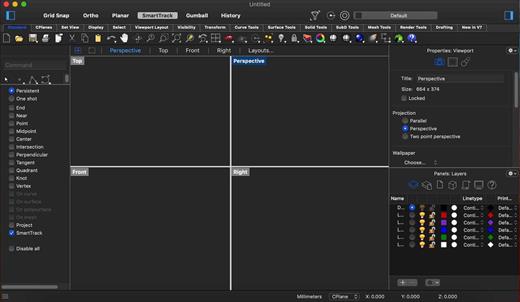
Rhino – Versatile 3D modeler. Rhinoceros can create, edit, analyze, document, render, animate, and translate NURBS* curves, surfaces, and solids, point clouds, and polygon meshes. There are no limits on complexity, degree, or size beyond those of your hardware.

Special features include:

  • Uninhibited free-form 3-D modeling tools like those found only in products costing 20 to 50 times more. Model any shape you can imagine.
  • Accuracy needed to design, prototype, engineer, analyze, and manufacture anything from an airplane to jewelry.
  • Compatibility with all your other design, drafting, CAM, engineering, analysis, rendering, animation, and illustration software.
  • Read and repair meshes and extremely challenging IGES files.
  • Accessible. So easy to learn and use that you can focus on design and visualization without being distracted by the software.
  • Fast, even on an ordinary laptop computer. No special hardware is needed.
  • Affordable. Ordinary hardware. Short learning curve. Affordable purchase price. No maintenance fees.

What’s New

Version 7.31:

  • Release notes were unavailable when this listing was updated.

Compatibility

macOS 10.14 or later 64-bit


Release Name: Rhinoceros 7.31.23166.15002 RC
Size: 452.1 MB
Links: HOMEPAGE – NFO – Torrent Search

Download: FiKPERUPLOADGiGNiTROFLARERAPiDGATOR

1 Comment
Jun 21

RightFont 8.0.2

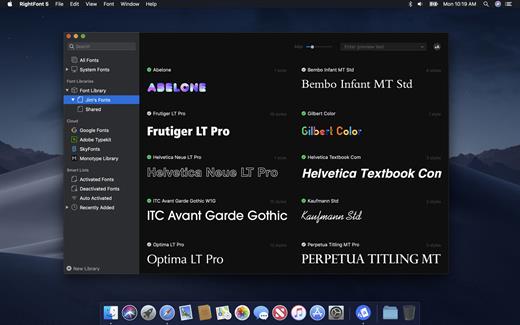
RightFont is a lightweight font manager with a clean, beautiful interface. It offers many features which help you manage all your local fonts with ease.

  • Font-management access anytime directly from your menubar
  • Mark any font as starred with a click
  • Create and manage font lists
  • Access fonts directly in Adobe Creative Cloud (Photoshop, Illustrator, InDesign, Flash, AfterEffect), Sketch, etc.
  • Instant search results as you type
  • Change font preview and font size in real-time
  • Find the right font faster
  • Easily filter fonts by classifications (sans serif, serif, script, etc.), font width and font weight. Even Google fonts and Adobe TypeKit fonts are listed separately for you.
  • Effortless integrations – You can use RightFont with design software. With a simple double-click, the font used in your text layer can be changed.

What’s New

Version 8.0.2:

  • Release notes were unavailable when this listing was updated.

Compatibility

macOS 10.13 or later
Apple Silicon or Intel Core processor


Release Name: RightFont 8.0.2
Size: 15.4 MB
Links: HOMEPAGE – NFO – Torrent Search

Download: FiKPERUPLOADGiGNiTROFLARERAPiDGATOR

2 Comments
Jun 21

Project Office X Pro 1.1.4

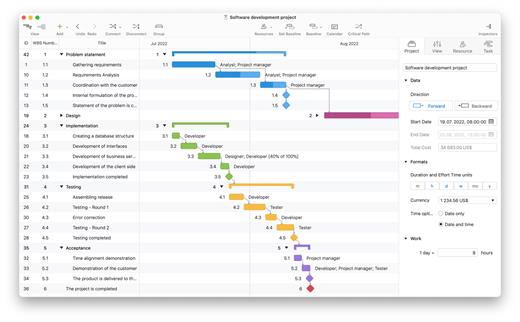
Project Office X is a full featured project management app designed to help you managing both simple and complex projects on your iOS and macOS devices

Features

  • Add resources to your project: people or materials, modify work hours, identify bottlenecks, distribute workloads fairly and create a realistic plan
  • Send Project Office file, export and import files with Microsoft Project® (XML) format, save project as PDF file and make HTML reports of tasks and resources

What’s New

Version 1.1.4:

  • Release notes were unavailable when this listing was updated.

Compatibility

macOS 10.12 or later
Apple Silicon or Intel Core processor


Release Name: Project Office X Pro 1.1.4
Size: 22 MB
Links: HOMEPAGE – NFO – Torrent Search

Download: FiKPERUPLOADGiGNiTROFLARERAPiDGATOR

4 Comments
Jun 21

Sketch 97.1

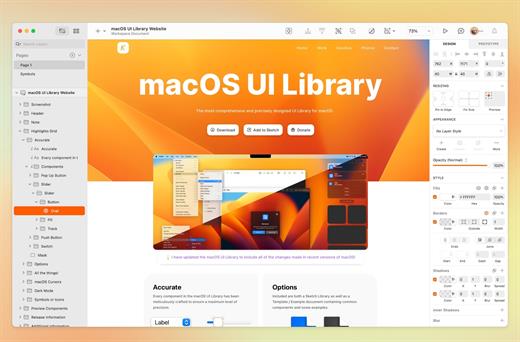
Sketch is an innovative and fresh look at vector drawing for the Mac. Its intentionally minimalist design is based upon a drawing space of unlimited size and layers, free of palettes, panels, menus, windows, and controls. Though simple to use, it offers powerful vector drawing and text tools like perfect Boolean operations, symbols, and powerful rulers, guides, and grids.

What’s New

Version 97.1:

  • Selection Improvements
    For this release, we’ve spent some time focusing on selection — and improving all the little interactions that might bug you or feel inconsistent. We’ve listed all the individual changes and improvements below, but it should feel easier and more predictable to select layers by clicking on their visible parts and move layers by dragging within their selection box.
  • Collections
    We heard your requests for another level of organization inside your Workspace, and with this release we’re introducing just that. With Collections, you can group documents inside of Projects in just about any way that suits you and your collaborators. Ever found the number of Projects in your Workspace a little unmanageable? Having trouble sorting through loads of documents in a Project? Collections can help. You can create a new Collection from the new save dialog, and organize existing documents and Collections in the Workspace window.
  • Redesigned Save Dialog
    We’ve completely redesigned the Save dialog for Workspace documents, with a better experience for organizing documents and full support for the new Collections feature. This is now the default way to save in Sketch. You can still save locally to your Mac via the “Save to Your Mac” button in the Save dialog, or via File > Save to Your Mac. You can also change the default save location and dialog under the General tab in Sketch’s Settings.
  • Multi-Layer Renaming
    You can now select multiple layers and use Edit > Rename (⌘R) to rename your entire selection, with support for modifier tokens and optional matching of portions of the layers’ names. You can also use Edit > Rename All (⌥⌘R) to rename all the layers on your current page, with the option to filter for specific layers to rename. Finally, you can quickly rename another selection of layers using the last renaming pattern you used via Edit > Rename with Last Format (⌥⇧⌘R).

Compatibility

macOS 11.0.0 or later
Apple Silicon or Intel Core processor


Release Name: Sketch 97.1
Size: 74.3 MB
Links: HOMEPAGE – NFO – Torrent Search

Download: FiKPERUPLOADGiGNiTROFLARERAPiDGATOR

4 Comments
Jun 21

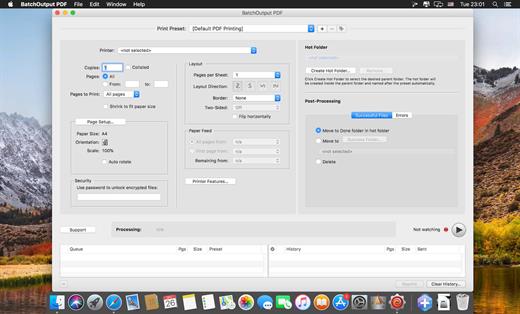
BatchOutput PDF 2.4.7

BatchOutput PDF prints PDF files automatically from watched hot folders. Create hot folders for various printing settings, then just drop PDFs there – and BatchOutput PDF will do the rest for you. Keep working with other programs while BatchOutput PDF works in the background. Save time and hassle of opening and printing each PDF manually.

Features

  • Print PDFs automatically by dropping them into watched hot folders
  • Create hot folders for various printing settings
  • A separate Server license which allows to create hot folders on a network
  • Serve multiple users with a single copy of BatchOutput PDF Server
  • Move files to success and error folders after processing
  • Processing history

What’s New

Version 2.4.7:

  • Release notes were unavailable when this listing was updated.

Compatibility

macOS 10.10 or later


Release Name: BatchOutput PDF 2.4.7
Size: 18.1 MB
Links: HOMEPAGE – NFO – Torrent Search

Download: FiKPERUPLOADGiGNiTROFLARERAPiDGATOR

3 Comments
Jun 21

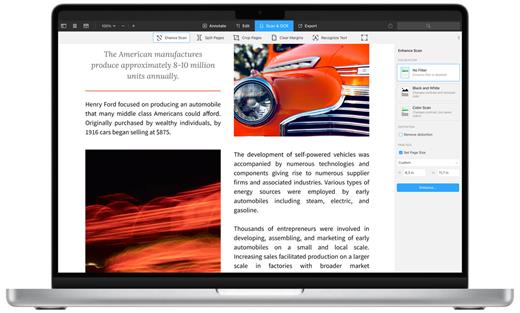
PDF Expert 3.2.0

PDF Expert springs into action with smooth scrolling and fast search from the first document you select. PDFs open instantly, whether they are just small email attachments or 2000-page reports.

  • Professional Annotation Tool – From simple changes to marathon editing sessions, PDF Expert lives up to its name. Powerful yet easy-to-use tools are just a click away so you can leave your mark in record time.
  • Read – An award-winning, lightning-fast, tabbed document viewer will get you through multiple PDFs faster than ever.
  • Excellent for Form Filling – PDF Expert provides the best experience for filling out PDF forms. Text fields, checkboxes, radio buttons, and other form elements work as you expect, and all the information you enter is saved within the form. Even complex interactive forms with Javascript work impressively well.
  • An Easy Way to Sign Documents – Signing document on your Mac is as simple as it could be. Just type your name on a keyboard and PDF Expert will transform it into beautiful handwriting. Or use your Macbook’s trackpad and write with your finger. You can even use signatures already created in PDF Expert for iOS.
  • Wide Sharing Options – You don’t work alone, and neither does PDF Expert. When it’s time to send documents to clients, coworkers, and everyone in between, PDF Expert has top-notch support for your Mac’s system-wide share sheet and other apps. If an app accepts PDFs, PDF Expert can get them there.
  • Works across all your devices – Use PDF Expert on any Apple device – Mac, iPad, and iPhone. Use Apple’s Continuity and Handoff features to seamlessly transfer document from one device to another and continue editing where you left.

What’s New

Version 3.2.0:

  • Release notes were unavailable when this listing was updated.

Compatibility

macOS 10.13 or later
Support Apple silicon.


Release Name: PDF Expert 3.2.0
Size: 110.9 MB
Links: HOMEPAGE – NFO – Torrent Search

Download: FiKPERUPLOADGiGNiTROFLARERAPiDGATOR

4 Comments
Jun 21

TunesKit Screen Recorder 2.4.0.45

A handy 2-in-1 video and audio recorder that lets you capture any video and audio from any source on your computer screen with a single click, and edit and save the recordings in any format and device with high quality retained.
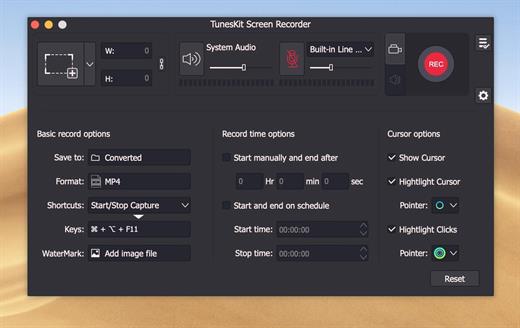
Efficient screen recording tool to grab anything you want from desktop

Powerful as it is, TunesKit Screen Recorder is capable of recording anything you like on the PC or Mac screen, such as online videos, computer games, app tutorials, how-tos, video lectures, webinars, video conferences, video calls, live broadcasts, and much more in an easy way. It’s not only a high-quality video recorder, but also an independent audio capture that allows users to grab any audio from system sound and/or microphone, including streaming music, sound effects, background music, or other appearing sound through browser, media player or many other applications. In addition, you can also extract audio from videos on the computer, etc. with lossless quality.

Record screen video and audio separately or simultaneously

TunesKit Screen Recorder enables users to record video and audio from screen, microphone or webcam. What if you want to record just video or audio? It’s easy! The program offers two options for users: record video (with audio) or record audio only. In other words, you can record screen video along with audio, or even mute the sound; you can also choose to capture merely audio, either system sound or microphone audio or both at the same time. You’re given full flexibility to do whatever according to your needs.

Flexible options for users to adjust the settings

With TunesKit Screen Recorder, you can set your preferences as you like. For example, you can capture full screen, select areas to record from 176144, 1280720 to 1920*1080 or set the size of capture area based on your requirements. Or, you can use the time scheduler to make a scheduled recording while you’re away by setting the start time and end time in advance. Besides, you can also customize your own keyboard shortcuts, add watermark, and highlight your cursor or clicks with different interesting icons.

Record screen and save in any format and device

As an all-round screen recording utility, TunesKit Screen Recorder offers you the ability to save recordings on the computer in numerous formats such as MP4, M4V, MOV, MKV, WMV, MPEG, 3GP, WebM, 4K HD videos; MP3, M4A, M4B, AAC, FLAC, WAV, and many others. You can also preset and transfer your recordings to various portable devices like iPhone, iPad, Apple Generic, Galaxy phone and tablet, Huawei and other Android Generic as well as game consoles and smart TVs etc. In addition, you’re allowed to upload and share the recording to social media platform such as YouTube, Facebook, Vimeo, etc.

Output high resolution recordings

With the advanced recording technology adopted in the program, TunesKit Screen Recorder is a perfect tool to capture any footage while keeping the high original quality. To be specific, this professional video capturing software can record screen in high resolution at up to 60 frames per second.

What’s New

Version 2.4.0.45:

  • Release notes were unavailable when this listing was updated.

Compatibility

OS X 10.9 or later, 64-bit processor


Release Name: TunesKit Screen Recorder 2.4.0.45
Size: 59.8 MB
Links: HOMEPAGE – NFO – Torrent Search

Download: FiKPERUPLOADGiGNiTROFLARERAPiDGATOR

4 Comments
Jun 21

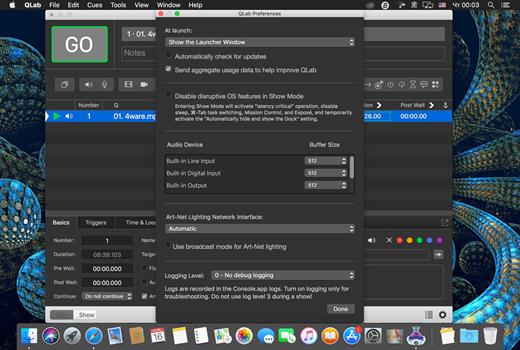
QLab Pro 5.2.0

QLab is a streamlined and intuitive Mac OS X application that provides the required tools and features to create complex designs that can bring your audio and video content to life.

Versatile and user-oriented show control

QLab’s user-oriented interface helps you design and handle your multimedia content from within a smooth-running and personalizeable workspace that allows you to manage audio, video, MIDI, OCS and more.

QLab comes with numerous building blocks, also known as “cues”, that can help you design your stunning multimedia performance with just a few mouse clicks. Once you dragged and dropped your files you can start adding commands to fade in and fade out the volume, animate videoclips and apply various video and audio effects.

User-definable scripts and numerous video and audio effects

After getting familiar with the basics, you can step up your game and become a power user by using complex features like scripting, multi-projector edge blending, video corner pinning and audio localization. What is more, you can build multi-computer designs and send commands to multiple QLab systems connected to the same local network.

When you are happy with your Cue List, you can give it a try and hit the “Go” button to preview your show. Thanks to the Warnings panel you can check your list and view all encountered issues.

Support for Blackmagic device input, as well as various types of video surfaces and a host of other similarly powerful tools

QLab comes with support for 48 output and 24 input audio channels, intuitive audio waveform editing, customizable playback rate with pitch adjustment, video and audio faders, animation tools, Matrix mixer, audio and video effects, Syphon integration, keystone correction and corner pinning.

You can also overlay titles, use live video input from various devices, including Blackmagic devices, handle multiple video surfaces, apply fade curves, slice files, use markers and use external video effects.

What’s New

Version 5.2.0:

  • Release notes were unavailable when this listing was updated.

Compatibility

macOS 11.0 or later


Release Name: QLab Pro 5.2.0
Size: 42.4 MB
Links: HOMEPAGE – NFO – Torrent Search

Download: FiKPERUPLOADGiGNiTROFLARERAPiDGATOR

4 Comments