Aug 18

Keep It 2.2.11

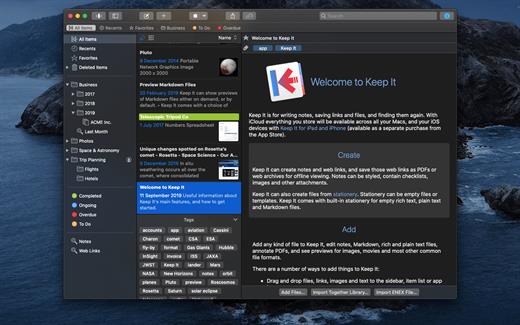
Keep It is for writing notes, saving web links, storing documents, and finding them again. Available on Mac, and as a separate app for iPhone and iPad, changes are automatically made available to all your devices with iCloud. Keep It is the destination for all those things you want to put somewhere, confident you will find them again later.
Features

  • Create, edit, view and save:
    • Notes with styles, checklists and attachments that look good and read well on all your devices
    • Web links with live previews, or saved as PDFs for offline viewing
    • Rich and plain text files, and Markdown documents
    • Add any other kind of file, and see previews for most images, documents, web pages, and more
    • See summaries and thumbnails in the list for most files
    • Use the Recents list to see things you’ve added or viewed lately
    • Share items with iCloud
  • Organize:
    • Folders let you organise things hierarchically – select a folder to see everything it and its subfolders contain
    • Use bundles to gather items into one place – items can be in more than one bundle at a time
    • Use labels to color-code items for quick visual recognition
    • Add searchable tags and comments
    • Make items favorites and drag lists to the Favorites Bar for quick access
  • Search and Filter:
    • Search everything in Keep It: names, tags, file contents, dates, kinds and more
    • Choose suggestions as you search to create complex searches with ease
    • Use keywords and natural language for dates while searching
    • Save searches for later reuse
    • Use the Tag Filter to see all items with a tag and any other relevant tags; choose another tag to drill down further
  • Use Keep It with other apps:
    • Compact Mode reduces the app to a single column, ideal for using alongside other apps
    • Drag pretty much anything to Keep It
    • Copy clickable links to items in Keep It
    • Share extension can add links, text, images and other files, and append text to notes from within other apps
    • Save files to Keep It’s folders to automatically add them to the library
    • Use a bookmarklet to add links from web browsers that don’t use Share extensions

*** You need to disable the System Integrity Protection (SIP) to perform the selected Application.

What’s New

Version 2.2.11:

  • Release notes were unavailable when this listing was updated.

Compatibility

macOS 11.3.0 or later


Release Name: Keep It 2.2.11
Size: 30.8 MB
Links: HOMEPAGE – NFO – Torrent Search

Download: FiKPERUPLOADGiGNiTROFLARERAPiDGATOR

4 Comments
Aug 18

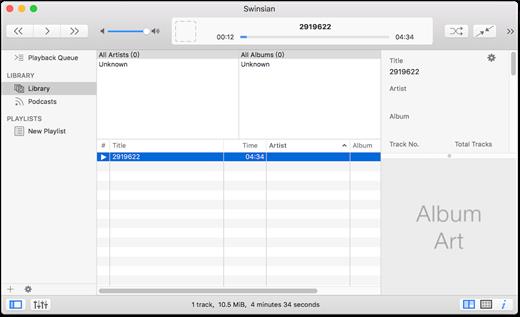
Swinsian 3.0 Preview 8

Swinsian is a music manager and player for OS X.

Features

  • Supports FLAC/Ogg Vorbis as well as MP3, AAC, WAV, APE, AC3, WavPack, WMA, and cue files
  • Copies tracks from iPods and iPhones
  • Watches folders for new files
  • Fetches album art
  • Quick control window
  • Imports iTunes libraries
  • Playback over AirTunes
  • Duplicate finding
  • Bulk tag editing with regex support

What’s New

Version 3.0:

  • Release notes were unavailable when this listing was updated.

Compatibility

OS X 10.7 or later, 64-bit processor


Release Name: Swinsian 3.0 Preview 8
Size: 18.7 MB
Links: HOMEPAGE – NFO – Torrent Search

Download: FiKPERUPLOADGiGNiTROFLARERAPiDGATOR

5 Comments
Aug 14

EdgeView 4.3.0

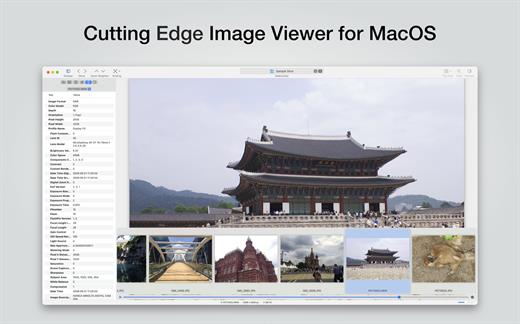
EdgeView 4 is fast image viewer has elegant user interface. EdgeView 3 is developed and designed for modern MacOS. It can open various image files such as JPEG, PNG, TIFF, BMP, and RAW file of DSLR, EPS and PDF, AI(Adobe Illustrator). Can open image files in archive directly without extraction.

User can open files, rename files, delete files from EdgeView’s file browser. Also can access to SMB/AFP/FTP network volume.

User can navigate images quickly by using keyboard shorcut, mouse wheel, trackpad gesture. EdgeVew show EXIF information, play animation GIF/PNG/WebP smoothly. Save last status to history, and restore when reopen file.

EdgeView 4 will be the best choice when viewing and managing image files.

What’s New

Version 4.3.0:

  • Release notes were unavailable when this listing was updated.

Compatibility

macOS 11.1 or later
Apple Silicon or Intel Core processor


Release Name: EdgeView 4.3.0
Size: 39.2 MB
Links: HOMEPAGE – NFO – Torrent Search

Download: FiKPERUPLOADGiGNiTROFLARERAPiDGATOR

6 Comments
Aug 14

Rectangle Pro 3.0.6

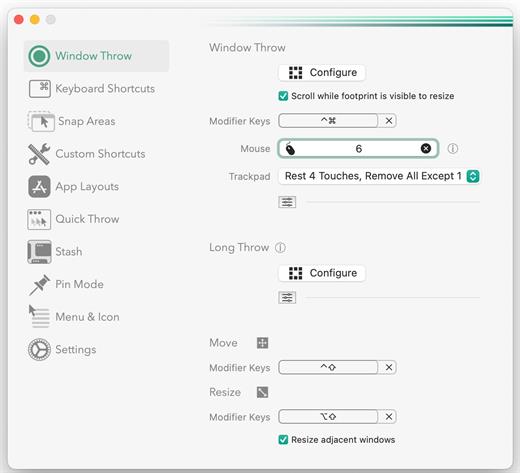
Snap windows faster in this featureful Rectangle superset. Toss windows in the right places with cursor movement, move multiple windows with one command, create custom shortcuts, and more.

One simple key combo
• 16 window sizes & positions
• No need to remember a ton of keyboard shortcuts, but those are all here, too

A Supercharged Rectangle Superset
• Keyboard shortcuts
• Drag windows to screen edges to snap

PRO
• Move and resize by holding a key and moving your cursor
• Snap windows under your cursor, even if not in focus
• Custom shortcuts for any size & position
• Sync your settings over iCloud

The Lightweight Gesture Champ
• Unlike touch gesture based window managers, Rectangle Pro only consumes CPU when configured modifier keys are pressed. Even then it’s minimal
• Rectangle Pro is a breeze to learn, and doesn’t conflict with any built-in macOS behavior
• Use it with any device that moves the cursor

Unmatched Customization and Actions
• Create keyboard shortcuts with any window size and location, and specify what happens on each repeated execution
• Fill left and right actions make it simple to maximize screen usage without overlap
• Match the keyboard shortcut window management of that other OS

Multiple Windows at Once
• Cascade windows
• Move all windows for an app to another display or screen half
• Tile top windows in a 2×2 or 2×3 grid

Additional Efficiency and Speed
• Each window action can be configured with a quick, simple cursor movement and modifier key combination
• Just press and release modifier keys while you move your cursor over the window you want to snap

What’s New

Version 3.0.6:

  • Release notes were unavailable when this listing was updated.

Compatibility

macOS 10.12 or later
Apple Silicon or Intel Core processor


Release Name: Rectangle Pro 3.0.6
Size: 9.7 MB
Links: HOMEPAGE – NFO – Torrent Search

Download: FiKPERUPLOADGiGNiTROFLARERAPiDGATOR

6 Comments
Aug 14

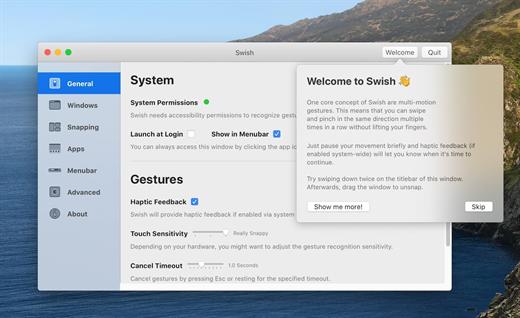
Swish 1.10.2

The missing gesture layer for macOS.

Control windows and applications right from your trackpad with intuitive two-finger swipe, pinch, tap and hold gestures.

More than just a window manager.

Swish features 28 easy-to-use titlebar, dock and menubar gestures that will supercharge your workflow and make you a trackpad power user.

Control windows & apps.

Swish’s gestures are fast and convenient.
No need to aim for tiny buttons.
No need to reach for the keyboard.

Next-level snapping.

Swiping is the new dragging.
No more opening Mission Control on accident.
Use the familiar 2×2 grid or unlock the 2×3 grid with a modifier key.

Pixel-perfect grid.

Your desktop never looked so clean. Swish is the only window manager to truly honor the macOS look.
The grid even reacts to dark mode as well as your dock setup.

Manage screens & spaces.

Swish automatically detects your multi-monitor setup, so just flick to move windows between screens.
Working with spaces also gets a major productivity boost.
Watching lots of videos? Send your player to the big screen with a single gesture.

Stay in control.

The settings window explains everything in detail. Gestures can be toggled on or off.
There’s also a quick tutorial to get you started.

What’s New

Version 1.10.2:

  • Release notes were unavailable when this listing was updated.

Compatibility

macOS 10.13 or later, 64-bit processor


Release Name: Swish 1.10.2
Size: 10.1 MB
Links: HOMEPAGE – NFO – Torrent Search

Download: FiKPERUPLOADGiGNiTROFLARERAPiDGATOR

7 Comments
Aug 14

RAW Power 3.4.15

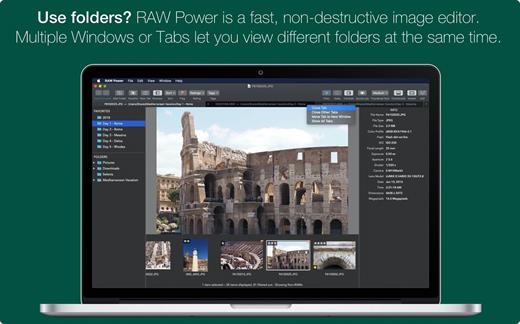
RAW Power unlocks the power of Apple’s RAW engine with simple, easy-to-use controls. Use it as an editing extension inside Apple Photos, or as a standalone, non-destructive RAW photo editor. If you loved Aperture’s advanced RAW processing adjustments, you’ll feel right at home with RAW Power. Using adjustments like Boost, previously only available in Aperture, you can improve your images in ways that simply can’t be done in any other application. RAW Power takes advantage of RAW processing improvements in macOS Sierra.

Features

  • Extends Apple’s Photos app for macOS Sierra
  • Control over Apple’s Boost filter to achieve unparalleled highlight recovery
  • Real-time control of all of Apple’s RAW engine, including noise reduction, and black point, RAW sharpen, and more
  • Hot-pixels overlay with clipping indicators
  • Advanced curves adjustment with auto curves, linear, and Lab modes
  • Recovery slider for targeted control over highlights
  • White-balance sampling
  • Luminance-oriented sharpen
  • All sliders are real-time and GPU accelerated
  • Highlights, shadows, vibrancy, and more
  • Support for hundreds of RAW cameras
  • Images are displayed the same way as in Photos, Aperture, or iPhoto
  • Also works with JPEGs, TIFFs, and other image formats

What’s New

Version 3.4.15:

  • Release notes were unavailable when this listing was updated.

Compatibility

macOS 10.14 or later, 64-bit processor


Release Name: RAW Power 3.4.15
Size: 59.9 MB
Links: HOMEPAGE – NFO – Torrent Search

Download: FiKPERUPLOADGiGNiTROFLARERAPiDGATOR

6 Comments
Aug 14

Live Wallpaper & Themes 4K Pro 17.6

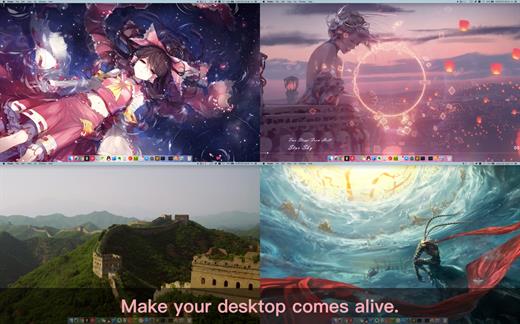
Live Wallpaper & Themes 4K allows you to use live wallpapers on your desktop/screensaver. It provides thousands of live wallpapers in the Workshop while taking as little system resources as possible. It’s the Wallpaper Engine for Mac.

Feature

  • 2000+ hand-picked videos which are updated every day.
  • Multiple types of 4K Ultra HD videos, anime, scenery, cute, game, creative, Beauty, Ancient, Movie, etc.
  • Supports “keyword searching” in videos.
  • Supports “Dynamic-ScreenSaver”, personalize your lock screen.
  • Easy to import local video.
  • Supports The playlist, list loop, shuffle loop.
  • Supports multiple screen aspect ratios and video native resolutions.
  • Set different wallpapers on different displays.
  • Manual control, video pause, resume and mute.
  • Break reminders, with flexible customization if you want it.
  • Supports global hotkeys to control wallpaper, hide desktop icons and show screensaver.
  • Auto mode, pause the video when other apps are active, not disturbed at work.
  • Auto mode, pause the video when Power Disconnected.
  • Support for hiding desktop icons.
  • Live Wallpaper Engine is designed to provide an interesting experience while consuming as little system resources as possible.

What’s New

Version 17.6:

  • Release notes were unavailable when this listing was updated.

Compatibility

macOS 10.11 or later


Release Name: Live Wallpaper & Themes 4K Pro 17.6
Size: 191.8 MB
Links: HOMEPAGE – NFO – Torrent Search

Download: FiKPERUPLOADGiGNiTROFLARERAPiDGATOR

7 Comments
Aug 14

OmniReader Pro 2.3.7

Read EPUB,CHM,MOBI… use it.. OmniReader is a fully functional book Reader with a simple and beautiful interface and a good reading experience.

Features

  • Supports reading EPUB, CHM and Kindle files.
  • Support single page search and full text search, and highlight search results.
  • Support the forward and backward browsing history.
  • Supports page turning, zooming, and sidebar shrinking.
  • Support page printing.
  • Support to view the basic information of the file.
  • Supports file export to EPUB, PDF.
  • Support to extract all images in the file.
  • Support file coding, deal with the problem of garbled code.
  • Support image adaptive, automatically adjust the size of the picture.

Bookrack

  • All the files you have read will be saved in the bookshelf for quick review next time.
  • Supports file drag and drop addition.

What’s New

Version 2.3.7:

  • Release notes were unavailable when this listing was updated.

Compatibility

macOS 10.13 or later


Release Name: OmniReader Pro 2.3.7
Size: 13.4 MB
Links: HOMEPAGE – NFO – Torrent Search

Download: FiKPERUPLOADGiGNiTROFLARERAPiDGATOR

6 Comments
Aug 11

Ghost Buster Pro 2.3.1

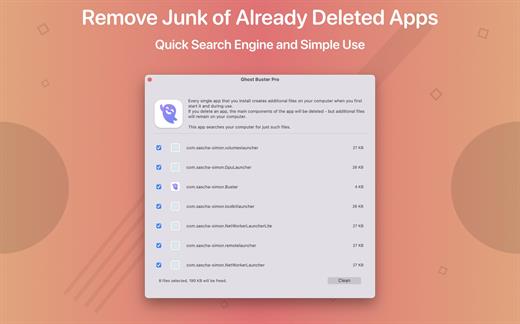
Ghost Buster Pro finds and deletes files from apps you’ve already uninstalled. The app is lightning fast and frees memory in no time.

Many apps are installed on a computer, but they usually only stay on your computer for a short time. Each app creates files, but deleting the app does not remove them.
This leads to a large number of files accumulating over time, which take up valuable storage space.
Ghost Buster Pro searches your computer for exactly such files and can also delete them directly if you wish.

Ghost Buster Pro offers the following features:
Fast Search

Ghost Buster Pro quickly scans your computer for data from previously deleted apps. You can have them deleted with one click.

Extremely easy handling

Ghost Buster Pro couldn’t be simpler. The search is started immediately after the app is started. You can now delete files with just one click.

No automatic deletion

Ghost Buster Pro does not delete any data without your consent. Choose for yourself which data is deleted and which you want to keep.

What’s New

Version 2.3.1:

  • Release notes were unavailable when this listing was updated.

Compatibility

macOS 11.5 or later
Apple Silicon or Intel Core processor


Release Name: Ghost Buster Pro 2.3.1
Size: 8.4 MB
Links: HOMEPAGE – NFO – Torrent Search

Download: FiKPERUPLOADGiGNiTROFLARERAPiDGATOR

10 Comments
Aug 11

Dato 5.0.3

Dato is a replacement for the system menu bar clock.

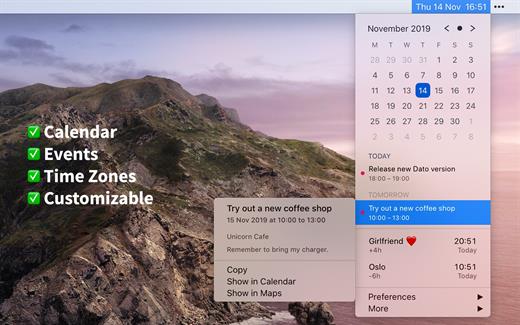
By default, it looks exactly the same, but when you click it, you get a small calendar, calendar events for the next week, the current time in various time zones (even with custom names), week number, and more. You can customize what to show in the menu and the menu bar.

Dato supports all the locales and languages that macOS supports for dates, times, and the calendar, but the menus are English-only.

Features

  • Calendar, optionally with week numbers. Your upcoming events for the next week at a glance (customizable).Time zones, optionally with custom names.Search time zones by city (15K cities included).Customizable.Double-click a day in the calendar to open that day in the default calendar app.
  • (Supports: Calendar, Fantastical 2, BusyCal).Fully offline with no network entitlements, for your privacy benefit.Supports calendar events with HTML formatted notes.Lots of keyboard shortcuts for power users.”Join Zoom Meeting” button on Zoom meeting calendar invites.

What’s New

Version 5.0.3:

  • Bug fixes.

Compatibility

macOS 10.14.4 or later, 64-bit processor


Release Name: Dato 5.0.3
Size: 20.5 MB
Links: HOMEPAGE – NFO – Torrent Search

Download: FiKPERUPLOADGiGNiTROFLARERAPiDGATOR

5 Comments