Aug 23

PDF Expert 3.4

PDF Expert springs into action with smooth scrolling and fast search from the first document you select. PDFs open instantly, whether they are just small email attachments or 2000-page reports.
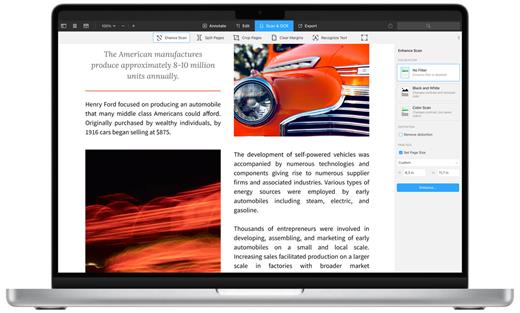
  • Professional Annotation Tool – From simple changes to marathon editing sessions, PDF Expert lives up to its name. Powerful yet easy-to-use tools are just a click away so you can leave your mark in record time.
  • Read – An award-winning, lightning-fast, tabbed document viewer will get you through multiple PDFs faster than ever.
  • Excellent for Form Filling – PDF Expert provides the best experience for filling out PDF forms. Text fields, checkboxes, radio buttons, and other form elements work as you expect, and all the information you enter is saved within the form. Even complex interactive forms with Javascript work impressively well.
  • An Easy Way to Sign Documents – Signing document on your Mac is as simple as it could be. Just type your name on a keyboard and PDF Expert will transform it into beautiful handwriting. Or use your Macbook’s trackpad and write with your finger. You can even use signatures already created in PDF Expert for iOS.
  • Wide Sharing Options – You don’t work alone, and neither does PDF Expert. When it’s time to send documents to clients, coworkers, and everyone in between, PDF Expert has top-notch support for your Mac’s system-wide share sheet and other apps. If an app accepts PDFs, PDF Expert can get them there.
  • Works across all your devices – Use PDF Expert on any Apple device – Mac, iPad, and iPhone. Use Apple’s Continuity and Handoff features to seamlessly transfer document from one device to another and continue editing where you left.

What’s New

Version 3.4:

  • Release notes were unavailable when this listing was updated.

Compatibility

macOS 10.13 or later
Support Apple silicon.

Release Name: PDF Expert 3.4
Size: 105.9 MB
Links: HOMEPAGE – NFO – Torrent Search

Download: FiKPERUPLOADGiGNiTROFLARERAPiDGATOR

2 Comments
Aug 21

Pixelmator Pro 3.3.12

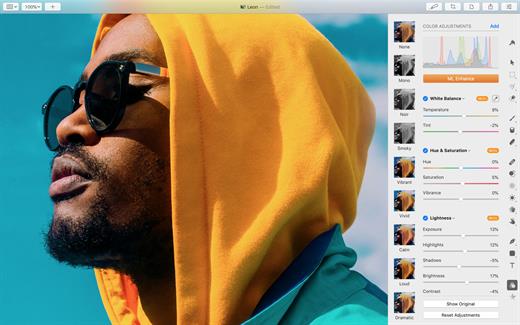
Pixelmator Pro is an incredibly powerful, beautiful, and easy to use image editor designed exclusively for Mac.

With a wide range of professional-grade, nondestructive image editing tools, Pixelmator Pro lets you bring out the best in your photos, create gorgeous compositions and designs, draw, paint, apply stunning effects, design beautiful text, and edit images in just about any way you can imagine. And thanks to its intuitive and accessible design, Pixelmator Pro is delightfully easy to use – whether you’re just starting out with image editing or you’re a seasoned pro.

The modern, single-window interface is designed exclusively for working with images on a Mac. An intuitive and accessible design makes it easy for anyone to edit images – from complete beginners to design professionals.

The new ML Super Resolution feature lets you increase the resolution of images without blurriness or reduced quality using state-of-the-art machine learning.

What’s New

Version 3.3.12:
Pixelmator Pro 3.3.12 is a smaller update that adds a new Support submenu in the Help menu to make it easier to report issues and share diagnostic files with us.

Compatibility

macOS 11.0 or later
Apple Silicon or Intel Core processor


Pixelmator Pro is an incredibly powerful, beautiful, and easy to use image editor designed exclusively for Mac.

With a wide range of professional-grade, nondestructive image editing tools, Pixelmator Pro lets you bring out the best in your photos, create gorgeous compositions and designs, draw, paint, apply stunning effects, design beautiful text, and edit images in just about any way you can imagine. And thanks to its intuitive and accessible design, Pixelmator Pro is delightfully easy to use – whether you’re just starting out with image editing or you’re a seasoned pro.

The modern, single-window interface is designed exclusively for working with images on a Mac. An intuitive and accessible design makes it easy for anyone to edit images – from complete beginners to design professionals.

The new ML Super Resolution feature lets you increase the resolution of images without blurriness or reduced quality using state-of-the-art machine learning.

What’s New

Version 3.3.12:
Pixelmator Pro 3.3.12 is a smaller update that adds a new Support submenu in the Help menu to make it easier to report issues and share diagnostic files with us.

Compatibility

macOS 11.0 or later
Apple Silicon or Intel Core processor


Release Name: Pixelmator Pro 3.3.12
Size: 581.7 MB
Links: HOMEPAGE – NFO – Torrent Search

Download: FiKPERUPLOADGiGNiTROFLARERAPiDGATOR

6 Comments
Aug 21

Lasso 1.5.7

Lasso – Window Manager for macOS. Move and resize windows with your mouse. Posted on Reddit today. Looks really good. Click and drag – that’s all you need to move and resize windows Quickly arrange and resize your windows with custom layouts

Streamline your workflow and increase productivity with the ability to assign unique keyboard shortcuts to each of your individual layouts. The simplest answer would be – all. Really, no matter how many screens you have – Lasso will handle all of them. With many options available, you can change how you work by adjusting the space around windows, selecting grid sizes for Layouts, and more. Make your workspace fit your needs.

Improvements:

  • When triggering a layout shortcut, the active window will stay on the same screen and won’t jump back to the screen that the mouse cursor is on.

Compatibility

macOS 12.0 or later
Apple Silicon or Intel Core processor


Release Name: Lasso 1.5.7
Size: 14.3 MB
Links: HOMEPAGE – NFO – Torrent Search

Download: FiKPERUPLOADGiGNiTROFLARERAPiDGATOR

5 Comments
Aug 21

Tinderbox 9.6.1

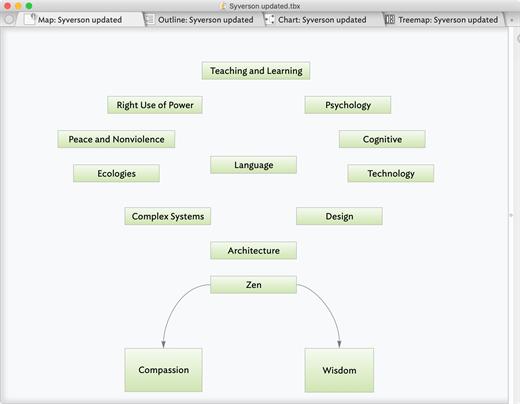
Tinderbox is a personal content management assistant. It stores your notes, ideas, and plans. It can help you organize and understand them. And Tinderbox helps you share ideas through Web journals and Web logs.

Tinderbox’s agents automatically scan your notes, looking for patterns and building relationships. Agents help discover relationships and help make sure important things don’t get lost. Agents are easy to make and easy to modify. They’re flexible and powerful. And Tinderbox can even gather and update changing information and breaking news from the Internet.

When it’s time to share your notes, Tinderbox can assemble multiple notes into one page. Updates are a breeze — even if you update several times a day. Private notes, timestamps, permanent links, archives: everything you want, just the way you want it.

What’s New

Version 9.6.1:

  • Release notes were unavailable when this listing was updated.

Compatibility

macOS 10.13 or later


Release Name: Tinderbox 9.6.1
Size: 40.3 MB
Links: HOMEPAGE – NFO – Torrent Search

Download: FiKPERUPLOADGiGNiTROFLARERAPiDGATOR

5 Comments
Aug 21

Overlay 4.26

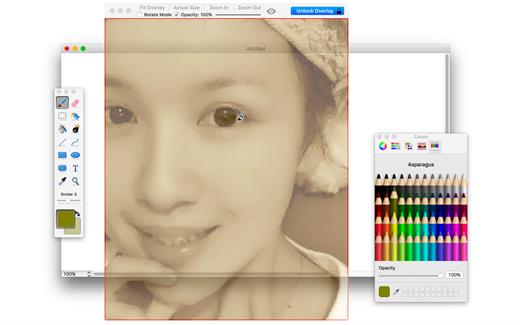
A frame that allows you to have an image or even PDF displayed semi-transparently in front of everything. It enables you to copy, trace, or compare designs, images, and documents with ease since you can lock the frame and make it undisturbed by mouse gestures.

It’s a transparent overlay of an image or document on your screen that you can click through – like a transparent sticker on your screen.

Overlay is especially useful for artists, designers, and students as it allows you to make your art or design from or reference photos and screenshots.

What’s New

Version 4.26:

  • Release notes were unavailable when this listing was updated.

Compatibility

macOS 10.15 or later
Apple Silicon or Intel Core processor


Release Name: Overlay 4.26
Size: 8.2 MB
Links: HOMEPAGE – NFO – Torrent Search

Download: FiKPERUPLOADGiGNiTROFLARERAPiDGATOR

5 Comments
Aug 21

1.14.10.3W

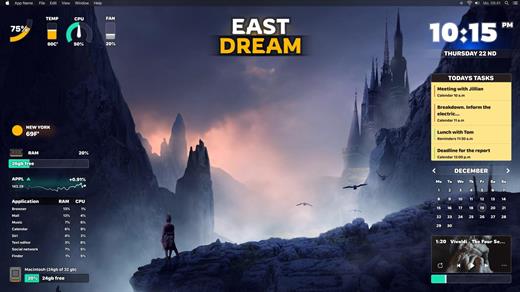
Widgetter – Custom Desktop is a direct line to upscaling your desktop into a work station perfectly tailored to your needs.
Start building a customized home screen to have all the key data points and basic functions always remain available at a glance.
The app streamlines the controls by collecting the pivotal information about your Mac’s performance as well as the most essential commands and wrapping them into widgets. You can pick any combination of those to be displayed on the screen, group and arrange them in an optimal way. For the most essential ones, make sure to use always-on-top feature so they show up over every opened window.

Choose the screensaver you like from the huge collection of 4k and 5k wallpapers.
The collection of widgets covers a range of system data (logs, reports and operations) that you can conveniently and easily manage right from your desktop.
It doesn’t require any special knowledge, because our widgets will highlight and notify you about possible errors and problems.

The current lineup will provide you access to the following:

  • Date & Time: the nearest place to check in for temporal data.
  • Сalendar: refer to a wider context for your appointments and plans.
  • Weather: all the most important weather conditions – forecast for the current day and the upcoming week.
  • Battery: keep a consistent eye on the battery indicator to better plan around recharging times.
  • Music player: create the right ambience without extra clicks. The built-in playlist will help to directly navigate your audio library.
  • Quotes of currencies and cryptocurrencies: keep an eye on the changes in exchange rates and monitor the movements on the exchanges.
  • Tasks and Reminders: all your current and future tasks at a glance – you will not miss anything important.
  • CPU: track the usage to pinpoint moments when the system gets too busy.
  • RPM: monitor how the cooling system is functioning and prevent overheating.
  • RAM: get insights on the memory usage, including the list of resource intensive apps.
  • HDD/SSD: make sure you’re not running out of storage space.

Add multiple widgets of the same type to keep track of weather and time data in different cities, as well as compose selections of the right stocks.
As a finishing touch to your customized workspace, you can choose a look for the desktop by applying the right skins.

What’s New

Version 1.14.10.3W:

  • Release notes were unavailable when this listing was updated.

Compatibility

macOS 10.13.2 or later


Release Name: Widgetter 1.14.10.3W
Size: 218.8 MB
Links: HOMEPAGE – NFO – Torrent Search

Download: FiKPERUPLOADGiGNiTROFLARERAPiDGATOR

7 Comments
Aug 21

JU-106 Editor 2.5.2

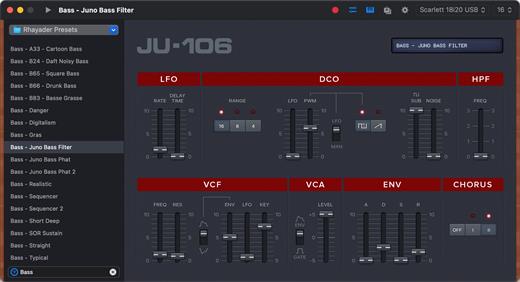
Juno Editor is a preset editor and library for the Roland Juno 106 and MKS7 Synthesizers. Save, organize and edit presets via a simple MIDI connection.

Presets can be created from scratch or received from the synthesizer’s inner memory, and are stored as .jep documents or .syx files (sysex) on your hard drive.

Features:

  • Presets as Files: Perfect for sharing or backup !
  • Keyboard Playback
  • Undo Support
  • Quick Search
  • Retina Display Ready Interface
  • MIDI Out and Channel are directly customizable in the main window
  • Compatible with the Roland MKS7

What’s New

Version 2.5.2:

  • Release notes were unavailable when this listing was updated.

Compatibility

macOS 10.14 or later


Release Name: JU-106 Editor 2.5.2
Size: 11.1 MB
Links: HOMEPAGE – NFO – Torrent Search

Download: FiKPERUPLOADGiGNiTROFLARERAPiDGATOR

6 Comments
Aug 21

WebSite Auditor 4.56.15

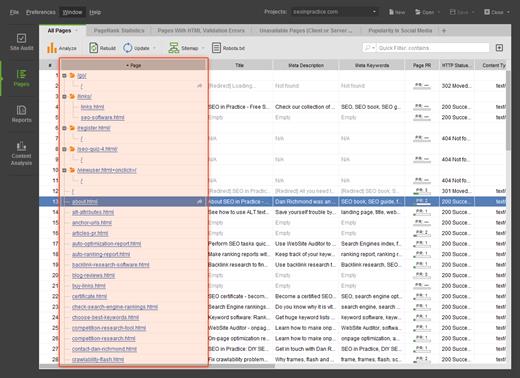
WebSite Auditor is an extremely efficient SEO tool that introduces a creative and smart approach to onpage SEO. This software product is a must-have for anyone engaged in website promotion, be it a professional SEO or a beginner webmaster. It takes your top 10 rivals and analyzes why they rank so high in search engine results. After presenting detailed analysis of your competitors’ webpage promotion strategies in a report, WebSite Auditor produces a unique optimization plan for your website, based on your competitors’ strategies. The reports are written in plain English, easy to read and consistent.

WebSite Auditor quickly suggests the optimal keyword density in all the elements of your website – title, body, headers h1-h6 etc. Helpful tips come in easy to follow step-by-step sequence.

Using WebSite Auditor you will:

  • Look into your competitors’ strategies for ranking so high.
  • Learn what exactly search engines need to rank websites high.
  • Find out how to make your pages meet search engines’ conditions for success.
  • Easily perform necessary changes under professional guidance.
  • Find out if there are any problem areas on your page.
  • Eliminate the problem areas by onpage optimization.
  • Effectively use unique report’s features, such as step-by-step advice.
  • Leave no more open SEO questions for yourself.

What’s New

Version 4.56.15:

  • Release notes were unavailable when this listing was updated.

Compatibility

OS X 10.10 or later, 64-bit processor


Release Name: WebSite Auditor 4.56.15
Size: 557.7 MB
Links: HOMEPAGE – NFO – Torrent Search

Download: FiKPERUPLOADGiGNiTROFLARERAPiDGATOR

6 Comments
Aug 18

Matlab R2023a 9.14.0.2337262

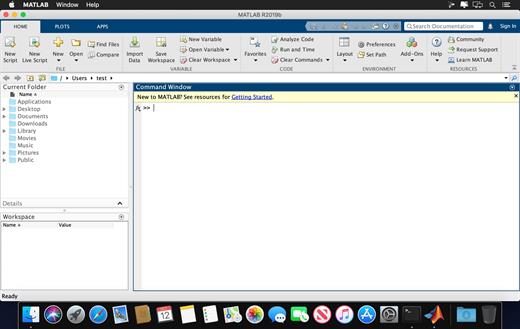
MATLAB is a high-level language and interactive environment that enables you to perform computationally intensive tasks faster than with traditional programming languages such as C, C++, and Fortran.

Key Features

  • High-level language for scientific and engineering computing
  • Desktop environment tuned for iterative exploration, design, and problem-solving
  • Graphics for visualizing data and tools for creating custom plots
  • Apps for curve fitting, data classification, signal analysis, and many other domain-specific tasks
  • Add-on toolboxes for a wide range of engineering and scientific applications
  • Tools for building applications with custom user interfaces
  • Interfaces to C/C++, Java®, .NET, Python®, SQL, Hadoop®, and Microsoft® Excel®
  • Royalty-free deployment options for sharing MATLAB programs with end users

What’s New

Version 9.14.0:

  • Release notes were unavailable when this listing was updated.

Compatibility

macOS 10.15 or later, 64-bit processor


Release Name: Matlab R2023a 9.14.0.2337262
Size: 7.7 GB
Links: HOMEPAGE – NFO – Torrent Search

Download: FiKPERUPLOADGiGNiTROFLARERAPiDGATOR

3 Comments
Aug 18

BetterMouse 1.5 (3963)

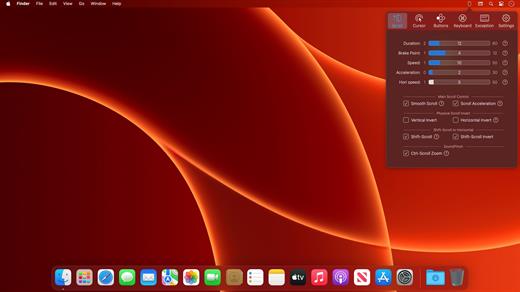
BetterMouse is a macOS utility improving external mouse performance and functionalities, aiming for replacing bulky, intrusive, and resource-hungry mouse drivers like Logitech Options. It’s feature-rich, light-weighted, efficiency-optimized, and perfectly privacy safe, trying to meet all your needs for using a 3rd-party mouse on macOS.

Features:

Scroll

  • Butter smooth scroll, with fully configurable settings of duration, direction, acceleration, etc.
  • Precise configurable discrete scroll with or without acceleration.
  • Shift-scroll to horizontal on/off, with configurable speed, direction.
  • Ctrl-scroll to zoom/pinch.
  • Thumbwheel zoom for hi-res thumbwheel.

Cursor

  • Separated cursor acceleration & speed control, acceleration can be completely eliminated.
  • Precise mouse fps counter.

Button/gesture mapping

  • Mapping every extra mouse button to any keyboard shortcuts & extensive special actions.
  • Up/down/left/right gestures mapping for every extra mouse buttons.
  • Modifier keyed button/gesture mapping.
  • Click-through feature for left/right click for direct actions to inactive window with one click.
  • Click-through option for every mapping independently.
  • Right click free pan view.

Exception apps

  • Per-app independent settings for scroll setting & button/gesture mapping.

App

  • Menu bar app with hide-able app icon.
  • Clean & safe, with no custom network access, no file access.
  • Fully optimized algorithm with extremely low CPU & power usage.
  • Full functional free trial, one-time purchase for lifetime.

What’s New

Version 1.5 (3963):

  • Release notes were unavailable when this listing was updated.

Compatibility

macOS 11.0 or later.
Apple Silicon or Intel Core processor


Release Name: BetterMouse 1.5 (3963)
Size: 6.1 MB
Links: HOMEPAGE – NFO – Torrent Search

Download: FiKPERUPLOADGiGNiTROFLARERAPiDGATOR

4 Comments