Aug 26

MacDroid Pro 1.8.0

MacDroid app is a very helpful solution for those who use Mac or MacBook, at the same time preferring an Android device to an iPhone. Android and macOS cannot natively work together, hence there is a vital need for an interface that would not only connect the two systems but also allow safe and smooth file transfer between them.
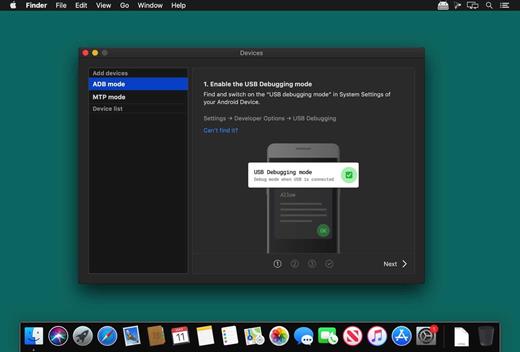
With MacDroid you get the convenience of connecting Mac and an Android phone or tablet and accessing the portable device’s content in the Finder. You will be able to transfer photos, music, videos as well as entire folders. You’ll only need a USB cable to connect your phone to computer, MacDroid will take care of everything else.

Transfer your photos

You can access your Android photos in the Finder app and easily drag them with your mouse cursor to any folder on your Mac.

Transfer music to your phone

You can add your favorite tracks to Android from your Mac or vice versa and enjoy the music on the go.

Watch videos when offline

Got some great new episodes that you want to watch, but not planning to take your computer with you? Not a problem! You can transfer them to your Android and watch on a plane, on a train, or while having an Uber ride.

Edit Android files directly from Mac

When you don’t really feel like moving files around, you can edit your Android files with your favorite Mac app without actually saving them to your computer.

What’s New

Version 1.8.0:

  • Release notes were unavailable when this listing was updated.

Compatibility

macOS 10.10 or later


Release Name: MacDroid Pro 1.8.0
Size: 24.5 MB
Links: HOMEPAGE – NFO – Torrent Search

Download: FiKPERUPLOADGiGNiTROFLARERAPiDGATOR

4 Comments
Aug 23

Boxy SVG 4.8.0

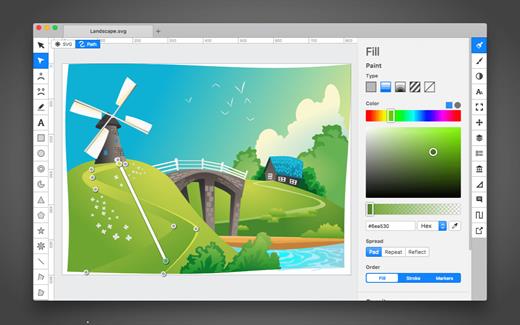
SVG is the standard format for storing vector graphics such as icons, banners, charts and illustrations.

Boxy SVG project goal is to create the best SVG editor for non-technical users as well as for professional designers and developers.

CORE FEATURES

• Clean and intuitive UI heavily inspired by Inkscape, Sketch and Adobe Illustrator
• Extensive support for on-canvas editing of object geometry, transform, paint and other properties
• Save to SVG and SVGZ formats, export to PNG, JPG, WebP, PDF and HTML5
• Open Clip Art Library integration with thousands of free stock vector arts
• Google Fonts integration with hundreds of free fonts
• Configurable keyboard shortcuts for over 100 commands
• Manual guides, smart guides and grid
• Path operations (unite, intersect, subtract, exclude, close, reverse, etc.)
• Arrangement operations (align to, rotate, flip, order, group, etc.)

FOR WEB DEVELOPERS

• Chromium-based rendering engine
• SVG and CSS code inspector similar to Chrome Dev Tools
• Clean SVG output that preserves IDs, classes, titles and other metadata
• SVG sprites editing support

What’s New

Version 4.8.0:

  • Release notes were unavailable when this listing was updated.

Compatibility

macOS 10.15 or later


Release Name: Boxy SVG 4.8.0
Size: 172.6 MB
Links: HOMEPAGE – NFO – Torrent Search

Download: FiKPERUPLOADGiGNiTROFLARERAPiDGATOR

6 Comments
Aug 23

Camtasia 2023.2.0

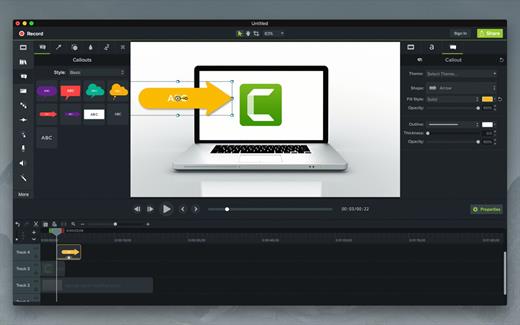
Camtasia for remarkable screencasts made easy. Create eye-catching training, presentation, and demo videos…the easy way. Camtasia screen-recording software is streamlined, intuitive, and makes you look like a pro.

Easily record onscreen activity, Keynote slides, camera video, microphone, or system audio – all with sparkling clarity. Record in front of a live audience or at your desk. Edit to perfection. Turn it into a stunning, HD-quality video at the perfect size to share on popular video sites, Apple devices, your website, blog, or anywhere you like. Make them wonder how you did it.

What’s New

Version 2023.2.0:

  • Release notes were unavailable when this listing was updated.

Compatibility

macOS 10.15.0 or later
Apple Silicon or Intel Core processor


Release Name: Camtasia 2023.2.0
Size: 371.6 MB
Links: HOMEPAGE – NFO – Torrent Search

Download: FiKPERUPLOADGiGNiTROFLARERAPiDGATOR

6 Comments
Aug 23

Ableton Live 11 Suite 11.3.10 (Universal + Intel)

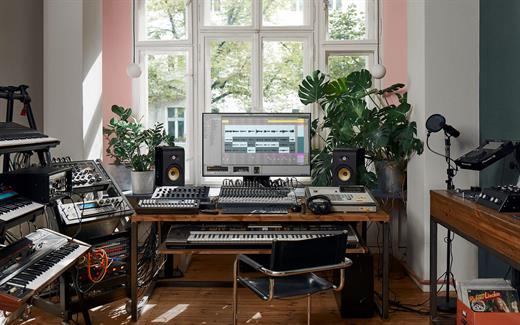
Ableton Live lets you create and record music on your Mac. Use digital instruments, pre-recorded sounds, and sampled loops to arrange, produce, and perform your music like never before. Ableton Live is an all-in-one production suite.

Find your sound

  • Start in Arrangement View. Create and edit multitrack recordings in a straightforward linear view.
  • Go further in Session View. Switch to this one-of-a-kind interface to improvise and experiment with countless sounds and loops.
  • Access an endless palette of sounds. With 5 built-in synths, 3 samplers, 390 drum kits, and 4000 loops, the possibilities are endless.

What’s New

Version 11.3.10:

  • Release notes were unavailable when this listing was updated.

Compatibility

OS X 10.11.6 or later, 64-bit processor


Release Name: Ableton Live 11 Suite 11.3.10 (Universal + Intel)
Size: 6.2 GB
Links: HOMEPAGE – NFO – Torrent Search

Download: FiKPERUPLOADGiGNiTROFLARERAPiDGATOR

2 Comments
Aug 23

Stats 2.9.6

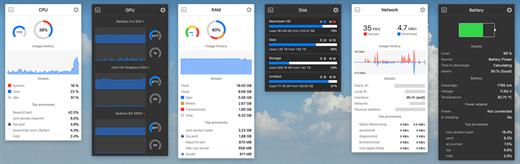
Stats is a application which allows you to monitor your macOS system.

  • CPU Usage
  • Memory Usage
  • Disk utilization
  • Sensors information (Temperature/Voltage/Power)
  • Battery level
  • Network usage

What’s New

Version 2.9.6:

  • fix: fixed free space reader to read the selected drive, not the document directory (#1589)
  • fix: adding new value to the chart in the line chart widget (#1591)

Compatibility

macOS 10.14 or later, 64-bit processor


Release Name: Stats 2.9.6
Size: 7.8 MB
Links: HOMEPAGE – NFO – Torrent Search

Download: FiKPERUPLOADGiGNiTROFLARERAPiDGATOR

5 Comments
Aug 23

LaunchBar 6.18

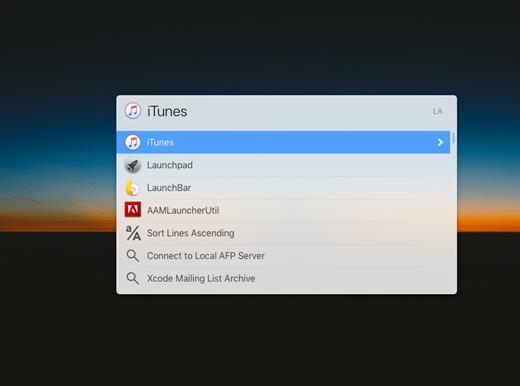
LaunchBar is an award-winning productivity utility that offers an amazingly intuitive and efficient way to search and access any kind of information stored on your computer or on the Web. It provides instant access to your applications, documents, contacts, and bookmarks, to your music library, to search engines and more, just by entering short abbreviations of the searched item’s name.

You just hit Command-Space to bring LaunchBar’s input window to front, enter an arbitrary abbreviation, and as soon as you start typing LaunchBar displays the best matching choices, ready to be opened immediately.

Start applications, open documents, invoke system services, compose emails, or navigate the Web–LaunchBar will be your essential servant.

Automatic Theme Switching

  • Added automatic switching between a theme’s dark and light appearance based on the current system appearance.
  • The desired theme appearance can be chosen in LaunchBar Settings > Appearance.
  • In addition to automatic switching it’s still possible to choose a fixed dark or light appearance.
  • The desired appearance can also be chosen in the LaunchBar window. Select a theme (either by browsing the Themes indexing rule or by selecting it directly via abbreviation search), then press Right Arrow (or Space) and choose either Automatic, Light or Dark.
  • Added dark variants of built-in themes (except for the “Vintage” theme).

Improvements and Bug Fixes

  • Improved appearance of sidebar in index window.
  • Improved caching of applications index for better startup performance.
  • Improved ranking of system applications when searching via abbreviation search.
  • Fixed: Sending files to a shortcut (those created in the macOS Shortcuts app) didn’t work on macOS Ventura. This was caused by a bug in the Shortcuts API on Ventura, which no longer accepts multiple files or folders to be sent to a shortcut. As a consequence it’s currently only possible to send a single file or folder to a shortcut via LaunchBar on Ventura. On macOS Monterey it’s still possible to send multiple files or folders.
  • Fixed a bug causing a file path copied from LaunchBar into a Terminal window to be pasted twice.
  • Fixed a crash when allowing Calendar/Reminders access after adding or enabling the corresponding indexing rule.
  • Fixed an issue causing the shadows in a few custom icons to be headed in the wrong direction.

Compatibility

macOS 10.14.4 or later


Release Name: LaunchBar 6.18
Size: 19.1 MB
Links: HOMEPAGE – NFO – Torrent Search

Download: FiKPERUPLOADGiGNiTROFLARERAPiDGATOR

5 Comments
Aug 23

Dato 5.0.7

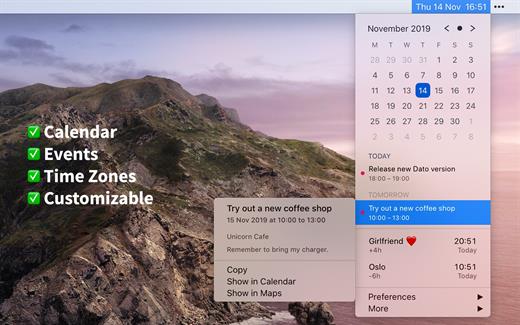
Dato is a replacement for the system menu bar clock.

By default, it looks exactly the same, but when you click it, you get a small calendar, calendar events for the next week, the current time in various time zones (even with custom names), week number, and more. You can customize what to show in the menu and the menu bar.

Dato supports all the locales and languages that macOS supports for dates, times, and the calendar, but the menus are English-only.

Features

  • Calendar, optionally with week numbers. Your upcoming events for the next week at a glance (customizable).Time zones, optionally with custom names.Search time zones by city (15K cities included).Customizable.Double-click a day in the calendar to open that day in the default calendar app.
  • (Supports: Calendar, Fantastical 2, BusyCal).Fully offline with no network entitlements, for your privacy benefit.Supports calendar events with HTML formatted notes.Lots of keyboard shortcuts for power users.”Join Zoom Meeting” button on Zoom meeting calendar invites.

What’s New

Version 5.0.7:

  • Bug fixes.

Compatibility

macOS 10.14.4 or later, 64-bit processor


Release Name: Dato 5.0.7
Size: 20.6 MB
Links: HOMEPAGE – NFO – Torrent Search

Download: FiKPERUPLOADGiGNiTROFLARERAPiDGATOR

5 Comments
Aug 23

UniConverter 15.0.2 (ARM/INTEL)

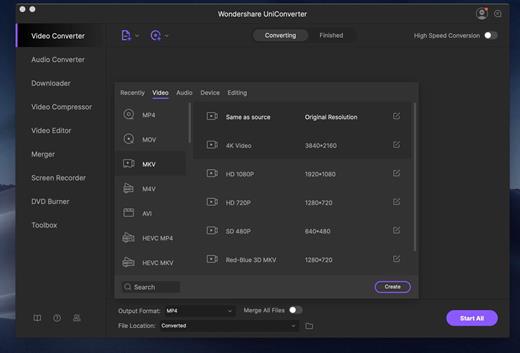
Wondershare UniConverter (was Wondershare Video Converter Ultimate) for Mac The Most Powerful Video Converter Ever. Use this complete all-in-one video toolbox to convert, edit, enhance, download, burn, organize, capture, and play any videos on your Mac.

Full Quality, High Speed Video Conversion to Any Format

Wondershare UniConverter Ultimate accomplishes your conversion tasks with handy features.

  • Convert Any Video to Over 1,000 Formats
  • Convert Videos for All Kinds of Devices
  • 30X Faster Video Conversion Speed
  • Add Videos from Different Sources

Easy-to-Use Video Editor, Makes Your Video Stand Out

You can customize home movies through advanced editing features and get professional-looking works in minutes.

A Flawless DVD Experience Anywhere

Powerful DVD toolkit of Video Converter Ultimate helps you to create and edit DVD files in an easy way.

  • Burn Videos to DVD
  • Convert Any Format to DVD
  • Provide Free DVD Templates
  • Edit DVD Files with Builtin Editor

Save Videos From Over 10,000 Sites With One Click

Download or record your favorite 4K/HD videos from video sharing sites like YouTube, Dailymotion, and more for enjoyment without Internet connection; Or convert them to compatible formats for playback on TV, smartphone or other devices.

  • Download Videos from YouTube and Other UGC Sites.
  • Download YouTube to MP3 in One Click.
  • Download Entire YouTube Playlist at One Go.
  • Record Videos from Streaming Sites.

Transfer Videos to Devices & External Hard Drives

With just one click, you can download or record your favourite 4K/HD videos from many popular online sites like YouTube, Dailymotion and enjoy them anytime – without an Internet connection.

All-Purpose Video Toolbox

Wondershare Video Converter Ultimate also offers a full set of optimized video tools which will come in handy sometime.

Fix Video Metadata

Fix metadata info for videos.

VR Converter

Convert any video to VR format.

DVD Copy (Only for Mac)

Copy DVD to ISO or DVD folder directly.

GIF Maker

Convert a video or photos to a GIF picture.

Cast Video to TV

Cast videos to TV as a media server.

Screen Recorder

Record all desktop activities with voice.

What’s New

Version 15.0.2:

  • Release notes were unavailable when this listing was updated.

Compatibility

macOS 10.11 or later


Release Name: UniConverter 15.0.2 (ARM/INTEL)
Size: 585.1 MB
Links: HOMEPAGE – NFO – Torrent Search

Download: FiKPERUPLOADGiGNiTROFLARERAPiDGATOR

5 Comments
Aug 23

Little Snitch 5.7

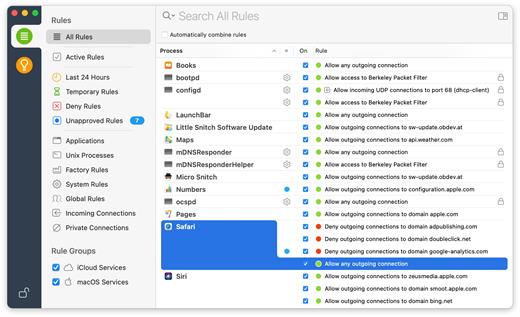
Little Snitch gives you control over your private outgoing data.

Track background activity

As soon as your computer connects to the Internet, applications often have permission to send any information wherever they need to. Little Snitch takes note of this activity and allows you to decide for yourself what happens with this data.

Control your network

Choose to allow or deny connections, or define a rule how to handle similar, future connection attempts. Little Snitch runs inconspicuously in the background and it can even detect network-related activity of viruses, trojans, and other malware.

Instructions:

  • 1. Mount disk image provided
  • 2. Install Little Snitch
  • 3. Open Little Snitch preferences and turn off Automatic Updates
  • 4. Use the provided serial to unlock Little Snitch

What’s New

Version 5.7:

  • Compatibility with macOS 14 Sonoma.
  • Fixed a rare problem caused by a bug in macOS Monterey and later when using multiple Spaces, causing the connection alert not to appear on all Spaces.
  • Fixed a potential crash when clicking a notification from Little Snitch in Notification Center.

Compatibility

macOS 11.0.0 or later.
Apple Silicon or Intel Core processor


Release Name: Little Snitch 5.7
Size: 35.1 MB
Links: HOMEPAGE – NFO – Torrent Search

Download: FiKPERUPLOADGiGNiTROFLARERAPiDGATOR

5 Comments
Aug 23

Sketch 98.0

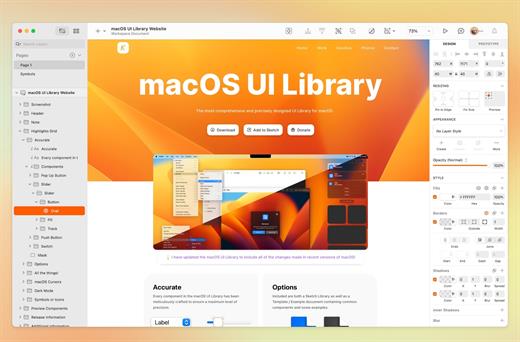
Sketch is an innovative and fresh look at vector drawing for the Mac. Its intentionally minimalist design is based upon a drawing space of unlimited size and layers, free of palettes, panels, menus, windows, and controls. Though simple to use, it offers powerful vector drawing and text tools like perfect Boolean operations, symbols, and powerful rulers, guides, and grids.


What’s improved

  • We’re continuing to work hard on a new experimental feature, Smart Layout in groups. You can read about the latest updates on our community forum.
  • We now only show the notifications icon (bell) in the toolbar if you have notifications to review.
  • We’ve improved how things look when content is a little slow to load on the Canvas. It should feel more natural now.
  • We’re continuing to make our Figma file importer more reliable, and this update includes a few enhancements here. Thanks for all your feedback!

What’s fixed

  • Fixes a bug that caused marquee selections to incorrectly select boolean shapes when the selection included sub-shapes but not the compound boolean shape itself.
  • Fixes a crash that could occur when you changed the order of images fills in a Symbol source, if any instances of that Symbol had loaded already.
  • Fixes an issue in the JavaScript API where using text style with Style objects would cause Sketch to crash.
  • Fixes a bug that made Library names difficult to read in the Document Settings pane after you changed Sketch’s appearance.
  • Fixes a bug that stopped the Workspace window from remembering the Workspace you had selected before you quit Sketch.
  • Fixes a bug that stopped plugins from being able to control trimming options for exports via our API. Also, by default, Symbol instances will no longer be automatically trimmed when you export them.
  • Fixes a bug that stopped the image editing tools from appearing when you double-clicked on an image.
  • Fixes a bug that stopped the Canvas from updating when you made changes to layers that involved certain combinations of groups and masks.
  • Fixes a crash that could occur when trying to undo an edit to a comment.
  • Fixes a bug that caused export previews in the Inspector to appear at a higher resolution than the actual export.
  • Fixes a bug that caused an error icon to appear misplaced if a Symbol could not be displayed.
  • Fixes a bug that named all new Collections you created to be called “New Collection”, regardless of how many Collections with that name already existed. Now we number your new Collections so not all new Collections are “New Collection”.
  • Fixes a bug that could occur if you tried to apply a background blur to a bitmap without an alpha channel.
  • Fixes a bug that caused Artboard names to render incorrectly in certain scenarios.
  • Fixes a bug that stopped you from being able to paste images using the CMYK color space into Sketch.
  • Fixes a bug that caused text from a Linked Data source to always insert at random from the Inspector, even if you had unchecked the option for this.
  • Fixes a bug that could block you from deleting empty groups if the last layer in that group was cut or moved out of it.

Compatibility

macOS 11.0.0 or later
Apple Silicon or Intel Core processor


Release Name: Sketch 98.0
Size: 75.6 MB
Links: HOMEPAGE – NFO – Torrent Search

Download: FiKPERUPLOADGiGNiTROFLARERAPiDGATOR

2 Comments