Sep 5

Typora 1.7.3

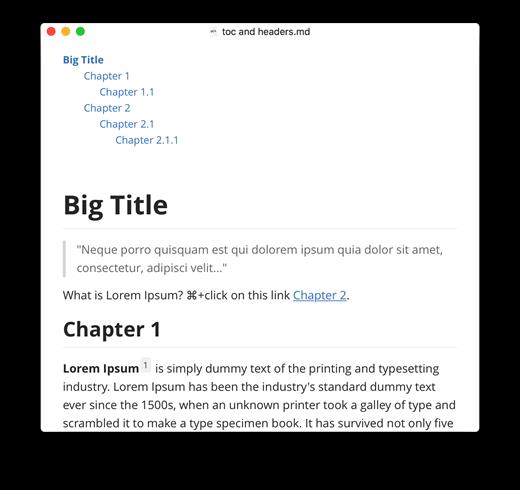
Typora gives you a seamless experience as both a reader and a writer. It removes the preview window, mode switcher, syntax symbols of markdown source code, and all other unnecessary distractions, replacing them with a real-time preview to help you concentrate on the content itself.

Features:

  • Markdown support including tables, code fences with syntax highlight, LaTeX, table of contents
  • Cross-platform
  • The real-time preview and WYSIWYG features
  • Beautiful interface and custom CSS theme support
  • Easy export

What’s New

Version 1.7.3:

  • Release notes were unavailable when this listing was updated.

Compatibility

macOS 10.13.0 or later, 64-bit processor


Release Name: Typora 1.7.3
Size: 21.5 MB
Links: HOMEPAGE – NFO – Torrent Search

Download: FiKPERUPLOADGiGNiTROFLARERAPiDGATOR

5 Comments
Sep 5

Cookie 7.0

Cookie prevents third parties from hijacking your browsing experience. The sites you visit store “cookies” in your browser without your knowledge or consent. Some are helpful, but others are frustrating and invasive. Cookie can help.

Features:

  • Consolidate all your browser privacy settings
  • Simplified View that takes care of all the technical details for you
  • Advanced View which puts you in total control of all your privacy settings
  • Combined cookie view displaying all cookie/flash/localStorage data in one easy to manage view
  • Cookie’s can be favorited on a per domain, or per cookie basis. You decide
  • Individual Browser settings. It is possible to configure different automatic removal options for each browser. In the case of Chrome/Chromium/Canary/Brave you can even configure settings per user!
  • A number of removal schedules are possible: When quitting Cookie, when a Browser is Quit, on computer login, On computer waking from sleep, on a customizable time schedule, or entirely manually
  • Hotkey support, so you can remove all unwanted data quickly and easily
  • Customizable tracking cookie definitions
  • Whitelist individual tracking cookies
  • Clean, modern and Intuitive User Interface
  • Helpful setup window
  • Browser extension protection
  • Full Screen support
  • iCloud support
  • Dark/Regular theme

What’s New

Version 7.0:

  • improved database identification

Compatibility

macOS 10.14 or later, 64-bit processor


Release Name: Cookie 7.0
Size: 10.9 MB
Links: HOMEPAGE – NFO – Torrent Search

Download: FiKPERUPLOADGiGNiTROFLARERAPiDGATOR

5 Comments
Sep 5

Text Workflow 1.6.5

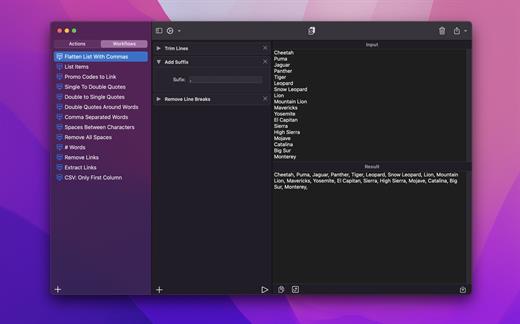
A powerful and easy to use tool that will help you transform your text. Text Workflow removes the need to perform repetitive tasks manually on your text.

Combine transformation actions to create powerful automations for your text. Save your transformation workflows to use them any time you want.

Available text transformation actions

• Add prefix
• Add suffix
• Replace text
• Sort lines

  • alphabetically
  • reverse
  • shuffle
  • by length
    • Trim Lines
    • Add line number
    • Break lines
  • after every word
  • after every sentence
  • after text
  • before text
    • Convert Case
  • uppercase
  • lowercase
  • title case
  • camel case
  • pascal case
    • Delete Characters
  • selected characters
  • non-alphanumeric
  • numeric characters
  • non numeric
  • tabs
  • spaces
  • characters after position
  • characters before position
  • last characters
  • emojis
  • characters after text
  • characters before text
    • Insert Text
  • at first line
  • at last line
  • every line (position)
  • before every word
  • after every word
  • before text
  • after text
  • after every character
    • Delete Lines
  • containing text
  • starting with text
  • not containing text
  • not starting with text
    • Remove line breaks
    • Remove multiple spaces
    • Remove duplicates lines
    • Remove duplicates words
    • Remove empty lines
    • Delete/Filter words
  • containing text
  • starting with text
  • not containing text
  • not starting with text
    • Spell out lines
    • Get Statistics
  • count characters
  • count words
  • count lines
    • Encode/Decode
  • Base64
  • URL
    • Encrypt/Decrypt Text with password
    • Beautify JSON
    • Beautify XML

You can combine all these actions to create your custom transformation workflows!
Export your workflows to file and share them easily with other users!

What’s New

Version 1.6.5:

  • Release notes were unavailable when this listing was updated.

Compatibility

macOS 11.2 or later


Release Name: Text Workflow 1.6.5
Size: 13.2 MB
Links: HOMEPAGE – NFO – Torrent Search

Download: FiKPERUPLOADGiGNiTROFLARERAPiDGATOR

6 Comments
Sep 5

Boxy SVG 4.11.1

SVG is the standard format for storing vector graphics such as icons, banners, charts and illustrations.

Boxy SVG project goal is to create the best SVG editor for non-technical users as well as for professional designers and developers.

CORE FEATURES

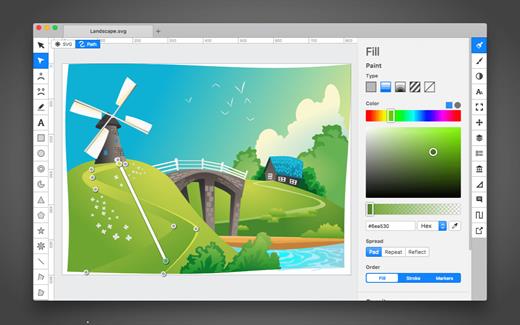
• Clean and intuitive UI heavily inspired by Inkscape, Sketch and Adobe Illustrator
• Extensive support for on-canvas editing of object geometry, transform, paint and other properties
• Save to SVG and SVGZ formats, export to PNG, JPG, WebP, PDF and HTML5
• Open Clip Art Library integration with thousands of free stock vector arts
• Google Fonts integration with hundreds of free fonts
• Configurable keyboard shortcuts for over 100 commands
• Manual guides, smart guides and grid
• Path operations (unite, intersect, subtract, exclude, close, reverse, etc.)
• Arrangement operations (align to, rotate, flip, order, group, etc.)

FOR WEB DEVELOPERS

• Chromium-based rendering engine
• SVG and CSS code inspector similar to Chrome Dev Tools
• Clean SVG output that preserves IDs, classes, titles and other metadata
• SVG sprites editing support

What’s New

Version 4.11.1:

  • Release notes were unavailable when this listing was updated.

Compatibility

macOS 10.15 or later


Release Name: Boxy SVG 4.11.1
Size: 172.5 MB
Links: HOMEPAGE – NFO – Torrent Search

Download: FiKPERUPLOADGiGNiTROFLARERAPiDGATOR

7 Comments
Sep 5

Blocs 5.1.2

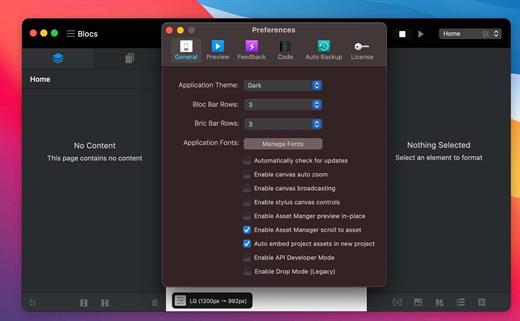
Blocs for Mac is a fast, easy-to-use, powerful visual web-design tool that lets you create beautiful, modern websites without the need to write code. Cleverly designed to accommodate complete beginners or those familiar with web design. You will love building with Blocs.

Features

  • Designed For Simplicity – Building with Blocs is simple and fun. A clean, intuitive interface makes creating sites unbelievably quick. Simply click, select, edit and enjoy stacking blocks to build your website. Its ease of use will make you feel right at home.
  • Powerful Styling features – Behind the simplified interface of Blocs lie some of its more advanced editing features. When you are ready to get more creative with your designs, Blocs will grow with you. You set the pace.
  • Create CMS-Driven Websites – Blocs has integrated support for a range of premium (paid) and open source (free) third-party content management systems. It’s now possible to easily create powerful, dynamic websites, that can be updated and contributed to, right from your web browser.
  • Time-Saving features – Paint mode, global swatches, auto text colouring and one click animations are just a few of the playful, time saving features in Blocs. You’ll be amazed how quickly you can create a website.
  • No subscription, unlimited web sites

What’s New

Version 5.1.2:

  • Release notes were unavailable when this listing was updated.

Compatibility

macOS 10.13 or later


Release Name: Blocs 5.1.2
Size: 67 MB
Links: HOMEPAGE – NFO – Torrent Search

Download: FiKPERUPLOADGiGNiTROFLARERAPiDGATOR

7 Comments
Sep 5

Permute 3.10.9

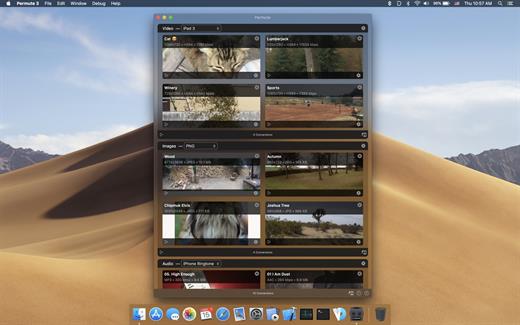
Permute offers easy-to-use drag-and-drop video conversion.

Features:

  • Easy to Use – built from the ground up, Permute is a perfect example of what a Mac app should be. With a gorgeous interface and drag & drop simplicity no need for complicated options.
  • Insanely Fast – Permute was engineered to be incredibly fast. Let us take care of the hard stuff. Just select the video format you want and it’ll be done faster than you can say “hardware acceleration” – MP4 and HEVC presets now take advantage of your machine’s hardware acceleration capabitlities, speeding up HEVC conversions more than 3 times over previous versions of Permute!
  • PDF Support – Permute 3 now includes support for stitching multiple images into a single PDF.
  • Everything Included – It doesn’t matter if you’re converting home movies or processing images. Permute can do it all. We support nearly every format and have plenty of device presets to choose from.
  • Looks Amazing – Whether you use dark mode or not, Permute will look amazing. Taking advantage of the modern technologies, Permute will even change its icon in dark mode.
  • Keep the Schedule – Video re-encoding is quite demanding on computer resources. This is why you can now schedule Permute to convert videos e.g. at night when you’re not using your computer.
  • And so much more! – There are so many other great features in Permute – adjust volume of an audio file or an audio track in a video. Batch-resize, rotate and flip images and videos. And more!

What’s New

Version 3.10.9:

  • Release notes were unavailable when this listing was updated.

Compatibility

macOS 10.12.0 or later


Release Name: Permute 3.10.9
Size: 84.5 MB
Links: HOMEPAGE – NFO – Torrent Search

Download: FiKPERUPLOADGiGNiTROFLARERAPiDGATOR

7 Comments
Sep 2

ImageRanger Pro Edition 1.9.4.1875

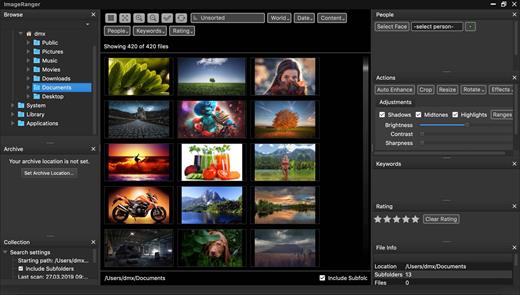
We live in the day in which pictures are a common thing, especially with all phones being equipped with pretty powerful cameras. As such, your computer can end up the storage place of your picture collections, but it can be a hassle to manually handle it. In this regard, ImageRanger comes as an advanced picture finding and organizing tool.

With ImageRanger, auto-enhancements can be applied to multiple images at once. Manual fine-tuning makes it possible to select dark or bright regions of the image and apply various correction settings.

All necessary editing controls (brightness, contrast, sharpness, saturation) are designed in a user friendly interface, with an UNDO function to correct any mishaps as you go.

You can even ask ImageRanger to find and categorize all images of poor quality automatically for your convenience. For advanced users, a powerful batch-processing allows work to be carried out on entire folders while processing only relevant photos.

ImageRanger will index photos on your Mac or storage drives so you can:

  • Quickly load thousands of images
  • Find portraits, faces
  • Sort and filter
  • Find duplicates and remove copies
  • Organize in folders by year, location
  • Crop, resize very quickly
  • Manually sort collections from multiple folders
  • Sort out your images from other illustrations, clip arts
  • Find low quality images and improve image contrast
  • Perform general photo managment tasks
  • Print hundreds of photos

What’s New

Version 1.9.4.1875:

  • Release notes were unavailable when this listing was updated.

Compatibility

macOS 10.10 or later


Release Name: ImageRanger Pro Edition 1.9.4.1875
Size: 106.4 MB
Links: HOMEPAGE – NFO – Torrent Search

Download: FiKPERUPLOADGiGNiTROFLARERAPiDGATOR

7 Comments
Sep 2

BuhoCleaner 1.9.7

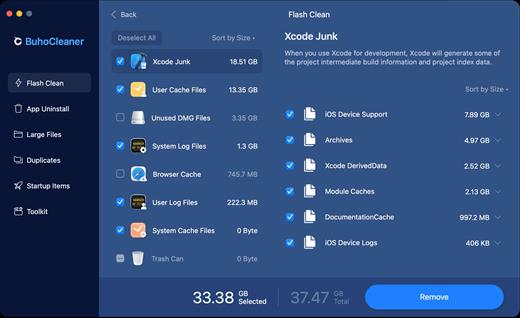
BuhoCleaner is a Mac cleaning app that is made for boosting your Mac performance. With this handy Mac Cleaner app, you can keep your Mac hard drive storage in fit and always running fast.

Highlights:

  • Clean Up Mac Cache Junk, In One Tap
  • Completely Uninstall Apps You Don’t Use
  • Speed Up and Boost Mac Performance
  • Find and Delete Large Files in a Snap
  • In-built Duplicate File Remover Widget
  • Tailored Xcode Cache Cleaner and More

Features:

  • Speed Up and Boost Mac Performance – Feel your Mac running slow? BuhoCleaner can terminate these unresponsive windows and reduce slow loading time. With Multiple-layed Mac Speed-up method, you can reload your Mac with heavy tasks and even make it run like new
  • Clean Up Mac Cache Junk, In One Tap – Feel your Mac is bloated and runs slow? Not a problem. BuhoCleaner gives you an instant Mac cleaning and maintenance solution by wiping out those temporary files, app leftovers, and system cache
  • Completely Uninstall Apps You Don’t Use – Do you know moving an app to the Trash will not uninstall it completely? These app leftovers still remain on your Mac taking up a lot of storage. Let BuhoCleaner remove these unwanted applications the right way
  • Find and Delete Large Files in a Snap – It’s a tough thing to free up disk space from a full hard drive. BuhoCleaner is an excellent tool for macOS that can list all your large files and allow you to get rid of useless ones in one click. Probably the most efficient mean to to get your disk cleaned up
  • In-built Duplicate File Remover Widget – The Copy-and-Paste gesture makes it easy to create duplicated files on your Mac. But to locate these duplicates would be tedious on macOS. BuhoCleaner is built with the Duplicate File Remover feature that allows you scan all identical files and clean them up all at one go
  • Tailored Xcode Cache Cleaner and More – If you use your Mac as dev workstation, maybe you’ve noticed that the Xcode and similar tools will bloat itself over time. BohuCleaner brings a solution letting you delete a load of Xcode orphaned simulators, freeing up huge amounts of space
  • Perfectly Optimized For macOS Big Sur – From the inner code, to the viewable UI design, BuhoCleaner knows best for the revamped Safari, iMessages and all new features in macOS Big Sur. By doing so, BuhoCleaner is about to bring you a whole experience for wiping out the macOS system clutter

What’s New

Version 1.9.7:

  • Release notes were unavailable when this listing was updated.

Compatibility

macOS 10.10 or later
Apple Silicon or Intel Core processor


Release Name: BuhoCleaner 1.9.7
Size: 89.5 MB
Links: HOMEPAGE – NFO – Torrent Search

Download: FiKPERUPLOADGiGNiTROFLARERAPiDGATOR

6 Comments
Sep 2

JetBrains WebStorm 2023.2.1

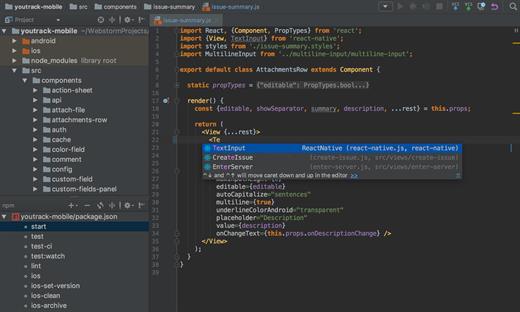
WebStorm is the smartest JavaScript IDE with CSS and HTML Editor for Web Development, at your fingertips. Navigate through files easily. Use relevant autocompletion for everything in your code. Get notified about code problems on the fly. Complicated language mixtures with HTML markup or SQL inside a JavaScript? Check how a modern IDE such as WebStorm handles this.

  • Smart DOM-based autocompletion
  • JavaScript Debugger
  • Extended JavaScript Frameworks support
  • HTML5 Support
  • Zen Coding
  • Language Mixing
  • FTP and Remote Files Synchronization
  • Spell Checker

What’s New

Version 2023.2.1:

  • Release notes were unavailable when this listing was updated.

Compatibility

macOS 10.13 or later.
Apple Silicon or Intel Core processor


Release Name: JetBrains WebStorm 2023.2.1
Size: 1.1 GB
Links: HOMEPAGE – NFO – Torrent Search

Download: FiKPERUPLOADGiGNiTROFLARERAPiDGATOR

7 Comments
Sep 2

ArchiCAD 26 Build 5003

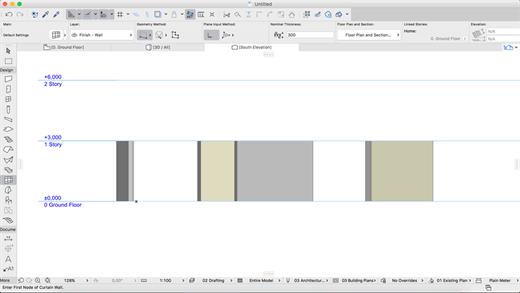
ARCHICAD enables architects to model faster and create accurate construction details and quantity estimations for reinforced concrete, complex steel, timber, and composite beams and columns. Complex columns, curved and haunched beams can now be modeled and documented to meet graphic and representation standards. Beams and columns can be displayed using various projected and symbolic views and cover fills.
Building Together

Archicad connects architects and engineers in a shared BIMcloud environment — powered by advanced collaboration and communication workflows — to deliver integrated design. Seamless and transparent information exchange builds trust among team members, eliminates model duplication, and redundant work between architects and engineers.

Model anything. Model everything.

Create the BIM model of the entire building with Archicad 24’s powerful toolkit. Integrate the structural model and the architectural model in one shared design hub, resulting in a powerful, collaborative environment. Archicad tools now integrate the Structural Analytical Model.

Built-in MEP modeler

Built-in MEP design tools further extend the integrated design approach of Archicad 24. As of this version, MEP Modeler is a core part of the software. Access intelligent MEP equipment inside the architectural model. Integrate MEP systems correctly in the BIM model without the need for a federated approach.

Share and explore your ideas

Explore ideas and design alternatives, leaving no stone unturned. Model and submit ideas for review by your team. When accepted, they’ll immediately become part of the project.

Object creation made easy

Create your own objects with the node-based visual PARAM-O tool without the need for GDL programming knowledge. Model anything from interior details to urban landscapes with parametric capabilities. Create parametric BIM elements with ease — the possibilities are endless!

Build better buildings

Archicad puts architects and structural engineers on the same page with an integrated structural analytical model in the BIM model. Keep architects and engineers in sync, save time and costs with a collision-free, one model strategy and a bi-directional workflow.

Built-in physical and analytical model checking

Increase the reliability and accuracy of your model with the help of built-in physical and analytical model checking and a seamless, bi-directional workflow between Archicad 24 and the analysis application — saving you time and money on the job site.

One shared model

Save time, avoid mistakes, and minimize the risk of data loss thanks to efficient project management between architects and engineers based on a shared model and design hub — built to OPEN BIM standards. Strengthen team performance and design better buildings through solutions powered by streamlined data management processes.

Stay in the loop

Detect and visualize the changes between models and revisions in a more intuitive way thanks to smart change monitoring and real-time notifications.

Change management made easy

With multiple stakeholders on each project, the job of following, understanding, and adapting ongoing design changes is a significant task. Archicad introduces Model Compare. Compare two 3D models or versions, and visualize and filter the differences between them. Keep track of design changes accurately and even evaluate design variants to get to the best possible design.

Track and change

Resolve issues faster and reduce the risk of unsolved issues thanks to clear organization and real-time notifications of BIM model changes. Integrate issues from third parties based on compatibility with industry standard issue management solutions.

Always in sync

Upload and refresh content in the model regardless of each team members’ location thanks to our fast and simple publishing workflow and BIMcloud. Save time, avoid mistakes and share files with confidence, knowing everything’s up-to-date. Real-time access to the shared model throughout the design process means all team members are in sync at all times.

Direct information exchange with Revit

Exchange information with Revit directly “out-of-the-box.” Import and export elements with their precise geometry and parameters (as non-editable content) from Revit (RVT) files for coordination and model referencing purposes. Access RVT files locally or via BIMcloud, using Hotlink or Publish functions.

Simple project submission

Publish projects from Archicad to shared online locations with ease thanks to a streamlined submission process. There’s no need to stay glued to the screen to watch for the publishing to finish, or additional manual uploads. Archicad takes care of it all.

Connect to industry-leading CDE solutions such as Aconex via buildingSMART-defined “open” protocols.

Automate your workflows

Using higher-level programming languages like Python, create automation scripts in Archicad, and complete command chains from outside. Access general element, property information and element listing information, and modify these and other Archicad element classifications as necessary.

Smarter information exchange

Exchange data with consultants outside of the model environment in a smart, efficient way: option set properties are now exported to Excel, guaranteeing accurate and high-quality information input into your BIM model.

New and updated surface materials

Is it real or is it rendered? Create high-end visualizations quickly and easily with new and updated surfaces in the Additional Surface Catalog. 500+ surface materials, including new wallpaper and realistic metal surfaces, result in stunning photo-realistic renderings.

Bring your interiors to life

Add life to your 2D and 3D views for a more contemporary look and feel. Furnish your scenes with brand-new objects from the updated library quickly and easily, thanks to an improved design workflow.

What’s New

Version 26:

  • Release notes were unavailable when this listing was updated.

Compatibility

macOS 10.14 or later


Release Name: ArchiCAD 26 Build 5003
Size: 9.3 GB
Links: HOMEPAGE – NFO – Torrent Search

Download: FiKPERUPLOADGiGNiTROFLARERAPiDGATOR

Comments Off