Sep 13

Downie 4.6.27

A simple download manager that offers you the possibility to quickly save videos from different websites to your own disk drive.

If you are using a poor internet connection, trying to visualize videos streamlined online might not work properly since the content is loaded too slowly. Downie is a simple Mac app that can help you download those videos to your computer, and then watch them by using your default media player.

User friendly video downloader featuring support for drag and drop actions

Working with Downie is extremely straightforward: simply drop the video URL on top of the app’s main window or on the Dock icon. Downie adds the video to your downloads list, so all you have to do next is start the process by pressing the appropriate button. Of course, you can also remove items from the list.

By default, Downie downloads MP4 files and places them in your default Downloads folder, but you can easily change this via the Preferences window. The same area allows you to setup notifications, or post processing actions (convert to MP4 if necessary, or extract audio only).

Effortlessly download videos from a wide collection of hosting websites

Downie provides support for more than 400 different websites that host video content, among which there are the most popular choices, such as YouTube, Apple, LiveLeak, Vimeo, BBC, and so on. If a certain website is not included, within the app you can send a request email to the Downie developers.
Moreover, Downie also provides matching extensions for various popular web browsers, such as Firefox, Safari, Google Chrome or Chromium. The add-ons are not installed by default: open the Preferences window and install only the ones you plan to use.

Straightforward solution for downloading video content hosted online

Downie is a great tool for saving videos posted on various websites to your Mac for offline playback. The application is extremely useful especially if you have a slow internet connection.

What’s New

Version 4.6.27:

  • Improved: facebook.com, ibm.com, youtube.com

Compatibility

macOS 10.12 or later
Apple Silicon or Intel Core processor


Release Name: Downie 4.6.27
Size: 57.1 MB
Links: HOMEPAGE – NFO – Torrent Search

Download: FiKPERUPLOADGiGNiTROFLARERAPiDGATOR

4 Comments
Sep 13

Bookshelf – Library 6.3.4

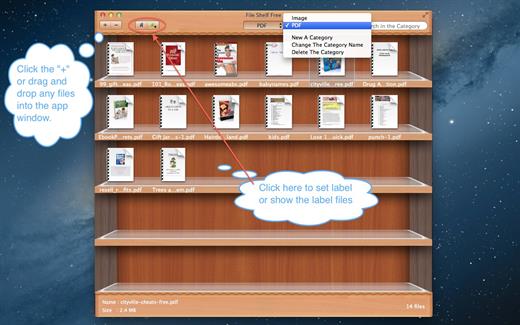
File Shelf Pro is a file index management tool, it can help you manage your files better.

Key Features

  1. You can add any files here, including the folder.
  2. You can create file category in order to manage them conveniently.
  3. You can search for files in current category and all categories.
  4. You can set image file to the desktop image.
  5. You can ascending and descending order files.
  6. You can add file labels, It’s easier to find files.
  7. You can move files from one category to another category.
  8. Move files into the buffer in order to manage your files better, can also let your desktop become cleaner.
  9. Support drag and drop to add files.
  10. Create more categories.

What’s New

Version 6.3.4:

  • Release notes were unavailable when this listing was updated.

Compatibility

macOS 10.13 or later


Release Name: Bookshelf – Library 6.3.4
Size: 10.7 MB
Links: HOMEPAGE – NFO – Torrent Search

Download: FiKPERUPLOADGiGNiTROFLARERAPiDGATOR

5 Comments
Sep 13

Microsoft Office 2021 for Mac LTSC v16.77 VL

Office 2021 for Mac is designed from the ground up to take advantage of the latest Mac features, including Retina display, full screen view support, and even scroll bounce. It’s the perfect combination of the Office you know and trust, and the Mac you love.

Word

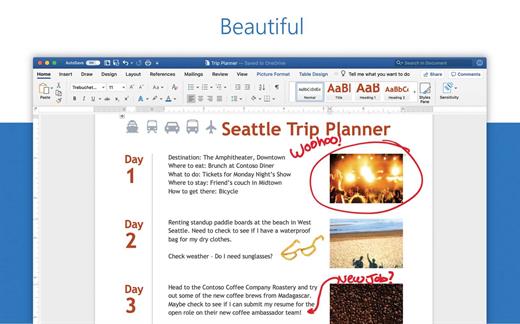
Create and share professional-looking documents with state-of-the-art editing, reviewing, and sharing tools. The new Design tab provides quick access to features, and Smart Lookup shows relevant contextual information from the web directly inside Word.

Excel

Analyze and visualize your data in new and intuitive ways with a fresh user interface plus your favorite keyboard shortcuts. Leverage features like Analysis Toolpak, Slicers, and Formula Builder to save time, so you can focus on insights.

PowerPoint

Create, collaborate, and effectively present your ideas with new slide transitions and an improved Animations task pane. Threaded comments alongside your slides help you incorporate feedback into your presentations. And Presenter View displays the current slide, next slide, speaker notes, and a timer on your Mac, while projecting only the presentation to your audience on the big screen.

OneNote

It’s your very own digital notebook, so you can keep notes, ideas, web pages, photos, even audio and video all in one place. Whether you’re at home, in the office, or on the move, you can take it all with you wherever you go while sharing and collaborating with others. It’s great for school assignments, work projects, travel plans, party planning, and more.

Outlook

Easily manage your email, calendar, contacts, and tasks. Push email support keeps your inbox up to date, conversation view groups related messages, and calendars can be viewed side-by-side for planning.

What’s New

Version 16.77:

  • Release notes were unavailable when this listing was updated.

Compatibility

macOS 10.14 or later
Apple Silicon or Intel Core processor


Release Name: Microsoft Office 2021 for Mac LTSC v16.77 VL
Size: 2.1 GB
Links: HOMEPAGE – NFO – Torrent Search

Download: FiKPERUPLOADGiGNiTROFLARERAPiDGATOR

3 Comments
Sep 13

AirMail Pro 5.6.9

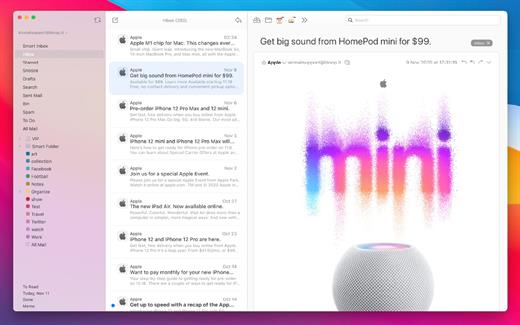
Airmail 4 is a new mail client designed with performance and intuitive interaction in mind optimized for macOS High Sierra! Support for iCloud™, MS Exchange, Gmail™, Google™ Apps, IMAP, POP3, Yahoo!™, AOL™, Outlook.com™, Live.com™

Airmail was designed from the ground UP to retain the same experience with a single or multiple accounts and provide a quick, modern and easy-to-use user experience. Airmail is clean and allows you to get to your emails without interruption – it’s the mail client for the 21st century.

We have taken usability and function to the next level with Airmail and bring a striking-design with support for all major email services. Switch between accounts like a breeze and quick reply to incoming messages within seconds – email has never been so easy and productive.

  • iCloud Account sync
  • iCloud attachment upload and share the link.
  • Handoff support, Composing Draft and folder selection are mirrored on different devices
  • Today Extension, quick access to your inbox.
  • Action Extension, Airmail Compose, Inline create and send messages directly form other apps
  • Action Extension, Airmail Share to quick send messages and attachments.

Accounting:

  • Unified Inbox
  • Alias with custom SMTP
  • Exchange, iCloud™, Gmail™, IMAP, POP3, Google™ Apps, Yahoo!™, AOL™, Outlook.com™, Live.com™
  • Local Accounts
  • Import from Apple Mail, MBOX archive, EML, EMLX, Airmail 1.x

Interactions:

  • Quick Reply
  • Undo History
  • Offline operations
  • Move messages on Different mailboxes
  • Interaction sounds
  • Multi Touch gestures
  • Exchange Meeting Invite

Shortcuts:

  • Gmail Shortcuts
  • Custom global shortcuts
  • Quick Label, Move, Label and Archive
  • Quick folder selection

Attachment:

  • Drag and drop
  • Quick Look preview
  • Google Drive, Dropbox, CloudApp, Box, Onedrive, Droplr, FTP
  • Inline image attachments
  • Winmail.dat preview
  • VCalendar

Conversations:

  • Group by id
  • Group by subject
  • Chronological Reverse
  • Muted CC’d conversation

Visual:

  • Multiple visual themes
  • Minimal and extended Mode
  • Plain Text Rendering

Notifications:

  • Per account notifications
  • Notification center support
  • Notification alerts with custom actions

Address:

  • Gmail, Exchange and OS X contacts
  • Contacts Group
  • Filter by address
  • Open Directory search

Composer:

  • Google App Directory
  • Exchange Global Address List
  • LDAP directory
  • Markdown, Html(Html Source for templates), and text only.
  • Custom settings per single account
  • Bullet and numbered list.

Sending:

  • Auto CC, BCC.
  • Pending operations
  • Send Delay
  • Redirect
  • Send again
  • Bounce

Advanced:

  • Split Screen Support
  • Time Machine friendly
  • Deckles mode
  • EML Import/Export
  • Disable GPU to save battery life
  • Applescript
  • Activity monitor
  • Data Detectors

Signatures:

  • Multiple Account Signatures
  • Markdown, Rich text, Html Source, and text only.
  • Signature above or below the quote

Search & Filtering:

  • Global search for multiple accounts
  • Realtime powerful filters
  • Sort messages, Date, Attachments, Conversations ….
  • Show messages of the same user
  • Flags and filters

Folders, Labels:

  • Nested folders
  • Create, Delete and edit folders
  • Custom colors synced by iCloud
  • Custom folder mappings
  • ToDo, Done, Memo

Send to:

  • Omnifocus
  • Fantastical
  • Evernote
  • Apple Reminder
  • Calendar
  • BusyCal
  • Things
  • 2To
  • Wunderlist
  • Todoist

Privacy:

  • Per user Autoload Remote Images,
  • Disable icon detection

What’s New

Version 5.6.9:

  •  Bugfixed

Compatibility

macOS 10.12 or later.
Apple Silicon or Intel Core processor


Release Name: AirMail Pro 5.6.9
Size: 45.8 MB
Links: HOMEPAGE – NFO – Torrent Search

Download: FiKPERUPLOADGiGNiTROFLARERAPiDGATOR

5 Comments
Sep 13

Capture One 23 Enterprise 16.2.4.34

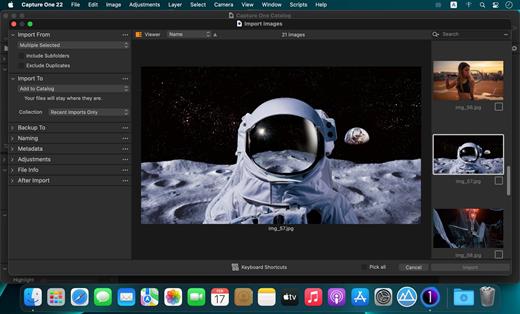
Capture One 22 Enterprise – the photo editing solution for image production studios and e-commerce platforms. Its authentic true-to-life color processing, seamless editing experience, and fastest tethering in the industry gives you total creative control, making it a household name in studios across the world. Based in Copenhagen, Denmark, Capture One empowers photographers with cutting-edge features to keep your photography one step ahead

With an updated processing engine, market-leading performance, and powerful new features, Capture One is the professional choice in imaging software. You get the highly responsive precision tools you need to create stunning images from your camera’s RAW files in a time-saving workflow that can be customized to fit your needs.

What’s New

Version 16.2.4.34:

  • Release notes were unavailable when this listing was updated.

Compatibility

macOS 10.13 or later
Apple Silicon or Intel Core processor


Release Name: Capture One 23 Enterprise 16.2.4.34
Size: 726.3 MB
Links: HOMEPAGE – NFO – Torrent Search

Download: FiKPERUPLOADGiGNiTROFLARERAPiDGATOR

6 Comments
Sep 9

Farrago 2.0.5

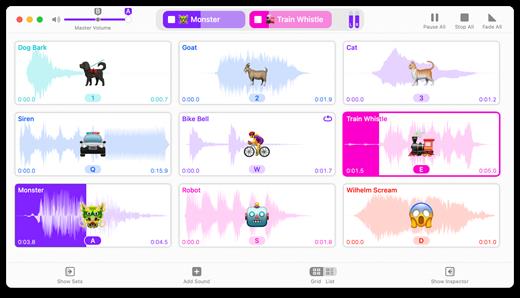
Farrago provides the best way to quickly play sound bites, audio effects, and music clips on your Mac. Podcasters can use Farrago to include musical accompaniment and sound effects during recording sessions, while theater techs can run the audio for live shows. Whether it’s providing quick access to a large library of sounds or running through a defined list of audio, Farrago is ready to assist!

  • Powerful Tile Interface: Farrago’s tile grid lets you lay out your audio exactly how you want it. Put your sounds at your fingertips and work the way you want.
  • Customize With the Inspector: Use the inspector to tailor each sound’s settings to your needs. Set the tile name and color, tweak in/out points, alter fade settings and more.
  • Organize With Sets: Create distinct groups of audio based on mood, show, or any other critera you like. Using sets makes managing audio a breeze.
  • Sound Sets: Farrago’s default sound set is useful, but you can create your own sets based on show, mood, or anything else you like.
  • A Thoughtful Interface: Farrago’s tile-based layout provides an easily understood way to play your audio via the keyboard or mouse.
  • Global Access via Hotkeys: With Farrago’s user-definable Global Hotkey, you can pull the app forward, then use the in-app shortcuts to instantly trigger your desired audio.

What’s New

Version 2.0.5:

  • Release notes were unavailable when this listing was updated.

Compatibility

macOS 10.14 or later


Release Name: Farrago 2.0.5
Size: 47 MB
Links: HOMEPAGE – NFO – Torrent Search

Download: FiKPERUPLOADGiGNiTROFLARERAPiDGATOR

6 Comments
Sep 9

Fission 2.8.4

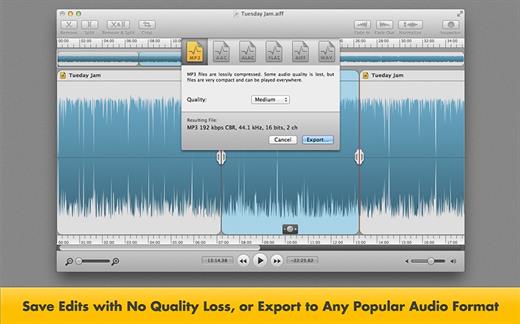
Fission can crop and trim audio, paste in or join files, or just rapidly split one long file into many. It’s streamlined for fast editing. Plus, it works without the quality loss caused by other editors, so you can get perfect quality audio even when editing MP3 and AAC files.

If you need to convert formats, Fission can do that too! You can rapidly export or batch convert files to the MP3, AAC, Apple Lossless, FLAC, AIFF, and WAV formats.

Key Features:

  • Edit MP3, AAC, Apple Lossless, and AIFF files with no quality loss
  • Quickly split a long audio file into smaller files
  • Remove unwanted content, such as commercials, from your audio file
  • Re-arrange audio in a single file, copy audio from one file to another, or merge with a quick drag and drop
  • Create great-sounding MP3 or AAC ringtones for your cell phone.

What’s New

Version 2.8.4:

  • Release notes were unavailable when this listing was updated.

Compatibility

macOS 10.14 or later


Release Name: Fission 2.8.4
Size: 19.5 MB
Links: HOMEPAGE – NFO – Torrent Search

Download: FiKPERUPLOADGiGNiTROFLARERAPiDGATOR

7 Comments
Sep 9

CleanShot X 4.6

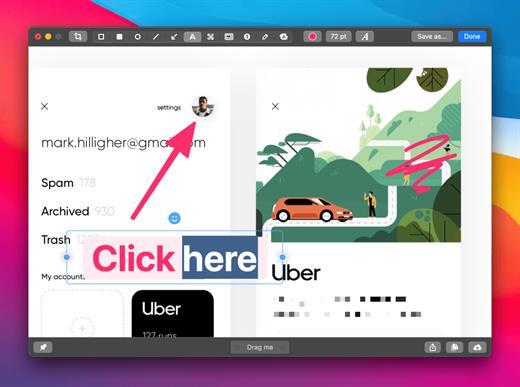
CleanShot is the ultimate screen recording app made for macOS. With its rich toolkit, CleanShot actually feels like 6 apps in one. You can use it to swiftly capture Mac’s screen without desktop icons, record and trim video, annotate, save screenshots to dedicated cloud, and more.

Features:

CleanShot Cloud

You can instantly save your screen captures to CleanShot Cloud, dedicated screenshots hosting integrated with the app. Right from the quick menu, upload your screenshot to the cloud, and get a link to it in a click.

Hide desktop icons

CleanShot hides desktop icons, so that you can capture your Mac’s screen on the spot, without wasting time on a cleanup. If you need a quick capture, toggle the icons and bring them back once you’re finished. You can even set a custom wallpaper like an image or plain color for your screenshots.

Record screen

CleanShots lets you choose between recording a video or a GIF, whether you capture a specific window, part of the screen, or fullscreen. Even set your custom dimensions before hitting the Record button. You can also disable desktop notifications for when you’re recording.

Quick Access Overlay

Right after taking a screenshot, you’ll see a small pop-up window appear on the screen. It’s the shortcut to viewing, annotating, or sharing whatever you’ve just captured. Essentially, Quick Access Overlay gives you an instant editing toolkit, plus saves you from searching and reopening screenshots.

Simple yet powerful

CleanShot teaches you to use simple actions while capturing the screen — yet provides tons of options to do it. You can grab the area, fullscreen, window, or even a scrolling window. Set a timer if you need a few seconds to capture the right moment. In your hands, it caters for your needs.

Annotate, highlight or blur

No screenshot is perfect. Using CleanShot’s built-in editor, you can highlight or hide specific parts of your screenshots as well as add annotations flexibly. Just click on the pencil icon in the Quick Access Overlay to edit screen captures in a flash.

Note:
To upgrade from previous installation, remove CleanShot from Screen Recording system permission, then launch patched app.

What’s New

Version 4.6:

  •  Introducing a new Audio Recording Engine – Computer audio recording is now much more reliable and no longer requires additional drivers!
  •  Save Background Tool settings as Presets – use the same look multiple times with a single click.
  •  Added QR code reader to the OCR tool
  •  Added an easier way to resize Text in Annotate
  •  Added countdown option to Screen Recording
  •  Added notification when your mic is muted during recording
  •  Added audio indicator to recorder controls – visually see if the audio is being recorded
  •  Added two finger scroll gesture to adjust opacity of pinned screenshots
  • Added new shortcut to annotate last taken screenshot
  • Added option to record audio in mono
  • Added option to change recorder controls position on the screen
  • Added option to disable URL scheme API
  • Recorder controls will be available also while recording full screen (but won’t appear on the recording)
  • Added option to manually enter values in Background Tool
  • Added option to open MP4 files from clipboard
  • Added more FPS options
  • Double-Click in Capture History will now open Annotate
  • Auto-crop Notch from screenshots of fullscreen apps
  • Improved compatibility with GoPro webcam utility
  • Fixed bug with opening multiple screenshots with share extension
  • Fixed bug with showing a cursor on full size camera recording
  • Fixed bug with merging audio when there is not enough free disk space
  • Fixed bug with using ‘Capture Previous Area’ option on macOS Sonoma
  • Fixed minor bug when using Self-Timer from All-In-One
  • Other minor bug fixes and improvements

Compatibility

macOS 10.14.4 or later
Apple Silicon or Intel Core processor


Release Name: CleanShot X 4.6
Size: 35.7 MB
Links: HOMEPAGE – NFO – Torrent Search

Download: FiKPERUPLOADGiGNiTROFLARERAPiDGATOR

6 Comments
Sep 9

Cookie 7.0.4

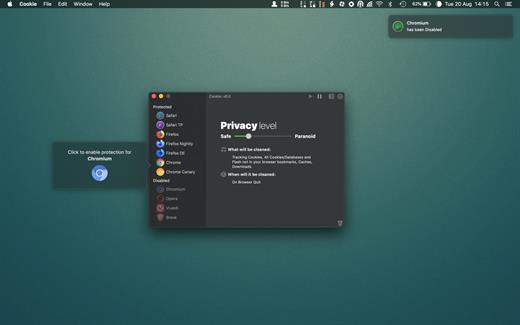
Cookie prevents third parties from hijacking your browsing experience. The sites you visit store “cookies” in your browser without your knowledge or consent. Some are helpful, but others are frustrating and invasive. Cookie can help.

Features:

  • Consolidate all your browser privacy settings
  • Simplified View that takes care of all the technical details for you
  • Advanced View which puts you in total control of all your privacy settings
  • Combined cookie view displaying all cookie/flash/localStorage data in one easy to manage view
  • Cookie’s can be favorited on a per domain, or per cookie basis. You decide
  • Individual Browser settings. It is possible to configure different automatic removal options for each browser. In the case of Chrome/Chromium/Canary/Brave you can even configure settings per user!
  • A number of removal schedules are possible: When quitting Cookie, when a Browser is Quit, on computer login, On computer waking from sleep, on a customizable time schedule, or entirely manually
  • Hotkey support, so you can remove all unwanted data quickly and easily
  • Customizable tracking cookie definitions
  • Whitelist individual tracking cookies
  • Clean, modern and Intuitive User Interface
  • Helpful setup window
  • Browser extension protection
  • Full Screen support
  • iCloud support
  • Dark/Regular theme

What’s New

Version 7.0.4:

  • improved database identification

Compatibility

macOS 10.14 or later, 64-bit processor


Release Name: Cookie 7.0.4
Size: 10.9 MB
Links: HOMEPAGE – NFO – Torrent Search

Download: FiKPERUPLOADGiGNiTROFLARERAPiDGATOR

5 Comments
Sep 9

Topaz Photo AI 2.0

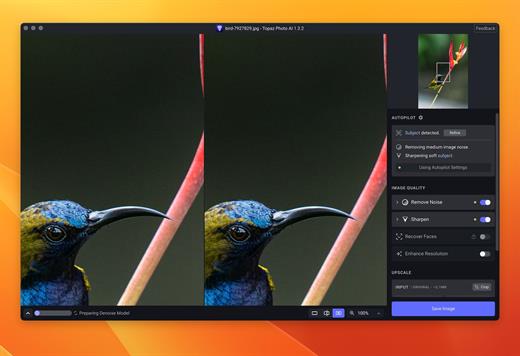
Sharpen, remove noise, and increase the resolution of your photos with tomorrow’s technology. Topaz Photo AI supercharges your image quality so you can focus on the creative part of photography.

Focus on your creativity rather than your tools.
AI is good at some things but bad at others. It can write sentences but can’t tell a story, and it can recommend songs but can’t compose music. But most importantly for us: AI is exceptionally good at improving image quality, but bad at knowing what to do with it.

We believe that stunning photography comes from artistic vision paired with world-class tools. AI will never replicate human creativity, so it’s still your job to provide the vision. But just like a sharper lens or better camera, Topaz Photo AI empowers you to create images that just aren’t possible with yesterday’s tools.

Your photos at their very sharpest.
You won’t always be able to retake a shot when your subject is blurry. Sometimes you won’t even know until you’re reviewing your photos on your computer.

In these cases, use Topaz Photo AI to ensure that your photos are the sharpest they can possibly be. Instead of artificially increasing edge contrast like traditional sharpening, the Sharpen AI module naturally reverses root causes of blurriness (camera shake, motion blur, misfocus) to create more natural results.

In the absence of blur, sharpness remains – crisp, clear detail that’s free of edge haloes or other artifacts.

What’s New

Version 2.0:

  • Release notes were unavailable when this listing was updated.

Compatibility

macOS 10.12 or later


Release Name: Topaz Photo AI 2.0
Size: 231.4 MB
Links: HOMEPAGE – NFO – Torrent Search

Download: FiKPERUPLOADGiGNiTROFLARERAPiDGATOR

9 Comments