Sep 14

Audio Hijack 4.2.3

Audio Hijack (was Audio Hijack Pro) drastically changes the way you use audio on your computer, giving you the freedom to listen to audio when you want and how you want. Record and enhance any audio with Audio Hijack – it’s the cornerstone of your digital audio experience.
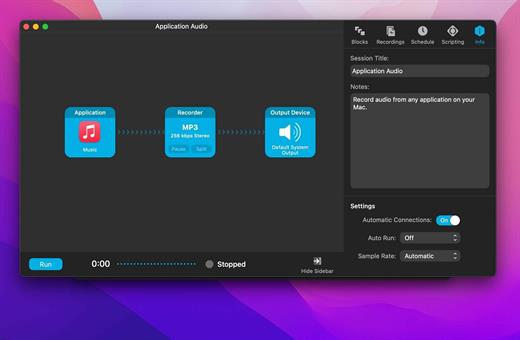
Audio Hijack will allow you to record any application’s audio, from Internet streams to DVD audio and everywhere in between. If your machine can play it, Audio Hijack can record it. And that’s not all – Audio Hijack will also enhance any audio, unsing industry-standard VST and AudioUnit audio effects to make your music sound incredible. Record. Enhance. Enjoy!

More Great Features

Record to All Major Formats
Record to the world’s most popular audio formats, including MP3 and AAC, or save in perfect-fidelity AIFF, WAV, ALAC or FLAC.

Reusable Sessions
Once you’ve configured a Session to your liking, you can re-use it over and over. With one click, you’ll be recording exactly as desired.

Easy File Organization
Find all of your recordings sorted by Session in the Recordings tab, where you can quickly pass files to an audio editor, add them to iTunes, or share them.

Timed Recordings
Use the Schedule tab to set up timed recordings for when you’re not around. Your audio will be waiting for you when you return.

Silence Monitoring
When silence is detected, Audio Hijack can automatically stop recording, split to a new file, or remove audio.

Bulletproof Recording
Bulletproof recording means that even if the power goes out or your computer crashes, you’ll never lose a recording.

A Thoughtful Interface
Audio Hijack’s intuitive audio grid provides a terrific pipeline-style view of exactly how your audio flows, so you can easily understand it.

Gorgeous Audio Effects
The included audio effects are easy to use and easy on the eyes. Their functionality is now accessible to all.

Time Shift Your Audio
Now you can pause, delay, and rewind live audio on your Mac. It’s perfect for transcribing audio and more!

What’s New

Version 4.2.3:

  • Release notes were unavailable when this listing was updated.

Compatibility

macOS 10.14.4 or later
Apple Silicon or Intel Core processor


Release Name: Audio Hijack 4.2.3
Size: 40.9 MB
Links: HOMEPAGE – NFO – Torrent Search

Download: FiKPERUPLOADGiGNiTROFLARERAPiDGATOR

5 Comments
Sep 14

EdgeView 4.3.1

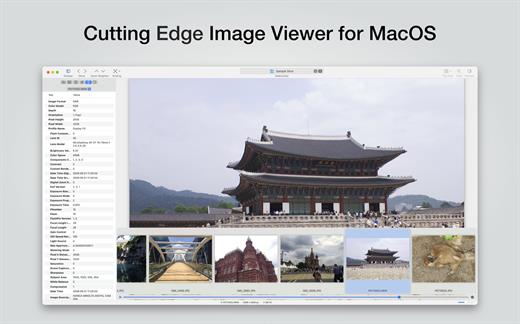
EdgeView 4 is fast image viewer has elegant user interface. EdgeView 3 is developed and designed for modern MacOS. It can open various image files such as JPEG, PNG, TIFF, BMP, and RAW file of DSLR, EPS and PDF, AI(Adobe Illustrator). Can open image files in archive directly without extraction.

User can open files, rename files, delete files from EdgeView’s file browser. Also can access to SMB/AFP/FTP network volume.

User can navigate images quickly by using keyboard shorcut, mouse wheel, trackpad gesture. EdgeVew show EXIF information, play animation GIF/PNG/WebP smoothly. Save last status to history, and restore when reopen file.

EdgeView 4 will be the best choice when viewing and managing image files.

What’s New

Version 4.3.1:

  • Release notes were unavailable when this listing was updated.

Compatibility

macOS 11.1 or later
Apple Silicon or Intel Core processor


Release Name: EdgeView 4.3.1
Size: 40.3 MB
Links: HOMEPAGE – NFO – Torrent Search

Download: FiKPERUPLOADGiGNiTROFLARERAPiDGATOR

5 Comments
Sep 14

Default Folder X 6.0 b5

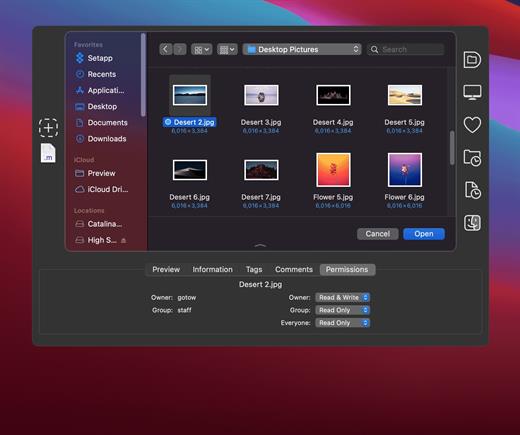
Default Folder X attaches a toolbar to the right side of the Open and Save dialogs in any OS X-native application. The toolbar gives you fast access to various folders and commands. You just click on the buttons to go to your favorite and recently used folders, manage the folders and files shown in the list, and make changes to your settings. It also fixes a number of problems in Open and Save dialogs, “rebounding” to the last selected file, putting the path listing back in the top menu, and correcting bugs in scrolling column views.

Features

  • Directory assistant: You can access the contents of your recent, favorite, and open folders right from Default Folder X’s toolbar.
  • Real time saving: If you’re constantly saving things inside the same folder, Default Folder X can remember that folder for you.
  • Finder management: Default Folder X lets you open up or save to any Finder window with a single click.
  • Instant Recall: To help you quickly return to folders you’ve recently used, Default Folder X remembers them for you.
  • Spotlight on the spot: Default Folder X lets you add Spotlight keywords, OpenMeta tags, and Finder labels on the spot, while you’re still in the Save dialog.
  • Information central: With Default Folder X you get previews below every Open dialog, expanded to fill the available space. Need to see more detail? Click on the image and it zooms up to full size.
  • Workflow without work: Rather than make you learn and set up a new application, Default Folder X blends into OS X.

What’s New

Version 6.0 b5:

  • Release notes were unavailable when this listing was updated.

Compatibility

macOS 10.13 or later
Apple Silicon or Intel Core processor


Release Name: Default Folder X 6.0 b5
Size: 21.7 MB
Links: HOMEPAGE – NFO – Torrent Search

Download: FiKPERUPLOADGiGNiTROFLARERAPiDGATOR

5 Comments
Sep 14

OmniGraffle Pro 7.21.6

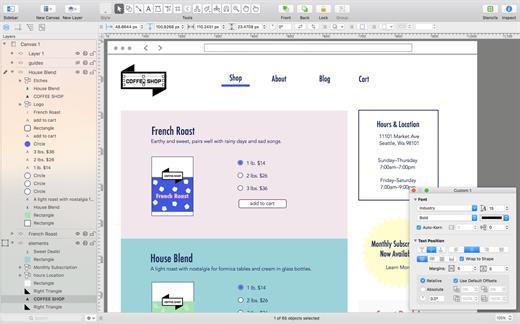
OmniGraffle Pro helps you draw beautiful diagrams, family trees, flow charts, org charts, layouts, and (mathematically speaking) any other directed or non-directed graphs. We’ve had people use Graffle to plan plotlines for a story, make an overview of an operating system, show the evolution of computers, and even show how diseases can spread in a closed population. If you want to organize your thoughts, your projects, or even your friends graphically, using boxes and lines, OmniGraffle is your tool.

OmiGraffle Professional has all of the great features in the standard version, plus a powerful toolset for advanced document creation and editing options. For the pro user who’s looking for an in-depth diagramming application that’s still priced below the competition, you’ve come to the right place.

What’s New

Version 7.21.6:

  • Cloud Storage Providers: Improved compatibility with linked resource folders stored in OneDrive.

Compatibility

macOS 11.0.0 or later
Apple Silicon or Intel Core processor


Release Name: OmniGraffle Pro 7.21.6
Size: 61.4 MB
Links: HOMEPAGE – NFO – Torrent Search

Download: FiKPERUPLOADGiGNiTROFLARERAPiDGATOR

5 Comments
Sep 14

GoodTask 7.6.0

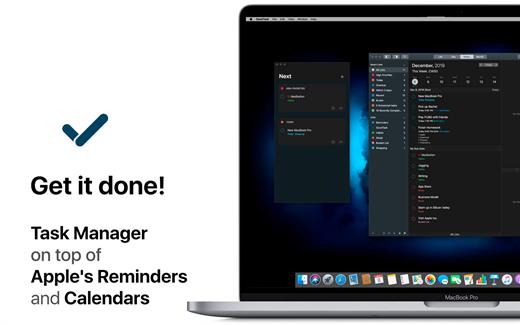
GoodTask is a powerful task/project manager based on Apple’s Reminders and Calendars. You can use it as simple checklist to focus or as complex project management tool to get big things done. GoodTask 3 provides various viewpoints to the things that you care and need to be done. Manage your tasks, projects and even your life better with GoodTask.

Features:

  • Syncs with default stock Reminders and Calendars (iCloud/Exchange/etc)
  • Supports fully customizable recurring tasks
  • Manage reminders, lists, and calendars easily
  • List, day, week, month view on each lists
  • Add quickly and smartly with quick actions and text snippets
  • List with selective reminders, lists, and calendars
  • Filter by including or excluding text/tags
  • Filter by priorities
  • Overdue tasks, location-based tasks, recent tasks, etc.
  • Quickly edit tasks on-the-fly
  • Bulk actions to edit/check/delete multiple tasks at once
  • Duplicate, change due dates, add/switch tags/lists, etc.
  • App icon badge and notifications
  • Dark theme
  • Today-widget support
  • Time-zone support
  • Subtasks, automatic repeat after completion, and manual sort

What’s New

Version 7.6.0:

  • Release notes were unavailable when this listing was updated.

Compatibility

macOS 10.15 or later


Release Name: GoodTask 7.6.0
Size: 40.5 MB
Links: HOMEPAGE – NFO – Torrent Search

Download: FiKPERUPLOADGiGNiTROFLARERAPiDGATOR

3 Comments
Sep 14

Integrity Pro 12.7.10

Integrity Pro builds on Integrity Plus. It has the new v12 crawling engine, it checks links and generates a sitemap with all the searching, filtering and exporting functionality of the Plus version. It adds SEO details and a sitewide spellcheck. It isn’t intended to replace Scrutiny, but to be pitched between Integrity Plus and Scrutiny, a more affordable step for Integrity Plus users. There will, of course, be an upgrade from Integrity Plus, but this early public beta is simply free until the stable version is released.

What’s New

Version 12.7.10:

  • Release notes were unavailable when this listing was updated.

Compatibility

macOS 10.10 or later


Release Name: Integrity Pro 12.7.10
Size: 9.4 MB
Links: HOMEPAGE – NFO – Torrent Search

Download: FiKPERUPLOADGiGNiTROFLARERAPiDGATOR

4 Comments
Sep 14

Scrutiny 12.7.10

Scrutiny is a suite of web optimization tools. Native cocoa app (i.e., not Java) fast and efficient. 30-days free trial. This is a major update from v5. This is a completely free upgrade for v5 users and there is an upgrade path from v4.

Features

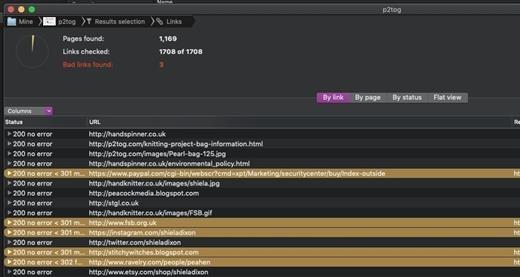
  • Link checker
  • SEO analysis
  • XML Sitemap generation, optionally include images / pdf pages
  • Page load speed test
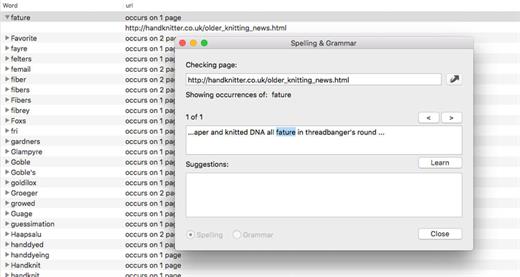
  • Spelling and grammar checking
  • Scans sites requiring authentication
  • Search your site (source or visible text) obtain a list of pages containing a search term or not containing a search term
  • Website monitoring of as many URL’s as you like with a choice of alerts and logging
  • Scheduling made easy with a few easy clicks (the old method using iCal will still work)
  • On finish, send an email, save a report, open a file or applescript, FTP the sitemap XML, and other actions
  • Opens and scans a list of links in HTML, CSV, plain text format, or XML sitemap

What’s New

Version 12.7.10:

  • Release notes were unavailable when this listing was updated.

Compatibility

macOS 10.14 or later


Release Name: Scrutiny 12.7.10
Size: 9.7 MB
Links: HOMEPAGE – NFO – Torrent Search

Download: FiKPERUPLOADGiGNiTROFLARERAPiDGATOR

5 Comments
Sep 14

Rhino 7.33.23248.13002

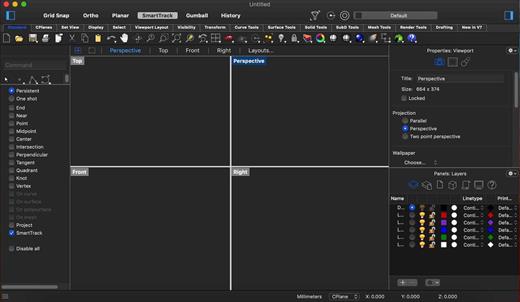
Rhino – Versatile 3D modeler. Rhinoceros can create, edit, analyze, document, render, animate, and translate NURBS* curves, surfaces, and solids, point clouds, and polygon meshes. There are no limits on complexity, degree, or size beyond those of your hardware.

Special features include:

  • Uninhibited free-form 3-D modeling tools like those found only in products costing 20 to 50 times more. Model any shape you can imagine.
  • Accuracy needed to design, prototype, engineer, analyze, and manufacture anything from an airplane to jewelry.
  • Compatibility with all your other design, drafting, CAM, engineering, analysis, rendering, animation, and illustration software.
  • Read and repair meshes and extremely challenging IGES files.
  • Accessible. So easy to learn and use that you can focus on design and visualization without being distracted by the software.
  • Fast, even on an ordinary laptop computer. No special hardware is needed.
  • Affordable. Ordinary hardware. Short learning curve. Affordable purchase price. No maintenance fees.

What’s New

Version 7.33:

  • Release notes were unavailable when this listing was updated.

Compatibility

macOS 10.14 or later 64-bit


Release Name: Rhino 7.33.23248.13002
Size: 452.6 MB
Links: HOMEPAGE – NFO – Torrent Search

Download: FiKPERUPLOADGiGNiTROFLARERAPiDGATOR

5 Comments
Sep 14

Widgetter 1.16.0W

Widgetter – Custom Desktop is a direct line to upscaling your desktop into a work station perfectly tailored to your needs.
Start building a customized home screen to have all the key data points and basic functions always remain available at a glance.
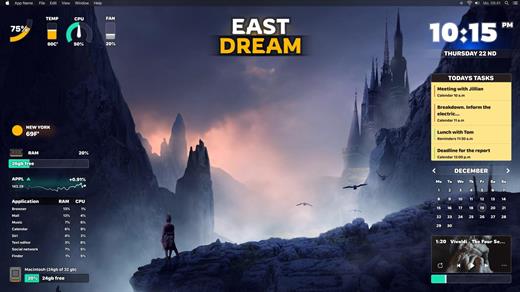
The app streamlines the controls by collecting the pivotal information about your Mac’s performance as well as the most essential commands and wrapping them into widgets. You can pick any combination of those to be displayed on the screen, group and arrange them in an optimal way. For the most essential ones, make sure to use always-on-top feature so they show up over every opened window.

Choose the screensaver you like from the huge collection of 4k and 5k wallpapers.
The collection of widgets covers a range of system data (logs, reports and operations) that you can conveniently and easily manage right from your desktop.
It doesn’t require any special knowledge, because our widgets will highlight and notify you about possible errors and problems.

The current lineup will provide you access to the following:

  • Date & Time: the nearest place to check in for temporal data.
  • Сalendar: refer to a wider context for your appointments and plans.
  • Weather: all the most important weather conditions – forecast for the current day and the upcoming week.
  • Battery: keep a consistent eye on the battery indicator to better plan around recharging times.
  • Music player: create the right ambience without extra clicks. The built-in playlist will help to directly navigate your audio library.
  • Quotes of currencies and cryptocurrencies: keep an eye on the changes in exchange rates and monitor the movements on the exchanges.
  • Tasks and Reminders: all your current and future tasks at a glance – you will not miss anything important.
  • CPU: track the usage to pinpoint moments when the system gets too busy.
  • RPM: monitor how the cooling system is functioning and prevent overheating.
  • RAM: get insights on the memory usage, including the list of resource intensive apps.
  • HDD/SSD: make sure you’re not running out of storage space.

Add multiple widgets of the same type to keep track of weather and time data in different cities, as well as compose selections of the right stocks.
As a finishing touch to your customized workspace, you can choose a look for the desktop by applying the right skins.

What’s New

Version 1.16.0W:

  • Release notes were unavailable when this listing was updated.

Compatibility

macOS 10.13.2 or later


Release Name: Widgetter 1.16.0W
Size: 254.9 MB
Links: HOMEPAGE – NFO – Torrent Search

Download: FiKPERUPLOADGiGNiTROFLARERAPiDGATOR

5 Comments
Sep 13

iZotope Neutron 4.5.0

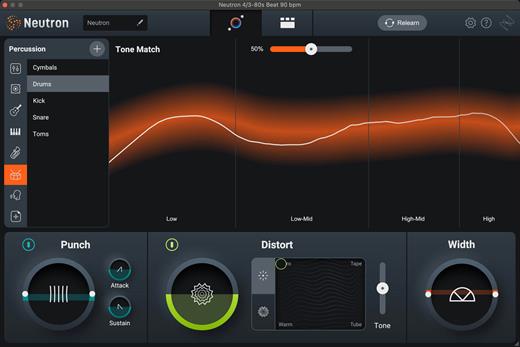
With Neutron 4 you can mix smarter and faster while staying in your flow. Eight powerful plug-ins combine powers through AI assistive technology to create your modern and intelligent mixing experience.

What’s New in Neutron 4?

Assistant View

Neutron’s beloved Mix Assistant is now modernized into the new Assistant View, your intelligent control center that produces fast, personalized results.

Make Space

The new Unmask Module discovers and fixes masking issues for you, enabling you to reach new levels of clarity. Make space between two competing tracks, balancing your bass and kick or allowing vocals to shine over your mix.

Distort Responsibly. Or Not.

A slice of iZotope fan favorite, Trash, is now in Neutron 4. Distort and destroy sound with Trash Mode and dial in specific extremes with the Tone Slider and Tame button. Explore the boundaries of weird and wild.

Punch it up

Make an impact using the new Punch Mode to control and visualize how hard your sounds hit. Add more thump, punch or snap to breathe life into vocals, percussion, bass, and more.

What’s New

Version 4.5.0:

  • Release notes were unavailable when this listing was updated.

Compatibility

macOS 10.15.7 or later


Release Name: iZotope Neutron 4.5.0
Size: 2.8 GB
Links: HOMEPAGE – NFO – Torrent Search

Download: FiKPERUPLOADGiGNiTROFLARERAPiDGATOR

5 Comments