Feb 12

Filmworkz Nucoda 2024.1.002

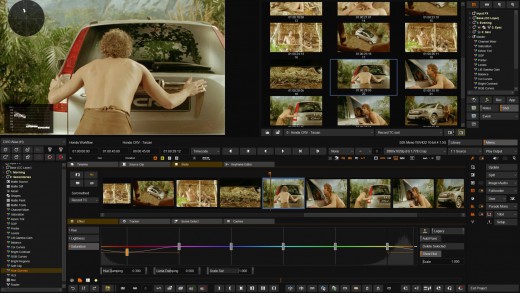
Description: With over 30 years of image science and development behind it, Nucoda is our industry leading color grading application with unparalleled ability to enhance, restore and manipulate moving images. Long favored by major studios, broadcasters and post houses to create complex looks and visual styles for film, commercials, television and animation, Nucoda also allows you to take advantage of the full range of DVO Tools to bring you unmatched enhancement, correction and conversion capabilities. And now Nucoda include our DVO Essentials Pack, offering even more incredible value.

Nucoda is now faster than ever!
– New Planer, Deform, Warp and TRS tracker based on entirely new highly intelligent algorithms
– DVO render improvements with up to 30% speed increases
– Create caches using the lossless EXR PIZ format

So Much More Than Color Grading
Nucoda is the perfect host platform to access the entire range of Emmy award-winning DVO Tools. To give you a taste of the power of our DVOs we’ve featured here one of the most popular.

Why choose Nucoda for your next Color Grading Project?

Unmatched flexibility for true professionals
Advanced color grading application with HDR support and more color tools than competing systems.

Emmy award-winning technology
Full access to the entire range of DVO Tools for an unmatched choice of additional enhancement, correction and conversion capability (optional).

More than color grading out of the box
DVO Essentials Pack included at no additional cost.

Built for speed and efficiency
Designed as a fit-for-purpose color grading system at the outset combining speed and efficiency balanced with advanced functionality.

Unlimited color layers
Powerful memories view – easily recall grades, events and notes. Not restricted by a node-based approach.

System Requirements
– Windows 10 Pro 64
– AMD Ryzen™ Threadripper™ Pro 3975WX (32-Cores) OR AMD Ryzen™ Threadripper™ Pro 3995WX (64-Cores) OR 2x Intel™ 18 core Processors
– 8x 16 GB DDR4 3200MHz RAM
– NVIDIA® Quadro® RTX 5000
– 1 TB M.2 Gen 3 PCIe SSD, OPAL (O/S)
– 2x 2TB M.2 Gen 3 PCIe SSD, OPAL (Project Caching drive)
– 8x 2TB Internal SSD Raid (for Storage, if no SAN/NAS)


Release Name: Filmworkz Nucoda 2024.1.002
Size: 1 GB
Links: HOMEPAGE – NFO – Torrent Search

Download: FiKPERNiTROFLARERAPiDGATOR

8 Comments
Feb 12

JRiver Media Center 32.0.16 (x64) Multilingual

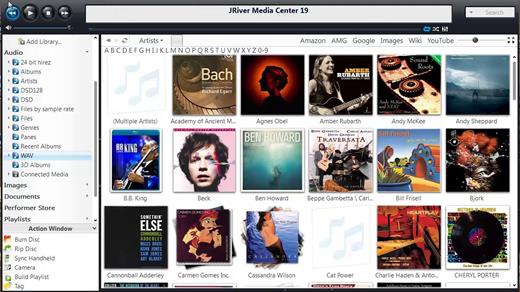
Supports more cell phones, MP3 players, DLNA, and other devices. Powers an HTPC to entertain your family. Even different playback in multiple zones. And it can record high definition TV, and provide a replacement for cable TV. It has a Theater View interface, controllable by a Media Center Remote, an iPad, iPhone, Android, a Windows netbook or Touchscreen. MC is a DirectShow player. Obsessive taggers will be delighted with cover art and metadata options. And MC backs up your work so you can sleep at night.

JRiver Media Center has a streamlined user interface designed to make it even easier to organize, find and play your digital files, and to connect to hardware devices. Make a CD of music for your car. Record your favorite shows and watch them on your TV. More than one soundcard? Play different music simultaneously in different rooms. MC’s Media Server can even stream your music to your PC at work!

Audio:
* Native support of DirectShow DSP filters
* Audiophile – WASAPI exclusive output using high-end USB DACs
* Audiophile – Added ability to play files from memory instead of disk
* Audiophile – Support for high end USB DAC’s with WASAPI
* Headphone DSP makes listening more natural and comfortable.
* /SoundcardSwitch command for the launcher (MC14.exe), allows soundcard selection on Vista and W7
* 3D album view adjusts text size to display more tracks when necessary
* 3D album view allows playing, adding, shuffling, and adding as next to play

Images:
* Image Preview allows zoom from a thumbnail to rotate, delete, compare, edit, and more
* Image thumbnail frames (optional)
* Photoshop PSD file support
* Single command copy / send to an editor like Photoshop, and stack new image with original

Video:
* Video tagging using sidecar files
* Chapter Support for MKV and MP4
* Chapters added to On Screen Display
* Info Panel displays metadata

Television:
* Added new “watched” column to metadata
* EPG can automatically retrieve XMLTV data
* Automatic correlation of XML channel names and MC channel names
* Info Panel displays metadata, including TV program art
* TV program art from YADB

Theater View:
* Watch Hulu and YouTube from Theater View
* Customizable nested views in Theater View
* Customizable File Info panel to display metadata
* Speed and quality enhancements
* Custom backgrounds
* Touch screen support
* On screen clock

Remotes and Servers:
* Wiki articles: Remotes and Servers
* Remote Relay using IR transceivers for controlling a set top box or receiver
* Remote Setup Wizard
* Media Center Remote learning and blasting
* Media Center can connect to another Media Center to act as a remote (TRemote)
* New HID remote control plug-in — supports shortcuts with keyboard, mouse, & gamepad
* Remote control with REST based Web Service Interface in Library Server
* Library Server supports read and write to allow for shared, multi-user database access
* DLNA added to the UPnP Server
* Library Server clients can write changes back to server
* Library Server connections allow playback on server as Playing Now zones

Release Name: JRiver Media Center 32.0.16 (x64) Multilingual
Size: 74.1 MB
Links: HOMEPAGE – NFO – Torrent Search

Download: FiKPERNiTROFLARERAPiDGATOR

7 Comments
Feb 12

PicPick Professional 7.2.7 Multilingual

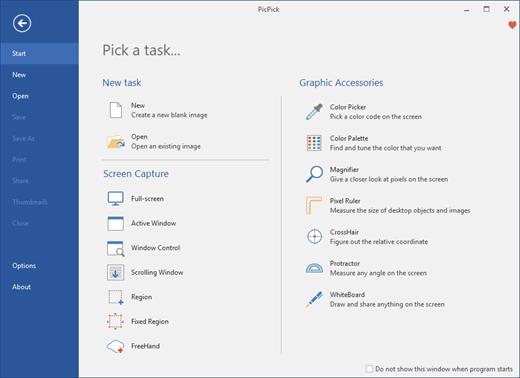
PicPick Professional Crack Full Version Free Download is a powerful software tool that allows users to capture, edit, and annotate images and screenshots. It offers a range of advanced features that make it a valuable tool for professionals in a variety of fields, including graphic design, software development, and technical writing.

One of the main features of PicPick Professional is its ability to capture images and screenshots in a variety of ways. Users can capture the entire screen, a specific window, or a selected region, and can also choose to capture scrolling pages or video. The software also includes a range of image editing tools, including the ability to resize, crop, and rotate images, as well as adjust color and brightness.

Another feature of PicPick Professional is its support for annotation and markup. The software includes a range of tools for adding text, shapes, and arrows to images, as well as the ability to blur or highlight specific areas. This makes it easy for users to communicate their ideas and provide feedback on images and screenshots.

Download PicPick Free Download features:

Here are some key features of PicPick Professional:

  • Image capture: It allows users to capture images and screenshots in a variety of ways, including the entire screen, a specific window, or a selected region, as well as capture scrolling pages or video.
  • Image editing: The software includes a range of image editing tools, including the ability to resize, crop, and rotate images, as well as adjust color and brightness.
  • Annotation and markup: It includes a range of tools for adding text, shapes, and arrows to images, as well as the ability to blur or highlight specific areas.
  • Image management: The software includes tools for organizing and managing large numbers of images, such as keyword tagging, metadata management, and the ability to create custom collections and albums.
  • User-friendly interface: It has a user-friendly interface that makes it easy for users to navigate and access its various features and tools.
  • Wide range of supported formats: The software supports a wide range of image file formats, including JPEG, TIFF, and PNG, making it easy for users to work with their images.
  • Regular updates:It is regularly updated to ensure that it is compatible with the latest versions of operating systems and to add new features and improvements.
  • Multi-language support: The software is available in a variety of languages, making it accessible to users around the world.

What’s New in the PicPick scrolling window:

  • New language updates (UI)
  • Fix bugs and improvements

In addition to its image capture and editing capabilities, PicPick Professional also includes a range of tools for organizing and managing large numbers of images. It includes features such as keyword tagging, metadata management, and the ability to create custom collections and albums.

Overall, PicPick Professional is a powerful and feature-rich software tool that offers a range of advanced features for capturing, editing, and annotating images and screenshots. It is an ideal choice for professionals in a variety of fields looking to improve their productivity and streamline their workflow.

  • Microsoft Windows 10, 8.1, 8, 7, Vista and XP including
  • both 32-bit and 64-bit versions..
  • RAM 1 GB

Release Name: PicPick Professional 7.2.7 Multilingual
Size: 71.7 MB
Links: HOMEPAGE – NFO – Torrent Search

Download: FiKPERNiTROFLARERAPiDGATOR

6 Comments
Feb 12

Home Manager 2024 v4.0.1008

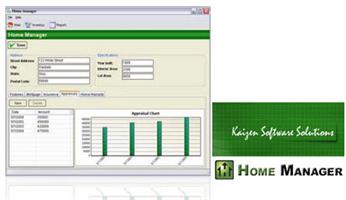
Do you need a way to track all your “stuff”? With Home Manager you can organize and track your home inventory. Easily enter the details about your belongings, and use the built-in search feature to find it again quickly. If you already have a lot of digital pictures, simply drag and drop them into the program to automatically create new inventory items for each one.

Organize your inventory by category and location, and drag and drop items from one category to another. Keep a running maintenance and repair history for your assets. Print a home inventory report (complete with digital pictures) for your insurance agent; backup your data for safekeeping, and get the peace of mind that comes with having a full accounting of your home inventory.

Home Manager helps you get organized
You have better things to do with your time than searching through paperwork or digging through old paint cans looking for that lost color code. Now you can stop the frustrating searching and take control. With Home Manager software you can have all the information you need about your home right at your fingertips.

Be prepared for the unexpected
Sadly, every year natural disasters like earthquakes, fires, floods, tornadoes and hurricanes leave people without a home and with their possessions lost or destroyed. Without a detailed record, making an insurance claim can be a hassle at best. Whether you own your home, or rent an apartment, insurance companies recommend that you keep a current home inventory record to assist in the event of an insurance claim. Home Manager gets you started by building a complete home inventory. You can track warranty and insurance information, and even include digital pictures to assist in the unfortunate event of an insurance claim. Use the built-in backup feature to backup to a remote drive or email server, or for more options, check out this article about Amazon.com’s Simple Storage Service.

Home Manager Features
* Home Inventory Tracking for one or multiple residences.
* Track costs for home improvement and repair.
* Store your book and movie information in a database.
* Track warranty and insurance Information.
* Import an unlimited number of digital pictures.
* Search your inventory to find records fast.
* Backup your inventory to disk, floppy, or as an Email Attachment.
* Print report for off-site storage.
* Create your own custom categories and locations.

Release Name: Home Manager 2024 v4.0.1008
Size: 32.1 MB
Links: HOMEPAGE – NFO – Torrent Search

Download: FiKPERNiTROFLARERAPiDGATOR

6 Comments
Feb 12

Ableton Live 12.0.28 (x64) Beta Multilingual

Description: Live is fast, fluid and flexible software for music creation and performance. It comes with effects, instruments, sounds and all kinds of creative features—everything you need to make any kind of music. Create in a traditional linear arrangement, or improvise without the constraints of a timeline in Live’s Session View. Move freely between musical elements and play with ideas, without stopping the music and without breaking your flow.
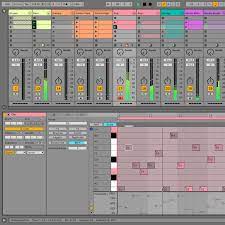
New features and updates in Live 12

Play freely with ideas
MIDI Transformations
Create a variety of simple or complex variations to your MIDI clips: add ornaments and articulations, draw acceleration and deceleration curves, connect successive notes and chords, or simulate the strum of a guitar.

MIDI Generators
Conjure up melodies, chords and rhythms with new MIDI Generators. Give your chosen Generator custom constraints, watch it create playful and original patterns, and then turn the ideas it produces into your own.

Max for Live MIDI Tools
Max now facilitates even greater experimentation, letting you create new MIDI Transformations and Generators – either based on existing ones, or your own creations.

MIDI Editing Improvements
Arrange the order of a selection of notes by pitch, velocity or duration. Stretch, split, chop or join notes in new ways; shape the velocity of notes; transpose them into a scale; or add intervals chromatically or in key.

Keys and Scales
Set the selected clip’s scale in Live’s Control Bar to see its notes in any clip you create. Then edit the clip using scale highlighting as a guide, use the clip scale to transform and generate musical ideas, or sync the scale of MIDI devices and instruments to the clip being played. Any changes in Live will be reflected in Push, and vice versa.

Expanded probability
Assign a single probability rule to a group of notes so that the entire group of notes is played whenever the trigger is fired. Or select a chord and tell Live to randomly play one note from it whenever the probability trigger is fired.

Embrace and explore tunings
Follow your preferred tuning systems or try different ones more easily. Work outside the 12-tone equal temperament system, and access tunings with Live’s devices as well as any MPE-capable plugin.

Surprise yourself with the sounds you create
Meld
A bi-timbral, MPE-capable instrument designed for deep sound shaping that lets you create a wide array of textural and experimental tones with its two easy-to-use macro oscillators.

Granulator III
The latest iteration of Robert Henke’s granular instrument now has MPE capability, giving you expressive control over parameters like note bend, vibrato and glissando. Plus, you can now capture audio in real time and start manipulating it immediately.

Roar
Create everything from subtle and precise mastering-grade warmth to wild and unpredictable sound degradation with Live’s new coloring and saturation effect. Roar’s three saturation stages can be used in series, parallel, or even in mid/side and multiband configurations – and it comes equipped with a feedback generator and an extensive modulation matrix.

New Modulation Behavior
Modulation destinations are no longer taken over by the modulation source. This means you can still adjust the parameter being modulated, even after assigning an LFO or other modulation source to it, opening up faster workflows, more possibilities for performance and continuous real-time control of parameters.

New Packs
Lost and Found – A collection of sounds fashioned from unusual materials, percussive trinkets, unique foley recordings and expressive objects to infuse your productions with character and authenticity. Dig deep and create layers of decorative, expressive instruments, playful Drum Racks and rich sound effects.

Performance Pack – A set of innovative devices from Iftah that push the boundaries of performing with Live. Capture snapshots of your sets and deploy them later, control multiple parameters with layered macros and curves, extend performances with looping in Arrangement View and pre-arrange the structure of a performance before you have even recorded it.

Work more intuitively
Stacked Detail Views
View your devices and the Clip Editor, or automation and device parameters, at the same time – so you can work without the distraction of switching between views.

View styling
Live 12’s cleaner, more minimal look removes visual complexity and keeps the focus on your music.

Mixer in Arrangement
Live’s Mixer, previously available only in Session View, can now be used in Arrangement View. Toggle it on or off with Mixer View Control located in the bottom right corner or via the View menu, and configure it independently of the Arrangement Mixer.

Mixer improvements
Live’s Mixer also comes with visual improvements that make it more accurate for detailed mixing decisions, and easier to read and control.

Browser Tagging and Filtered Searches
Search for your sounds in the Browser without the constraints of Live’s built-in categorization. That means when you search for bass sounds, you’ll see all the bass sounds in your Ableton library, whether they’re samples or instrument presets.

Live 12’s sound content is also tagged using a new system that acts as a more flexible alternative or addition to Collections in the sidebar. Sounds now come with sensible labels to make them easier to find – but if you need more detail, or just want to use your own method of labeling, you can also add your own.

Aside from Live 12’s built-in tags, you can create your own custom categories in the sidebar for easy access to all your favorite sounds and devices in the way that makes the most sense to your workflow.

Sound Similarity Search
Start with a sample and tell Live’s browser to find comparable sounds and instrument presets, with the help of a neural network.

Or swap all the samples in your Drum Rack for similar ones to quickly try out new percussive textures – like a drum machine with seemingly-infinite kits.

Browser History
Retrace your steps, and see and hear the sounds or categories you’ve previously searched for: Live’s Browser now lets you backtrack through your search history as you would with a web browser.

Accessibility and navigation improvements
Control core workflows in Live 12 using assistive technologies like screen readers, and use new keyboard shortcuts to navigate to nearly every part of Live.

New Themes
Choose new themes and adjust them with cool, neutral or warm tones and even a high contrast mode.

Release Name: Ableton Live 12.0.28 (x64) Beta Multilingual
Size: 3.3 GB
Links: HOMEPAGE – NFO – Torrent Search

Download: FiKPERNiTROFLARERAPiDGATOR

5 Comments
Feb 12

Syncovery Premium 10.11.13.173 (x64)

Description: Syncovery is a great application used to back up data and to synchronize PCs, servers, and notebooks. Users can choose the user interface that suits them best: Wizard Mode or Advanced Mode. The settings are stored in multiple profiles, and the software comes with support for FTP and secure FTP servers, SSH, WebDAV, Amazon S3, http, partial file updating, ZIP compression, data encryption, and a scheduler for automated backups. The scheduler can run as a service without users having to log on. On Windows XP or later, locked files can be copied using the Volume Shadow Service.

Here are some key features of “Syncovery”:
· Synchronizes Files and complete folder structures in different locations, such as a PC and a laptop. 64-bit I/O ensures that files sizes greater than 4GB are supported.
· Save complete sets of option settings as Profiles, with instant access to all saved settings. You can even Run Multiple Profiles with one command.
· Detect Moved Files. If you reorganized your folders by moving files to different locations, the Super Flexible File Synchronizer will detect this and quickly perform the same moves, for example, on your laptop. No extraneous copying!
· With Scheduler. Schedule the synchronization of your data on a backup hard disk at a convenient time each day or as frequently as you wish.
· Smart and Flexible. If some files cannot be copied due to other software accessing these files, the synchronizer will continue copying the remaining files, and then retry all those files that were locked, until all files have been copied successfully. A limit for the time spent on retries can be specified. However, during the retry phase, the synchronizer uses only minimal CPU resources.
· Keep Multiple Backup Versions Of Each File (optional) This feature doesn’t overwrite the backup files but renames them, until a selectable number of different backup versions is reached. You can also specify where to put these older backup versions (in the same folder as the original, or in a subfolder thereof, or in just one subfolder for the complete profile).
· Database-Aware. A special technique prevents any data corruption when copying database files, including SQL server database files. The synchronizer will wait with the copying until it has totally exclusive access to the file. During the copying process, the database server will not be able to work with the file. So, a prerequisite for using this software as a backup tool for database files is that they are occasionally not used (for example, at night).
· Can Use Recycle Bin for older versions of files that are overwritten. This is a fairly unique feature because most programs will permanently replace older versions of a file. Using Super Flexible File Synchronizer, you will have a chance of retrieving overwritten files if you select the appropriate options.
· Multiple File Masks (Inclusion and Exclusion) File Masks are transparently (and swiftly!) processed. Even if you specify redundant file masks, there will be no strange side effects.
· Select Base Folder Items. Want to synchronize only some folders? No need for separate runs for each folder. Just specify the base folder containing these folders, and then choose “Only Selected Items From Base Folders…”.
· Minimize Load Using Obsolete File Folders. If you occasionally move obsolete files to a specially designated folder, this usually causes trouble with traditional file synchronizers. They will copy the obsolete files back from your laptop right into the folders where you moved them out of. No longer! If you use the Select Base Folder Items option described above, you can place a grayed checkmark next to each folder for obsolete files. These folders are then taken into account for moving files into them, but not for copying files out. Thus, the synchronizer does the same moving of obsolete files on your laptop that you previously did on the PC, but it does not waste any time copying all obsolete files between the two machines.
· No More Trouble With Daylight Savings Time Since exact 1-hour time differences can be ignored if the file size matches, you won’t have any more problems if the file systems of two computers are off by one hour. If this is true only for some files, fine! The ignoring of the offset is done in a flexible way rather than adding a fixed number to the hours on one side.
· Easy Resuming On Disk Full. You simply make more space and ask the software to continue copying. It can pause right in the middle of a file until additional space is freed.
· Unattended Mode. In this mode, no questions are asked. You can specify beforehand which kinds of files may be overwritten.
· Optionally Create Exact Mirrors. If desired, you can optionally create an exact mirror of your data, even if this means that some files are deleted or replaced with older files.

Release Name: Syncovery Premium 10.11.13.173 (x64)
Size: 48.1 MB
Links: HOMEPAGE – NFO – Torrent Search

Download: FiKPERNiTROFLARERAPiDGATOR

6 Comments
Feb 12

Gillmeister Automatic PDF Processor 1.30.10

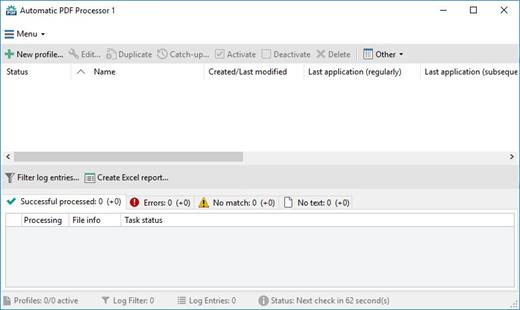
With Automatic PDF Processor Crack, PDF files can be processed automatically. Any folders can be monitored to automatically print, rename, or move incoming PDF files to dynamically named folders. Numerous metadata of the PDF document can be used in addition to the content, for example to include invoice information in the file path.

The PDF files to be processed can be narrowed down with various profile-specific filters – the document text, PDF metadata and general file information are available as filters.

Automatic PDF Processor Free Download Features:

  • Monitor any number of folders
    Examine incoming PDF files and apply individual rules
  • Store PDF files in a structured manner
    Automatically rename PDF files and save them in dynamically created folders
  • Print PDF files automatically
    Send certain PDF documents directly to the printer (e.g., invoices or quotations)
  • Optional further processing
    Perform subsequent tasks, e.g., run a program with the filename of the PDF file passed as parameter

Release Name: Gillmeister Automatic PDF Processor 1.30.10
Size: 129.9 MB
Links: HOMEPAGE – NFO – Torrent Search

Download: FiKPERNiTROFLARERAPiDGATOR

6 Comments
Feb 12

Family Tree Heritage Gold 16.0.13 Multilingual

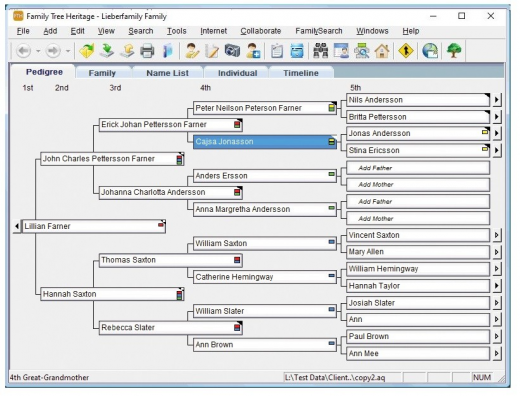
Description: Build Your Family Tree and share Your Family Story with Family Tree Heritage Gold. This new gold version provides exciting, easy to use new features, including a new Descendants View, printing of background images on many charts, improvements to the ability to sync with FamilySearch™ Family Tree, recording non-traditional couple relationships, plus more efficient ways to enter important genealogical data.

Features :

  • TreeTips™
    Have you ever wished that someone could do your research for you? TreeTips™ is an innovative technology built into Family Tree Heritage that displays hints for possible records about your ancestors. TreeTips combines the hinting capabilities of FamilySearch (based in Utah, with over 5 billion searchable records) and Findmypast (based in England, with nearly 3 billion searchable records), along with advanced searching of Ancestry.com (based in Utah, with over 20 billion records) and MyHeritage (based in Israel, with over 6 billion searchable records).
  • Memories Manager
    New! Link Family Tree Heritage to FamilySearch records. Quickly and easily exchange your scrapbook items with the Memories on FamilySearch. You can easily link your scrapbook items to the images on FamilySearch, and share your information and images with others!
  • Direct Access to Powerful Genealogy Sites
    Family Tree Heritage is fully integrated with the new FamilySearch Family Tree, Myheritage, and Findmypast. Import records directly and build your family tree quickly.– No subscription required for worldwide searches
    – Search 14 billion records with 1-click from the software
  • Language Options
    Get started quickly with a friendly user interface and options for English, French, Spanish, and German. Choose the language you wish to use.
  • Powerful Genealogy Design Tools
    Create colorful trees, heirloom-quality charts, reports and family books that will be cherished by your family members now and in future years, with Family Tree Heritage’s genealogy design tools. Share your family’s story at family reunions and online.
  • Interactive Research Timeline
    Uncover clues to discover more information about your ancestors and family history. Find events that may have affected your ancestors, such as a war or immigration issue. These events will refer you to additional resources to learn more about your ancestors. There are several pre-designed event groups to choose from and you may also add your own events. The Timeline view is interactive: click on names, dates, and places to see how it responds. A Timeline report is available for printing.
  • Tags
    Tag your ancestor similarities, such as geographic location, medical conditions, and more! Create your own set of Tags and assign up to three Tags to individuals in your database. The tags display on various screens and reports in Family Tree Heritage. Easily Adjust Tags for Any Ancestor.
  • Color Coding
    Quickly identify individuals and family lines on your family tree. This four-color filing system allows you to add background colors to the name boxes for individuals and/or family lines. The color coding displays on various screens and reports, allowing you to track individuals from the maternal and paternal sides of your mother and father’s ancestors.

How To Install?

  • Install the program from the given setup.
  • Don’t run the application yet and close from system tray or task manager if running.
  • Extract the “Crack Fix.zip” to directory where you’ve installed the program. Replace all the files.
  • Boom! Now you can use the program without any interruptions.
  • That’s it, Enjoy now

Release Name: Family Tree Heritage Gold 16.0.13 Multilingual
Size: 133.8 MB
Links: HOMEPAGE – NFO – Torrent Search

Download: FiKPERNiTROFLARERAPiDGATOR

6 Comments
Feb 12

Bixelangelo 5.3.0.0 (x64)

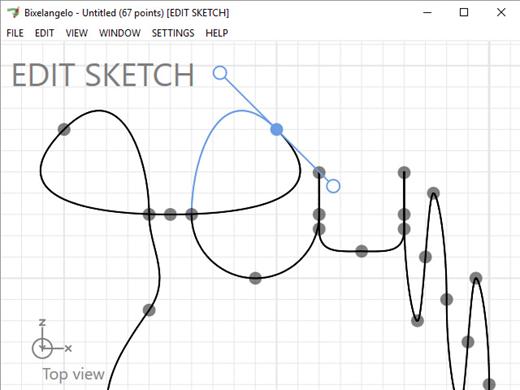
Bixelangelo Crack Free Download is a Windows computer app that develops 2D & 3D curves because used in BluffTitler. Use Bixelangelo Download to imitate propagating logos, handwritten texts, departure paths, roller coasters, and tunnels. Michelangelo is a vector editing app. It has been designed for developing EPS files because utilizes in the EPS yet Sketch layers about BluffTitler.

Bixelangelo Free Download is a design tool for creating bitmap (PNG) and vector (EPS) drawings for use in BluffTitler. Next to recording handwritten sketches, Bixelangelo can generate drawings in a wide range of styles including ornaments, filigrees, flourishes, curls and swirls. Branches can have a wide range of shapes. The branch editor offers lots of presets but also allows you to draw and import your own shapes. Every branch can sprout a new branch. Parents can have children, grand children, great-grandchildren,… Every generation can have its own branch settings. Every branch can have a bitmap flower that pops up when the branch has been rendered. Bixelangelo offers presets for Azalias, Buttercups, Camellias, Clematises, Daisies, Dandelions, Lilies, Papavers, Rododendrons and Tulips.

Typical use include

  • logos
  • shapes
  • handwritten texts
  • drawings
  • flight paths
  • roller coasters
  • swimming pool slides
  • mountain roads
  • tunnels

Bixelangelo Crack Key Features:

  • Amazing compression
  • Supporting standards
  • Animated handwritten texts
  • Splines
  • Mixing 3D animation with sketching
  • Transparent glow
  • Text following a path
  • Roller coaster
  • Glowing Particles
  • Silver Sketch
  • Attached Picture

Bixelangelo System requirements

  • Microsoft Windows 7, 8 or 10, 64 bit
  • A DirectX 11 compatible graphics card
  • 4 MB available hard disk space
  • BluffTitler version 14.0 or higher

Release Name: Bixelangelo 5.3.0.0 (x64)
Size: 16.9 MB
Links: HOMEPAGE – NFO – Torrent Search

Download: FiKPERNiTROFLARERAPiDGATOR

4 Comments
Feb 12

BluffTitler 16.5.0.2 (x64) Multilingual

Description: Create dazzling 3D titles for your videos with BluffTitler. Want to impress your friends and clients with cool 3D titles? But don’t want to spend a fortune on professional 3D animation and video titling software? BluffTitler is the easiest way to add spectacular 3D text animations to your photos and videos! Other 3D programs always seemed too hard to learn and too expensive to justify. But thanks to BluffTitler, I can finally create all of the cool animations I only dreamed of before!

Effects that can be created with BluffTitler include:
• golden beveled titles
• blood dripping titles
• JPG textured titles
• MPG textured titles
• slimy titles
• hairy titles
• exploding titles
• reflection mapped titles
• twisted titlesa
• cartoon shaded titles
• golden glowing titles
• spooky lightened titles
• titles with silver spikes
• jumbling titles
• inverted titles
• bouncing titles
• powerfield emitting titles
• titles with flying hearts
• pumping titles
• plasma backgrounds
• background videos morphing into donuts
• particle effects
• MP3 audio
• morphing JPG pictures
• exploding video backgrounds
• fractal backgrounds

Release Name: BluffTitler 16.5.0.2 (x64) Multilingual
Size: 52.6 MB
Links: HOMEPAGE – NFO – Torrent Search

Download: FiKPERNiTROFLARERAPiDGATOR

7 Comments