Feb 15

O&O DiskImage Professional / Server 18.5.366

O&O DiskImage 18 lets you back up an entire computer or single files whenever you want – even while the computer is being used. In the event you should lose your personal data it can be quickly restored with just a few mouse clicks – even when Windows is no longer able to start. It also supports SSD drives and the latest UEFI System.
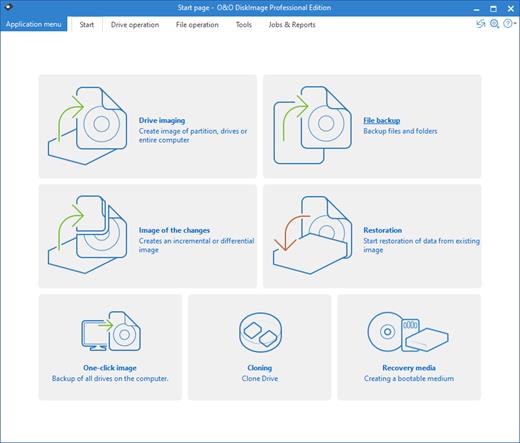
O&O DiskImage lets you carry out a system restore and to duplicate or clone an entire PC or hard drive. You can even restore this backup onto a computer whose hardware is different from the original machine, for instance, where you have changed a motherboard on the target machine or have bought a brand new PC and want to restore an old backup onto it.

A regular backup is still something that many users prefer to avoid. At least that is until they suffer their first loss of important files as a result of software, hardware or user error: that’s when it becomes crystal clear just how valuable a reliable and up-to-date backup really is!

New in O&O DiskImage 18: Comprehensive VHD / VHDX functionality
With the new version 18 it’s possible to convert image files made with O&O DiskImage into Microsoft Virtual Hard Disc (VHDX as well as VHD) image files. This can be especially useful if someone wants to first “rehearse” migrating from Windows 10 to Windows 11 because it can be done using a virtual machine created on the current system.

The new O&O DiskImage 18 can also create incremental and differential images of virtual drives. Combining or mounting these images is also possible. Whenever there’s a backup available, it only takes a few seconds to access any files that are needed. Work on the computer can then be continued without any loss of time or important data.

O&O DiskImage 18 with its own recovery partition
Normally with a backup or imaging program you need to create a boot medium (USB) to boot up your system if something goes awry. This you have to either carry around or store somewhere safe in case disaster strikes.

Thanks to the integration into the system, the O&O DiskImage RecoveryPartition can be accessed immediately so that the last system image can be restored directly. If the Windows operating system does not start or if faulty drivers have to be uninstalled – with the integrated recovery environment, all O&O tools are available to make the system operational again as easily as possible. Not only is this much more comfortable and quicker for the user, it also provides them with an extra level of security as this medium cannot get lost or damaged as easily as a “portable”, external one.

O&O DiskImage To Go
Previously, in addition to regularly backing up your machine, you also had to separately create an O&O DiskImage boot media to restore that backup. Everything is easier now! The new O&O DiskImage To Go function automatically turns an external hard drive (or USB flash drive with enough storage space) into an O&O DiskImage boot medium and marks this disk as the preferred storage medium for future system backups. As soon as you then connect this external USB hard disk to your computer, O&O DiskImage 18 automatically creates a backup. This makes it easy to create a recent backup. And if something really happens to your computer or you want to transfer your system and all your data to a new computer, then with the O&O DiskImage boot medium you can restore the backup stored on it with just one touch of a button. Without the hassle of searching for the boot medium and the external hard drive with the backup.
It has never been so easy to ensure the security of your data!

Further functions of O&O DiskImage:

All default and advanced features are combined in one single product
This backup software is the safest and easiest way to avoid losing important personal files! Options are available for both auto backup and manual settings. Thanks to a unique recovery system that includes additional system recovery tools combined with O&O DiskImage you’ll quickly be able to restore all your important data – even if the backup you’re using was created with an older O&O DiskImage version.

Backup entire PCs, hard drives or files with the push of a button
When you back up a PC, O&O DiskImage saves all personal files as well as hard drive information and individual settings. This not only protects irreplaceable files but, in a worst case scenario, also saves you the trouble of having to carry out a time-consuming new setup of programs and the Windows operating system. O&O DiskImage lets you back up an entire computer, system and hard drives or just individual files and folders. To make sure your backups are always up to date, we recommend creating them at short intervals from one another.

Quick and easy system restore – even onto different hardware
Restoring a backup with O&O DiskImage is as easy as pie: all you have to do is start the program, select the backup you want to restore, and you’re off. Included with the software is our machine independent restoration which means your old backup can be transferred 1:1 onto a new machine. Hardware of a different make will be automatically recognized and Windows settings will be carried out by themselves.

Plug-and-play function
Anyone wanting to save data on an external hard disk has it even easier with the new O&O DiskImage 18. Thanks to the integrated plug-and -play option, selected files and folders can be backed up automatically as soon as, for example, an external hard disk is connected to the computer. This is ideal for users who forget to carry out regular backups or who don’t want to go through the trouble. Once configured, the auto backup function runs by itself.

Create a boot medium directly from within the program
O&O DiskImage can bring a system back to life immediately and with no installation required. It does so by way of a Boot Medium (USB Stick) which is based on the currently installed Windows system and which contains all the standard drivers required.

Product features
Backup an entire computer with the push of a button
Backup system and hard drives, clone drives and entire disks
Brand new file-based backup: now twice as fast as ever before – backup and restore individual files and/or folders
Direct creation of VHD/VHDX
Monitoring and warning of security risks
Incremental/differential backup: back up only the changes
Easily restore files, folders, drives and disks
System restore onto different hardware (M.I.R.)
Create a Windows Boot system directly from within the program with driver integration
Plug-and-play: Selected files and folders are automatically backed up and synchronized
Variable pixel density settings: adjusts to the selected DPI setting of the connected monitor
New and enhanced functions Control via Command Lines

Operating System:
Windows 11, Windows 10 and Windows 8.1

Release Name: O&O DiskImage Professional / Server 18.5.366
Size: 439.8 MB
Links: HOMEPAGE – NFO – Torrent Search

Download: FiKPERNiTROFLARERAPiDGATOR

7 Comments
Feb 15

4K Stogram Professional 4.8.0.4640 Multilingual

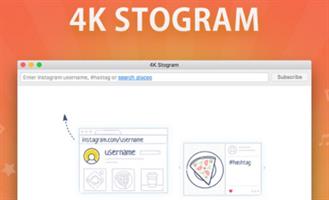
4K Stogram is an Instagram Downloader for PC. The program allows you to download and backup Instagram photos and videos, even from private accounts. Just enter Instagram user name or photo link and press ‘Follow user’ button. Open up wide new vistas of imagery all from your desktop.

Features:
• Grab photos of few account simultaneously and save it in JPEG on your desktop.
• Follow your favourite photographers and get their latest photos automatically.
• Login with your Instagram credentials and download photos of private friends accounts.
• Access to your viewer directly from the application.
• Download Instagram video in MP4 format.
• Enjoy the minimalistic interface of application.

Release Name: 4K Stogram Professional 4.8.0.4640 Multilingual
Size: 86.1 MB
Links: HOMEPAGE – NFO – Torrent Search

Download: FiKPERNiTROFLARERAPiDGATOR

7 Comments
Feb 15

KeepStreams 1.2.1.3 (x64) Multilingual

Description: KeepStreams specializes in providing services for downloading videos and converting music for users worldwide. Our innovative product range includes advanced video downloaders and high-quality music converters that cater to the diverse needs and preferences of our customers.

Our video downloader service is fully compatible with multiple platforms, enabling users to quickly and easily download their favorite videos from popular websites such as Netflix, Disney Plus, Prime Video, HBO Max, and many more. Moreover, our music converter tool empowers users to download and convert audio files from music streaming services like Spotify, Amazon Music, and Apple Music into various formats, ensuring seamless enjoyment of their favorite music on any device or operating system.

Enjoy Playing Any Music You Want
KeepStreams is compatible with the vast majority of music streaming services, and we provide excellent assistance to guarantee the highest quality of your music downloads.

Dive into the World of Entertainment
KeepStreams support most OTT platforms and movie streaming services, we offer great service to maintain the best video download experience.

Watch TV Anywhere, Anytime, and Any Moment
KeepStreams support most TV streaming service, we offer great solutions for our users to download and watch live TV offline.

Explore the Fun of Anime
KeepStreams also offers support for Anime streaming services like Funimation and Crunchyroll. Watch anime series offline with us.

Dive into the World of Live Streams and Broadcasting
KeepStreams enables you to download live streaming services like Twitch and ESPN Plus, you won’t miss out on any game with KeepStreams.

Save Playlists and Videos from Social Networks
KeepStreams can be your best social network video downloader, which supports various social networks like YouTube, Facebook, Instagram, Twitter, and more.

Release Name: KeepStreams 1.2.1.3 (x64) Multilingual
Size: 386.3 MB
Links: HOMEPAGE – NFO – Torrent Search

Download: FiKPERNiTROFLARERAPiDGATOR

7 Comments
Feb 15

CyberLink PowerDirector Ultimate 2024 v22.1.2.2605.0 (x64) Multilingual

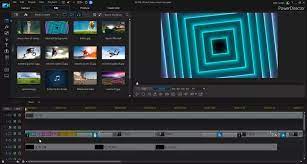
Description: Limitless Capabilities, Made Simple. Cut, refine, add effects, and publish – PowerDirector 365 offers best-in-class editing tools with an intuitive workflow. Create compelling content with powerful new effects, a streamlined user interface, and ever-growing resource libraries. No matter your level of proficiency, you can achieve spectacular results.

Shape Designer (NEW!)
Apply and edit completely customizable vector shapes to your videos, with auto-fit text and keyframe controls. Perfect for YouTubers and video tutorials.

Impressive Motion Graphics & Animated Titles (NEW!)
Combine motion graphic elements with your videos’ titles to make them stylish and modern.

1:1 Square Video for Instagram & Facebook (NEW!)
Easily create, edit and produce content perfectly fit for social media. Produce square (1:1) output for Facebook and Instagram. Or edit and save vertical videos, the perfect size ratio for social media Stories.

Nested Projects as Adjustable PiP Objects (NEW!)
Repurpose previous project files in your new ones. Embed them into scenes with keyframe control to scale, skew, rotate & even set opacity.

Audio Scrubbing (NEW!)
Hear audio while dragging the playhead through a project so that you can quickly find the scene you need.

Multi-key Sampling Chroma Key Editing
Perform Hollywood-style green screen editing thanks to an improved chroma key engine and multi-key color sampling.

Advanced Motion Tracking
Ensure 100% object tracking accuracy in your video clips with frame-by-frame motion tracking.

AI Style Transfer
Transform your videos into living artworks thanks to the magic of AI. We’ve trained our AI Style Engine to analyze footage frame by frame and intelligently apply brushstrokes, so your video looks like it was hand-painted by a master artist.

360˚ Video Stabilization
Shaky video footage is virtually unavoidable when shooting with a 360º camera. Our 360º VR stabilization technology gives you the control to produce mind-blowing VR videos, free of shakes and stutters, in next to no time!

Reversible Timeline Track Order (NEW!)
Switch timeline track order between top-down and bottom-up to suit your workflow.

CPU & GPU Performance Boosts
Don’t waste time waiting for your software to respond! PowerDirector supports transcoding of non-full frame video clips in a single timeline track. Also enjoy better performance on 8+ core processors with improved multi-threading.

4K Video Editing Preview (NEW!)
Preview your projects in 4K quality, and see how your video will look like before you produce.

Professional Format & Camera Support (NEW!)
Import and edit video shot on professional-grade cameras and in HEVC & VP9 10bit HDR10 & HLG, ProRes 10bit 4:2:2, XAVC 8bit 4:2:0 and MXF AVC 8bit 4:2:0 video compatibility.

System Requirements:
– Microsoft Windows 10, 8/8.1, 7 (64 bit OS only)
– Intel Core™ i-series or AMD Phenom® II and above
– Standard Video: 128 MB VGA VRAM or higher
– 360-video: DirectX 11 compatible
– AI Plugin: 2GB VGA VRAM or higher
– 4GB memory required (6GB or above recommended)
– 7GB hard disk space
– Burning drive is required for disc burning purpose
– Windows compatible sound card is required

Language Support:
– English
– French
– German
– Italian
– Spanish (European)
– Chinese Simplified
– Chinese Traditional
– Japanese
– Korean
– Dutch


Release Name: CyberLink PowerDirector Ultimate 2024 v22.1.2.2605.0 (x64) Multilingual
Size: 771.6 MB
Links: HOMEPAGE – NFO – Torrent Search

Download: FiKPERNiTROFLARERAPiDGATOR

7 Comments
Feb 15

Emurasoft EmEditor Professional 23.1.2 Multilingual

Description: EmEditor Professional – professional version of the powerful text editor for programmers, Web developers and ordinary users with the illumination of syntax and Unicode support. Editor features such as search and replace in files using regular expressions, auto-detection coding, highlighting the links and email addresses, block selection mode, configure the button bar, menu, font and color elements. For each language, you can create a separate configuration. The program also has the support of powerful macros written in javascript or VBScript, allowing you to capture virtually any action, used often or occasionally.

Feature :
• Support for file sizes up to 248 GB
• Edit binary files
• Optimized search and relocation
• Improved design plug-ins
• Ability to display panel functions
• Optimized speed when each row has a greater length
• Auto-panning by clicking the mouse wheel
• Supports Drag and drop
• Specify the temporary folder in the program settings
• Import INI files in the registry
• Unicode
• Syntax highlighting for ASP, C, CSS, HTML, javascript, JSP, Pascal, Perl, Python, PHP, SQL, VBScript and other
• User-friendly interface with customizable toolbar

Release Name: Emurasoft EmEditor Professional 23.1.2 Multilingual
Size: 137.3 MB
Links: HOMEPAGE – NFO – Torrent Search

Download: FiKPERNiTROFLARERAPiDGATOR

8 Comments
Feb 12

Adobe Acrobat Reader DC 2023.008.20533

Top features in Acrobat Pro:
• PDF file conversion. Create PDF documents from any application that prints, including one-button conversion from Microsoft Word, Excel, PowerPoint, Outlook, Publisher, and Access, as well as Firefox and Lotus Notes — without ever leaving your authoring application.
• Scanning to PDF. Scan and convert paper documents and forms to PDF. Make scanned text searchable automatically with OCR, and then check and fix suspected errors. Text can be exported for reuse in other applications
• HTML to PDF. With a single click from within Internet Explorer or Firefox, capture web pages as PDF files, keeping all links intact. Convert only a portion of the page by selecting just the content you want.
• Email to PDF. Handle email-based communication more efficiently and simplify email search and retrieval. Archive emails or email folders from Microsoft Outlook or IBM Lotus Notes with one-button ease.

Export and edit PDF files
Easily edit PDF files and quickly export PDFs to Word or Excel documents. Spend less time rekeying information and more time reusing content. Use Acrobat X to reduce errors, improve productivity, and finish projects faster.
• PDF to Word. Save PDF files as Word documents with improved preservation of formatting and layouts. Relative positioning of tables, images, and even multicolumn text is preserved, as well as page, paragraph, and font attributes.
• PDF to Excel. Expedite reuse of content by converting PDF document data to Excel file formats. Even select a portion of a PDF page and export it to an editable format.
• Editing PDF files. Quickly and easily edit PDF documents without going back to the original source files. Save time by making simple changes to text and images directly within PDF files. Remove, reorder, and rotate PDF pages.
• Printing preparation. Reduce errors and delays at the printer. Preview, preflight, correct, and prepare PDF files for high-end print production and digital publishing.

Combine files from multiple applications
No need to fill people’s inboxes with multiple emails and attachments. Create and deliver professional-looking PDF files that are simple to send, open, view, and navigate.
• PDF Portfolio assembly. Quickly assemble a wide range of file types — including audio, video, and rich media content — into a polished, organized PDF Portfolio using the new PDF Portfolio Wizard.
• PDF Portfolio customization. Easily customize PDF Portfolios with included layouts, visual themes, and color palettes. Add corporate logos and colors to reflect your branding. Import custom PDF Portfolio layouts and themes developed by third-party developers and designers.
• Rich media. Quickly bring ideas to life through rich, interactive documents. Insert audio, Flash Player compatible video, and interactive media into PDF files, for seamless playback in Adobe Reader X or Reader 9.
• Attaching native files. Make sure source files are simple to locate, access, and archive. Attach them to any PDF document in their original, native formats, ensuring a more complete document of record.

Increase productivity and process consistency
Use innovative productivity-enhancing software features to simplify complex projects, prepare and present high-quality content, and achieve better results.
• Action Wizard. Automate routine, multistep tasks into a guided Action. Create, manage, execute, and share a sequence of frequently used steps that can be applied to a single PDF or batches of files.
• Quick Tools. Quickly access the tools you use most — from your favorite PDF document editing tools to your most-often used comment and markup tools — by adding them to the Quick Tools area.
• Version comparison. Eliminate confusion and improve version control. Easily identify differences between two versions of a PDF file by having Acrobat analyze both files and highlight changes to text and images.
• Integration with Microsoft SharePoint. Work seamlessly with PDF files in Microsoft SharePoint. Access SharePoint from any Acrobat Open or Save dialog box. Open PDF files from SharePoint for viewing. Check them out for editing, and then check them back in (Windows only).

Streamline online document reviews
Gather feedback efficiently and accelerate approvals. Use shared online document reviews and PDF comments to get — and keep — everyone on the same page from project start to finish.
• Commenting tools. Review and mark up PDF files using a complete set of familiar commenting tools, including sticky note and highlighter tools, lines, and stamps.
• Online document reviews. Gain the feedback you need, faster, through easy-to-manage, shared document reviews that allow participants to see and build on one another’s comments. Easily track progress and participation, add reviewers, and email updates or reminders.
• Extending Reader functionality. Enable Adobe Reader X or Reader 9 users to participate in shared reviews, fill and save forms, and digitally sign and approve PDF documents — regardless of platform or operating system.
• Commenting tool pane. Access markup tools and view comments from a single, unified tool pane. View all comments in a searchable list that can be filtered and sorted by page, author, and date.

Collect data with fillable PDF forms
Create, distribute, and track easy-to-use, interactive PDF forms that look like familiar paper forms — without asking IT for help.
• Form Wizard. Easily create dynamic, fillable PDF forms from paper or existing electronic files. Automatically convert static fields to fillable ones with the Form Wizard.
• Adobe Reader support. Enable Adobe Reader users (Reader 9 or X only) to fill and save forms — regardless of platform or operating system.
• Distribution and tracking. Distribute forms, track status, and compile results to expedite more accurate information collection. Use services at Acrobat.com to distribute and collect forms.
• Analyzing data. Streamline data reporting and analysis. Automatically compile form data in a single document or view. Filter responses as required. Easily export data to a spreadsheet for analysis.

Protect PDF files and documents
Simple-to-use security features enable you to protect sensitive information. Use PDF passwords, digital signatures, and redaction to build electronic processes you can trust.
• Digital signatures. Digitally sign PDF documents, or add document timestamps. Add certified digital signatures to help recipients validate document authenticity and integrity.
• Enabling Reader users to sign. Enable Adobe Reader X or Reader 9 users to digitally sign PDF documents and forms or add document timestamps.
• Passwords and permissions. Use passwords to help control access to your PDF documents. Apply permissions to restrict printing, copying, or altering. Save passwords and permissions as security policies that can be easily applied to new PDF files.
• Permanent information removal. Use redaction tools to permanently delete sensitive information, including specific text and illustrations. Easily sanitize documents with one click, finding and deleting hidden information such as metadata, annotations, attachments, form fields, layers, and bookmarks.

Read, search, and share PDF files
Enable anyone, anywhere, to view, search, and print PDF files using free Adobe Reader® software. Share PDF files with confidence, knowing colleagues and customers will be able to see your work exactly as intended — across file formats, platforms, browsers, and devices.
• Optimized viewing mode. Maximize your screen for optimal reading and presentation of PDF files with the new Reading Mode. Menus and panels disappear, and a transparent floating toolbar appears, to help you navigate PDF files more easily.
• Online file sharing. Use Adobe SendNow online services from within Acrobat to send, share, and track large files without the headaches of email size restrictions, FTP sites, and costly overnight services.

Release Name: Adobe Acrobat Reader DC 2023.008.20533
Size: 667.5 MB
Links: HOMEPAGE – NFO – Torrent Search

Download: FiKPERNiTROFLARERAPiDGATOR

7 Comments
Feb 12

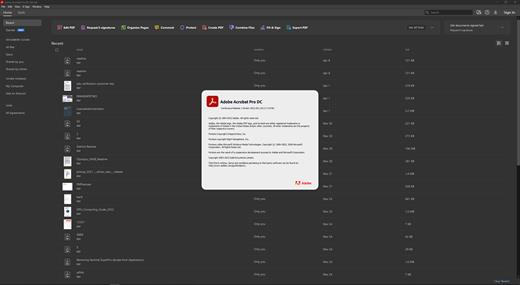
Adobe Acrobat Pro DC 2023.008.20533 Multilingual

Top features in Acrobat Pro:
• PDF file conversion. Create PDF documents from any application that prints, including one-button conversion from Microsoft Word, Excel, PowerPoint, Outlook, Publisher, and Access, as well as Firefox and Lotus Notes — without ever leaving your authoring application.
• Scanning to PDF. Scan and convert paper documents and forms to PDF. Make scanned text searchable automatically with OCR, and then check and fix suspected errors. Text can be exported for reuse in other applications
• HTML to PDF. With a single click from within Internet Explorer or Firefox, capture web pages as PDF files, keeping all links intact. Convert only a portion of the page by selecting just the content you want.
• Email to PDF. Handle email-based communication more efficiently and simplify email search and retrieval. Archive emails or email folders from Microsoft Outlook or IBM Lotus Notes with one-button ease.

Export and edit PDF files
Easily edit PDF files and quickly export PDFs to Word or Excel documents. Spend less time rekeying information and more time reusing content. Use Acrobat X to reduce errors, improve productivity, and finish projects faster.
• PDF to Word. Save PDF files as Word documents with improved preservation of formatting and layouts. Relative positioning of tables, images, and even multicolumn text is preserved, as well as page, paragraph, and font attributes.
• PDF to Excel. Expedite reuse of content by converting PDF document data to Excel file formats. Even select a portion of a PDF page and export it to an editable format.
• Editing PDF files. Quickly and easily edit PDF documents without going back to the original source files. Save time by making simple changes to text and images directly within PDF files. Remove, reorder, and rotate PDF pages.
• Printing preparation. Reduce errors and delays at the printer. Preview, preflight, correct, and prepare PDF files for high-end print production and digital publishing.

Combine files from multiple applications
No need to fill people’s inboxes with multiple emails and attachments. Create and deliver professional-looking PDF files that are simple to send, open, view, and navigate.
• PDF Portfolio assembly. Quickly assemble a wide range of file types — including audio, video, and rich media content — into a polished, organized PDF Portfolio using the new PDF Portfolio Wizard.
• PDF Portfolio customization. Easily customize PDF Portfolios with included layouts, visual themes, and color palettes. Add corporate logos and colors to reflect your branding. Import custom PDF Portfolio layouts and themes developed by third-party developers and designers.
• Rich media. Quickly bring ideas to life through rich, interactive documents. Insert audio, Flash Player compatible video, and interactive media into PDF files, for seamless playback in Adobe Reader X or Reader 9.
• Attaching native files. Make sure source files are simple to locate, access, and archive. Attach them to any PDF document in their original, native formats, ensuring a more complete document of record.

Increase productivity and process consistency
Use innovative productivity-enhancing software features to simplify complex projects, prepare and present high-quality content, and achieve better results.
• Action Wizard. Automate routine, multistep tasks into a guided Action. Create, manage, execute, and share a sequence of frequently used steps that can be applied to a single PDF or batches of files.
• Quick Tools. Quickly access the tools you use most — from your favorite PDF document editing tools to your most-often used comment and markup tools — by adding them to the Quick Tools area.
• Version comparison. Eliminate confusion and improve version control. Easily identify differences between two versions of a PDF file by having Acrobat analyze both files and highlight changes to text and images.
• Integration with Microsoft SharePoint. Work seamlessly with PDF files in Microsoft SharePoint. Access SharePoint from any Acrobat Open or Save dialog box. Open PDF files from SharePoint for viewing. Check them out for editing, and then check them back in (Windows only).

Streamline online document reviews
Gather feedback efficiently and accelerate approvals. Use shared online document reviews and PDF comments to get — and keep — everyone on the same page from project start to finish.
• Commenting tools. Review and mark up PDF files using a complete set of familiar commenting tools, including sticky note and highlighter tools, lines, and stamps.
• Online document reviews. Gain the feedback you need, faster, through easy-to-manage, shared document reviews that allow participants to see and build on one another’s comments. Easily track progress and participation, add reviewers, and email updates or reminders.
• Extending Reader functionality. Enable Adobe Reader X or Reader 9 users to participate in shared reviews, fill and save forms, and digitally sign and approve PDF documents — regardless of platform or operating system.
• Commenting tool pane. Access markup tools and view comments from a single, unified tool pane. View all comments in a searchable list that can be filtered and sorted by page, author, and date.

Collect data with fillable PDF forms
Create, distribute, and track easy-to-use, interactive PDF forms that look like familiar paper forms — without asking IT for help.
• Form Wizard. Easily create dynamic, fillable PDF forms from paper or existing electronic files. Automatically convert static fields to fillable ones with the Form Wizard.
• Adobe Reader support. Enable Adobe Reader users (Reader 9 or X only) to fill and save forms — regardless of platform or operating system.
• Distribution and tracking. Distribute forms, track status, and compile results to expedite more accurate information collection. Use services at Acrobat.com to distribute and collect forms.
• Analyzing data. Streamline data reporting and analysis. Automatically compile form data in a single document or view. Filter responses as required. Easily export data to a spreadsheet for analysis.

Protect PDF files and documents
Simple-to-use security features enable you to protect sensitive information. Use PDF passwords, digital signatures, and redaction to build electronic processes you can trust.
• Digital signatures. Digitally sign PDF documents, or add document timestamps. Add certified digital signatures to help recipients validate document authenticity and integrity.
• Enabling Reader users to sign. Enable Adobe Reader X or Reader 9 users to digitally sign PDF documents and forms or add document timestamps.
• Passwords and permissions. Use passwords to help control access to your PDF documents. Apply permissions to restrict printing, copying, or altering. Save passwords and permissions as security policies that can be easily applied to new PDF files.
• Permanent information removal. Use redaction tools to permanently delete sensitive information, including specific text and illustrations. Easily sanitize documents with one click, finding and deleting hidden information such as metadata, annotations, attachments, form fields, layers, and bookmarks.

Read, search, and share PDF files
Enable anyone, anywhere, to view, search, and print PDF files using free Adobe Reader® software. Share PDF files with confidence, knowing colleagues and customers will be able to see your work exactly as intended — across file formats, platforms, browsers, and devices.
• Optimized viewing mode. Maximize your screen for optimal reading and presentation of PDF files with the new Reading Mode. Menus and panels disappear, and a transparent floating toolbar appears, to help you navigate PDF files more easily.
• Online file sharing. Use Adobe SendNow online services from within Acrobat to send, share, and track large files without the headaches of email size restrictions, FTP sites, and costly overnight services.

Release Name: Adobe Acrobat Pro DC 2023.008.20533 Multilingual
Size: 2.4 GB
Links: HOMEPAGE – NFO – Torrent Search

Download: FiKPERNiTROFLARERAPiDGATOR

7 Comments
Feb 12

Advanced Password Recovery Suite 2.1.0 Multilingual

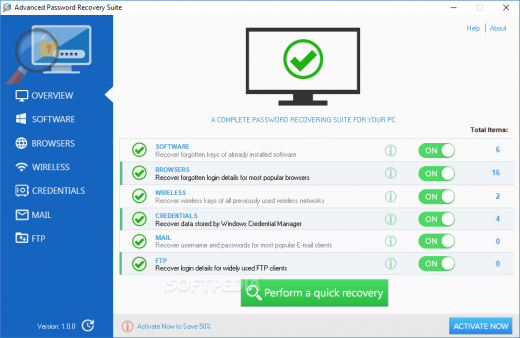
Description: Advanced Password Recovery Suite is an easy-to-use tool with ability to recover your forgotten software keys or login details for most popular web browsers, wireless networks, Windows Credential Manager, E-Mail or FTP clients.

Software Features:
– Our software can recover your forgotten software keys or login details for most popular web browsers, wireless networks, Windows Credential Manager, E-Mail or FTP clients.
– Recover keys for Microsoft Windows and Office, Nero, WinZip and more than 1500 other software and games.
– Recover usernames and passwords for Google Chrome, Microsoft Edge, Internet Explorer and etc.
– Recover forgotten wireless network keys (WEP, WPA and WPA2) for all previously used wireless networks.
– Recover login data saved by Windows Credential Manager.
– Recover usernames and passwords for most popular E-mail clients as MS Outlook, Thunderbird and Opera Mail.
– Recover login details for widely used FTP clients.

Release Name: Advanced Password Recovery Suite 2.1.0 Multilingual
Size: 6.4 MB
Links: HOMEPAGE – NFO – Torrent Search

Download: FiKPERNiTROFLARERAPiDGATOR

3 Comments
Feb 12

Lazesoft Recovery Suite Professional 4.7.3 Multilingual + WinPE

Description: Lazesoft Data Recovery offers home users and businesses complete solutions to recover deleted files or lost due to the format or corruption of a hard drive, virus or Trojan infection, unexpected system shutdown or software failure. With easy to use interfaces and the most powerful data recovery software engine, you can using Lazesoft Data Recovery recover data by yourself, preview recovered files while the search is in progress.

Easy recovery in all major data loss cases.
Accidentally deleted files or emptied from recycle bin
Formatted media/disk drive/partitions/dynamic volumes
Logically crashed disk
Data deleted using Shift+Del keys
Files corrupted due to virus attacks
Software crash
Power faults
partition with corrupt file systems, etc.
Recover files even when your computer cannot boot up and cannot enter Windows.

Easily recover data from Windows!
Windows Version of Lazesoft Data Recovery.
Native support for Windows 64 bit.
Added support for Windows 8 New!

Recover Data When Windows Cannot Boot up normally!
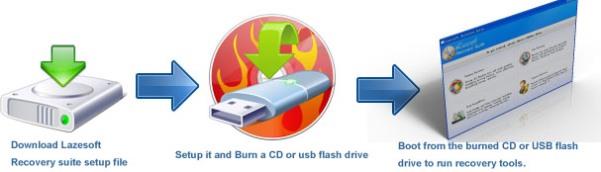
On some disk or Windows serious crashed, you might not be able to boot up your computer and enter Windows. Lazesoft Data Recovery can burn a bootable data recovery CD/USB disk and allow you to boot up your computer and rescue your data.
Boot from various brands of desktops, laptops like Dell, ThinkPad, Hp, Sony, Toshiba, Acer, Samsung, etc.
With WinPE-based and linux-base bootable disk builder, Lazesoft Recovery Suite has best hardware compatibility.
Boot up computer from CD or usb disk.
User friendly Boot Media Builder interface


Release Name: Lazesoft Recovery Suite Professional 4.7.3 Multilingual + WinPE
Size: 540.9 MB
Links: HOMEPAGE – NFO – Torrent Search

Download: FiKPERNiTROFLARERAPiDGATOR

8 Comments
Feb 12

RiDoc 5.0.14.10 Multilingual

RiDoc Full Version Free Download

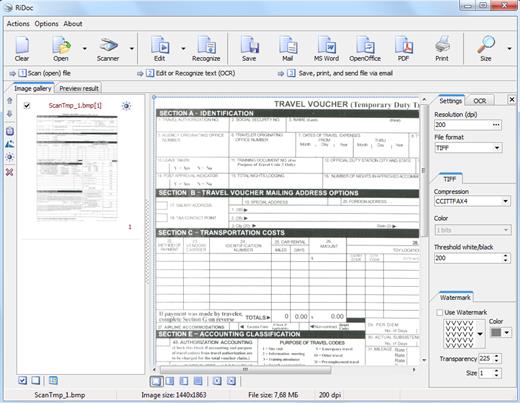
RiDoc Full Crack Download– the program for getting images from a scanner and reducing image file sizes. This program reduces the electronic document or image file size without decreasing of image quality. With the help of the Assembly function, the image frame is fit to A4 page format, and image file size is reduced without picture quality decrease.

Conversion of documents in to a graphical format makes it possible to protect these documents from unauthorized copying. To increase the document protection level you can apply watermark to the final document.

RiDoc License Key Features:

  • Scans images, documents and fit to A4 page format of small sizes of scanned images (button “Assembly”).
  • Overlay watermarks on scanned images.
  • Scanner program for daily use.
  • Getting the electronic version of the document from a scanner.
  • Batch scanning.
  • Saving the document in different graphic format (bmp, jpeg, png).
  • Scanning document into TIFF (multipage mode).
  • Ridoc – scanning document into Word.
  • Ridoc – scanning document into PDF.
  • Scanning document into printer, email.
  • Virtual printer: PDF, DOC, XLS – into tiff, bmp, png
  • Quickly and easily saves scanned documents on your computer with the help of technology “QuickFolder”.
  • Creating a gallery of scanned documents and images.
  • Single mechanism to manage both electronic documents.
  • And much more…

Whats New In RiDoc Download Crack:

  • Updates: official site does not provide any info about changes in this version.

Release Name: RiDoc 5.0.14.10 Multilingual
Size: 36.8 MB
Links: HOMEPAGE – NFO – Torrent Search

Download: FiKPERNiTROFLARERAPiDGATOR

6 Comments