Sep 12

Wondershare UniConverter v13.0.3.58 (x64) Portable Cracked

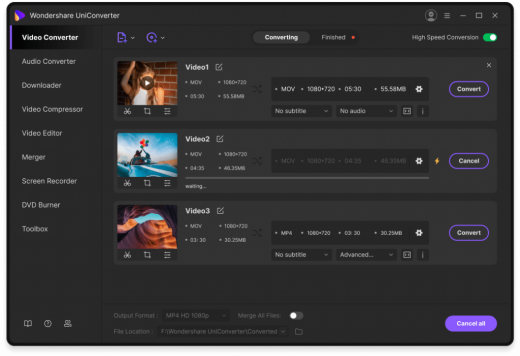
Description: UniConverter – Best Video Converter Ultimate. Convert, Download, Compress, Edit, Burn Videos in 1000 formats and do more. Download or record your favorite 4K/HD videos from popular video sharing sites for enjoyment without Internet connection; Or convert them to compatible formats for playback on TV, smartphone, or other devices. Powerful DVD toolkit of UniConverter (originally Wondershare Video Converter Ultimate) helps you to create and edit DVD files in an easy way.
Features :

  • Video Conversion To Any Format
    Wondershare UniConverter (originally Wondershare Video Converter Ultimate) accomplishes your conversion tasks with handy features.
  • Easy-to-Use Video Editor, Makes Your Video Stand Out
    You can customize home movies through advanced editing features and get professional-looking works in minutes.
  • Save Videos From Over 10,000 Sites With One Click
    Download or record your favorite 4K/HD videos from popular video sharing sites for enjoyment without Internet connection; Or convert them to compatible formats for playback on TV, smartphone, or other devices.
  • A Flawless DVD & Blu-ray Experience Anywhere
    Powerful DVD toolkit of UniConverter (originally Wondershare Video Converter Ultimate) helps you to create and edit DVD files in an easy way.
  • Transfer Videos to Devices & External Hard Drives
    Transfer media files to Apple devices, Android devices, USB flash drives or external hard drivers easily. More importantly, all unsupported formats will be intelligently converted to compatible ones during the transfer.

How To Install?

  • Extract the given archive.
  • Copy the given files to your hard disk.
  • Run the program by clicking the .exe file.
  • Boom! Now you can use the program without any interruptions. (It’s Portable Cracked lol)
  • That’s it, Enjoy now

Release Name: Wondershare UniConverter v13.0.3.58 (x64) Portable Cracked
Size: 286.12 MB
Links: HOMEPAGE – NFO – Torrent Search

Download: UPLOADGiG – NiTROFLARE – RAPiDGATOR

7 Comments
Sep 12

Wondershare Recoverit v10.0.1.6 (x64) Portable Cracked

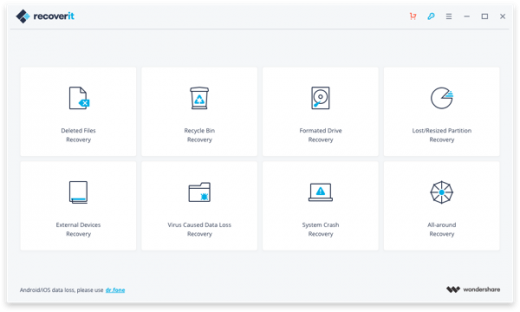
Description: Wondershare Recoverit is the reliable Data Recovery software for Windows and Mac. It can recover all file types including photos, videos, documents and other files. It restore data from all storage devices and crashed Windows system or bootable problem.
Data recovery is easier, faster, and more reliable than ever before. Faster scan speed driven by a powerful built-in Data-Analyzer Engine. Advanced Deep-Scan algorithm goes deeper into the data structure and brings a record-high data recovery rate of more than 98%.

Features :

  • Recover Deleted Word Documents
    Once a file is deleted from a computer, it never disappears completely. There are still traces of it left behind. The chances are that you can recover it successfully by following our simple methods…
  • Recover Deleted Files from USB Drive
    USB drive will loss file cause of accidentally delete or format, system failure and corruption, virus attack. Then, you will need a USB drive recovery software to help you recover files from USB drive…
  • Recover Deleted Files from Emptied Trash
    When you emptied the trash bin (secure emptying is not included), what you deleted was actually not the files.To prevent overwriting we need to stop using the computer immediately…
  • Recover Data from Digital Hard Drive
    Accidentally formatted the Western Digital hard drive and forgot to back up important files. Then you need a hard drive data recovery software to help you find and get back all the lost files…
  • Recover Deleted Photos in Mac
    The deleted photos are not really gone from your Mac, they still lie in your Mac even if you cannot see them in Trash Bin.
  • Recover Data From Formated Hard Drive
    Formatting a hard drive without having a backup can result in the loss of precious data collected over the course of years.Therefore, to recover files from formatted hard drive, you will need to do the following things.
  • Supported File types:
    Documents: nDOC/DOCX, XLS/XLSX, PPT/PPTX, PDF, CWK, HTML/HTM, INDD, EPS, etc.
    Graphics: JPG, TIFF/TIF, PNG, BMP, GIF, PSD, CRW, CR2, NEF, ORF, RAF, SR2, MRW, DCR, WMF, DNG, ERF, RAW, etc.
    Video: AVI, MOV, MP4, M4V, 3GP, 3G2, WMV, ASF, FLV, SWF, MPG, RM/RMVB, etc.
    Audio: AIF/AIFF, M4A, MP3, WAV, WMA, MID/MIDI, OGG, AAC, etc.
    Email: PST, DBX, EMLX, etc.
    Other Files: ZIP, RAR, SIT, and other useful data.

How To Install?

  • Extract the given archive.
  • Copy the given files to your hard disk.
  • Run the program by clicking the .exe file.
  • Boom! Now you can use the program without any interruptions. (It’s Portable Cracked lol)
  • That’s it, Enjoy now

Release Names: Wondershare Recoverit v10.0.1.6 (x64) Portable Cracked
Size: 213.95 MB
Links: HOMEPAGE – NFO – Torrent Search

Download: UPLOADGiG – NiTROFLARE – RAPiDGATOR
5 Comments
Sep 12

SysTools Pen Drive Recovery v13.0.0.0 (x64) + Fix

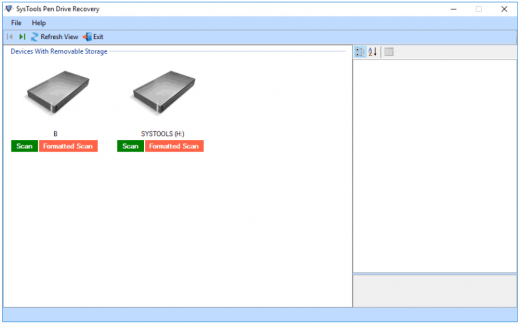
Description: SysTools Pen Drive Recovery Tool is a powerful and safe solution to recover permanently deleted data from pen drive. The software is designed in such a manner that it can retrieve and restore data even after formatting the pen drive Flash Drive / Pen Drive. It supports recovery from FAT, exFAT, and NTFS formatted pen drives and recover files after formatting pen drive in a few simple clicks.

Features :

  • Recover Corrupt Pen Drive Data
    Pen drives are the most commonly used storage devices to exchange or transfer data. While connecting the pen drives on various machines, sometimes due to virus attack, trojan infections or improper ejecting the pen drive, it may get corrupt or show error message. Now with this tool, you can successfully recover the data from corrupt pen drive easily.
  • 2 Options to Recover Pen Drive Files
    The pen drive recovery software,allows you to recover external storage drive deleted data in two different ways:– Scan: for corrupted and deleted pen drive data
    – Formatted Scan: For formatted pen drive data recovery
  • Recover Normal Data from Pen Drive
    With this option, you can recover the complete data from of a pen drive & retrieve it. The pen drive data recovery software scans the pen drive and load complete data present in it. Later, you can extract the data to save it at any desirable location. With this recovery mode, you can recover the deleted files and folders of the pen drive.
  • Deleted Files or Folder Recovery
    If you have connected your thumb drive in any machine and mistakenly deleted some of the files or folders from it then recovery is possible with Pen drive recovery tool. This software thoroughly scan the pen drive data and load all the files present in it. Further, you can extract and restore the lost or deleted data in your pen drive.
  • Recover Formatted Pen Drive Files
    Formatting of a Pen Drive is a very common practice when the pen drives get corrupt. Although it makes the pen drive clean & virus free but you also lose your crucial data. But now you can quickly retrieve the data from a formatted partition with pen drive recovery tool. Software also supports to recover all the raw Data files like PNG, ZIP, DOCX, JPEG, PPTX, XLSX,GIF, PDF, MPEG, AVI, WAV, BMP etc.

How To Install?

  • Install the program from the given setup.
  • Don’t run the application yet and close from system tray or task manager if running.
  • Extract the “Crack Fix.zip” to directory where you’ve installed the program. Replace all the files.
  • Boom! Now you can use the program without any interruptions.
  • That’s it, Enjoy now

Release Name: SysTools Pen Drive Recovery v13.0.0.0 (x64) + Fix
Size: 28.09 MB
Links: HOMEPAGE – NFO – Torrent Search

Download: UPLOADGiG – NiTROFLARE – RAPiDGATOR

5 Comments
Sep 12

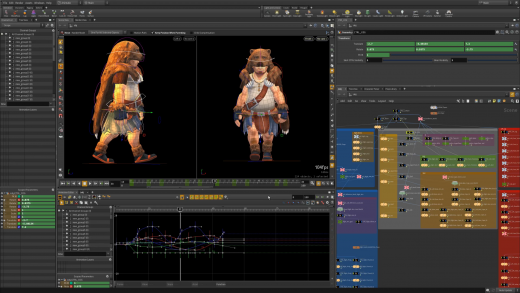
SideFX Houdini FX v18.5.696 (x64) + Fix

Description: Houdini is built from the ground up to be a procedural system that empowers artists to work freely, create multiple iterations and rapidly share workflows with colleagues. While the nodes are what makes Houdini unique and give it power, there are lots of viewport and shelf tools that allow for artist-friendly viewport interactions. Behind the scenes, Houdini builds up the nodes and networks for you. Houdini let’s artists explore different creative paths because it is easy to branch off a new node to explore alternative solutions.

Features :

  • FLEXIBLE
    Node-based Workflow
    In Houdini, every action is stored in a node. These nodes are then “wired” into networks which define a “recipe” that can be tweaked to refine the outcome then repeated to create similar yet unique results. The ability for nodes to be saved and to pass information, in the form of attributes, down the chain is what gives Houdini its procedural nature.
  • INTUITIVE
    Artist Friendly Tools
    While the nodes are what makes Houdini unique and give it power, there are lots of viewport and shelf tools that allow for artist-friendly viewport interactions. Behind the scenes, Houdini builds up the nodes and networks for you. Houdini let’s artists explore different creative paths because it is easy to branch off a new node to explore alternative solutions.
  • NEXT LEVEL
    VFX & Simulation
    Visual effects artists gravitate to Houdini because its procedural workflow is ideal for creating sophisticated particle and dynamic simulations. Effects are typically designed to react to actions taking place in a shot and a procedural solution “automates” these reactions providing studios with more creative control and more rapid turnaround.
  • DIRECTABLE
    Shots & Multiple Iterations
    Houdini lets you make creative decisions deep into production as changes made to Houdini nodes cascade through the network to create a new and unique result. This directability is retained throughout the creative process and can be used to make last minute decisions that would be too costly in a traditional CG pipeline.
  • POWERFUL
    Pipeline in a Box
    Whether you are setting up a shot or building a game level, Houdini lets you create tools that can be reused many times during a project’s life cycle. Instead of simply reacting to issues and problems, you will be able to plan ahead and visualize and refine your pipeline.
  • ROBUST
    Asset Creation Tools
    A big benefit of Houdini’s node-based approach is the ability to encapsulate node networks into custom nodes that are shareable. Create these digital assets without writing any code then share them with other Houdini artists.
    With the Houdini Engine, open assets in other applications such as Autodesk Maya, Autodesk 3ds Max, C4D, UE4 and Unity with the asset’s procedural controls available for editing in the host app.

How To Install?

  • Install the program from the given setup.
  • Don’t run the application yet and close from system tray or task manager if running.
  • Start Houdini Keygen as ADMINISTRATOR. Click on Patch License Daemon (wait for confirmation in keygen window)
  • Launch the License Administrator. In the Server Information tab you will find your Server Name & Server Code.
  • Go back to Houdini Keygen. Enter your Server Name & Server Code and generate your license keys …
  • Go back to the License Administrator, Select File/Manually Enter Keys… Copy paste the keys you generated, 5 by 5. Key string #1 should be SERVER your_server_name server_code.
  • Boom! Now you can use the program without any interruptions.
  • That’s it, Enjoy now

Release Names: SideFX Houdini FX v18.5.696 (x64) + Fix
Size: 1.64 GB
Links: HOMEPAGE – NFO – Torrent Search

Download: UPLOADGiG – NiTROFLARE – RAPiDGATOR
5 Comments
Sep 12

Windows 11 Pro Insider Preview 21H2 Build 22454 (Dev Channel) (x64) Untouched Incl. Activator

Description: Hello Windows Insiders, we are excited to release the Windows 11 Insider Preview build to the Dev Channel! As we finalize the product over the coming months, we will work with you to validate the experience. You will get to try many, but not all, of the new features we showed last week in this early preview. We will bring more features such as Chat with Microsoft Teams and Android apps in the Microsoft Store over the coming months as they are ready for you – we are just getting started on this journey together!

What’s New in this Build ?

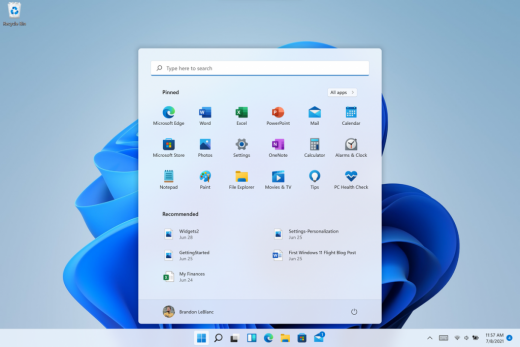
  • Right-clicking on Recycle Bin on the desktop now uses the new modern context menu.
  • New modern context menu when you right-click on Recycle Bin on your desktop.
  • Added an option when right clicking a network share in File Explorer to pin it to Quick Access without having to click Show more options.
  • They have begun releasing an updated version of the Korean IME with adjustments made based on Windows Insider feedback. They believe this will provide a more reliable input experience for Korean on Windows 11. The updated version of the Korean IME follows the new visual design of Windows 11 with acrylic in the candidate window, a new selection visual, and dark mode support. It also improves improved performance and compatibility. The updated Korean IME is rolling out to a subset of Insiders in the Dev Channel first, to help us quickly identify issues that may impact performance and reliability. Over time, it will roll out to everyone in the Dev Channel. Please file feedback via Feedback Hub under Input and Language > Text Input.

Fixes :

  • [General]
    They fixed the issue that was causing PCs with Windows Defender Application Guard (WDAG) enabled to bugcheck continuously. PCs with WDAG enabled should now receive Build 22454.
  • [Start]
    Windows Terminal is listed again when right-clicking on the Start button (WIN + X).
    Narrator should announce the Start launch more reliably now.
  • [Taskbar]
    The Desktops flyout should now dismiss properly for Narrator users when scanning with item navigation across the Task View button.
    Fixed an issue where the preview thumbnails for Desktops They re not rendering correctly for certain aspect ratios.
    Fixed a rounding issue that was making the volume icon tooltip show the wrong number in some cases.
    The input indicator, Quick Settings, and notification center icon tooltips will no longer display behind the flyouts when they’re open.
    Addressed an underlying issue that was resulting in the volume icon in the Taskbar displaying sound was muted when that was not the case.
    Fixed an issue that could cause the Taskbar to unexpectedly get stuck on top of full screen applications, such as PoThey rPoint presentations, after interacting with the Taskbar previews.
    Taskbar icons should no longer flicker when you mouse over them while using a contrast theme.
    Fixed an issue where app icons would occasionally unexpectedly animate onto the Taskbar from somewhere other than from below.
    Shift + Click on an app icon in the Taskbar to launch a new instance of that app (for apps that support multiple instances) is now working again.
    Did some work to address an issue where app icons could get stuck in an alert state in the Taskbar even if the app in question was closed.
  • [Input]
    Fixed an issue that was causing the text candidates to not appear after the first time the handwriting panel was invoked.
    Mitigated a stutter in the animation when tapping a text field to invoke the touch keyboard.
    Fixed a bug that was causing clipboard history to not render for some people.
    Displaying 3rd party IME icons in the input indicator should be more reliable now.
    Addressed an explorer.exe crash that could happen when changing window focus while using the touch keyboard.
    Fixed an issue for people who’d opted into the previous version of the Japanese IME that was causing certain games to crash.
    Fixed an issue where the tip for voice typing when using the touch keyboard wouldn’t be connected to the microphone button.
    Addressed an issue where the touch keyboard could get into a state where the key labels would be invisible due to the wrong background color being used.
    Mitigated an issue that was leading to the touch keyboard settings flyout having white on white text sometimes.
    Did some work to address an issue where interacting with the expressive input button in the touch keyboard could result in the candidate area having a broken layout.
  • [File Explorer]
    Improved the reliability of context menu invocation.
    Mitigated a couple of issues that They re causing leaks when using File Explorer.
    The context menu will now not immediately dismiss when the option to open things with a single-click is enabled in File Explorer.
    If you press F11 to full screen File Explorer, then use WIN + Shift + Left/Right to change what screen the window is displaying on, pressing F11 again will no longer jump the window back to the original screen.
  • [Settings]
    Mitigated an issue when typing with certain 3rd party IMEs into the search box in Settings that could result in the candidate window being rendered elsewhere on-screen (not attached to the search box) and/or characters inserted into the search box not displaying.
    They did some work to help address an issue that was making the Windows Insider Program page in Settings appear blank sometimes.
    The mouse pointers under Accessibility > Mouse pointer and touch are no longer invisible for Arabic and Hebrew display languages.
    System > Storage > Show more categories > Other should no longer always say it’s managed by group policy even when it isn’t.
    Added some links to “Find my device” in Settings to help you learn more about the privacy resources.
    Start time and end time pickers under Focus Assist > During these times are now visible when focus is set while using a contrast theme.
    Addressed a crash that could happen when using Sound Settings.
    Fixed an issue with the volume slider in Quick Settings that was causing the volume to sometimes to save at a slightly different level than what was actually set.
  • [Logging in and Authentication]
    Fixed a crash that could happen when the network icon updated states on the login screen.
  • [Windowing]
    Made a change to address an issue where title bar options including close, minimize and maximize where not appearing as expected in certain apps when moving the mouse to top of the screen while the app was maximized.
  • [Other]
    Improved icon rendering for certain apps in the Search hover flyout.
    Addressed an issue that was causing overlapping text in the Share window for certain languages.
    Made some performance improvements when switching to the Details tab of Task Manager.
    If the Windows Security app is open when switching to dark mode, the UI elements should respond better now and not have unreadable text.
    If there are a large number of exclusions listed under Virus and Threat Protection in the Windows Security app, it will now display a progress indicator when loading them.
    Fixed some text clipping in the Windows Security app when using the option in Accessibility Settings to increase the text size.
    Mitigated an issue that was causing the WM_CTLCOLORSTATIC message used in certain apps to be ignored, so the colors in some places wouldn’t appear correctly.
    Fixed a leak when the desktop background was set to a slideshow, impacting performance over time until explorer.exe was restarted.
    Mitigated an issue that was causing some PCs to bugcheck while in modern standby.
    Fixed an issue that was causing sloThey r Wi-Fi speeds after enabling Hyper-V and creating an External V-Switch.
    When animations are disabled in the system, there should no longer be a fade animation in UWP apps like Settings or the Feedback Hub when transitioning from the splash screen to the app content.

Known issues :-

  • [General]
    They ’re working on a fix for an issue that is causing some Surface Pro X’s to bugcheck with a WHEA_UNCORRECTABLE_ERROR.
  • [Start]
    In some cases, you might be unable to enter text when using Search from Start or the Taskbar. If you experience the issue, press WIN + R on the keyboard to launch the Run dialog box, then close it.
    System is missing when right-clicking on the Start button (WIN + X).
  • [Taskbar]
    The Taskbar will sometimes flicker when switching input methods.
    They ’re investigating an issue in this build where app icons in the Taskbar are getting cut off by the “show hidden icons” button and aren’t centered.
  • [Search]
    After clicking the Search icon on the Taskbar, the Search panel may not open. If this occurs, restart the “Windows Explorer” process, and open the search panel again.
    Search panel might appear as black and not display any content below the search box.
  • [File Explorer]
    If you right click files in OneDrive locations in File Explorer, the context menu will unexpectedly dismiss when you hover over entries that open sub-menus, such as “Open with.”
  • [Widgets]
    The widgets board may appear empty. To work around the issue, you can sign out and then sign back in again.
    Widgets may be displayed in the wrong size on external monitors. If you encounter this, you can launch the widgets via touch or WIN + W shortcut on your actual PC display first and then launch on your secondary monitors.
  • [Windows Sandbox]
    They ’re investigating an issue in which Windows Sandbox may not launch for some Insiders after upgrading to this build.
  • [Microsoft Store]
    They continue to work to improve search relevance in the Store.
  • [Windows Subsystem for Linx (WSL) & Hyper-V]
    [ADDED 9/10] They ’re investigating reports of both WSL2 and Hyper-V not working on this build on ARM64 PCs such as the Surface Pro X.

How To Install?

  • Download the build.
  • Create a bootable drive or Install from ISO.
  • Select the Windows type you want to install.
  • Skip the activation for now.
  • Let the windows installation get finished.
  • After installing, run the activator as admin.
  • Use the activator to activate your windows.
  • Boom! Enjoy the activated Build.

Release Names: Windows 11 Pro Insider Preview 21H2 Build 22454 (Dev Channel) (x64) Untouched Incl. Activator
Size: 3.25 GB
Links: HOMEPAGE – NFO – Torrent Search

Download x64 & Activator : UPLOADGiG – NiTROFLARE – RAPiDGATOR

4 Comments
Sep 12

CCleaner v5.84.9143 (All Editions) Portable Cracked

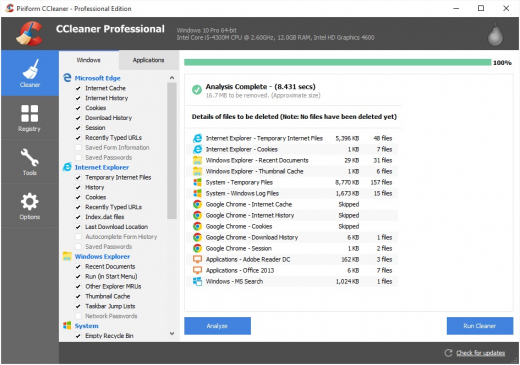
Description: Piriform CCleaner Professional – it is a selection of the newest versions of programs from Piriform Software, united in a common envelope, which will help you to make your computer faster, more secure and ensure its stable and confidential work.
We get many requests from our users wanting to buy all our products in one bundle. So we’ve listened and we’re very happy to announce that we’re launching CCleaner Professional Plus: a 4-in-1 product that includes all the Professional versions of CCleaner, Defraggler, Recuva and Speccy! With our patented technology products you can regain full control of your PC and keep it running like new.

Info :

  • CCleaner a utility for cleaning the debris in the operating system. In the course of their work CCleaner (Crap Cleaner) is looking for and removes unused files. These include: cookies, history, visiting sites in IE, temporary Internet files, search strings, files, Recycle Bin, etc.
  • Also search for temporary files of third-party applications: Firefox, Opera, Media Player, eMule, Kazaa, Google Toolbar, Netscape, Office XP, Nero, Alcohol 120, Adobe Acrobat, WinRAR, WinAce, WinZip, GetRight, Morpheus, Download Accelerator Plus, VirtualDub , ZoneAlarm and many others. Can be subjected to cleaning and registry Windows, ridding it of its unnecessary extensions of the old library dll and wrong ways, which accumulate in considerable quantities, especially after the installation and removal of a variety of programs.

How To Install?

  • Extract the given archive.
  • Copy the given files to your hard disk.
  • Run the program by clicking the .exe file.
  • Boom! Now you can use the program without any interruptions. (It’s Portable Cracked lol)
  • That’s it, Enjoy now

Release Names: CCleaner v5.84.9143 (All Editions) Portable Cracked
Size: 194.85 MB
Links: HOMEPAGE – NFO – Torrent Search

Download: UPLOADGiG – NiTROFLARE – RAPiDGATOR
6 Comments
Sep 11

WinCatalog v2020.5.1.623 + Fix

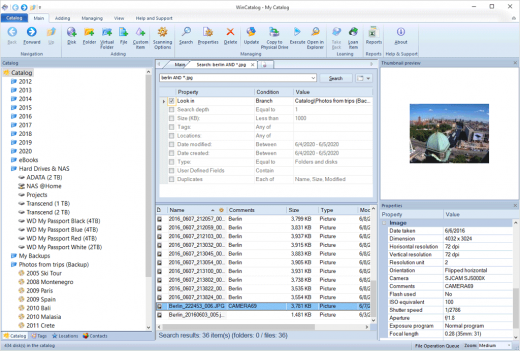
Description: Looking for a reliable and powerful disk catalog software to organize your huge collection of disks? WinCatalog disk cataloger is a perfect solution! On the market since 2001. Automatically create a catalog of all files, stored on your disks (HDDs, DVDs, CDs, network drives and other media storage devices): WinCatalog will automatically grab ID3 tags for music files, Exif tags and thumbnails for photos, thumbnails and basic information for video files, e-books, contents of archive files, thumbnails for images (pictures) and PDF files, ISO files, and much more.

Features :

  • Automatically extract supplemental information from music, video, HTML, TXT files during scanning a disk and creating a catalog.
  • WinCatalog 2019 can display ID3 tags including artist name, song, album, disk cover and other information for music files in the following formats: MP3, WAV, WMA, OGG, OGA, ASF, M4A, M4B, M4P and MP4.
  • For video files WinCatalog extracts and adds to video catalog basic information including thumbnail, codec, video frame resolution, audio tracks information, etc. So you can successfully use
  • WinCatalog as a video catalog software.
  • For E-books WinCatalog extracts a title, a description, author’s names, and a cover image. The supported formats of e-books are Epub, Mobi, and FB2.
  • For HTML files WinCatalog extracts and stores headings and tags.
  • For text files WinCatalog extracts a part of text and creates a preview that is displayed when you search for a particular document.
  • For PDF files Wincatalog creates thimbnail for the first page.

How To Install?

  • Install the program from the given setup.
  • Don’t run the application yet and close from system tray or task manager if running.
  • Extract the “Patch Fix.zip” to directory where you’ve installed the program.
  • Run the Patch as admin and apply it. (you may need to find the .exe to patch)
  • Boom! Now you can use the program without any interruptions.
  • That’s it, Enjoy now

Release Names: WinCatalog v2020.5.1.623 + Fix
Size: 87.32 MB
Links: HOMEPAGE – NFO – Torrent Search

Download: UPLOADGiG – NiTROFLARE – RAPiDGATOR

5 Comments
Sep 11

DVDFab v12.0.4.6 (x64) + Fix

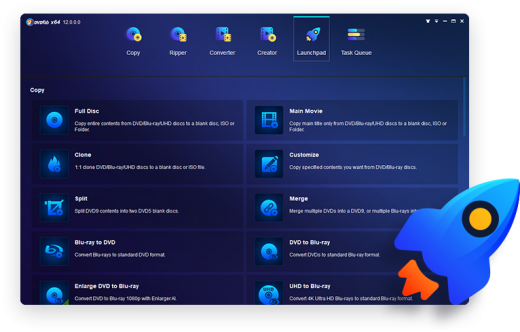
Description: DVDFab All-In-One includes 26 DVDFab 12 products, offers complete multimedia solutions on DVDs, Blu-rays, 4K Ultra HD Blu-rays, recorded (4K) BDAV Blu-rays and videos. Copy, rip, burn and convert DVDs, Blu-rays and 4K Ultra HD Blu-rays; download, convert and edit videos…no matter what your demand is, you’re all covered!

Features :

  • DVD Copy
    Copy and burn DVDs with 6 backup modes.
  • DVD Ripper
    Convert DVDs to MP4, MKV, MP3, AAC and more.
  • DVD Creator
    Produce premium home DVDs from family videos.
  • DVD to Blu-ray Converter
    Convert DVDs to standard Blu-ray format.
  • DVD Cinavia Removal
    Remove Cinavia watermarks from infected DVDs.
  • Video Converter
    Convert videos from one format to another, or to mainstream audio formats.
  • Hi-Fi Audio Converter
    Extract the high quality audios from Blu-rays and save as popular lossless audio files.
  • DRM Removal for Apple
    Remove the DRM encryptions from Apple contents for unrestricted playback on any devices.
  • Screen Recorder & Editor for iOS
    Record everything from the screen of an iOS device, such as an iPhone, iPod touch or iPad.

How To Install?

  • Install the program from the given setup.
  • Don’t run the application yet and close from system tray or task manager if running.
  • Extract the “Crack Fix.zip” to directory where you’ve installed the program. Replace all the files.
  • Boom! Now you can use the program without any interruptions.
  • That’s it, Enjoy now

Release Names: DVDFab v12.0.4.6 (x64) + Fix
Size: 210.73 MB
Links: HOMEPAGE – NFO – Torrent Search

Download : UPLOADGiG – NiTROFLARE – RAPiDGATOR
8 Comments
Sep 10

Windows 11 Pro Insider Build 22000.184 Non-TPM 2.0 Compliant x64 En-US Activated September 2021-P2P

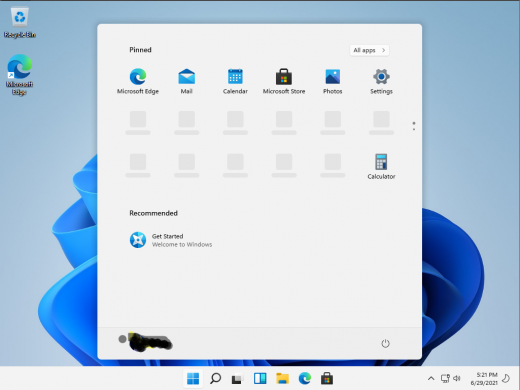
Description: Windows 11 is “the next generation of Windows”, Microsoft’s new operating system, which will be released in the fall of 2021. The new system received a seriously redesigned interface and new functionality, which will now be tested by insiders using preview builds of Windows 11. Many changes are already known.

Feature :
Windows 11 is a series of personal computer operating systems produced by Microsoft as part of its Windows NT family of operating systems. It is the successor to Windows 10, and was released to manufacturing on July 15, 2015, and to retail on July 29, 2015. Windows 10 receives new releases on an ongoing basis, which are available at no additional cost to users. Devices in enterprise environments can receive these updates at a slower pace, or use long-term support milestones that only receive critical updates, such as security patches, over their ten-year lifespan of extended support.

One of Windows 11′s most notable features is support for universal apps, an expansion of the Metro-style apps first introduced in Windows 10. Universal apps can be designed to run across multiple Microsoft product families with nearly identical code‍—‌including PCs, tablets,smartphones, embedded systems, Xbox One, Surface Hub and Mixed Reality.
The Windows user interface was revised to handle transitions between a mouse-oriented interface and a touchscreen-optimized interface based on available input devices‍—‌particularly on 2-in-1 PCs, both interfaces include an updated Start menu which incorporates elements of Windows 7′s traditional Start menu with the tiles of Windows 8. Windows 10 also introduced the Microsoft Edge web browser, a virtual desktop system,a window and desktop management feature called Task View, support for fingerprint and face recognition login, new security features for enterprise environments, and DirectX 12.

Release Names:Windows 11 Pro Insider Build 22000.184 Non-TPM 2.0 Compliant x64 En-US Activated September 2021-P2P
Size: 3.83 GB
LinksHomepage – NFO – Torrent Search

Download: UPLOADGiGNiTROFLARERAPiDGATOR

4 Comments
Sep 10

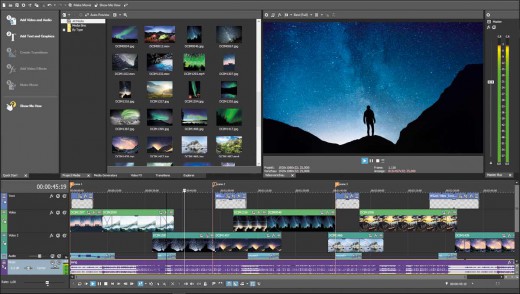
MAGIX Movie Studio suite 18.1.0.24(x64)-P2P

Description: Create lasting memories from your digital photos and video clips, and craft something special for your family and friends. VEGAS Movie Studio makes it easy to edit video and audio into something so special you can’t wait to share it with the world.

Feature :

  • From Popular Streaming Formats to Ultra High-Def 4K
  • Easily Crop Out Unwanted Video
  • Get creative with special effects
  • Add professional-quality titles and text
  • Sharing Made Easy
  • User interface improvements
  • Quick Start window
  • Improved Add Media options
  • Event Healing
  • Hardware acceleration improvements
  • Improved file format support including iPhone video files

Release Names: MAGIX Movie Studio suite 18.1.0.24(x64)-P2P
Size: 729.45 MB
LinksHomepage – NFO – Torrent Search

Download: UPLOADGiGNiTROFLARERAPiDGATOR

6 Comments