Feb 27

O&O DiskImage Professional 19.0.117 (x64)

O&O DiskImage 18 lets you back up an entire computer or single files whenever you want – even while the computer is being used. In the event you should lose your personal data it can be quickly restored with just a few mouse clicks – even when Windows is no longer able to start. It also supports SSD drives and the latest UEFI System.
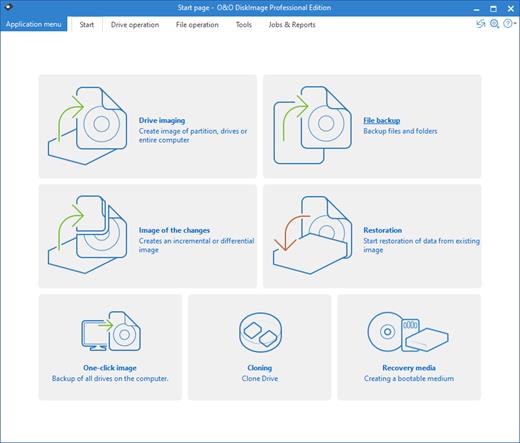
O&O DiskImage lets you carry out a system restore and to duplicate or clone an entire PC or hard drive. You can even restore this backup onto a computer whose hardware is different from the original machine, for instance, where you have changed a motherboard on the target machine or have bought a brand new PC and want to restore an old backup onto it.

A regular backup is still something that many users prefer to avoid. At least that is until they suffer their first loss of important files as a result of software, hardware or user error: that’s when it becomes crystal clear just how valuable a reliable and up-to-date backup really is!

New in O&O DiskImage 18: Comprehensive VHD / VHDX functionality
With the new version 18 it’s possible to convert image files made with O&O DiskImage into Microsoft Virtual Hard Disc (VHDX as well as VHD) image files. This can be especially useful if someone wants to first “rehearse” migrating from Windows 10 to Windows 11 because it can be done using a virtual machine created on the current system.

The new O&O DiskImage 18 can also create incremental and differential images of virtual drives. Combining or mounting these images is also possible. Whenever there’s a backup available, it only takes a few seconds to access any files that are needed. Work on the computer can then be continued without any loss of time or important data.

O&O DiskImage 18 with its own recovery partition
Normally with a backup or imaging program you need to create a boot medium (USB) to boot up your system if something goes awry. This you have to either carry around or store somewhere safe in case disaster strikes.

Thanks to the integration into the system, the O&O DiskImage RecoveryPartition can be accessed immediately so that the last system image can be restored directly. If the Windows operating system does not start or if faulty drivers have to be uninstalled – with the integrated recovery environment, all O&O tools are available to make the system operational again as easily as possible. Not only is this much more comfortable and quicker for the user, it also provides them with an extra level of security as this medium cannot get lost or damaged as easily as a “portable”, external one.

O&O DiskImage To Go
Previously, in addition to regularly backing up your machine, you also had to separately create an O&O DiskImage boot media to restore that backup. Everything is easier now! The new O&O DiskImage To Go function automatically turns an external hard drive (or USB flash drive with enough storage space) into an O&O DiskImage boot medium and marks this disk as the preferred storage medium for future system backups. As soon as you then connect this external USB hard disk to your computer, O&O DiskImage 18 automatically creates a backup. This makes it easy to create a recent backup. And if something really happens to your computer or you want to transfer your system and all your data to a new computer, then with the O&O DiskImage boot medium you can restore the backup stored on it with just one touch of a button. Without the hassle of searching for the boot medium and the external hard drive with the backup.
It has never been so easy to ensure the security of your data!

Further functions of O&O DiskImage:

All default and advanced features are combined in one single product
This backup software is the safest and easiest way to avoid losing important personal files! Options are available for both auto backup and manual settings. Thanks to a unique recovery system that includes additional system recovery tools combined with O&O DiskImage you’ll quickly be able to restore all your important data – even if the backup you’re using was created with an older O&O DiskImage version.

Backup entire PCs, hard drives or files with the push of a button
When you back up a PC, O&O DiskImage saves all personal files as well as hard drive information and individual settings. This not only protects irreplaceable files but, in a worst case scenario, also saves you the trouble of having to carry out a time-consuming new setup of programs and the Windows operating system. O&O DiskImage lets you back up an entire computer, system and hard drives or just individual files and folders. To make sure your backups are always up to date, we recommend creating them at short intervals from one another.

Quick and easy system restore – even onto different hardware
Restoring a backup with O&O DiskImage is as easy as pie: all you have to do is start the program, select the backup you want to restore, and you’re off. Included with the software is our machine independent restoration which means your old backup can be transferred 1:1 onto a new machine. Hardware of a different make will be automatically recognized and Windows settings will be carried out by themselves.

Plug-and-play function
Anyone wanting to save data on an external hard disk has it even easier with the new O&O DiskImage 18. Thanks to the integrated plug-and -play option, selected files and folders can be backed up automatically as soon as, for example, an external hard disk is connected to the computer. This is ideal for users who forget to carry out regular backups or who don’t want to go through the trouble. Once configured, the auto backup function runs by itself.

Create a boot medium directly from within the program
O&O DiskImage can bring a system back to life immediately and with no installation required. It does so by way of a Boot Medium (USB Stick) which is based on the currently installed Windows system and which contains all the standard drivers required.

Product features
Backup an entire computer with the push of a button
Backup system and hard drives, clone drives and entire disks
Brand new file-based backup: now twice as fast as ever before – backup and restore individual files and/or folders
Direct creation of VHD/VHDX
Monitoring and warning of security risks
Incremental/differential backup: back up only the changes
Easily restore files, folders, drives and disks
System restore onto different hardware (M.I.R.)
Create a Windows Boot system directly from within the program with driver integration
Plug-and-play: Selected files and folders are automatically backed up and synchronized
Variable pixel density settings: adjusts to the selected DPI setting of the connected monitor
New and enhanced functions Control via Command Lines

Operating System:
Windows 11, Windows 10 and Windows 8.1

Release Name: O&O DiskImage Professional 19.0.117 (x64)
Size: 112.6 MB
Links: HOMEPAGE – NFO – Torrent Search

Download: FiKPERNiTROFLARERAPiDGATOR

9 Comments
Feb 27

Robin YouTube Video Downloader Pro 6.8.2

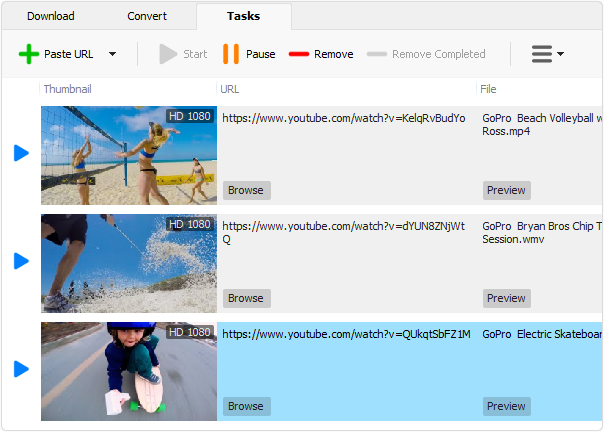
Description: YouTube Video Downloader Pro is a professional Windows app for downloading and converting videos from YouTube, Facebook, Dailymotion, and thousands of other video sharing sites. It accelerates your downloads by up to 5 times. YouTube Video Downloader Pro allows you to download multiple videos at a time. It also allows you to pause, resume, and cancel downloads at anytime.

Features

Download videos from YouTube and thousands of other video sites
YouTube Video Downloader Pro can download videos from YouTube, Facebook, Dailymotion, Vimeo, Vine, Metacafe, and thousands of other video sites.

Accelerate downloads by up to 5 times
YouTube Video Downloader Pro features an advanced download acceleration engine that lets you download videos up to 500% faster than normal speed.

Download 4K, 2K, FHD 1080p, HD 720p, and 3D videos from YouTube
YouTube Video Downloader Pro can download UHD 4K, QHD 2K, FHD 1080p, HD 720p, and 3D videos from YouTube if they are available.

Download only audio stream from YouTube
YouTube Video Downloader Pro allows you to download only audio stream from YouTube, without downloading the entire video file.

Download whole playlist from YouTube
Just enter a YouTube playlist ID, YouTube Video Downloader Pro will download all or selected videos in the playlist from YouTube for you.

Download more than one video at a time
YouTube Video Downloader Pro supports simultaneous downloads that allows you to download multiple videos at the same time.

Pause and resume downloads
YouTube Video Downloader Pro allows you to pause, resume, and cancel downloads at anytime.

Preview incomplete video while downloading
While downloading, you can click “Preview” button to play incomplete video and make sure the file you are downloading is really the video of your choice.

Convert downloaded videos to any format
YouTube Video Downloader Pro can automatically convert downloaded videos to the format that you specify. It supports MP4, FLV, WMV, MOV, ASF, AVI, DV, M4V, MKV, MPG, OGV, SWF, TS, VOB, WEBM, DVD, VCD, SVCD, and many other formats.

Optimize downloaded videos for any device
YouTube Video Downloader Pro automatically converts and optimizes downloaded videos for your mobile/desktop device, so you can watch them smoothly on your iPhone, iPad, iPod, Android phone, Android tablet, Xbox, PSP, PS4, PS3, Samsung Galaxy, or other device.

Extract audio stream from video
YouTube Video Downloader Pro allows you to extract audio stream from video, and save it as MP3, WAV, WMA, AC3, AAC, OGG, M4A, FLAC, MP2, or any other audio format.

Convert local video/audio files
YouTube Video Downloader Pro is also a powerful video/audio converter. It helps you to convert your disk video/audio files to any format you wish so that they are playable on your media player.

Ready-made presets
YouTube Video Downloader Pro provides ready-made presets for all popular video and audio formats. You can also custom output video/audio format settings.

iTunes compatible
Optionally, YouTube Video Downloader Pro can automatically add downloaded video/music to your iTunes library, so you can easily synchronize your videos and music to your iPhone, iPad, iPod, etc.

Integrate with Internet Explorer and Firefox
YouTube Video Downloader Pro adds download button and menu commands to the toolbar and the context menu of your browser, so you can download and convert any video with just one click.

Support drag-and-drop

You may directly drag and drop video link/URL from your browser to the main window of YouTube Video Downloader Pro to start download, you don’t even need to copy and paste video URL manually.


Release Name: Robin YouTube Video Downloader Pro 6.8.2
Size: 46.1 MB
Links: HOMEPAGE – NFO – Torrent Search

Download: FiKPERNiTROFLARERAPiDGATOR

8 Comments
Feb 27

VMware Workstation Pro 17.5.1.23298084 (x64)

VMware Workstation Pro is the perfect tool to increase productivity, save time and conquer the cloud. Supports the latest version of Windows and Linux, the latest processors and hardware. And the ability to connect to VMware vSphere and vCloud Air.

User Interface
VMware Workstation Pro gives powerful control over how to set up and interact with virtual machines whether running them locally on your PC or in the cloud. The interface includes simplified menus, live thumbnails, tabs, preferences screens. And a virtual machine library with search capability allowing you to quickly view and access you virtual machines saving valuable time.

Built for Microsoft Windows 10 and More
VMware Workstation Pro is the best way to evaluate and test Windows 10 with your existing Windows or Linux PC. In a few simple steps you can easily install Windows 10 in a virtual machines from a disc. Or from ISO image using the Workstation Virtual Machines Wizard. You can start taking advantage of Windows 10 latest features like Cortana the personal digital assistant, new Edge web browser. Or even start building Universal Apps for Windows 10 devices. You can even ask Cortana to launch VMware Workstation right from Windows 10.

Display Powerful 3D Graphics
Supports DirectX 10 and OpenGL 3.3 delivering a more fluid and responsive experience when running 3D applications. In addition, Workstation makes running highly demanding 3D applications like AutoCAD or SOLIDWORKS a snap in a virtual machine.

Ready for High Resolution Displays
VMware Workstation Pro has been optimized to support high resolution 4K UHD (3840 x 2160) displays for Desktops and QHD+ (3200×1800) displays used in laptops and x86 tablets providing you with a crisp and detailed experience. VMware Workstation 14 Pro now supports multiple monitors on the host with different DPI settings so you can run your brand new 4K UHD display along with your existing 1080P HD display.

Create Powerful Virtual Machines
With VMware Workstation Pro, you can create virtual machines with up to 16 vCPUs, 8 TB virtual disks, and 64 GB of memory to run the most demanding desktop and server applications in a virtualized environment. You can give graphics-intensive applications an additional boost by allocating up to 2GB of video memory to a virtual machine.

Ready for the Latest Hardware
Take advantage of the latest Intel based tablets with Workstation virtual tablets sensors. Leverage the latest Microsoft Surface tablets with Workstation’s virtual accelerometer, gyroscope, compass, and ambient light sensor to enable applications running in the virtual machines to respond when a user moves, rotates, and shakes their tablet. Whether you are running on a laptop, tablet, or desktop, VMware Workstation Pro supports the latest Intel 64-bit x86 processors, including the Broadwell and Haswell microarchitecture for maximum performance.

Build Virtual Networks
With improved IPv6 support, including IPv6-to-IPv4 Network Address Translation (6to4 and 4to6), users can create more complex networking topologies than ever before. Use the VMware Workstation Pro virtual network editor to add and remove virtual IPv4 or IPv6 networks. Create custom virtual networking configurations, ideal for testing and demonstration environments without impacting the PCs network configuration.

Leverage the Power of vSphere and vCloud Air
VMware Workstation Pro provides connections to VMware vSphere and vCloud Air service. It allows you to extend and scale your virtual machines in the cloud. Seamlessly drag and drop virtual machines between your PC and your internal cloud running vSphere, ESXi or another instance of Workstation. In addition, easily connect to vCloud Air. You will able to upload, run, and view virtual machines right from the Workstation Pro interface.

Virtual Machine Cross Compatibility
With Workstation Pro you can create virtual machines that can run across the VMware product portfolio. Or create restricted virtual machines that can be used in Horizon FLEX, Fusion Pro, and Workstation Player.

Release Name: VMware Workstation Pro 17.5.1.23298084 (x64)
Size: 598.7 MB
Links: HOMEPAGE – NFO – Torrent Search

Download: FiKPERNiTROFLARERAPiDGATOR

11 Comments
Feb 27

R-Tools R-Drive Image 7.2 Build 7200 Multilingual

R-Tools R-Drive Image Overview

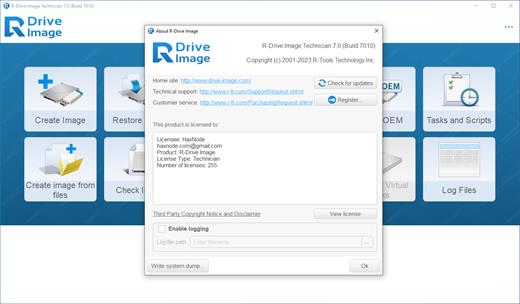
R-Drive Image is a potent utility providing disk image files creation for backup or duplication purposes. A disk image file contains the exact, byte-by-byte copy of a hard drive, partition or logical disk and can be created with various compression levels on the fly without stopping Windows OS and therefore without interrupting your business. These drive image files can then be stored in a variety of places, including various removable media such as CD-R(W)/DVD, Iomega Zip or Jazz disks, etc.

R-Drive Image restores the images on the original disks, on any other partitions or even on a hard drive’s free space on the fly. To restore system and other locked partitions R-Drive Image is switched to the pseudo-graphic mode directly from Windows or bootable version created by the utility is launched from CD disc or diskettes.

Using R-Drive Image, you can completely and rapidly restore your system after heavy data loss caused by an operating system crash, virus attack or hardware failure. You can also use R-Drive Image for mass system deployment when you need to setup many identical computers. In other words, you can manually setup one system only, create an image of the system, and then deploy it on all other computers, saving your time and costs. If you need to restore only certain files from a disk image, you can connect that image as a virtual disk and copy those files directly from the disk image using Windows Explorer or any other file utility.

R-Drive Image is one of the best backup and disaster recovery solutions to prevent losing your data after a fatal system failure.

Key Features of R-Tools R-Drive Image

A simple wizard interface – no in-depth computer management skills are required.
On-the-fly actions: Image files are created on-the-fly, no need to stop and restart Windows. All other disk writes are stored in a cache until the image is created. Data from image files are restored on-the-fly as well, except on a system partition. Data to the system partition can be restored either by restarting R-Drive Image in its pseudo-graphic mode directly from Windows, or by using specially created startup disks.
Image files compression. Image files can be compressed to save free storage space.
Removable media support. Image files can be stored on removable media.
Startup version. A startup version can be used to image / restore / copy partitions locked by the OS. The computer can be re-started into the startup version either directly from Windows, or from an external USB device, a CD/DVD disk, or 6 floppies. The startup version can use either a graphic user interface, or a pseudo-graphic mode, if the graphic card isn’t supported.
USB 2.0 and 3.0 support in the startup version. With hard drives prices constantly going down, an external IDE-USB 2.0 or 3.0 HDD case with an appropriate hard drive is an ideal (fast and reliable) solution for storing backup files for system and other partitions that can be restored only in the startup version. Do not use numerous unreliable CD discs and slow CD/DVD recorders any more. Remember: with the incremental backup, this hard drive is not to be too large.
Network support in the startup version. R-Drive Image startup version supports disk image file creation and restoration over the Microsoft network (CIFS protocol).
Extended List of the supported devices in the startup version. The list of hardware supported by R-Drive Image startup versions has been extended. VIEW THE LIST
An image file can be connected as a read-only virtual disk. Such disk can be browsed through and files/folders can be found and copied.
Individual files and folders restoration. Individual files and floders rather than entire disk can be restored either during the restoring action or from a image file connected as a virtual disk.
Image files splitting. Drive images can be split into several files to fit a storage medium.
Image Protection. Disk image files can be password-protected and contain comments.
New partition creation. Data from a disk image can be restored on a free (unpartitioned) space on any place on a hard drive. The size of the restored partition can be changed.

Release Name: R-Tools R-Drive Image 7.2 Build 7200 Multilingual
Size: 114.9 MB
Links: HOMEPAGE – NFO – Torrent Search

Download: FiKPERNiTROFLARERAPiDGATOR

4 Comments
Feb 27

VueScan Pro 9.8.27 DC 27.02.2024 Multilingual

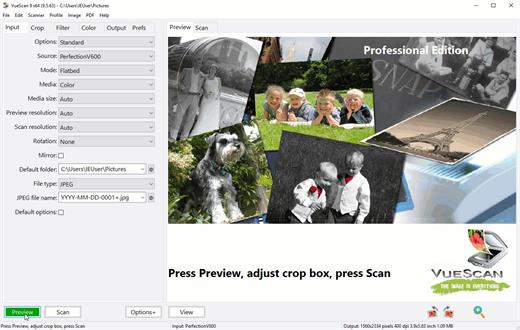
Description: VueScan, the world’s most popular scanner software, is used extensively by photographers, home users, scanning services and corporations. VueScan is a scanning program that works with most high-quality flatbed and film scanners to produce scans that have excellent color fidelity and color balance. It is very easy to use, and also has advanced features for restoring faded colors, batch scanning and other features used by professional photographers. VueScan changes nothing on your system, installs nothing in your operating system and all other scanner software will continue to function. VueScan increases your productivity and saves you money. VueScan has advanced scanning options, powerful features, and greatly improves your scans with superior color accuracy and better color balance. VueScan supports more than 700 scanners and 209 digital camera raw files and takes about 5 minutes to download and install.

Features:
• Works with 1200 flatbed and film scanners
• Runs on Mac OS X, Windows and Linux
• Improves your productivity and quality of scans
• Has been downloaded more than 5 million times
• Create raw scan files
• ICC profiles and color spaces
• IT8 color calibration

Release Name: VueScan Pro 9.8.27 DC 27.02.2024 Multilingual
Size: 43.3 MB
Links: HOMEPAGE – NFO – Torrent Search

Download: FiKPERNiTROFLARERAPiDGATOR

3 Comments
Feb 27

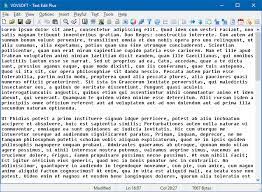
VovSoft Text Edit Plus 14.0 Multilingual

Description: Text Edit Plus is a lightweight tool that enables users to easily create new text documents or to modify existing ones. The application is designed as an alternative to Notepad, by offering a wider set of features.

Some of the features: Adding date and time. Changeability of background color and font properties. Encode and decode text. Combine lines. Command system for extracting the desired text. Delete empty lines. Delete same lines. Filter lines. Find and Replace. Full screen view. Generate e-mail list. Generate quick stats. Generate word list. Import picture as text (ASCII art). Insert numbers. Insert text into beginning or end of lines. Lowercase and uppercase conversion. Randomize lines. Reverse lines. Sort lines. Trim lines.

Release Name: VovSoft Text Edit Plus 14.0 Multilingual
Size: 5.1 MB
Links: HOMEPAGE – NFO – Torrent Search

Download: FiKPERNiTROFLARERAPiDGATOR

5 Comments
Feb 27

R-Tools R-Drive Image 7.2 Build 7200 Multilingual BootCD

R-Tools R-Drive Image Overview

R-Drive Image is a potent utility providing disk image files creation for backup or duplication purposes. A disk image file contains the exact, byte-by-byte copy of a hard drive, partition or logical disk and can be created with various compression levels on the fly without stopping Windows OS and therefore without interrupting your business. These drive image files can then be stored in a variety of places, including various removable media such as CD-R(W)/DVD, Iomega Zip or Jazz disks, etc.

R-Drive Image restores the images on the original disks, on any other partitions or even on a hard drive’s free space on the fly. To restore system and other locked partitions R-Drive Image is switched to the pseudo-graphic mode directly from Windows or bootable version created by the utility is launched from CD disc or diskettes.

Using R-Drive Image, you can completely and rapidly restore your system after heavy data loss caused by an operating system crash, virus attack or hardware failure. You can also use R-Drive Image for mass system deployment when you need to setup many identical computers. In other words, you can manually setup one system only, create an image of the system, and then deploy it on all other computers, saving your time and costs. If you need to restore only certain files from a disk image, you can connect that image as a virtual disk and copy those files directly from the disk image using Windows Explorer or any other file utility.

R-Drive Image is one of the best backup and disaster recovery solutions to prevent losing your data after a fatal system failure.

Key Features of R-Tools R-Drive Image

A simple wizard interface – no in-depth computer management skills are required.
On-the-fly actions: Image files are created on-the-fly, no need to stop and restart Windows. All other disk writes are stored in a cache until the image is created. Data from image files are restored on-the-fly as well, except on a system partition. Data to the system partition can be restored either by restarting R-Drive Image in its pseudo-graphic mode directly from Windows, or by using specially created startup disks.
Image files compression. Image files can be compressed to save free storage space.
Removable media support. Image files can be stored on removable media.
Startup version. A startup version can be used to image / restore / copy partitions locked by the OS. The computer can be re-started into the startup version either directly from Windows, or from an external USB device, a CD/DVD disk, or 6 floppies. The startup version can use either a graphic user interface, or a pseudo-graphic mode, if the graphic card isn’t supported.
USB 2.0 and 3.0 support in the startup version. With hard drives prices constantly going down, an external IDE-USB 2.0 or 3.0 HDD case with an appropriate hard drive is an ideal (fast and reliable) solution for storing backup files for system and other partitions that can be restored only in the startup version. Do not use numerous unreliable CD discs and slow CD/DVD recorders any more. Remember: with the incremental backup, this hard drive is not to be too large.
Network support in the startup version. R-Drive Image startup version supports disk image file creation and restoration over the Microsoft network (CIFS protocol).
Extended List of the supported devices in the startup version. The list of hardware supported by R-Drive Image startup versions has been extended. VIEW THE LIST
An image file can be connected as a read-only virtual disk. Such disk can be browsed through and files/folders can be found and copied.
Individual files and folders restoration. Individual files and floders rather than entire disk can be restored either during the restoring action or from a image file connected as a virtual disk.
Image files splitting. Drive images can be split into several files to fit a storage medium.
Image Protection. Disk image files can be password-protected and contain comments.
New partition creation. Data from a disk image can be restored on a free (unpartitioned) space on any place on a hard drive. The size of the restored partition can be changed.

Release Name: R-Tools R-Drive Image 7.2 Build 7200 Multilingual BootCD
Size: 78.8 MB
Links: HOMEPAGE – NFO – Torrent Search

Download: FiKPERNiTROFLARERAPiDGATOR

3 Comments
Feb 27

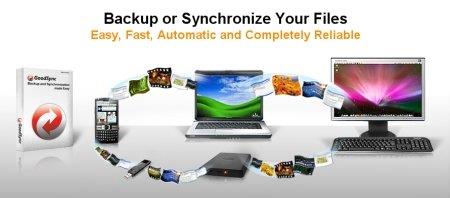
GoodSync Enterprise 12.5.6.6 (x64) Multilingual

Description: GoodSync is an easy and reliable file backup and file synchronization software. It automatically analyzes, synchronizes, and backs up your emails, precious family photos, contacts, MP3s, financial documents, and other important files locally – between desktops, laptops, servers, external drives, and Windows Mobile devices, as well as remotely through FTP, SFTP, WebDAV, and more. GoodSync file synchronization software combines bulletproof reliability with an extremely easy to use interface to compare, synchronize, and backup your emails, contacts, photos, iTunes, MP3s, and other important files. Automatically synchronize and back up your important files between desktops, laptops, servers, and external drives over a network or the Internet. Using an innovative synchronization algorithm – GoodSync file sync software is years ahead of the pack when it comes to file synchronization.

Main features:
• True Bi-Directional Synchronization Prevents Data Loss
• One-Way Synchronization Provides an Easy Backup Solution
• Lightning Fast Speed, Low Memory Requirement
• Syncs not just Windows folder but also FTP, WebDAV, SFTP, S3
• Syncs with your Windows Mobile Phone and Pocket PC too
• Selective File Synchronization: Exclude and Include Filters
• Automatic Reconnect for Remote Folders
• Flexible and Easy Sync Automation

Release Name: GoodSync Enterprise 12.5.6.6 (x64) Multilingual
Size: 67.4 MB
Links: HOMEPAGE – NFO – Torrent Search

Download: FiKPERNiTROFLARERAPiDGATOR

4 Comments
Feb 27

VMware Workstation Player 17.5.1.23298084 (x64) Commercial

VMware Workstation Player allows you to run a second, isolated operating system on a single PC. With many uses ranging from a personal educational tool, to a business tool for providing a simplified experience to run a corporate desktop on a BYO device, Workstation Player leverages the VMware vSphere hypervisor to provide a simple yet mature and stable, local virtualization solution.

Simple but Powerful Virtualization
With nearly 20 years of active development, VMware Workstation Player builds from the same platform as VMware Workstation Pro and vSphere, making it one of the most mature and stable solutions for local desktop virtualization. Safely and easily run a second operating system as a virtual machine (VM) on a single PC without affecting your main desktop environment and without rebooting.

Your Path to BYO
With VMware Workstation Player, you can isolate corporate desktops from BYO devices by disabling copy-and-paste, drag-and-drop, shared folders and access to USB devices. Run restricted VMs that are encrypted and password-protected to ensure only authorized users can interact with corporate data.

The Perfect Tool for Learning
The isolation and sandbox capabilities of VMware Workstation Player make it the perfect tool to help you learn about operating systems, applications and how they work. Being able to run a server environment on a desktop PC also allows you to explore software and application development in a “real world” environment without interfering with the host desktop.

A Secure and Isolated Environment
Run a secure second desktop with different privacy settings, tools and networking configurations to keep your host system safe and secure while browsing online.

System Requirements
Systems using Processors (CPUs) launched in 2011 or later are supported except:
Intel Atom processors based on the 2011 “Bonnell” micro-architecture (e.g. Atom Z670/Z650; Atom N570)
Systems using Intel Atom processors based on the 2012 “Saltwell” micro-architecture (e.g. Atom S1200, Atom D2700/D2500, Atom N2800/N2600).
Systems using AMD processors based on the “Llano” and “Bobcat” micro-architectures (e.g. code-named “Hondo”, “Ontario”, “Zacate”, “Llano”)
In addition the following are supported:
Systems using Intel processors based on the 2010 “Westmere” micro-architecture (e.g. Xeon 5600, Xeon 3600, Core i7-970, Core i7-980, Core i7-990)
1.3GHz or faster core speed
2GB RAM minimum/ 4GB RAM or more recommended
OS: Windows 10, Windows 8.X, Windows 7, Windows XP

Release Name: VMware Workstation Player 17.5.1.23298084 (x64) Commercial
Size: 562.7 MB
Links: HOMEPAGE – NFO – Torrent Search

Download: FiKPERNiTROFLARERAPiDGATOR

4 Comments
Feb 27

High-Logic FontCreator Pro 15.0.0.2959 (x64) Beta

Description: This award winning font software gives you all the tools you need to make new fonts and edit existing fonts. Use the advanced import features to make your own handwriting font or add signatures, logos and symbols to existing fonts.

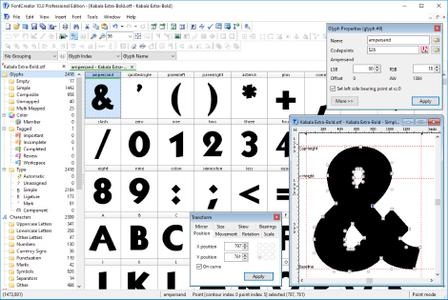
When you create or open a font, FontCreator displays an overview of all available characters. You can simply add missing characters, or select an existing character, and modify its appearance. You can import (scanned) images of your signature or company logo, or make a font from your own handwriting. With FontCreator you can also fix character codepoints, font names, kerning pairs, and at all times you can preview your fonts before installing.

FontCreator Features and Benefits:

  • Create and edit TrueType and OpenType fonts
  • Create and edit Web Open Font Format (WOFF) fonts
  • Create and edit scalable color fonts
  • Redesign existing characters
  • Add missing characters
  • Add up to 65,535 glyphs per font
  • Import vector files (EPS, AI, PDF, etc) and bitmap images (BMP, GIF, PNG, etc)
  • Add OpenType Layout Features
  • Fix character mappings
  • Correct fonts that display incorrectly
  • Glyph tagging
  • Convert OpenType fonts to TrueType fonts
  • Generate, modify, import, export, and clean up kerning pairs
  • Add or correct over two thousand composite glyphs
  • Transform individual glyphs or an entire font (e.g. to make a bold version)
  • Extract TrueType fonts from TrueType Collections
  • Unicode support (including the private use area and supplementary planes)
  • All popular encodings and code pages supported (ANSI, ASCII, Unicode, Symbol, Big5, PRC, Wansung, etc)
  • Preview fonts before installing
  • Install fonts in Windows

Release Name: High-Logic FontCreator Pro 15.0.0.2959 (x64) Beta
Size: 27.2 MB
Links: HOMEPAGE – NFO – Torrent Search

Download: FiKPERNiTROFLARERAPiDGATOR

3 Comments