Feb 12

Adobe Acrobat Reader DC 2023.008.20533

Top features in Acrobat Pro:
• PDF file conversion. Create PDF documents from any application that prints, including one-button conversion from Microsoft Word, Excel, PowerPoint, Outlook, Publisher, and Access, as well as Firefox and Lotus Notes — without ever leaving your authoring application.
• Scanning to PDF. Scan and convert paper documents and forms to PDF. Make scanned text searchable automatically with OCR, and then check and fix suspected errors. Text can be exported for reuse in other applications
• HTML to PDF. With a single click from within Internet Explorer or Firefox, capture web pages as PDF files, keeping all links intact. Convert only a portion of the page by selecting just the content you want.
• Email to PDF. Handle email-based communication more efficiently and simplify email search and retrieval. Archive emails or email folders from Microsoft Outlook or IBM Lotus Notes with one-button ease.
Export and edit PDF files
Easily edit PDF files and quickly export PDFs to Word or Excel documents. Spend less time rekeying information and more time reusing content. Use Acrobat X to reduce errors, improve productivity, and finish projects faster.
• PDF to Word. Save PDF files as Word documents with improved preservation of formatting and layouts. Relative positioning of tables, images, and even multicolumn text is preserved, as well as page, paragraph, and font attributes.
• PDF to Excel. Expedite reuse of content by converting PDF document data to Excel file formats. Even select a portion of a PDF page and export it to an editable format.
• Editing PDF files. Quickly and easily edit PDF documents without going back to the original source files. Save time by making simple changes to text and images directly within PDF files. Remove, reorder, and rotate PDF pages.
• Printing preparation. Reduce errors and delays at the printer. Preview, preflight, correct, and prepare PDF files for high-end print production and digital publishing.

Combine files from multiple applications
No need to fill people’s inboxes with multiple emails and attachments. Create and deliver professional-looking PDF files that are simple to send, open, view, and navigate.
• PDF Portfolio assembly. Quickly assemble a wide range of file types — including audio, video, and rich media content — into a polished, organized PDF Portfolio using the new PDF Portfolio Wizard.
• PDF Portfolio customization. Easily customize PDF Portfolios with included layouts, visual themes, and color palettes. Add corporate logos and colors to reflect your branding. Import custom PDF Portfolio layouts and themes developed by third-party developers and designers.
• Rich media. Quickly bring ideas to life through rich, interactive documents. Insert audio, Flash Player compatible video, and interactive media into PDF files, for seamless playback in Adobe Reader X or Reader 9.
• Attaching native files. Make sure source files are simple to locate, access, and archive. Attach them to any PDF document in their original, native formats, ensuring a more complete document of record.

Increase productivity and process consistency
Use innovative productivity-enhancing software features to simplify complex projects, prepare and present high-quality content, and achieve better results.
• Action Wizard. Automate routine, multistep tasks into a guided Action. Create, manage, execute, and share a sequence of frequently used steps that can be applied to a single PDF or batches of files.
• Quick Tools. Quickly access the tools you use most — from your favorite PDF document editing tools to your most-often used comment and markup tools — by adding them to the Quick Tools area.
• Version comparison. Eliminate confusion and improve version control. Easily identify differences between two versions of a PDF file by having Acrobat analyze both files and highlight changes to text and images.
• Integration with Microsoft SharePoint. Work seamlessly with PDF files in Microsoft SharePoint. Access SharePoint from any Acrobat Open or Save dialog box. Open PDF files from SharePoint for viewing. Check them out for editing, and then check them back in (Windows only).

Streamline online document reviews
Gather feedback efficiently and accelerate approvals. Use shared online document reviews and PDF comments to get — and keep — everyone on the same page from project start to finish.
• Commenting tools. Review and mark up PDF files using a complete set of familiar commenting tools, including sticky note and highlighter tools, lines, and stamps.
• Online document reviews. Gain the feedback you need, faster, through easy-to-manage, shared document reviews that allow participants to see and build on one another’s comments. Easily track progress and participation, add reviewers, and email updates or reminders.
• Extending Reader functionality. Enable Adobe Reader X or Reader 9 users to participate in shared reviews, fill and save forms, and digitally sign and approve PDF documents — regardless of platform or operating system.
• Commenting tool pane. Access markup tools and view comments from a single, unified tool pane. View all comments in a searchable list that can be filtered and sorted by page, author, and date.

Collect data with fillable PDF forms
Create, distribute, and track easy-to-use, interactive PDF forms that look like familiar paper forms — without asking IT for help.
• Form Wizard. Easily create dynamic, fillable PDF forms from paper or existing electronic files. Automatically convert static fields to fillable ones with the Form Wizard.
• Adobe Reader support. Enable Adobe Reader users (Reader 9 or X only) to fill and save forms — regardless of platform or operating system.
• Distribution and tracking. Distribute forms, track status, and compile results to expedite more accurate information collection. Use services at Acrobat.com to distribute and collect forms.
• Analyzing data. Streamline data reporting and analysis. Automatically compile form data in a single document or view. Filter responses as required. Easily export data to a spreadsheet for analysis.

Protect PDF files and documents
Simple-to-use security features enable you to protect sensitive information. Use PDF passwords, digital signatures, and redaction to build electronic processes you can trust.
• Digital signatures. Digitally sign PDF documents, or add document timestamps. Add certified digital signatures to help recipients validate document authenticity and integrity.
• Enabling Reader users to sign. Enable Adobe Reader X or Reader 9 users to digitally sign PDF documents and forms or add document timestamps.
• Passwords and permissions. Use passwords to help control access to your PDF documents. Apply permissions to restrict printing, copying, or altering. Save passwords and permissions as security policies that can be easily applied to new PDF files.
• Permanent information removal. Use redaction tools to permanently delete sensitive information, including specific text and illustrations. Easily sanitize documents with one click, finding and deleting hidden information such as metadata, annotations, attachments, form fields, layers, and bookmarks.

Read, search, and share PDF files
Enable anyone, anywhere, to view, search, and print PDF files using free Adobe Reader® software. Share PDF files with confidence, knowing colleagues and customers will be able to see your work exactly as intended — across file formats, platforms, browsers, and devices.
• Optimized viewing mode. Maximize your screen for optimal reading and presentation of PDF files with the new Reading Mode. Menus and panels disappear, and a transparent floating toolbar appears, to help you navigate PDF files more easily.
• Online file sharing. Use Adobe SendNow online services from within Acrobat to send, share, and track large files without the headaches of email size restrictions, FTP sites, and costly overnight services.

Release Name: Adobe Acrobat Reader DC 2023.008.20533
Size: 667.5 MB
Links: HOMEPAGE – NFO – Torrent Search

Download: FiKPERNiTROFLARERAPiDGATOR

7 Comments
Feb 12

Adobe Acrobat Pro DC 2023.008.20533 Multilingual

Top features in Acrobat Pro:
• PDF file conversion. Create PDF documents from any application that prints, including one-button conversion from Microsoft Word, Excel, PowerPoint, Outlook, Publisher, and Access, as well as Firefox and Lotus Notes — without ever leaving your authoring application.
• Scanning to PDF. Scan and convert paper documents and forms to PDF. Make scanned text searchable automatically with OCR, and then check and fix suspected errors. Text can be exported for reuse in other applications
• HTML to PDF. With a single click from within Internet Explorer or Firefox, capture web pages as PDF files, keeping all links intact. Convert only a portion of the page by selecting just the content you want.
• Email to PDF. Handle email-based communication more efficiently and simplify email search and retrieval. Archive emails or email folders from Microsoft Outlook or IBM Lotus Notes with one-button ease.

Export and edit PDF files
Easily edit PDF files and quickly export PDFs to Word or Excel documents. Spend less time rekeying information and more time reusing content. Use Acrobat X to reduce errors, improve productivity, and finish projects faster.
• PDF to Word. Save PDF files as Word documents with improved preservation of formatting and layouts. Relative positioning of tables, images, and even multicolumn text is preserved, as well as page, paragraph, and font attributes.
• PDF to Excel. Expedite reuse of content by converting PDF document data to Excel file formats. Even select a portion of a PDF page and export it to an editable format.
• Editing PDF files. Quickly and easily edit PDF documents without going back to the original source files. Save time by making simple changes to text and images directly within PDF files. Remove, reorder, and rotate PDF pages.
• Printing preparation. Reduce errors and delays at the printer. Preview, preflight, correct, and prepare PDF files for high-end print production and digital publishing.

Combine files from multiple applications
No need to fill people’s inboxes with multiple emails and attachments. Create and deliver professional-looking PDF files that are simple to send, open, view, and navigate.
• PDF Portfolio assembly. Quickly assemble a wide range of file types — including audio, video, and rich media content — into a polished, organized PDF Portfolio using the new PDF Portfolio Wizard.
• PDF Portfolio customization. Easily customize PDF Portfolios with included layouts, visual themes, and color palettes. Add corporate logos and colors to reflect your branding. Import custom PDF Portfolio layouts and themes developed by third-party developers and designers.
• Rich media. Quickly bring ideas to life through rich, interactive documents. Insert audio, Flash Player compatible video, and interactive media into PDF files, for seamless playback in Adobe Reader X or Reader 9.
• Attaching native files. Make sure source files are simple to locate, access, and archive. Attach them to any PDF document in their original, native formats, ensuring a more complete document of record.

Increase productivity and process consistency
Use innovative productivity-enhancing software features to simplify complex projects, prepare and present high-quality content, and achieve better results.
• Action Wizard. Automate routine, multistep tasks into a guided Action. Create, manage, execute, and share a sequence of frequently used steps that can be applied to a single PDF or batches of files.
• Quick Tools. Quickly access the tools you use most — from your favorite PDF document editing tools to your most-often used comment and markup tools — by adding them to the Quick Tools area.
• Version comparison. Eliminate confusion and improve version control. Easily identify differences between two versions of a PDF file by having Acrobat analyze both files and highlight changes to text and images.
• Integration with Microsoft SharePoint. Work seamlessly with PDF files in Microsoft SharePoint. Access SharePoint from any Acrobat Open or Save dialog box. Open PDF files from SharePoint for viewing. Check them out for editing, and then check them back in (Windows only).

Streamline online document reviews
Gather feedback efficiently and accelerate approvals. Use shared online document reviews and PDF comments to get — and keep — everyone on the same page from project start to finish.
• Commenting tools. Review and mark up PDF files using a complete set of familiar commenting tools, including sticky note and highlighter tools, lines, and stamps.
• Online document reviews. Gain the feedback you need, faster, through easy-to-manage, shared document reviews that allow participants to see and build on one another’s comments. Easily track progress and participation, add reviewers, and email updates or reminders.
• Extending Reader functionality. Enable Adobe Reader X or Reader 9 users to participate in shared reviews, fill and save forms, and digitally sign and approve PDF documents — regardless of platform or operating system.
• Commenting tool pane. Access markup tools and view comments from a single, unified tool pane. View all comments in a searchable list that can be filtered and sorted by page, author, and date.

Collect data with fillable PDF forms
Create, distribute, and track easy-to-use, interactive PDF forms that look like familiar paper forms — without asking IT for help.
• Form Wizard. Easily create dynamic, fillable PDF forms from paper or existing electronic files. Automatically convert static fields to fillable ones with the Form Wizard.
• Adobe Reader support. Enable Adobe Reader users (Reader 9 or X only) to fill and save forms — regardless of platform or operating system.
• Distribution and tracking. Distribute forms, track status, and compile results to expedite more accurate information collection. Use services at Acrobat.com to distribute and collect forms.
• Analyzing data. Streamline data reporting and analysis. Automatically compile form data in a single document or view. Filter responses as required. Easily export data to a spreadsheet for analysis.

Protect PDF files and documents
Simple-to-use security features enable you to protect sensitive information. Use PDF passwords, digital signatures, and redaction to build electronic processes you can trust.
• Digital signatures. Digitally sign PDF documents, or add document timestamps. Add certified digital signatures to help recipients validate document authenticity and integrity.
• Enabling Reader users to sign. Enable Adobe Reader X or Reader 9 users to digitally sign PDF documents and forms or add document timestamps.
• Passwords and permissions. Use passwords to help control access to your PDF documents. Apply permissions to restrict printing, copying, or altering. Save passwords and permissions as security policies that can be easily applied to new PDF files.
• Permanent information removal. Use redaction tools to permanently delete sensitive information, including specific text and illustrations. Easily sanitize documents with one click, finding and deleting hidden information such as metadata, annotations, attachments, form fields, layers, and bookmarks.

Read, search, and share PDF files
Enable anyone, anywhere, to view, search, and print PDF files using free Adobe Reader® software. Share PDF files with confidence, knowing colleagues and customers will be able to see your work exactly as intended — across file formats, platforms, browsers, and devices.
• Optimized viewing mode. Maximize your screen for optimal reading and presentation of PDF files with the new Reading Mode. Menus and panels disappear, and a transparent floating toolbar appears, to help you navigate PDF files more easily.
• Online file sharing. Use Adobe SendNow online services from within Acrobat to send, share, and track large files without the headaches of email size restrictions, FTP sites, and costly overnight services.

Release Name: Adobe Acrobat Pro DC 2023.008.20533 Multilingual
Size: 2.4 GB
Links: HOMEPAGE – NFO – Torrent Search

Download: FiKPERNiTROFLARERAPiDGATOR

7 Comments
Feb 12

Advanced Password Recovery Suite 2.1.0 Multilingual

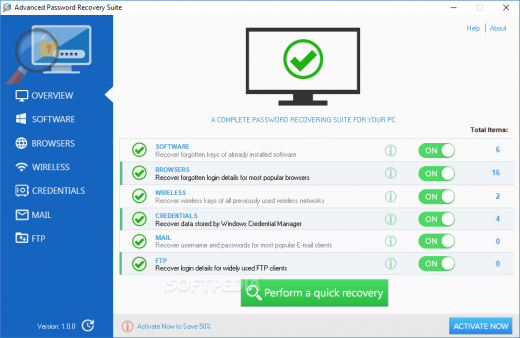
Description: Advanced Password Recovery Suite is an easy-to-use tool with ability to recover your forgotten software keys or login details for most popular web browsers, wireless networks, Windows Credential Manager, E-Mail or FTP clients.

Software Features:
– Our software can recover your forgotten software keys or login details for most popular web browsers, wireless networks, Windows Credential Manager, E-Mail or FTP clients.
– Recover keys for Microsoft Windows and Office, Nero, WinZip and more than 1500 other software and games.
– Recover usernames and passwords for Google Chrome, Microsoft Edge, Internet Explorer and etc.
– Recover forgotten wireless network keys (WEP, WPA and WPA2) for all previously used wireless networks.
– Recover login data saved by Windows Credential Manager.
– Recover usernames and passwords for most popular E-mail clients as MS Outlook, Thunderbird and Opera Mail.
– Recover login details for widely used FTP clients.

Release Name: Advanced Password Recovery Suite 2.1.0 Multilingual
Size: 6.4 MB
Links: HOMEPAGE – NFO – Torrent Search

Download: FiKPERNiTROFLARERAPiDGATOR

3 Comments
Feb 12

Lazesoft Recovery Suite Professional 4.7.3 Multilingual + WinPE

Description: Lazesoft Data Recovery offers home users and businesses complete solutions to recover deleted files or lost due to the format or corruption of a hard drive, virus or Trojan infection, unexpected system shutdown or software failure. With easy to use interfaces and the most powerful data recovery software engine, you can using Lazesoft Data Recovery recover data by yourself, preview recovered files while the search is in progress.

Easy recovery in all major data loss cases.
Accidentally deleted files or emptied from recycle bin
Formatted media/disk drive/partitions/dynamic volumes
Logically crashed disk
Data deleted using Shift+Del keys
Files corrupted due to virus attacks
Software crash
Power faults
partition with corrupt file systems, etc.
Recover files even when your computer cannot boot up and cannot enter Windows.

Easily recover data from Windows!
Windows Version of Lazesoft Data Recovery.
Native support for Windows 64 bit.
Added support for Windows 8 New!

Recover Data When Windows Cannot Boot up normally!
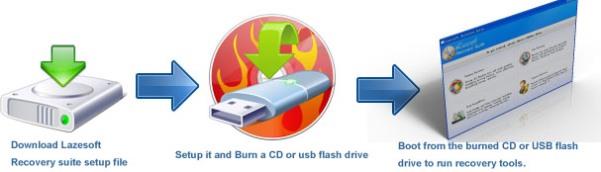
On some disk or Windows serious crashed, you might not be able to boot up your computer and enter Windows. Lazesoft Data Recovery can burn a bootable data recovery CD/USB disk and allow you to boot up your computer and rescue your data.
Boot from various brands of desktops, laptops like Dell, ThinkPad, Hp, Sony, Toshiba, Acer, Samsung, etc.
With WinPE-based and linux-base bootable disk builder, Lazesoft Recovery Suite has best hardware compatibility.
Boot up computer from CD or usb disk.
User friendly Boot Media Builder interface


Release Name: Lazesoft Recovery Suite Professional 4.7.3 Multilingual + WinPE
Size: 540.9 MB
Links: HOMEPAGE – NFO – Torrent Search

Download: FiKPERNiTROFLARERAPiDGATOR

8 Comments
Feb 12

RiDoc 5.0.14.10 Multilingual

RiDoc Full Version Free Download

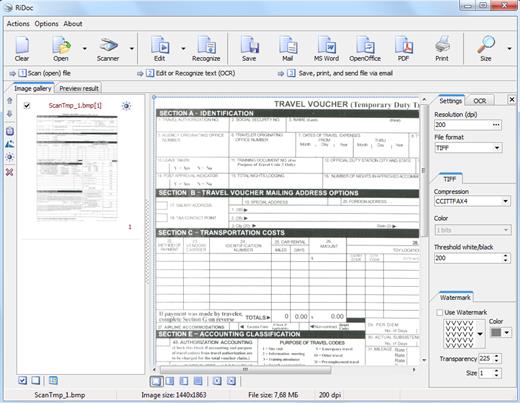
RiDoc Full Crack Download– the program for getting images from a scanner and reducing image file sizes. This program reduces the electronic document or image file size without decreasing of image quality. With the help of the Assembly function, the image frame is fit to A4 page format, and image file size is reduced without picture quality decrease.

Conversion of documents in to a graphical format makes it possible to protect these documents from unauthorized copying. To increase the document protection level you can apply watermark to the final document.

RiDoc License Key Features:

  • Scans images, documents and fit to A4 page format of small sizes of scanned images (button “Assembly”).
  • Overlay watermarks on scanned images.
  • Scanner program for daily use.
  • Getting the electronic version of the document from a scanner.
  • Batch scanning.
  • Saving the document in different graphic format (bmp, jpeg, png).
  • Scanning document into TIFF (multipage mode).
  • Ridoc – scanning document into Word.
  • Ridoc – scanning document into PDF.
  • Scanning document into printer, email.
  • Virtual printer: PDF, DOC, XLS – into tiff, bmp, png
  • Quickly and easily saves scanned documents on your computer with the help of technology “QuickFolder”.
  • Creating a gallery of scanned documents and images.
  • Single mechanism to manage both electronic documents.
  • And much more…

Whats New In RiDoc Download Crack:

  • Updates: official site does not provide any info about changes in this version.

Release Name: RiDoc 5.0.14.10 Multilingual
Size: 36.8 MB
Links: HOMEPAGE – NFO – Torrent Search

Download: FiKPERNiTROFLARERAPiDGATOR

6 Comments
Feb 12

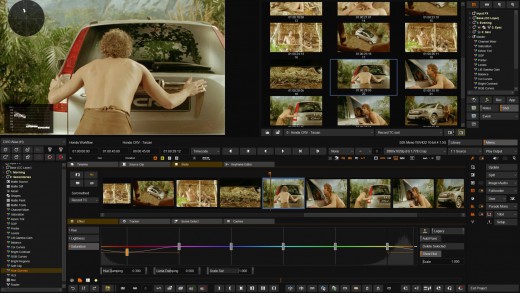
Filmworkz Nucoda 2024.1.002

Description: With over 30 years of image science and development behind it, Nucoda is our industry leading color grading application with unparalleled ability to enhance, restore and manipulate moving images. Long favored by major studios, broadcasters and post houses to create complex looks and visual styles for film, commercials, television and animation, Nucoda also allows you to take advantage of the full range of DVO Tools to bring you unmatched enhancement, correction and conversion capabilities. And now Nucoda include our DVO Essentials Pack, offering even more incredible value.

Nucoda is now faster than ever!
– New Planer, Deform, Warp and TRS tracker based on entirely new highly intelligent algorithms
– DVO render improvements with up to 30% speed increases
– Create caches using the lossless EXR PIZ format

So Much More Than Color Grading
Nucoda is the perfect host platform to access the entire range of Emmy award-winning DVO Tools. To give you a taste of the power of our DVOs we’ve featured here one of the most popular.

Why choose Nucoda for your next Color Grading Project?

Unmatched flexibility for true professionals
Advanced color grading application with HDR support and more color tools than competing systems.

Emmy award-winning technology
Full access to the entire range of DVO Tools for an unmatched choice of additional enhancement, correction and conversion capability (optional).

More than color grading out of the box
DVO Essentials Pack included at no additional cost.

Built for speed and efficiency
Designed as a fit-for-purpose color grading system at the outset combining speed and efficiency balanced with advanced functionality.

Unlimited color layers
Powerful memories view – easily recall grades, events and notes. Not restricted by a node-based approach.

System Requirements
– Windows 10 Pro 64
– AMD Ryzen™ Threadripper™ Pro 3975WX (32-Cores) OR AMD Ryzen™ Threadripper™ Pro 3995WX (64-Cores) OR 2x Intel™ 18 core Processors
– 8x 16 GB DDR4 3200MHz RAM
– NVIDIA® Quadro® RTX 5000
– 1 TB M.2 Gen 3 PCIe SSD, OPAL (O/S)
– 2x 2TB M.2 Gen 3 PCIe SSD, OPAL (Project Caching drive)
– 8x 2TB Internal SSD Raid (for Storage, if no SAN/NAS)


Release Name: Filmworkz Nucoda 2024.1.002
Size: 1 GB
Links: HOMEPAGE – NFO – Torrent Search

Download: FiKPERNiTROFLARERAPiDGATOR

8 Comments
Feb 12

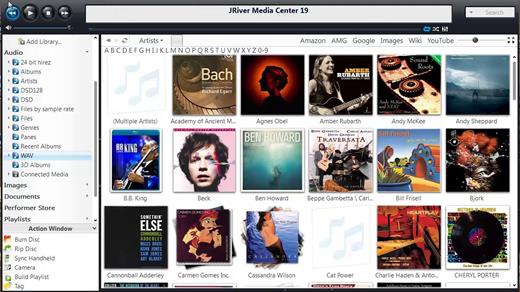
JRiver Media Center 32.0.16 (x64) Multilingual

Supports more cell phones, MP3 players, DLNA, and other devices. Powers an HTPC to entertain your family. Even different playback in multiple zones. And it can record high definition TV, and provide a replacement for cable TV. It has a Theater View interface, controllable by a Media Center Remote, an iPad, iPhone, Android, a Windows netbook or Touchscreen. MC is a DirectShow player. Obsessive taggers will be delighted with cover art and metadata options. And MC backs up your work so you can sleep at night.

JRiver Media Center has a streamlined user interface designed to make it even easier to organize, find and play your digital files, and to connect to hardware devices. Make a CD of music for your car. Record your favorite shows and watch them on your TV. More than one soundcard? Play different music simultaneously in different rooms. MC’s Media Server can even stream your music to your PC at work!

Audio:
* Native support of DirectShow DSP filters
* Audiophile – WASAPI exclusive output using high-end USB DACs
* Audiophile – Added ability to play files from memory instead of disk
* Audiophile – Support for high end USB DAC’s with WASAPI
* Headphone DSP makes listening more natural and comfortable.
* /SoundcardSwitch command for the launcher (MC14.exe), allows soundcard selection on Vista and W7
* 3D album view adjusts text size to display more tracks when necessary
* 3D album view allows playing, adding, shuffling, and adding as next to play

Images:
* Image Preview allows zoom from a thumbnail to rotate, delete, compare, edit, and more
* Image thumbnail frames (optional)
* Photoshop PSD file support
* Single command copy / send to an editor like Photoshop, and stack new image with original

Video:
* Video tagging using sidecar files
* Chapter Support for MKV and MP4
* Chapters added to On Screen Display
* Info Panel displays metadata

Television:
* Added new “watched” column to metadata
* EPG can automatically retrieve XMLTV data
* Automatic correlation of XML channel names and MC channel names
* Info Panel displays metadata, including TV program art
* TV program art from YADB

Theater View:
* Watch Hulu and YouTube from Theater View
* Customizable nested views in Theater View
* Customizable File Info panel to display metadata
* Speed and quality enhancements
* Custom backgrounds
* Touch screen support
* On screen clock

Remotes and Servers:
* Wiki articles: Remotes and Servers
* Remote Relay using IR transceivers for controlling a set top box or receiver
* Remote Setup Wizard
* Media Center Remote learning and blasting
* Media Center can connect to another Media Center to act as a remote (TRemote)
* New HID remote control plug-in — supports shortcuts with keyboard, mouse, & gamepad
* Remote control with REST based Web Service Interface in Library Server
* Library Server supports read and write to allow for shared, multi-user database access
* DLNA added to the UPnP Server
* Library Server clients can write changes back to server
* Library Server connections allow playback on server as Playing Now zones

Release Name: JRiver Media Center 32.0.16 (x64) Multilingual
Size: 74.1 MB
Links: HOMEPAGE – NFO – Torrent Search

Download: FiKPERNiTROFLARERAPiDGATOR

7 Comments
Feb 12

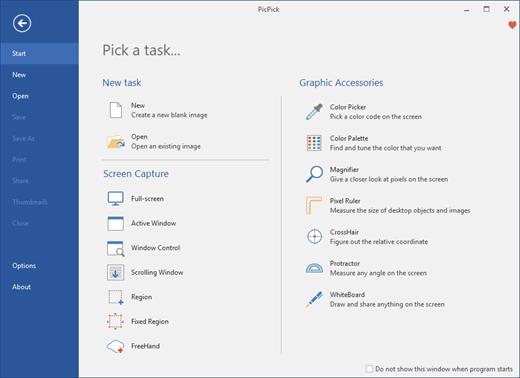
PicPick Professional 7.2.7 Multilingual

PicPick Professional Crack Full Version Free Download is a powerful software tool that allows users to capture, edit, and annotate images and screenshots. It offers a range of advanced features that make it a valuable tool for professionals in a variety of fields, including graphic design, software development, and technical writing.

One of the main features of PicPick Professional is its ability to capture images and screenshots in a variety of ways. Users can capture the entire screen, a specific window, or a selected region, and can also choose to capture scrolling pages or video. The software also includes a range of image editing tools, including the ability to resize, crop, and rotate images, as well as adjust color and brightness.

Another feature of PicPick Professional is its support for annotation and markup. The software includes a range of tools for adding text, shapes, and arrows to images, as well as the ability to blur or highlight specific areas. This makes it easy for users to communicate their ideas and provide feedback on images and screenshots.

Download PicPick Free Download features:

Here are some key features of PicPick Professional:

  • Image capture: It allows users to capture images and screenshots in a variety of ways, including the entire screen, a specific window, or a selected region, as well as capture scrolling pages or video.
  • Image editing: The software includes a range of image editing tools, including the ability to resize, crop, and rotate images, as well as adjust color and brightness.
  • Annotation and markup: It includes a range of tools for adding text, shapes, and arrows to images, as well as the ability to blur or highlight specific areas.
  • Image management: The software includes tools for organizing and managing large numbers of images, such as keyword tagging, metadata management, and the ability to create custom collections and albums.
  • User-friendly interface: It has a user-friendly interface that makes it easy for users to navigate and access its various features and tools.
  • Wide range of supported formats: The software supports a wide range of image file formats, including JPEG, TIFF, and PNG, making it easy for users to work with their images.
  • Regular updates:It is regularly updated to ensure that it is compatible with the latest versions of operating systems and to add new features and improvements.
  • Multi-language support: The software is available in a variety of languages, making it accessible to users around the world.

What’s New in the PicPick scrolling window:

  • New language updates (UI)
  • Fix bugs and improvements

In addition to its image capture and editing capabilities, PicPick Professional also includes a range of tools for organizing and managing large numbers of images. It includes features such as keyword tagging, metadata management, and the ability to create custom collections and albums.

Overall, PicPick Professional is a powerful and feature-rich software tool that offers a range of advanced features for capturing, editing, and annotating images and screenshots. It is an ideal choice for professionals in a variety of fields looking to improve their productivity and streamline their workflow.

  • Microsoft Windows 10, 8.1, 8, 7, Vista and XP including
  • both 32-bit and 64-bit versions..
  • RAM 1 GB

Release Name: PicPick Professional 7.2.7 Multilingual
Size: 71.7 MB
Links: HOMEPAGE – NFO – Torrent Search

Download: FiKPERNiTROFLARERAPiDGATOR

6 Comments
Feb 12

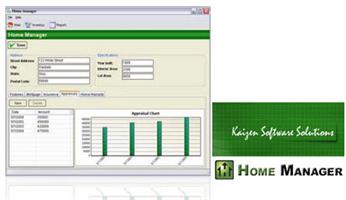
Home Manager 2024 v4.0.1008

Do you need a way to track all your “stuff”? With Home Manager you can organize and track your home inventory. Easily enter the details about your belongings, and use the built-in search feature to find it again quickly. If you already have a lot of digital pictures, simply drag and drop them into the program to automatically create new inventory items for each one.

Organize your inventory by category and location, and drag and drop items from one category to another. Keep a running maintenance and repair history for your assets. Print a home inventory report (complete with digital pictures) for your insurance agent; backup your data for safekeeping, and get the peace of mind that comes with having a full accounting of your home inventory.

Home Manager helps you get organized
You have better things to do with your time than searching through paperwork or digging through old paint cans looking for that lost color code. Now you can stop the frustrating searching and take control. With Home Manager software you can have all the information you need about your home right at your fingertips.

Be prepared for the unexpected
Sadly, every year natural disasters like earthquakes, fires, floods, tornadoes and hurricanes leave people without a home and with their possessions lost or destroyed. Without a detailed record, making an insurance claim can be a hassle at best. Whether you own your home, or rent an apartment, insurance companies recommend that you keep a current home inventory record to assist in the event of an insurance claim. Home Manager gets you started by building a complete home inventory. You can track warranty and insurance information, and even include digital pictures to assist in the unfortunate event of an insurance claim. Use the built-in backup feature to backup to a remote drive or email server, or for more options, check out this article about Amazon.com’s Simple Storage Service.

Home Manager Features
* Home Inventory Tracking for one or multiple residences.
* Track costs for home improvement and repair.
* Store your book and movie information in a database.
* Track warranty and insurance Information.
* Import an unlimited number of digital pictures.
* Search your inventory to find records fast.
* Backup your inventory to disk, floppy, or as an Email Attachment.
* Print report for off-site storage.
* Create your own custom categories and locations.

Release Name: Home Manager 2024 v4.0.1008
Size: 32.1 MB
Links: HOMEPAGE – NFO – Torrent Search

Download: FiKPERNiTROFLARERAPiDGATOR

6 Comments
Feb 12

Ableton Live 12.0.28 (x64) Beta Multilingual

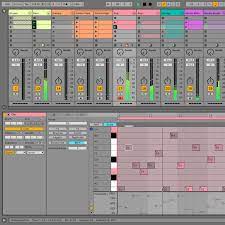
Description: Live is fast, fluid and flexible software for music creation and performance. It comes with effects, instruments, sounds and all kinds of creative features—everything you need to make any kind of music. Create in a traditional linear arrangement, or improvise without the constraints of a timeline in Live’s Session View. Move freely between musical elements and play with ideas, without stopping the music and without breaking your flow.

New features and updates in Live 12

Play freely with ideas
MIDI Transformations
Create a variety of simple or complex variations to your MIDI clips: add ornaments and articulations, draw acceleration and deceleration curves, connect successive notes and chords, or simulate the strum of a guitar.

MIDI Generators
Conjure up melodies, chords and rhythms with new MIDI Generators. Give your chosen Generator custom constraints, watch it create playful and original patterns, and then turn the ideas it produces into your own.

Max for Live MIDI Tools
Max now facilitates even greater experimentation, letting you create new MIDI Transformations and Generators – either based on existing ones, or your own creations.

MIDI Editing Improvements
Arrange the order of a selection of notes by pitch, velocity or duration. Stretch, split, chop or join notes in new ways; shape the velocity of notes; transpose them into a scale; or add intervals chromatically or in key.

Keys and Scales
Set the selected clip’s scale in Live’s Control Bar to see its notes in any clip you create. Then edit the clip using scale highlighting as a guide, use the clip scale to transform and generate musical ideas, or sync the scale of MIDI devices and instruments to the clip being played. Any changes in Live will be reflected in Push, and vice versa.

Expanded probability
Assign a single probability rule to a group of notes so that the entire group of notes is played whenever the trigger is fired. Or select a chord and tell Live to randomly play one note from it whenever the probability trigger is fired.

Embrace and explore tunings
Follow your preferred tuning systems or try different ones more easily. Work outside the 12-tone equal temperament system, and access tunings with Live’s devices as well as any MPE-capable plugin.

Surprise yourself with the sounds you create
Meld
A bi-timbral, MPE-capable instrument designed for deep sound shaping that lets you create a wide array of textural and experimental tones with its two easy-to-use macro oscillators.

Granulator III
The latest iteration of Robert Henke’s granular instrument now has MPE capability, giving you expressive control over parameters like note bend, vibrato and glissando. Plus, you can now capture audio in real time and start manipulating it immediately.

Roar
Create everything from subtle and precise mastering-grade warmth to wild and unpredictable sound degradation with Live’s new coloring and saturation effect. Roar’s three saturation stages can be used in series, parallel, or even in mid/side and multiband configurations – and it comes equipped with a feedback generator and an extensive modulation matrix.

New Modulation Behavior
Modulation destinations are no longer taken over by the modulation source. This means you can still adjust the parameter being modulated, even after assigning an LFO or other modulation source to it, opening up faster workflows, more possibilities for performance and continuous real-time control of parameters.

New Packs
Lost and Found – A collection of sounds fashioned from unusual materials, percussive trinkets, unique foley recordings and expressive objects to infuse your productions with character and authenticity. Dig deep and create layers of decorative, expressive instruments, playful Drum Racks and rich sound effects.

Performance Pack – A set of innovative devices from Iftah that push the boundaries of performing with Live. Capture snapshots of your sets and deploy them later, control multiple parameters with layered macros and curves, extend performances with looping in Arrangement View and pre-arrange the structure of a performance before you have even recorded it.

Work more intuitively
Stacked Detail Views
View your devices and the Clip Editor, or automation and device parameters, at the same time – so you can work without the distraction of switching between views.

View styling
Live 12’s cleaner, more minimal look removes visual complexity and keeps the focus on your music.

Mixer in Arrangement
Live’s Mixer, previously available only in Session View, can now be used in Arrangement View. Toggle it on or off with Mixer View Control located in the bottom right corner or via the View menu, and configure it independently of the Arrangement Mixer.

Mixer improvements
Live’s Mixer also comes with visual improvements that make it more accurate for detailed mixing decisions, and easier to read and control.

Browser Tagging and Filtered Searches
Search for your sounds in the Browser without the constraints of Live’s built-in categorization. That means when you search for bass sounds, you’ll see all the bass sounds in your Ableton library, whether they’re samples or instrument presets.

Live 12’s sound content is also tagged using a new system that acts as a more flexible alternative or addition to Collections in the sidebar. Sounds now come with sensible labels to make them easier to find – but if you need more detail, or just want to use your own method of labeling, you can also add your own.

Aside from Live 12’s built-in tags, you can create your own custom categories in the sidebar for easy access to all your favorite sounds and devices in the way that makes the most sense to your workflow.

Sound Similarity Search
Start with a sample and tell Live’s browser to find comparable sounds and instrument presets, with the help of a neural network.

Or swap all the samples in your Drum Rack for similar ones to quickly try out new percussive textures – like a drum machine with seemingly-infinite kits.

Browser History
Retrace your steps, and see and hear the sounds or categories you’ve previously searched for: Live’s Browser now lets you backtrack through your search history as you would with a web browser.

Accessibility and navigation improvements
Control core workflows in Live 12 using assistive technologies like screen readers, and use new keyboard shortcuts to navigate to nearly every part of Live.

New Themes
Choose new themes and adjust them with cool, neutral or warm tones and even a high contrast mode.

Release Name: Ableton Live 12.0.28 (x64) Beta Multilingual
Size: 3.3 GB
Links: HOMEPAGE – NFO – Torrent Search

Download: FiKPERNiTROFLARERAPiDGATOR

5 Comments