Jun 9

Airy Pro 3.26

Description: The Internet is full of YouTube downloaders that can help you grab and convert the video of your favorite artist in just a couple of seconds but few of them are as simple, intuitive and unobtrusive as Airy.
Lightweight and user-friendly YouTube downloader for everyday use

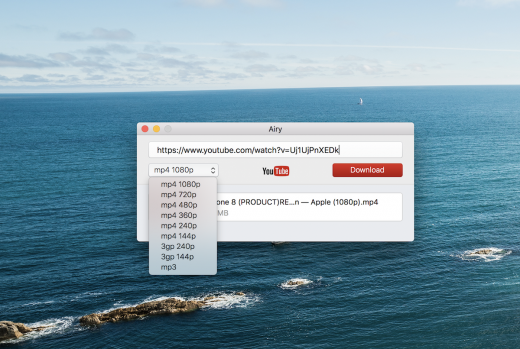
As expected, Airy is a straightforward Mac application that enables you to quickly download and convert various video clips to the desired video or audio format. You just have to paste the URL of any given YouTube video, select the video quality and initiate the download.

You can download YouTube videos to MP4 files at 144p, 240p, 360p, 480p, 720p, 1080p and even 4K if the resolution is available. You can also save a video as a low quality FLV file at 240p, or MP3 file that you can add to your iTunes playlist.

Easily integrates with your favorite web browser

What is more, Airy seamlessly integrates with your web browser and helps you send the video link directly to Airy with just a click of a mouse button. Apple’s Safari, Mozilla Firefox, Google Chrome and Opera are between the browsers supported by the app.

To integrate Airy into one of the above mentioned browser and other browsers that support this feature, you need to drag the link from Airy’s web browser integration page into your browser’s bookmarks bar. Every time you find a video you like and want to download, you can click on the bookmark to send the link to Airy for download.

Batch download and convert multiple videos with ease

You can even add multiple videos to the queue list and batch download them with ease. All downloaded items are displayed in the list can can be revealed in Finder. By accessing the Preferences window, you can set the default download directory and configure Airy to always ask where to save your video.

Unfortunately, Airy’s does not provide more audio encoding profiles and it is not able to automatically add your MP3 files to iTunes.

What’s New

Version 3.26:

  • Release notes were unavailable when this listing was updated.

Release Name: Airy Pro 3.26
Size: 30.17 MB
Links: HOMEPAGE – NFO – Torrent Search

Download: UPLOADGiG – NiTROFLARE – RAPiDGATOR

5 Comments
Jun 9

InstaBro 5.3.8


Description:
InstaBro is a simple Instagram browser that allows you to explore media by user, hashtag or location in a most convenient way. You can also export all data to a CSV file.

Features:

  • No sign-in required (for public accounts)
  • Search for users, tags, locations
  • Full-featured tabs
  • Like, comment and follow
  • Secure sign in to browse private accounts, personalize search & interact
  • Browse multiple sources (users/tags/places)
  • Table or collection view
  • Preview video or hires image in the Quick Look panel
  • Export data to CSV

What’s New

Version 5.3.8:

  • Release notes were unavailable when this listing was updated.

Release Name: InstaBro 5.3.8
Size: 18.16 MB
Links: HOMEPAGE – NFO – Torrent Search

Download: UPLOADGiG – NiTROFLARE – RAPiDGATOR

4 Comments
Jun 9

Cisdem ContactsMate 6.1.0

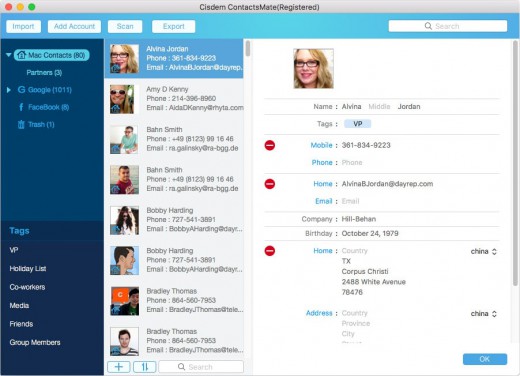
Description: Cisdem ContactsMate (was Contact Manager) is a great contacts manager. It allows you to backup everything in Contacts; edit the Contacts fields; find, analyze, report, and fix dozens of problems with OS X Contacts; and export your address book to CSV, vCard, TXT, DocX, HTML, Excel, Numbers, and Pages formats for easy Contacts backup or sync. The release of version 3 adds new functionalities: make a group for contacts, batch-fix similar problematic contacts, and manually set suffix or prefix.

New Features

  • Import Contacts – Import and combine contacts Contact manager enables you to easily import contact or contact lists directly from a .CSV or vCard file. It also syncs with the built-in Contacts app on Mac and supports all leading cloud services, including iCloud, Google, Exchange, Facebook, Twitter, and LinkedIn, etc.
  • Easily view, add, edit, group, tag, and manage contacts – It is very easy to add, enrich, and update contacts and you can manage your contacts by applying a tag to sub-categorize contacts and organize contacts by groups based on sources, interests, affinities, etc. Meanwhile, you also can quickly find what you want with the intelligent multi-conditional search feature and send group messages, emails or start a call to your assigned lists of contacts and print mailing address.
  • Delete duplicate contacts, fix formatting errors – Cisdem ContactsMate automatically scans your contacts for exact duplicates, incomplete contacts and flicts, it will find all the problems with your contacts and flag them for fix or removal. Once flagged, you have the opportunity to review one or all of the duplicate contact groups and formatting errors before processing, then you can fix them quickly.
  • Share, export and back up contacts to quickly exchange information -Share Contacts via Mail, Messages, Facebook, Twitter, etc. or export the whole or assigned contacts list to local files in different formats, including CSV, vCard, Excel, TXT, DocX, HTML, Numbers and Pages. Then you can easily backup or import it to Outlook, Yahoo, Gmail, etc.

What’s New

Version 6.1.0:

  • Optimized code structure.
  • Optimized the contact editing interface.
  • Optimized the loading speed.
  • Optimized the scan logic.
  • Added data refresh function.
  • Optimized the data display of internet accounts.
  • Added field mapping function to allow uses to manually match the fields when importing CSV file.

Release Name: Cisdem ContactsMate 6.1.0
Size: 9.89 MB
Links: HOMEPAGE – NFO – Torrent Search

Download: UPLOADGiG – NiTROFLARE – RAPiDGATOR

5 Comments
Jun 9

Web(Cache)Browser 1.8.1

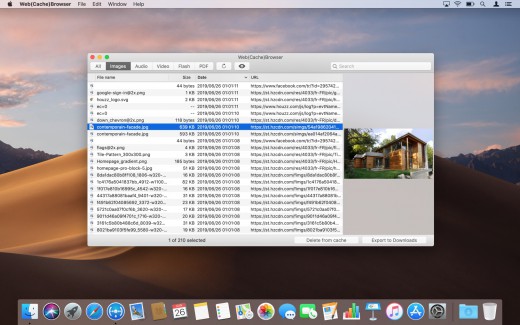
Description: Web(Cache)Browser is an application that allows to browse Safari’s cache content. So it is possible to retrieve resources that have been downloaded by the web browser, for example to use them offline.

You can find specific elements thanks to the search field or by selecting a type of resources to display.

Just press the space bar to open a Quick Look popup offering a live preview of the selected item.

Web(Cache)Browser also allows to individually delete some elements from Safari’s cache in order to save disk space. In this case, it will be efficient to use the sort-by-size feature to display the biggest resources on the top of the list.

What’s New

Version 1.8.1:

  • Release notes were unavailable when this listing was updated.

Release Name: Web(Cache)Browser 1.8.1
Size: 9.54 MB
Links: HOMEPAGE – NFO – Torrent Search

Download: UPLOADGiG – NiTROFLARE – RAPiDGATOR
5 Comments
Jun 6

Kaleidoscope 3.4.4

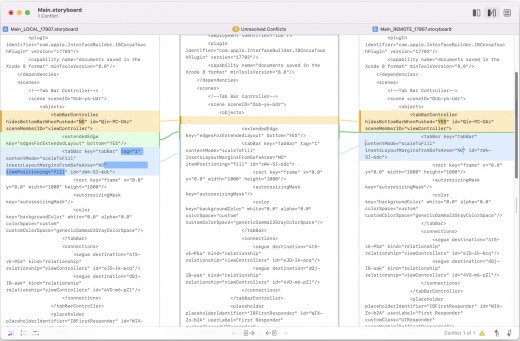
Description: Kaleidoscope spots differences in text and image files.

Kaleidoscope Features

  • General
  • Single window workflow: One tab per comparison
  • Compare two+ files: Add any number of files per tab
  • Always up to date: Auto-refreshes when files change
  • File Shelf: Quickly go from file to file
  • Path Bar: See where your files are
  • Keyboard shortcuts: Every action has a shortcut
  • Text Scope
  • Supports any text file: Plain text, source code, HTML, etc.
  • Clear comparisons
  • Three layouts: Blocks, Fluid, and Unified
  • Compare documents: Imports text from .doc and .rtf files
  • Instant search
  • Change Stepper: Quickly jump from change to change
  • Highlights: Added, deleted and changed text
  • Image Scope
  • All popular image file formats: JPEG, TIFF, PNG, PSD and more.
  • Four connected layouts: Two-Up, One-Up, Split, and Difference
  • Comprehensive image support: RGB/CMYK/LAB, alpha, any size.
  • Multi-touch support: Smooth scrolling and pinch to zoom
  • Customizable environment: Change background color, difference mask and checkerboard settings
  • Two difference mask modes: Spot absolute or relative changes
  • Integration
  • Git, Mercurial, SVN, and Bazaar: Integrate with a couple of clicks
  • Versions
  • TextMate SVN
  • Cornerstone
  • ksdiff Command-line tool: Integrate with practically anything


What’s New

Version 3.4.3:

  • Release notes were unavailable when this listing was updated.

Release Names: Kaleidoscope 3.4.4
Size: 34.44 MB
Links: HOMEPAGE – NFO – Torrent Search

Download: UPLOADGiG – NiTROFLARE – RAPiDGATOR

6 Comments
Jun 6

Wondershare PDFelement Pro 8.6.7.4133 (OCR)

Description: Meet All-New PDFelement – the most Powerful and Simple PDF solution that changes the way you work with your important documents Forever. PDFelement delivers a better way to transform your office documents.

Feature :

  • Brand New Design
  • Form Data Automation
  • Smarter, Faster Text Editing
  • The Complete PDF Solution
  • Edit PDFs like Word
  • Smarter Editing
  • Text Autofit
  • Create Fillable PDF Forms
  • Export Data from Scanned PDFs

Release Names: Wondershare PDFelement Pro 8.6.7.4133 (OCR)
Size: 619.42 MB
Links: HOMEPAGE – NFO – Torrent Search

Download: UPLOADGiG – NiTROFLARE – RAPiDGATOR
8 Comments
Jun 6

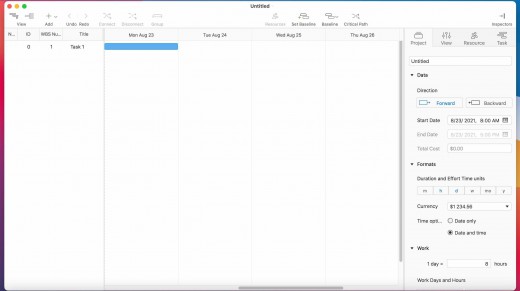
Project Office Pro 10.5

Description: Project Office is a full-featured project management app.

Designed to help you manage, create and monitor your projects. Use tasks, milestones, groups, connections and a lot of other features, for better work organization.

Project Office has peculiarities like Gantt charts, schedules, summaries, and milestones to let you manage all of your activities.

Project Office helps you in managing both simple and complex projects without any complexity.

Features:

  • Gantt chart allows monitoring your entire plan at a glance. Each task is shown graphically on a visual timeline by day, week, month or year. The visualized view helps you keep an eye on tasks durations, start and due dates, completion percentage, dependencies and resources assigned. Furthermore, you can easily edit tasks directly in the Gantt chart view.
  • Friendly and intuitive interface helps you get things done fast and stays out of your way while doing so.
  • Efficient resource management. Add resources to your project: people or materials, necessary to make this project done. Identify bottlenecks in your project and distribute workloads fairly.
  • Tool for tracking changes. Set a baseline to track development by comparing the set baseline with actual plan and progress.
  • Customized calendar. Modifying work hours for the entire project you can create a more realistic plan taking into account off-time and weekends into account.
  • Smart filter. You can easily hide those tasks you don’t need to think about at the moment. Simply use filter to focus on tasks you need to be done.
  • Share your projects. Send an entire project to your colleagues or Email the Gantt chart to others as PDF. For more convenience, you can make task and resources report and send them as HTML.
  • iCloud Backup. Backup your projects to keep all information you have added.
  • Critical Path – Project Office displays your project’s critical path, which is the series of tasks that are necessary in order to finish your project on schedule.

We developed Project Office to help you manage your business and keep it growing.

What’s New

Version 10.5:

Release notes were unavailable when this listing was updated.

Release Name: Project Office Pro 10.5
Size: 22.45 MB
Links: HOMEPAGE – NFO – Torrent Search

Download: UPLOADGIG – NiTROFLARE – RAPiDGATOR

5 Comments
Jun 6

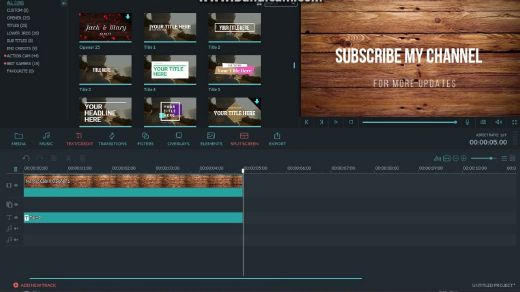
Wondershare Filmora X 11.3.5

Description: Video Editing Simplified – Ignite Your Story. A powerful and intuitive video editing experience. Filmora 8.0 is here with two new ways to edit: Action Cam Tool (Correct lens distortion, Clean up your audio, New speed controls) and Instant Cutter (Trim or merge clips quickly, Instant export).

Feature :
Edit and Enhance Your Media Files
Easily make perfect movies using your video clips (SD, HD, camcorder, records), audio and photos. See tech spec. for all supported formats.
Edit and personalize videos/photos/audio with features like split, crop, trim, rotate, set fade in & fade out, adjust duration, etc.
Tune all up with Contrast, Saturation, Brightness and Hue tools.
One click to record videos and voiceovers with a webcam and microphone.
Speed up, Slow down and voice change effects make audio/video editing fun.
Manage all your media sources including videos (also webcam), audio, images and color slides.

Release Names: Wondershare Filmora X 11.3.5
Size: 520.09 MB
Links: HOMEPAGE – NFO – Torrent Search

Download: UPLOADGiG – NiTROFLARE – RAPiDGATOR
5 Comments
Jun 6

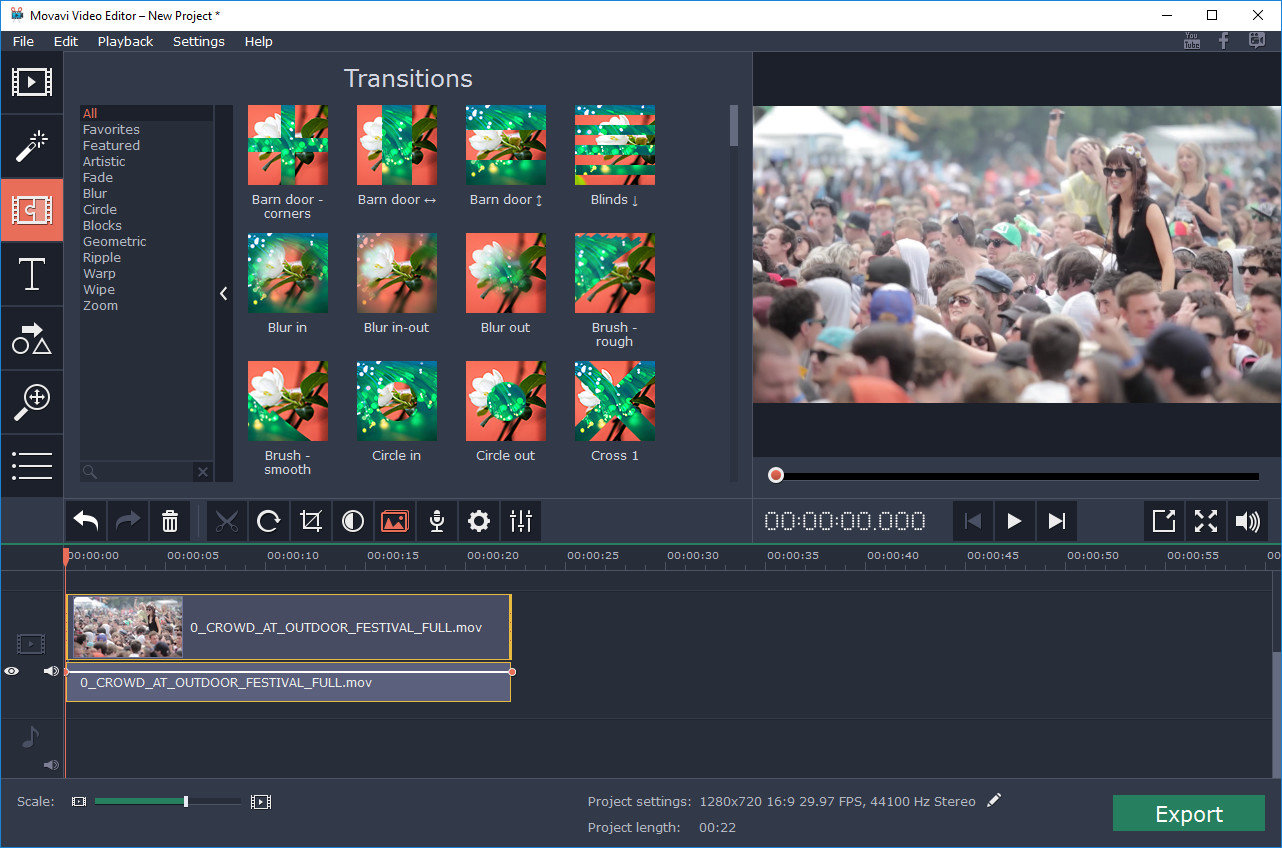
Movavi Video Suite 22.3.0

Description: Movavi Video Suite is comprehensive video making software that helps you create professional-looking movies and slideshows on your home computer – even if you have no experience. Incorporate music, create text captions, apply visual effects and transitions – you can do whatever you want with your video. In addition to the video making app, Movavi Video Suite contains a number of useful apps to help every video maker: powerful video converter that supports 180+ media formats, convenient utility for burning DVDs, a special tool for digitizing analog video, and more.

Feature :

  • Work with Audio
  • Add background music and sound effects in almost any format
  • Take advantage of the built-in ready-made audio tracks and samples
  • Record your own voice-over using your microphone
  • Vary audio volume and playback speed, equalize sound, apply fade-in/out effects
  • Overlay creative filters like Robot, Echo, Radio, and more
  • Add Captions and Labels
  • Choose from over 100 fonts
  • Add atmosphere with animated text

Release Name: Movavi Video Suite 22.3.0
Size: 250.46 MB
Links: HOMEPAGE – NFO – Torrent Search

Download: UPLOADGiG – NiTROFLARE – RAPiDGATOR
5 Comments
Jun 6

Tower Pro 8.2

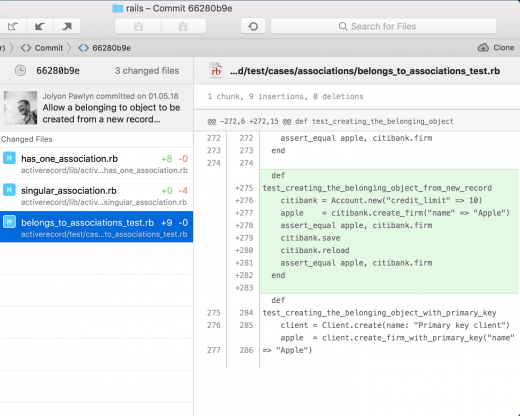
Description: Tower is a Git client for OS X that makes using Git easy and more efficient. Users benefit from its elegant and comprehensive interface and a feature set that lets them enjoy the full power of Git.

Tower abstracts Git’s complexity in an easy-to-use interface. For example, lots of actions can be performed simply via drag-and-drop, and mistakes can be undone easily. Advanced users can increase their productivity with features like single line staging, submodule support, or the file history.

Features

  • git-svn support
  • File history
  • git-flow support
  • Submodule support
  • git-lfs support
  • Blame view
  • Single-line staging (per-line committing)
  • Cherry-picking
  • Discard chunks/lines
  • Direct Github, Bitbucket, Gitlab, GitSwarm, Beanstalk, Visual Studio Team Services, Team Foundation Server and Rhodecode integration
  • Support for Bitbucket team accounts
  • Support for full-screen and Retina displays
  • Many powerful drag-and-drop features include merge, rebase, push /pull to/from remote, apply stash, create new branch, etc.

What’s New

Version 8.2:

New:

  • Skip Hooks: It is now possible to skip the execution of hooks for commit push, pull, merge, rebase and apply.
  • Sidebar: An option to show the number of stashes in the sidebar has been added to the General preference pane.
  • Pull Requests: Branches and Remote Branches can now be dragged on the Pull Requests workspace item to create a new pull request. Furthermore, the Ctrl + Cmd + P keyboard shortcut for creating pull requests is now available in all repository views.
  • DiffTool: The diff tool can now be opened with the current working copy status.

Improved:

  • Performance: We’ve improved the loading speed for repositories with many tags.
  • Auto-Fetch: Fetch operations are now automatically aborted if no data is received for some time, resolving an issue where Fetch operations block other remote operations until manually cancelled.
  • Pull Requests: The commit and changeset views have been improved. It is now possible to see the diffs for the changeset items of individual commits.
  • Pull Requests: The context menu in the sidebar now has an entry to show a pull request if one exists for the selected branch.
  • Git Flow: The default branch is now “main” instead of “master”.
  • History: A keyboard shortcut to toggle the “Compare Branch” feature has been added (Ctrl + Opt + Cmd + C).
  • Branches Review: GPG signature status is now available for commits.
  • Services: GitHub repositories are now created with Issues enabled by default.
  • Git LFS: the version was updated to 3.1.2 and the binary is now universal to support Macs with Apple Silicon chips.

Fixed:

  • Sidebar: Branches could be dragged to workspace items, creating a detached HEAD. This has been fixed.
  • Sidebar: The tag section is not automatically expanded anymore.
  • History: The “Autosquash” button is now disabled if the working copy is updating.
  • Remotes: Pulling with Git versions >= 2.35 could lead to an error in Tower. This has been fixed.
  • Remotes: Updating remotes crashed if multiple values existed for the same key in a remote config section. This has been fixed.
  • Diff Tools: When comparing two branches or tags, the full ref names are now passed to the Diff Tool to resolve any ambiguity errors.
  • Several crashes have been fixed.

Release Name: Tower Pro 8.2
Size: 53.58 MB
Links: HOMEPAGE – NFO – Torrent Search

Download: UPLOADGIG – NiTROFLARE – RAPiDGATOR

5 Comments