Sep 20

Bartender 4.2.24

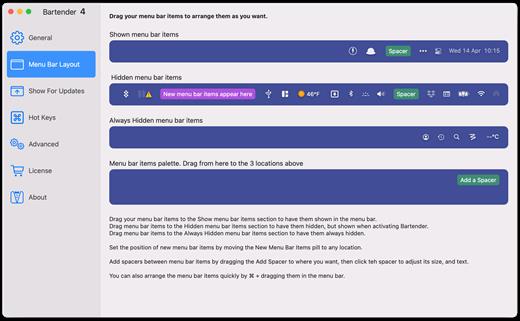
Bartender lets you organize your menu-bar apps by hiding them, rearranging them, or moving them to Bartender’s Bar. You can display the full menu bar, set options to have menu-bar items show in the menu bar when they have updated, or have them always visible in Bartender’s Bar.

Features

  • Lets you tidy your menu bar apps how you want.
  • See your menu bar apps when you want.
  • Hide the apps you need to run, but do not need to see.
  • Have the clean looking menu bar you want.
  • Rearrange your menu bar items as you wish.

What’s New

Version 4.2.24:

  • Release notes were unavailable when this listing was updated.

Compatibility

macOS 10.12 or later
Apple Silicon or Intel Core processor


Release Name: Bartender 4.2.24
Size: 14.9 MB
Links: HOMEPAGE – NFO – Torrent Search

Download: FiKPERUPLOADGiGNiTROFLARERAPiDGATOR

5 Comments
Sep 20

Little Snitch 5.7.1

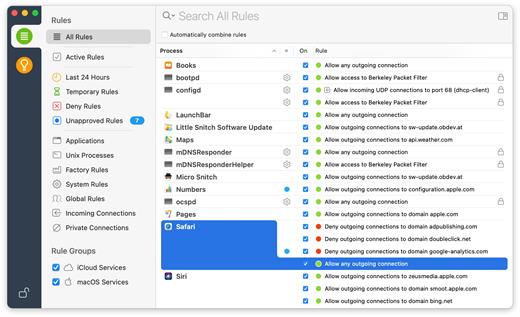
Little Snitch gives you control over your private outgoing data.

Track background activity

As soon as your computer connects to the Internet, applications often have permission to send any information wherever they need to. Little Snitch takes note of this activity and allows you to decide for yourself what happens with this data.

Control your network

Choose to allow or deny connections, or define a rule how to handle similar, future connection attempts. Little Snitch runs inconspicuously in the background and it can even detect network-related activity of viruses, trojans, and other malware.

Instructions:

  • 1. Mount disk image provided
  • 2. Install Little Snitch
  • 3. Open Little Snitch preferences and turn off Automatic Updates
  • 4. Use the provided serial to unlock Little Snitch

What’s New

Version 5.7.1:

  • Fixed a possible crash of the connection alert on macOS 14 Sonoma.
  • Fixed incorrect English localization of network types shown in the Networks section of the configuration interface.
  • Fixed a problem where settings changes made in Network Monitor were not preserved after quit on macOS 14 Sonoma.

Compatibility

macOS 11.0.0 or later.
Apple Silicon or Intel Core processor


Release Name: Little Snitch 5.7.1
Size: 35 MB
Links: HOMEPAGE – NFO – Torrent Search

Download: FiKPERUPLOADGiGNiTROFLARERAPiDGATOR

4 Comments
Sep 20

Compressor 4.6.6

Compressor adds power and flexibility to Final Cut Pro X export. Customize output settings, work faster with distributed encoding, and tap into a comprehensive set of delivery features.

Powerful Encoding for Final Cut Pro

  • Use Compressor to customize encoding settings available in Final Cut Pro.
  • Choose from a wide array of codecs, sizes, frame rates, and other parameters.
  • Save your custom settings in Compressor; they automatically appear in Final Cut Pro.
  • Share settings with other editors, even if Compressor isn’t installed on their workstations.

Time-Saving Encoding Workflow

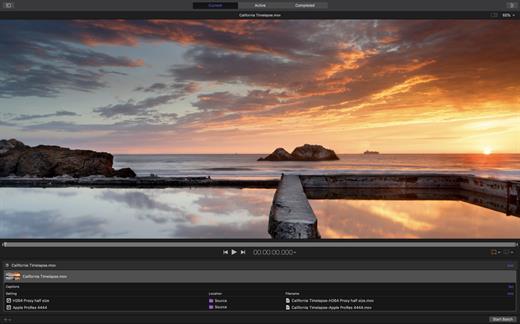
  • Experiment freely with encoding options, using real-time feedback in the Preview window.
  • Find exactly the setting you need in just a few clicks in the updated settings library.
  • Set up batch processes to streamline the encoding of large numbers of files.
  • Build batch templates to combine encoding with tasks such as moving or copying files.
  • Create self-contained Droplets to encode on the desktop with drag-and-drop ease.

Industry-Standard Encoding Support

  • Use one-step settings for Apple devices and websites such as Vimeo, YouTube, and Facebook.
  • Work with a choice of themed menus to encode and burn a DVD or Blu-ray disc.
  • Add chapter markers for discs or podcasts distributed on iPad, iPhone, iPod, or Apple TV.
  • Encode to a broad range of industry-standard formats, such as MPEG-2, H.264, and ProRes.
  • Generate files for HTTP live streaming in a single step.
  • Import Targa, DPX, TIFF, PSD, or PNG image sequences and encode them to any setting.
  • Tap into advanced encoding features for adding closed captioning, metadata, and more.

Pristine Format Conversions

  • Convert any file from its source format to another format, such as NTSC to PAL or SD to HD.
  • Clean up and customize your content using image filters, a timecode overlay, and watermarks.
  • Speed up video, slow it down, or adjust the frame rate to make the duration match a runtime.

Distributed Encoding

  • Save time by distributing encoding work among multiple cores and workstations.
  • Install Compressor on any Mac to activate it as a cluster node for distributed encoding.
  • Speed up encoding in Final Cut Pro by choosing a Compressor cluster for output processing.
  • Activate QuickCluster for dynamic configuration of nodes based on available resources.

What’s New

Version 4.6.6:

  • Take advantage of the flexibility and dynamic range of log-encoded video shot on iPhone 15 Pro.
  • Fixes an issue where the source/output comparison viewer would not reflect the camera log selection.
  • Addresses an issue where Reveal in Finder was not available for clips with modified audio settings.
  • Fixes an issue where luminance levels could be incorrect when Job inspector color space and Output color space were set to Rec. 709.

Compatibility

macOS 12.6 or later.
Apple Silicon or Intel Core processor


Release Name: Compressor 4.6.6
Size: 344.5 MB
Links: HOMEPAGE – NFO – Torrent Search

Download: FiKPERUPLOADGiGNiTROFLARERAPiDGATOR

5 Comments
Sep 17

DaVinci Resolve Studio 18.6

DaVinci Resolve Studio 18 is the world’s only solution that combines professional 8K editing, color correction, visual effects and audio post production all in one software tool! You can instantly move between editing, color, effects, and audio with a single click. DaVinci Resolve Studio is also the only solution designed for multi user collaboration so editors, assistants, colorists, VFX artists and sound designers can all work live on the same project at the same time! Whether you’re an individual artist, or part of a large collaborative team, it’s easy to see why DaVinci Resolve is the standard for high end post production and finishing on more Hollywood feature films, television shows and commercials than any other software.
Introducing the Cut Page!

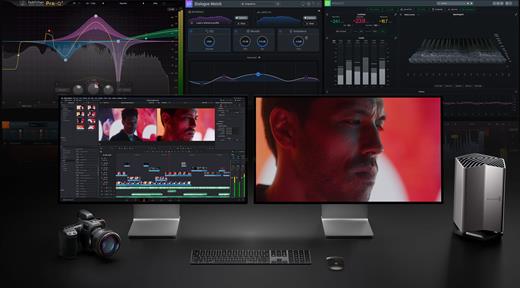
Designed specifically for editors working on high end fast turn around work such as television commercials and even news cutting, the cut page is all about speed. It’s an alternate edit page with a streamlined interface and revolutionary new tools that will help you work faster than ever. The cut page lets you import, edit, trim, add transitions, titles, automatically match color, mix audio and more. Whether you’re delivering for broadcast or for YouTube, the cut page has everything you need to get the job done, all in one place. Plus, the regular edit page is still available so you can switch between edit and cut pages to change editing style right in the middle of a job.

New Editing Features in DaVinci Resolve Studio:

DaVinci Resolve includes everything professional editors need to cut blockbuster films, television shows, and commercials. It’s perfect for both offline and online editing. The high performance playback engine makes editing and trimming incredibly fast, even for processor intensive formats such as H.264 and RAW.
New Fusion VFX Features in DaVinci Resolve Studio:

With over 250 built in tools, Fusion VFX’s advanced 3D compositing engine and node based workflow let you quickly connect effects and tools together in a flow chart style, making it easy to create cinematic feature film quality visual effects and broadcast motion graphics right inside of DaVinci Resolve!

New Color Features in DaVinci Resolve:
DaVinci Resolve’s legendary color tools let you manipulate color in breathtaking ways to get results that are simply impossible on other systems. That’s why DaVinci Resolve has been used on more feature films and television shows than any other grading system! You get powerful primary and secondary tools, curves, tracking, stabilization and more!

New Fairlight Features in DaVinci Resolve:
With Fairlight in DaVinci Resolve, audio is no longer an afterthought in post production! You get a completely integrated and powerful digital audio workstation with full mixer, EQ and dynamics processing, sample level audio editing, ADR tools, sound library support, FairlightFX audio plugins and more!

New Collaboration Features in DaVinci Resolve:
Featuring a universal timeline, powerful database driven design, bin and clip locking, built in chat, timeline comparison tools and more, DaVinci Resolve Studio is the world’s only post production solution that lets different artists all work together on the same project at the same time!

DaVinci Resolve Studio
Upgrade to DaVinci Resolve Studio for even more creative tools and options! You get a huge set of indispensable ResolveFX and FairlightFX plugins, along with support for 4K, 8K and higher resolution projects at frame rates up to 120 frames per second. You also get the new DaVinci Neural Engine which enables features such as facial recognition, speed warp retiming, automatic color balancing and automatic color matching. DaVinci Resolve Studio also adds film grain tools, advanced noise reduction, blur and mist effects, HDR grading, 10bit H.264 support, 3D immersive audio, stereoscopic 3D support, multi user collaboration tools and more!

DaVinci Neural Engine
The new DaVinci Neural Engine uses state of the art deep neural networks and learning, along with artificial intelligence to power new features such as speed warp motion estimation for retiming, super scale for up-scaling footage, auto color and color matching, facial recognition and more! The DaVinci Neural Engine is entirely cross-platform and uses the latest GPU innovations for AI and deep learning to provide unparalleled performance and quality. The DaVinci Neural Engine provides simple tools to solve complex, repetitive and time consuming problems. For example, it enables facial recognition to automatically sort and organize clips into bins based on people in the shot!

New and Improved ResolveFX
DaVinci Resolve Studio 16 features major improvements to existing ResolveFX, along with several new plugins that editors and colorists will love! You get new ResolveFX plugins for adding vignettes, drop shadows, removing objects, adding analog noise and damage, chromatic aberration, stylizing video and more! There are also improvements to the scanline, beauty, face refinement, blanking fill, warper, dead pixel fixer and colorspace transformation plugins. Plus, you can now view and edit ResolveFX keyframes from the timeline curve editor on the Edit page or from the keyframe panel on the Color page!

Legendary DaVinci Quality
DaVinci Resolve’s Emmy™ award-winning image processing technology features deep 32-bit float processing combined with unique, patented YRGB color science that processes luminance independent of color. This allows you to adjust the luminance of video without rebalancing the color of your highlights, midtones, or shadows! The massive internal color space is perfect for the latest HDR and wide color gamut workflows.

Blackmagic RAW
Blackmagic RAW is a new and modern codec that gives you stunning image quality and blazing fast performance in an intelligent new file format. Featuring advanced de-mosaic technology and a revolutionary intelligent design, Blackmagic RAW gives you both the quality and benefits of RAW with the speed, ease of use and file sizes of traditional video formats.

Hardware Control Panels
When you have a client looking over your shoulder you need to work fast. DaVinci Resolve control panels are designed to give you fluid, hands-on control over multiple parameters at the same time, allowing you to create looks that are simply impossible with a standard mouse! All controls are logically placed near your natural hand positions and are made out of the highest quality materials. You get smooth, high resolution weighted trackballs, along with precision engineered knobs and dials that feature the perfect amount of resistance so you can accurately adjust any setting. DaVinci Resolve control panels let you instinctively touch every part of the image!

Fairlight Professional Consoles
Fairlight mixing consoles provide high quality controls for nearly every parameter and feature in the software. Unique user interfaces and dynamic configuration changes provide fast to use buttons and controls that are optimized for the task at hand allowing you to work faster with Fairlight audio than any other tool in the world. With the modular design you can start with a larger console frame than you need and add more modules to meet the growing needs of your facility.

Minimum system requirements

  • Mac 10.15 Catalina.
  • 8 GB of system memory. 16 GB when using Fusion.
  • Blackmagic Design Desktop Video 12.0 or later.
  • Integrated GPU or discrete GPU with at least 2 GB of VRAM.
  • GPU which supports Metal or OpenCL 1.2.

What’s New

Version 18.6:

  • Release notes were unavailable when this listing was updated.

Compatibility

macOS 10.15 or later,
Apple Silicon or Intel Core processor


Release Name: DaVinci Resolve Studio 18.6
Size: 4.5 GB
Links: HOMEPAGE – NFO – Torrent Search

Download: FiKPERUPLOADGiGNiTROFLARERAPiDGATOR

3 Comments
Sep 17

PowerPhotos 2.5 beta 1

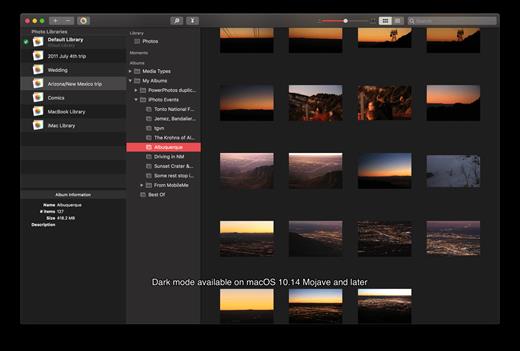
PowerPhotos allows you to break up your Photos.app images among multiple Photos libraries, rather than having to store all of them in one giant library. You can easily switch between libraries, or just browse the photos in your libraries directly from PowerPhotos, without having to open each library in Photos.

PowerPhotos also supports searching across all your libraries at once to help track down a particular photo. If you use iCloud Photo Library to sync photos with your other devices, splitting up your library can help save on iCloud storage costs. Use a single library to hold a smaller collection that you sync with iCloud, while keeping the bulk of your photos in separate libraries so they don’t take up space on iCloud. PowerPhotos can analyze your libraries for duplicate photos, showing them to you side-by-side and letting you get rid of extra copies of photos that you no longer need.

What’s New

Version 2.5 beta 1:

  • Release notes were unavailable when this listing was updated.

Compatibility

macOS 10.15 or later, 64-bit processor


Release Name: PowerPhotos 2.5 beta 1
Size: 37.3 MB
Links: HOMEPAGE – NFO – Torrent Search

Download: FiKPERUPLOADGiGNiTROFLARERAPiDGATOR

6 Comments
Sep 17

Multitrack Editor 1.0.5

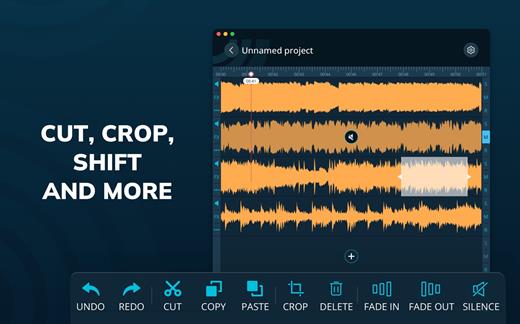
Professional Mixing Studio. Simple, fast and reliable audio editing tool! Start a new project and add an audio file. You can start editing a single track or add more and edit them simultaneously! Various effects, filters, 6 band equalizer and other settings.

The best thing about multitrack editing is that it allows you to edit tracks separately. No need to make changes to the whole mix when you can do this individually before rendering the tracks into the final result.

Features
– Multitrack editing
– Various audio file formats
– File sharing

Change the duration, crop and cut the selected areas with only a few taps. Save your files or entire projects on your device. Even if you don’t save, the app will back up any unsaved progress (can be activated/deactivated in the settings).

What’s New

Version 1.0.5:

  • Release notes were unavailable when this listing was updated.

Compatibility

macOS 10.15 or later


Release Name: Multitrack Editor 1.0.5
Size: 85.8 MB
Links: HOMEPAGE – NFO – Torrent Search

Download: FiKPERUPLOADGiGNiTROFLARERAPiDGATOR

6 Comments
Sep 17

PDF Compressor & PDF Toolbox 6.3.1

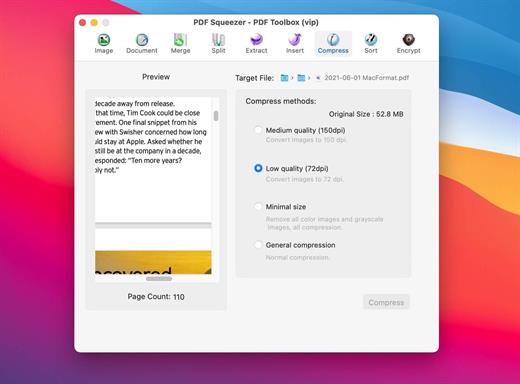
PDF Squeezer – PDF Toolbox is designed for operating PDF files and contains almost all operations you can imagine, such as: compress, merge, split, extract, insert, extract image, convert image, extract text, sequence, encrypt, etc. If you are worried about operating PDF files, download it, it’s so fantastic!

FEATURES:

  1. Merge
    You can easily merge various PDF files that you like into one which is convinent for managing and reading;
  2. Split
    You can arbitrarily split a PDF file at your convenience;
  3. Extract
    You can arbitrarily extract page number from one or more PDF files and merger into a new PDF file;
  4. Insert
    You can insert one PDF file into another;
  5. Extract image
    You can specify the page number of PDF file, and then extract the images or convert the whole page into any other image files in specified format(png,jpeg,bmp,tiff,gif);
  6. Document
    You can extract text in PDF and save as txt or rtfd format;
  7. Compress
    You can compress PDF files making files smaller to save your valuable disk space;
  8. Sort
    You can randomly sequence the page number of PDF file;
  9. Encrypt
    You can encrypt PDF files;

What’s New

Version 6.3.1:

  • Performance improvements.

Compatibility

macOS 10.7 or later


Release Name: PDF Compressor & PDF Toolbox 6.3.1
Size: 12.9 MB
Links: HOMEPAGE – NFO – Torrent Search

Download: FiKPERUPLOADGiGNiTROFLARERAPiDGATOR

6 Comments
Sep 17

Integrity Plus 12.7.10

Integrity Plus fills the gap between Integrity, the free no-frills link checker, and Scrutiny, the webmaster tools suite. If you manage more than one site then Integrity Plus allows you to store settings for each site and switch between them. It generates a sitemap in xml and a variety of other formats. it also adds a search box and filter button to help you search your data.

This version is leaner. It displays more information and is more efficient. It’s a free upgrade for existing licence holders.

  • Scans your site for broken links – as fast and accurate as Integrity
  • All the features of the free Integrity
  • Manage multiple sites
  • Generate a sitemap in XML, DOT, and CSV
  • Good XML sitemap options, optionally include images and PDFs, add rules for setting update frequency and priority, or edit these manually
  • Search your data
  • Archive the pages while scanning with the option to convert them to a browsable archive
  • OS X-native for speed and security

What’s New

Version 12.7.10:

  • Release notes were unavailable when this listing was updated.

Compatibility

macOS 10.14.0 or later
Apple Silicon or Intel Core processor


Release Name: Integrity Plus 12.7.10
Size: 9.4 MB
Links: HOMEPAGE – NFO – Torrent Search

Download: FiKPERUPLOADGiGNiTROFLARERAPiDGATOR

3 Comments
Sep 17

Aiseesoft FoneLab 10.3.82

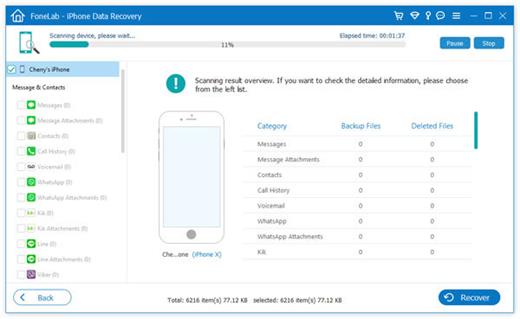
If you are just careless to drop your iPhone into water, how to recover lost photos/videos and other files from your iPhone? The Mac iPhone Data Recovery Software can help you! What’s more, whether your iOS device is locked because of the lost or forgotten password, or it gets smashed, damaged, or even broken, all the data are not lost!

As long as your iPhone/iPad/iPod has ever been successfully connected to iTunes on your MacBook, it’s possible to get back the lost data from the broken devices directly without backup.

If you have backups in iTunes or iCloud, you can also recover lost data from iTunes or iCloud backup. To help you rescue the data on your iPhone, iPad or iPod touch that may suffer from situations mentioned above, this iPhone Data Recovery will provide the best way to recover lost/deleted contacts, photos, text messages, WhatsApp, iMessages, videos, music, call history, notes, etc. from your broken devices.

What’s New

Version 10.3.82:

  • Release notes were unavailable when this listing was updated.

Compatibility

macOS 10.10 or later


Release Name: Aiseesoft FoneLab 10.3.82
Size: 67.5 MB
Links: HOMEPAGE – NFO – Torrent Search

Download: FiKPERUPLOADGiGNiTROFLARERAPiDGATOR

7 Comments
Sep 17

iFastZip 8.8

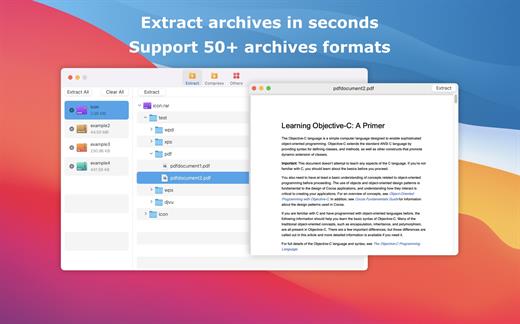
iFastZip can extract compressed files in all most formats(over 50 formats).

「Support RAR, ZIP, 7z, pak, pkg, apk, tbz, sti, tar, xar, lha, lzh, hqx, bin, bz2, bzip2, bz, xz, iso, cid, nrg, mdf, taz,l zma, xip, ace, arj, lbr, lqr, cab, rpm, cpt, sea, exe, msi, cpio, lzx, jar, swf, pdf, nsa, dcs, spk… 」

「Compress files to password-protected ZIP & 7Z archives 」

「Quicklook files in archive before extraction」

「Features」

  • Extract extract compressed files in all most formats(over 50 formats).
  • Unzip, unrar encrypted archives.
  • Easy view an archive’s file list.
  • Quicklook files in archive without extracting.
  • Unarchive & unrar the selected individual file or folder in the archive.
  • Double click to display or extract directly after setting this APP as default archiver.
  • Drag archives to the dock icon to extract or display directly.
  • Batch decompress many archives
  • Create password-protected ZIP & 7Z archives.
  • AES256 encryption algorithm to create ZIP & 7Z archives.
  • Drag the file in archive to the desktop to extract directly

What’s New

Version 8.8:

  • Release notes were unavailable when this listing was updated.

Compatibility

macOS 10.13 or later.


Release Name: iFastZip 8.8
Size: 14.5 MB
Links: HOMEPAGE – NFO – Torrent Search

Download: FiKPERUPLOADGiGNiTROFLARERAPiDGATOR

6 Comments