Nov 13

Things 3.19.3

Things is a task management solution that helps to organize your tasks in an elegant and intuitive way. Things combines powerful features with simplicity through the use of tags and its intelligent filter bar.

Features:

  • Collect Your Thoughts – Get things off your mind quickly: no matter what app you’re in, a keyboard shortcut instantly reveals Quick Entry. Type your thoughts and save them to the Inbox. Or just talk to Siri on any device (“Remind me to…”) and import from Reminders.
  • Get Organized – Create a project for each of your goals, then add the steps to reach them. For clarity, add structure with headings. Then group your projects by areas of responsibility, such as “Family”, “Work”, or “Health”. Review these regularly to stay on top of things.
  • Plan Your Time – See your calendar events alongside your to-dos and plan your time effectively. Create repeating to-dos for things you do every few days, weeks, or months – Things will remind you on the right day.
  • Make the Most of Your Day – Every morning, grab a coffee and prepare your list for “Today”: review previously planned to-dos and make quick decisions on what to tackle. Pick some more steps from your projects and then get going. The Today list is the only place you’ll need to look for the rest of the day.
  • Customize Your Workflow – Use tags to categorize your to-dos or add context. For example, tag places like “Office” or “Home”, or tag all your “Errands”, or everything you’re working on with “Kate”. You can easily find everything you’ve tagged via filtering or search.

What’s New

Version 3.19.3:

  • Things has been updated for macOS 14 Sonoma. Widgets are now interactive and you can add them to your desktop!

Compatibility

macOS 10.13.0 or later.
Apple Silicon or Intel Core processor


Release Name: Things 3.19.3
Size: 41.2 MB
Links: HOMEPAGE – NFO – Torrent Search

Download: FiKPERUPLOADGiGNiTROFLARERAPiDGATOR

6 Comments
Nov 7

Perfectly Clear WorkBench 4.6.0.2613

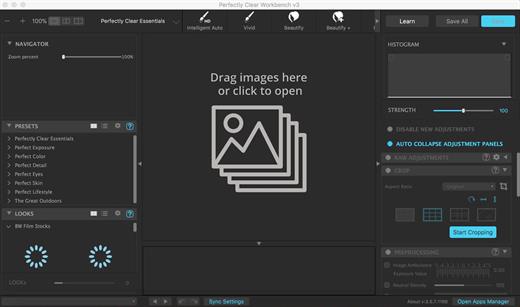
Perfectly Clear Workbench is an application that uses Athentech’s Perfectly Clear image correction libraries and is made available to demonstrate the capabilities of the Perfectly Clear processing libraries, face detection library and to allow a quick export of the processing settings for use.

Supported Image Formats:

Perfectly Clear requires RGB-formatted images in either 8 or 16-bit color depth. Any image file that Photoshop or Lightroom can open and convert to this format may be used in Perfectly Clear. Monochrome and CMYK images must be converted to RGB before using Perfectly Clear. RAW files must be opened through Adobe Camera RAW and loaded into Photoshop to be accessible to Perfectly Clear.

What’s New

Version 4.6.0.2613:

  • Release notes were unavailable when this listing was updated.

Compatibility

macOS 10.10 or later
Apple Silicon or Intel Core processor


Release Name: Perfectly Clear WorkBench 4.6.0.2613
Size: 197.6 MB
Links: HOMEPAGE – NFO – Torrent Search

Download: FiKPERUPLOADGiGNiTROFLARERAPiDGATOR

5 Comments
Nov 7

Living Weather & Wallpapers HD 5.3.2

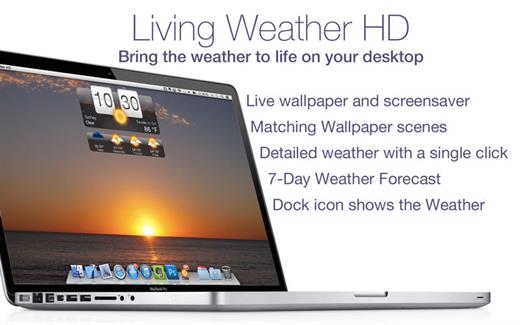
Introducing Weather HD – a stunning, unique app which brings the weather to life right on your desktop!
It gives the weather forecast and turns your desktop into a beautiful animated wallpaper scene matching the conditions.
Weather HD can also function as a screensaver.

MAIN FEATURES: 

  • Current weather conditions and forecast on your desktop from all around the world
  • Animated weather wallpaper scenes matching current weather conditions, today’s or tomorrow’s forecast. You can also select your favorite weather wallpaper scene or make it random.
  • Animated weather wallpaper:
    • Scenes match current weather conditions, today’s or tomorrow’s forecast
    • Option to select your favorite weather wallpaper scene
    • Option to make wallpaper scenes change randomly
  • Detailed weather forecast window accessible by a singe click on the Dock icon
  • Dock icon showing the weather:
    • Icon badge shows Current Temperature, Wind speed or “Feels like” temperature
    • Weather conditions icon
    • Weather conditions text
  • Adjustable Desktop Weather Widget:
    • Widget style – Choose from 5 different styles
    • Location on the screen – Move it anywhere you want on your desktop
    • Size – Set as small or large as you like
    • Transparency – Make it see-through
  • Search forecast locations by address, airport code or automatic location based detection.
  • Save as many locations as you want
  • Screensaver option (“Show Desktop” feature moves all other windows out of the way)
  • Forecast and conditions are updated every 60 minutes

FEATURES: 

  • Accurate weather forecasts and local time for any location around the world
  • Your first location is auto detected and new forecast locations can be added by typing the first few letter of the city name, zip code or airport code in the search field
  • Current temperature as an icon badge right on the desktop

WEATHER FORECAST DETAILS: 

  • 7-Day detailed weather forecast (3 days for free version)
  • 2-Hourly weather forecast for 3 days
    • Temperature
    • Wind speed & Direction
    • Humidity
  • Weather forecast text summary
  • Min and Max temperatures
  • Current “Feels Like” (apparent) temperature
  • Wind Speed and Direction
  • Dew Point
  • Humidity
  • Rain fall information
  • Local Sunrise and Sunset
  • Units: Fahrenheit or Celsius & mph or kmh
  • Time format: “System Default”, 12-hour or 24-hour
  • Accurate, premium weather data from Weather Underground®

What’s New

Version 5.3.2:

  • Bug fixes and performance improvements

Compatibility

OS X 10.9 or later, 64-bit processor


Release Name: Living Weather & Wallpapers HD 5.3.2
Size: 861.3 MB
Links: HOMEPAGE – NFO – Torrent Search

Download: FiKPERUPLOADGiGNiTROFLARERAPiDGATOR

9 Comments
Nov 7

Slidepad 1.4.6

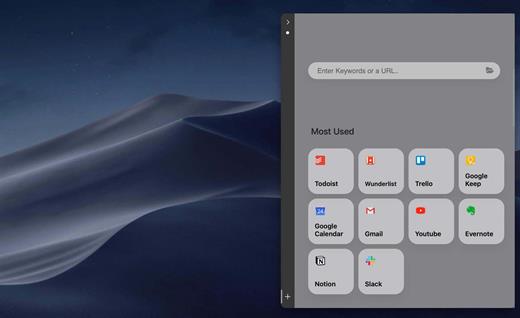
An iPad style slide over window for your web apps. No more hassle of window switching. Unlike other similar apps, there is no limit on what can be placed on Slidepad. You can type any keywords, URLs like what you do in common browsers!

An iPad slide over window

By slide in and slide out, Slidepad brings iPad style multitasking to your Mac. Using Slidepad is as easy as using your dock.

A simple sidebar to switch between apps

Slidepad borrowed the concept of sidebar from Franz and Station. It is much smoother than tabs, and it helps you quickly switch between different web apps.

An omnibox lets you open any websites, tutorials or PDFs

Unlike other similar apps, there is no limit on what can be placed on Slidepad. You can type any keywords, URLs like what you do in common browsers!

More Features

  • Minimal-style sidebar
  • Corner snapping
  • Developer tool enabled
  • Customizable sound setting
  • Mobile/Desktop user-agent switching
  • Display badge when receive new notifications
  • On/Off live notifications
  • Multi-screen support
  • Drag/drop support
  • Picture in Picture support
  • Quicklook icon support
  • Dark theme support (MacOS 10.14+)
  • Global keyboard shortcut support

What’s New

Version 1.4.6:

  • Minor bug fixes

Compatibility

macOS 10.13.4 or later, 64-bit processor


Release Name: Slidepad 1.4.6
Size: 13 MB
Links: HOMEPAGE – NFO – Torrent Search

Download: FiKPERUPLOADGiGNiTROFLARERAPiDGATOR

6 Comments
Nov 7

Notebooks 3.3.1

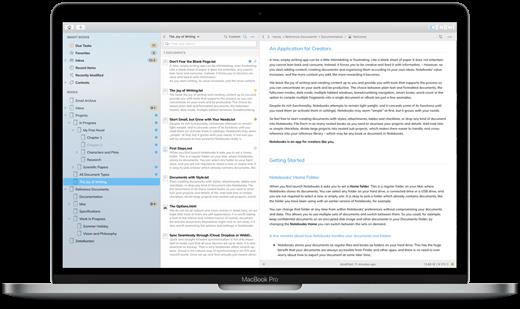
Notebooks is the only notebook you ever need. It allows you to create as many books as you need to write, store and structure your details of life, and it will quickly become the one and only repository for all journals, ideas, notes, drafts and diaries but also for your projects, task lists, documents, files and everything else you want to keep close at hand.

Notebooks stores and displays almost any type of document: plain text and formatted text, PDF, web pages, MS Office or iWork documents, photos, videos, music and much more. Everything you would usually print out and file can now go directly into Notebooks, without adding bulk. Notebooks also keeps your task lists and allows you to tick off your to-dos as you complete them. Divide your projects into nested sub projects, which makes them easier to handle, and cross-reference into your reference library, which, of course, is in Notebooks, too. So whether you need to write something down or look something up, Notebooks is the place to go.

*** You need to disable the System Integrity Protection (SIP) to perform the selected Application***

What’s New

Version 3.3.1:

  • Release notes were unavailable when this listing was updated.

Compatibility

macOS 10.11 or later


Release Name: Notebooks 3.3.1
Size: 18.7 MB
Links: HOMEPAGE – NFO – Torrent Search

Download: FiKPERUPLOADGiGNiTROFLARERAPiDGATOR

5 Comments
Nov 7

FSNotes 6.5.0

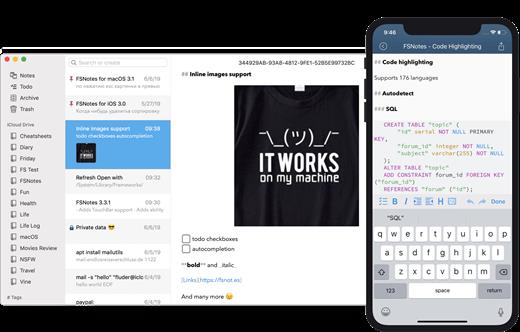
FSNotes is a plain-text note manager for macOS, and is modern reinvention of notational velocity (nvALT) on steroids. Our application respects the following open formats: plain/text, Markdown, and RTF, and stores data in the file system. You can view, edit, and copy data in your favourite external editor, and see live results in FSNotes.

Features:

  • ICloud synchronization
  • Keyboard centric
  • Global shortcuts (clipboard save / search field)
  • Markdown and RTF markup (files stored on disk as plain/text and rich text)
  • Markdown preview mode
  • Elastic two pane view (vertical and horizontal layout)
  • Blazing fast and lightweight
  • Open files in finder / works with external editors (changes seamless live sync with UI)
  • Pin/unpin important notes in top
  • Multi folder storage
  • Markdown live highlighting with over 170 languages in code blocks

What’s New

Version 6.5.0:

  • Release notes were unavailable when this listing was updated.

Compatibility

macOS 10.14 or later


Release Name: FSNotes 6.5.0
Size: 26.5 MB
Links: HOMEPAGE – NFO – Torrent Search

Download: FiKPERUPLOADGiGNiTROFLARERAPiDGATOR

5 Comments
Nov 7

BetterMouse 1.5 (4198)

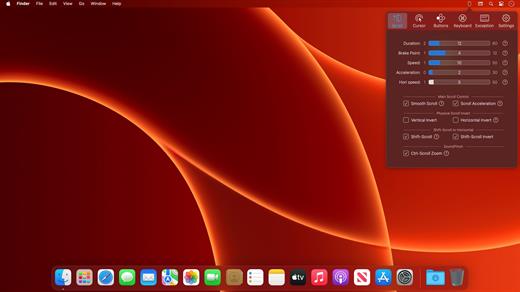
BetterMouse is a macOS utility improving external mouse performance and functionalities, aiming for replacing bulky, intrusive, and resource-hungry mouse drivers like Logitech Options. It’s feature-rich, light-weighted, efficiency-optimized, and perfectly privacy safe, trying to meet all your needs for using a 3rd-party mouse on macOS.

Features:

Scroll

  • Butter smooth scroll, with fully configurable settings of duration, direction, acceleration, etc.
  • Precise configurable discrete scroll with or without acceleration.
  • Shift-scroll to horizontal on/off, with configurable speed, direction.
  • Ctrl-scroll to zoom/pinch.
  • Thumbwheel zoom for hi-res thumbwheel.

Cursor

  • Separated cursor acceleration & speed control, acceleration can be completely eliminated.
  • Precise mouse fps counter.

Button/gesture mapping

  • Mapping every extra mouse button to any keyboard shortcuts & extensive special actions.
  • Up/down/left/right gestures mapping for every extra mouse buttons.
  • Modifier keyed button/gesture mapping.
  • Click-through feature for left/right click for direct actions to inactive window with one click.
  • Click-through option for every mapping independently.
  • Right click free pan view.

Exception apps

  • Per-app independent settings for scroll setting & button/gesture mapping.

App

  • Menu bar app with hide-able app icon.
  • Clean & safe, with no custom network access, no file access.
  • Fully optimized algorithm with extremely low CPU & power usage.
  • Full functional free trial, one-time purchase for lifetime.

What’s New

Version 1.5:

  • Release notes were unavailable when this listing was updated.

Compatibility

macOS 11.0 or later.
Apple Silicon or Intel Core processor


Release Name: BetterMouse 1.5 (4198)
Size: 5.3 MB
Links: HOMEPAGE – NFO – Torrent Search

Download: FiKPERUPLOADGiGNiTROFLARERAPiDGATOR

3 Comments
Nov 7

Bartender 5.0.43

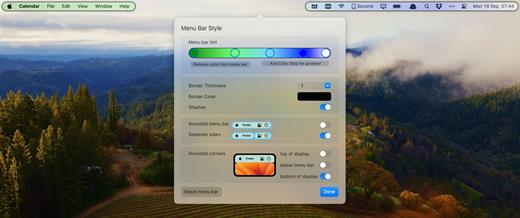
Bartender lets you organize your menu-bar apps by hiding them, rearranging them, or moving them to Bartender’s Bar. You can display the full menu bar, set options to have menu-bar items show in the menu bar when they have updated, or have them always visible in Bartender’s Bar.

Features:

  • Lets you tidy your menu-bar apps how you want.
  • See your menu-bar apps when you want.
  • Hide the apps you need to run, but do not need to see.
  • Have the clean looking menu bar you want.
  • Rearrange your menu-bar items as you wish.

Bartender 5 requires macOS Sonoma. For all other systems, choose Bartender 4.

What’s New

Version 5.0.43:

  • Release notes were unavailable when this listing was updated.

Compatibility

macOS 14.0 or later


Release Name: Bartender 5.0.43
Size: 12.1 MB
Links: HOMEPAGE – NFO – Torrent Search

Download: FiKPERUPLOADGiGNiTROFLARERAPiDGATOR

2 Comments
Nov 7

Transmit 5.10.3

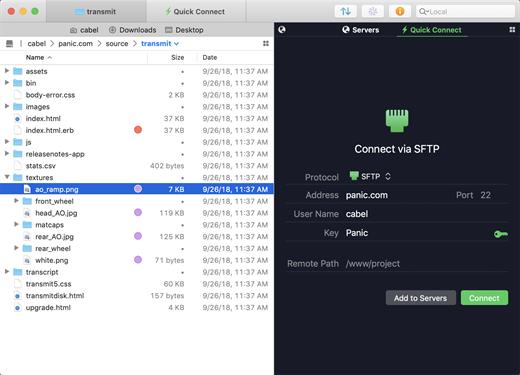
Transmit is a powerful and versatile Mac OS X application that makes it easy for you to manage and organize large files on various servers on clouds.

User-oriented interface with support for multiple tabs

With Transmit’s help you can quickly and effortlessly transfer files to SFTP or FTP server, as well as Amazon S3 or WevDAV from within a user-oriented interface.

Transmit comes a simple and reliable solution for users that need to maintain websites, upload numerous photos or perform backups.

Transmit comes with a “Twin-Turbo Engine”, multi-connection transfer and FXP support fact that makes it a fast, smooth-running and dependable client for most Mac users.

On top of that, Transmit enables you to limit the bandwidth, synchronize or compare files with ease.

Choose between a single or dual pane window

From Transmit’s two-panel window you can view the files stored locally and the ones saved on the server. At the same time, Transmit helps you create a list with favorite servers add a new FTP, SFTP, Amazon S3 or WebDAV server.

The top toolbar allows you to switch between the thumbnail, list, column and Cover Flow view mode and change from the a dual pane to a single pane window. In addition, Transmit seamlessly integrates Mac OS X’s Quick Look feature, a fact that helps you preview files before transferring them.

Handy synchronization features

By accessing the Action drop-down menu, you can open the Info window, copy the file path or URL address, move items to Trash or the desired location, create duplicates, compress or label files. On top of that, you have the option to create new folders or files, refresh the list and open a folder in a new tab or new window.

Thanks to the built-in search form, you can quickly and effortlessly filter the displayed items as soon as you start typing. The Preferences window enables you to change the default FTP client and configure Transmit to synchronize your favorite items via iCloud or Dropbox.

What’s New

Version 5.10.3:

  • Release notes were unavailable when this listing was updated.

Compatibility

macOS 10.15.0 or later
Apple Silicon or Intel Core processor


Release Name: Transmit 5.10.3
Size: 32 MB
Links: HOMEPAGE – NFO – Torrent Search

Download: FiKPERUPLOADGiGNiTROFLARERAPiDGATOR

2 Comments
Nov 7

MainStage 3.6.5

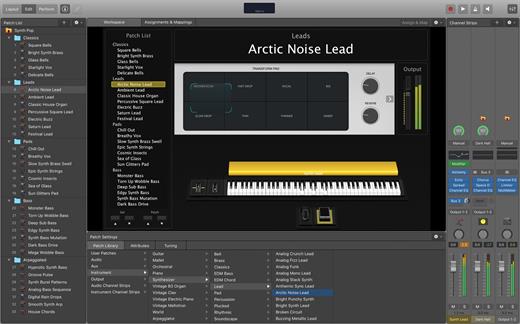
Apple MainStage makes it easy to bring to the stage all the same instruments and effects that you love in your recording. Everything from the Sound Library and Smart Controls you’re familiar with from Logic Pro X is integrated into MainStage 3. You can even expand your show with prerecorded backing tracks. You’ll also find new features like an improved Mixer, easier-to-use channel strips, and more. With the Mac as the core of your live rig, setup is faster, teardown is faster, and everything in between is more reliable. And you can easily use your favorite hardware to control every nuance of your performance.

What’s New

Version 3.6.5:

  • This update includes stability improvements and bug fixes

Compatibility

macOS 12.3 or later


Release Name: MainStage 3.6.5
Size: 1.1 GB
Links: HOMEPAGE – NFO – Torrent Search

Download: FiKPERUPLOADGiGNiTROFLARERAPiDGATOR

6 Comments