Nov 15

WinZip Mac Pro 10.5.6553

WinZip now lets you access key features more easily, share links to files in the cloud, and zip and protect with confidence:
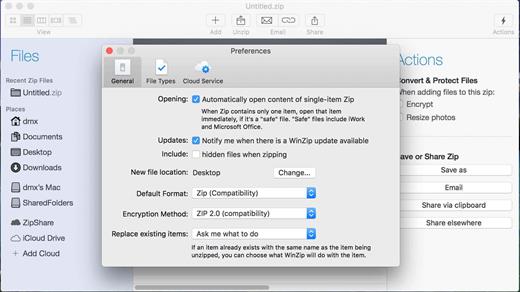
  • Zip and unzip files instantly with WinZip’s trusted compression
  • Protect files with strong AES encryption
  • Share directly to iCloud Drive, Dropbox, Google Drive and ZipShare, from within WinZip
  • Successfully email large files and minimize storage needs

New in 5

  • Easily share links to files in the cloud – WinZip Mac 5 automatically generates a link when you upload your zip file to a cloud service. The link is placed in your clipboard so you can easily paste it into other apps, such as Skype, for quick sharing.
  • Apply to all files in your Zip – Resize images in a Zip file without having to manually unzip and then zip them back up.
  • Resize images – Resize images any time you create a Zip file, not just when emailing.
  • More resize options – Choose from two additional options for resizing images: X-Large (1920 x 1536) and XX-Large (2880 x 2304).
  • Actions pane – Easily access frequently used features, including encryption, image resizing, link sharing and zip actions, on this new context-sensitive pane. Show or hide the Actions pane as needed with the new toolbar button.
  • Quick Action button – Use this menu on the Zip pane selection bar for fast access to many actions, including Unzip, Rename, Delete, Get Info and Quick Look.
  • Preserve the View type – During the Save process, WinZip Mac now saves the currently selected view type before saving the Zip file and then restores the view type when it re-opens the Zip file. This prevents the view type from changing during a Save if the current type does not match the default type.
  • .app file display – To simplify unzipping .app files in a Zip, they are now displayed as a file in the view instead of as a folder.
  • Default SaveLast Access Locations – A “New file location” default is used when saving a new Zip file. There is also a last accessed location to use as the default when requesting a location that is “from this Mac” or “to this Mac”. And there is a last accessed location used as the default when requesting a location that is “from the iCloud Drive” or “to iCloud Drive”.
  • Re-use password – Additional encrypted files are added to a Zip of encrypted files using the same password, rather than requesting an additional password. Password re-use is available for the length of that Zip session.
  • Check your password – Select the new “Show Password” checkbox to view your password and ensure it is entered correctly.
  • Apply to all files in the Zip – Encrypt files in an existing Zip without having to manually unzip them and then zip them back up with encryption enabled.

What’s New

Version 10.5.6553:

  • Release notes were unavailable when this listing was updated.

Compatibility

macOS 10.12 or later
Apple Silicon or Intel Core processor


Release Name: WinZip Mac Pro 10.5.6553
Size: 34 MB
Links: HOMEPAGE – NFO – Torrent Search

Download: FiKPERUPLOADGiGNiTROFLARERAPiDGATOR

6 Comments
Nov 15

Sketch 99.1

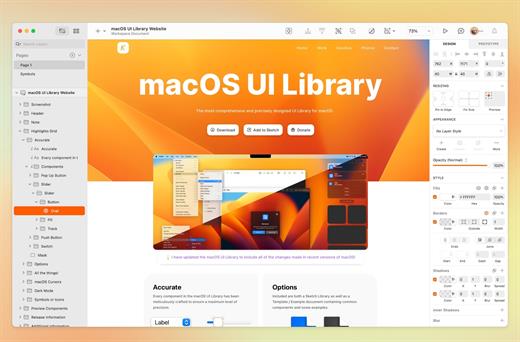
Sketch is an innovative and fresh look at vector drawing for the Mac. Its intentionally minimalist design is based upon a drawing space of unlimited size and layers, free of palettes, panels, menus, windows, and controls. Though simple to use, it offers powerful vector drawing and text tools like perfect Boolean operations, symbols, and powerful rulers, guides, and grids.

What’s New

New:

  • Bug and crash fixes: This update includes a few bug and crash fixes, along with some performance improvements based on your reports. Thanks for sharing them with us!

Fixed:

  • Fixes a crash that could occur when you were working with layers that contained large images.
  • Fixes a crash that could occur when you double-clicked on a Symbol to insert it from the Components view.
  • Fixes a sketchtool export layer bug that meant exports included shadows that extended beyond the bounds of a Symbol.
  • Fixes a performance bug which could cause Sketch to hang occasionally.

Compatibility

macOS 11.0.0 or later
Apple Silicon or Intel Core processor


Release Name: Sketch 99.1
Size: 78 MB
Links: HOMEPAGE – NFO – Torrent Search

Download: FiKPERUPLOADGiGNiTROFLARERAPiDGATOR

6 Comments
Nov 15

JixiPix Chromatic Edges 1.0.29

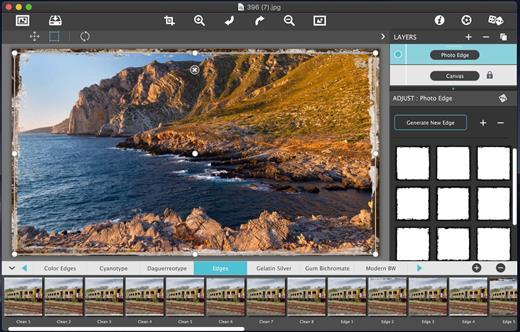
It’s all about the Edge! Unlimited edges to make your photography pop! JixiPix takes vintage to a whole new extreme. Gone are the days of having a few tiny choices when it comes to adding flare to your imagery. Chromatic Edges brings back the subtle magic of photo processing with glass, silver and paper plates all with a few taps and your unique photo.

PLUGIN HOST REQUIRMENTS

Adobe Photoshop CS5+, All Photoshop CC, Photoshop Elements 12+ or Lightroom 4+

What’s New

Version 1.0.29:

  • Release notes were unavailable when this listing was updated.

Compatibility

OS X 10.8 or later, 64-bit processor


Release Name: JixiPix Chromatic Edges 1.0.29
Size: 507 MB
Links: HOMEPAGE – NFO – Torrent Search

Download: FiKPERUPLOADGiGNiTROFLARERAPiDGATOR

7 Comments
Nov 15

Techtool Pro 18.1.2

TechTool Pro has long been one of the foremost utilities for keeping your Mac running smoothly and efficiently. With the release of this version, it has become more proficient than ever.

Main features:

  • TechTool Protection – TechTool Pro includes the option of installing a system preference pane to keep watch over your Mac. New features include check for I/O errors, Power On Self-Test errors, Mac notebook internal battery condition, and RAID status (if applicable). It also includes the same improvements to the SMART check in TechTool Pro. All of that, wrapped in an entirely new interface.
  • Check Computer – Check Computer is a handy way to tell TechTool Pro to run the entire suite of tests to give you the best possible snapshot of your Mac’s health. Sometimes, though, it’s nice to be able to leave tests out, or to skip certain drives. Using the new configuration panel, you have total control of the Check Computer suite. Power to the people.
  • Partition Map – TechTool Pro has long been known for testing your Mac’s file system. It is important also to test the data structures that contain the Mac’s file system: the Partition Map. The new Partition Map test checks the partition map of a given drive for errors. Partition map errors can cause entire volumes to go missing, or prevent a Mac from booting. If errors are found, they can be repaired usin the Partition Repair tool.
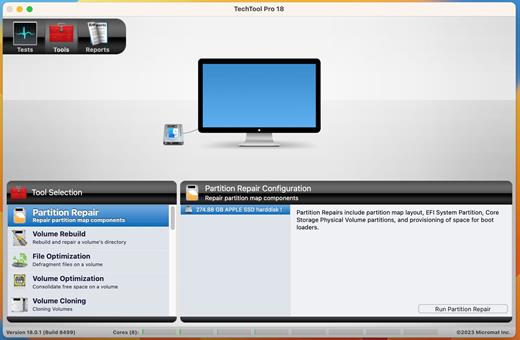
  • Partition Repair – Along with Volume Rebuild, which repairs Mac file systems, the Partition Repair tool repairs the remaining portions of the drive which keeps track of the volumes on your hard drive. This includes hidden partitions which keep track of your Mac’s startup process. The Partition Repair tool does just what it says, repairing the partition maps or drives where needed.
  • SMART Check – Hard drives include a technology called SMART (Self Monitoring, Analysis and Reporting Technology) which can inform a computer about the health of its hard drives. In most utilities, just the overall results – passed or failed – are reported to the user. In the failed state, often there is little or no time to back up data before the drive fails entirely. Previous versions of TechTool Pro reported the overall status of each attribute, but some attributes don’t contribute to the failure of a drive. Now, the SMART Check has gotten smarter. TechTool Pro now knows which attributes contribute to drive failure, and will report a failing result before the drive fails completely. Giving you time to rescue your data.
  • Memory Test – TechTool Pro 7 took a revolutionary step in testing memory, making TechTool Pro’s memory testing suite the most comprehensive test available for the Mac. In TechTool Pro 10, we’ve taken some of the additional advancements used by ATOMIC, our dedicated Memory Tester, and integrated them into TechTool Pro. Now, memory is ‘cleaned’ before testing, reclaimed from macOS, maximizing the amount of RAM that can be tested.
  • Processor Benchmark – Get an objective measurement of your Mac’s processor performance. The Processor Benchmark too uses industry-standard measurement algorithms to test processor performance. Using this tool, you can get metrics that can be used to compare processor speeds apples-to-apples. Avoids the confusion of comparison using Megahertz.
  • Bluetooth – Most Macs depend on Bluetooth to connect to the tools we use to interact with our computers: the keyboard and mouse. Bluetooth problems can result in dropped connections with those devices, which can be very frustrating. Verify the proper operation of your Mac’s Bluetooth hardware. Make sure that not only your input devices, but also your audio and fitness devices can connect to your Mac by checking the Bluetooth hardware on your Mac.
  • Network Interfaces – Most Macs spend the majority of their lives connected to the internet. If the ethernet or wifi adapters in your Mac aren’t working, the valuable connection to the internet can fail. The new Network Interfaces test can test any connected network interface for errors. It not only tests ethernet and wifi, but also any other supported internet connection, ethernet over USB, VPN connections, even a FireWire network conneciton. Ensure the reilability of your internet and intranet connections by testing your Mac’s network interfaces.

What’s New

Version 18.1.2:

  • Release notes were unavailable when this listing was updated.

Compatibility

macOS 10.13 or later.
Apple Silicon or Intel Core processor


Release Name: Techtool Pro 18.1.2
Size: 282.7 MB
Links: HOMEPAGE – NFO – Torrent Search

Download: FiKPERUPLOADGiGNiTROFLARERAPiDGATOR

7 Comments
Nov 15

Audio Hijack 4.3.1

Audio Hijack (was Audio Hijack Pro) drastically changes the way you use audio on your computer, giving you the freedom to listen to audio when you want and how you want. Record and enhance any audio with Audio Hijack – it’s the cornerstone of your digital audio experience.

Audio Hijack will allow you to record any application’s audio, from Internet streams to DVD audio and everywhere in between. If your machine can play it, Audio Hijack can record it. And that’s not all – Audio Hijack will also enhance any audio, unsing industry-standard VST and AudioUnit audio effects to make your music sound incredible. Record. Enhance. Enjoy!

More Great Features

Record to All Major Formats
Record to the world’s most popular audio formats, including MP3 and AAC, or save in perfect-fidelity AIFF, WAV, ALAC or FLAC.

Reusable Sessions
Once you’ve configured a Session to your liking, you can re-use it over and over. With one click, you’ll be recording exactly as desired.

Easy File Organization
Find all of your recordings sorted by Session in the Recordings tab, where you can quickly pass files to an audio editor, add them to iTunes, or share them.

Timed Recordings
Use the Schedule tab to set up timed recordings for when you’re not around. Your audio will be waiting for you when you return.

Silence Monitoring
When silence is detected, Audio Hijack can automatically stop recording, split to a new file, or remove audio.

Bulletproof Recording
Bulletproof recording means that even if the power goes out or your computer crashes, you’ll never lose a recording.

A Thoughtful Interface
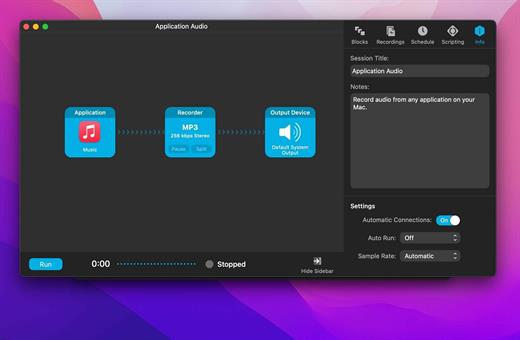
Audio Hijack’s intuitive audio grid provides a terrific pipeline-style view of exactly how your audio flows, so you can easily understand it.

Gorgeous Audio Effects
The included audio effects are easy to use and easy on the eyes. Their functionality is now accessible to all.

Time Shift Your Audio
Now you can pause, delay, and rewind live audio on your Mac. It’s perfect for transcribing audio and more!

What’s New

Version 4.3.1:

  • Release notes were unavailable when this listing was updated.

Compatibility

macOS 10.14.4 or later
Apple Silicon or Intel Core processor


Release Name: Audio Hijack 4.3.1
Size: 38.6 MB
Links: HOMEPAGE – NFO – Torrent Search

Download: FiKPERUPLOADGiGNiTROFLARERAPiDGATOR

6 Comments
Nov 15

JixiPix Watercolor Studio Pro 1.4.15

Watercolor Studio is an Automated Photo to Watercolor Software with Realistic and Natural Style

Watercolor Studio creates fluid, liquidy, translucent watercolors with paint that flows naturally. Built on-top of an incredible rendering system that uses real-world techniques, this application does the initial work, producing a watercolor instantly, then allows you to customize your paintings using an array of Sliders, Layers, Brushes, Color Washes and Artistic finishes. The end result—print quality watercolors filled with transparent luminosity and sheer beauty.

Watercolor Studio uses artificial intelligence and image recognition to render the initial watercolor then gives you the ability to create infinite variations quickly and easily. Change paintings into an ink wash, add a beautiful artistic finish, brush in details, and even spatter it with liquid spots. Control everything from details-to-shades-to-negative space-to-coloring. No artistic skill needed!

The beauty of a well executed watercolor comes from the transparency of paint on paper. It also comes from the watercolors unique free flowing characteristics. Watercolor Studio makes it easy to do just this with a one-of-a kind Liquid slider. As you move it, watch as color bleeds throughout the painting for an ultra wet style. Or use the Wet Edge slider to define edges with built-up pigment and color that bleeds inward naturally.

Paint Layers allows you to create beautiful and unique watercolors by stacking watercolor layers, blending color washes and texture, and brushing in details. No artistic skill needed! Every photo placed in Watercolor Studio is automatically transformed into a watercolor with full control over settings. While it’s great to have complete control over what the paint does on the paper, some of the most beautiful effects occur in the experiment process. So have fun and try not to be too careful. You will be amazed at some of the paintings you will get.

Watercolor—Portrait is a wet-on-dry painting with all the characteristics of a true watercolor. Fine-tune portrait detail and shades, then smooth color using the liquid slider while keeping contours clear and color defined.

Watercolor—Landscape is an abstract free flowing wet-in-wet paint style, great for landscapes. Use it to spread indiscriminate details as if saturated with water for a loose wet watercolor painting with color that bleeds together.

Ink Wash renders photos into soft subtle paintings, consisting of one-to-three colors. Choose from a library of washes to create ultra inky paintings or light monotone ones. Combine with Color Washes and Outline Layers for an expressive piece filled with artistic character.

Liquefy is a transparent layer used to dilute and bleed color. Use the Liquefy Layer above one or more layers then brush with a continuous motion to blend areas where needed. This subtle effect smooths areas like a true paint brush dipped in water.

Color Wash blends handmade color washes and textures into the painting while retaining some or all of the original color. Use them to warm up, cool down or to dapple light and color throughout the painting with control over how much. Use render modes to combine washes with Watercolor, Ink Wash and Outline Layers for breathtaking one-of-a-kind art pieces.

Spatter adds liquid spots that actually looks wet and runny. Use them to add texture, age, and bits of color throughout the painting.

Canvas is the base of your painting. On this layer use settings to change the canvas style (paper). Choose between cold press, hot press or rough. Here you can also increase the pigment granulation in the watercolor and how dark or light the transparency of the color appears on the paper.

• Full resolution support
• Print worthy output

What’s New

Version 1.4.15:

  • Optimizations for the new M1 Macs

Compatibility

OS X 10.7 or later, 64-bit processor


Release Name: JixiPix Watercolor Studio Pro 1.4.15
Size: 495.9 MB
Links: HOMEPAGE – NFO – Torrent Search

Download: FiKPERUPLOADGiGNiTROFLARERAPiDGATOR

7 Comments
Nov 13

Fig Player – play mp4 mkv mp3 1.3.7

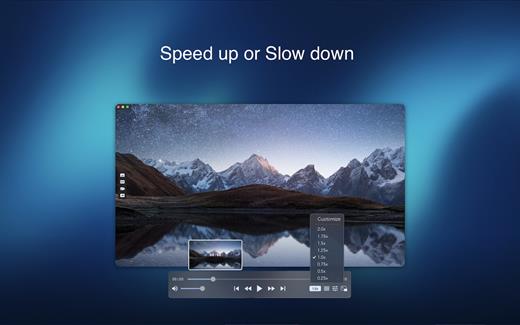
Fig Player, is a media player for Mac that supports a wide variety of media files and allows you to listen to music, watch videos and movies.

If you have an extensive media library but don’t have a good media player for Mac, here’s a good solution. Fig Player. It’s free to use and comes with a friendly interface. On the screen, you’ll be able to see all of the buttons that give you control over your experience, such as the play and stop button, playback options, volume slider, preview section, screenshot, and recording.

More Advanced Features

  • Smooth, seamless video play, support 4K.
  • Auto deinterlacing.
  • H/W-acceleration.
  • A-B loop.
  • Frame by Frame playback.
  • PIP mode.
  • Support various Subtitle formats(Text subtitles(SRT), Vobsub
    and ASS/SSA, etc.).
  • Choose which one when you have multiple sound output devices.
  • Create the scene poster with snapshots.
  • Playlist with upper-level folder name.
  • Support multiple windows and play multiple videos at the same time.
  • Support Wireless display to DLNA, Chromecast, Roku devices.
  • OCR Text Recognition(macOS 12+)

Supported Formats

Videos: mkv, rmvb, rm, avi, mov, wmv, flv, f4v, f4p, f4a, f4b, swf, mpg, mpeg, mpeg1, mpeg2, m1v, m2v, mpv, mp4, mpeg4, m4v, 3gp, 3gpp, 3g2, 3gp2, m2p, ps, ts, m2ts, mts, mt2s, ogm, ogv, divx, dv, asf, wtv, webm, etc.

Audios: flac, ape, m2a, mp1, mp2, mpa, mp3, mpg3, m4a, m4b, wma, wav, wv, xm, aiff, aif, ac3, a52, aac, opus, ogg, oga, mid, midi, mka, etc.

Subtitles: ASS, SSA, SRT, IDX&SUB

What’s New

Version 1.3.7:

  • Release notes were unavailable when this listing was updated.

Compatibility

macOS 10.13 or later


Release Name: Fig Player – play mp4 mkv mp3 1.3.7
Size: 75.8 MB
Links: HOMEPAGE – NFO – Torrent Search

Download: FiKPERUPLOADGiGNiTROFLARERAPiDGATOR

2 Comments
Nov 13

EtreCheck Pro 6.8.3

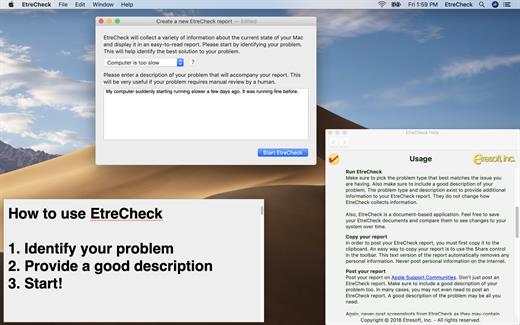
EtreCheck is an app that displays the important details of your system configuration and allow you to copy that information to the Clipboard. It is meant to be used with Apple Support Communities to help people help you with your Mac. EtreCheck automatically removes any personally identifiable information from the output.

EtreCheck will automatically alert you to serious problems like adware, insufficient RAM, or a failing hard drive.

EtreCheck is free and available in the Mac App Store with in-app purchases available. EtreCheck can now automatically generate solutions for any problems that it finds.

What’s New

Version 6.8.3:

  • Release notes were unavailable when this listing was updated.

Compatibility

OS X 10.9 or later, 64-bit processor


Release Name: EtreCheck Pro 6.8.3
Size: 13.4 MB
Links: HOMEPAGE – NFO – Torrent Search

Download: FiKPERUPLOADGiGNiTROFLARERAPiDGATOR

3 Comments
Nov 13

Airtool 2.5.3

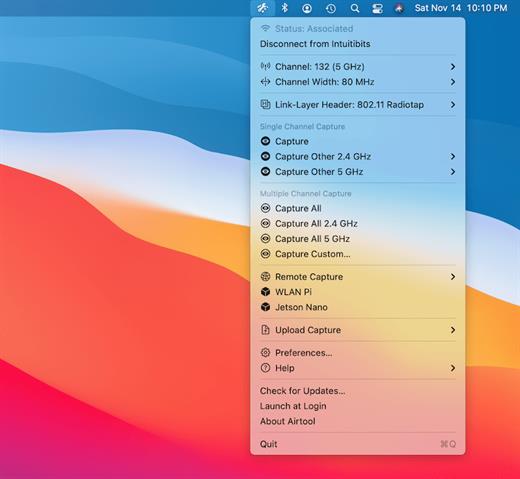
Airtool is a system menu-bar application that provides basic functions to check the state and channel configuration of the built-in Wi-Fi adapter, as well as to perform frame captures on single and multiple channels. It can be used together with Wireshark to let you change channel settings while performing live frame captures. In addition, captures can be automatically uploaded to CloudShark.

Features:

  • See Wi-Fi adapter state (associated, not associated) and channel information
  • Disconnect from network
  • List supported channels and channel widths
  • Perform frame captures on single or multiple channels
  • Change channel settings while performing live frame captures from external tools such as Wireshark or tcpdump
  • Automatically or manually upload captures to CloudShark

What’s New

Version 2.5.3:

  • Release notes were unavailable when this listing was updated.

Compatibility

macOS 10.13 or later, 64-bit processor


Release Name: Airtool 2.5.3
Size: 9.2 MB
Links: HOMEPAGE – NFO – Torrent Search

Download: FiKPERUPLOADGiGNiTROFLARERAPiDGATOR

7 Comments
Nov 13

OpenCore Configurator 2.75.0.0

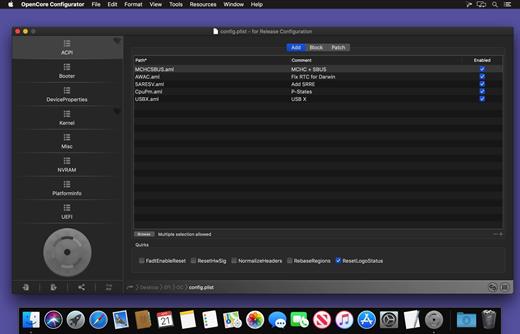
OpenCore Configurator easy to install for generating OpenCore EFI configuration files.

From the ashes of Ozmosis Configurator, a new application is born….. OpenCore Configurator like as Clover Configurator will help you create custom configuration files for the OpenCore EFI bootloader via a streamlined graphical interface.

OpenCore 0.9.7 supported

  • Added FixupAppleEfiImages key in Booter->Quirks properties
  • Added Spanish language

Compatibility

macOS 10.11 or later


Release Name: OpenCore Configurator 2.75.0.0
Size: 9.8 MB
Links: HOMEPAGE – NFO – Torrent Search

Download: FiKPERUPLOADGiGNiTROFLARERAPiDGATOR

5 Comments