Dec 29

uDock 4.0.3

μDock is a lightweight system extension for your Mac. Working in the system toolbar it is almost invisible and always ready when you need it.

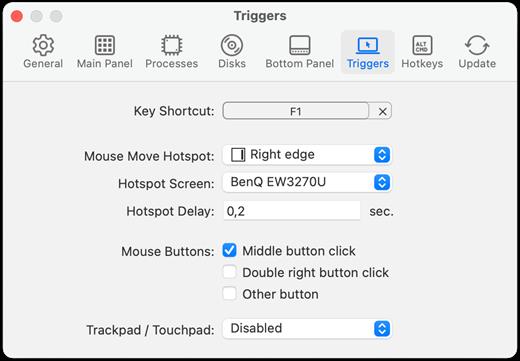
Use a keyboard shortcut or mouse hotspot to activate μDock. Running processes and all your drives are easily accessible. Add tabs to keep your applications, documents, music and folders.

μDock is a free, advanced and configurable dock for Mac.

What’s New

Version 4.0.3:

  • Release notes were unavailable when this listing was updated.

Compatibility

macOS 10.13.0 or later


Release Name: uDock 4.0.3
Size: 18.9 MB
Links: HOMEPAGE – NFO – Torrent Search

Download: FiKPERUPLOADGiGNiTROFLARERAPiDGATOR

6 Comments
Dec 29

Crescendo Masters 9.96

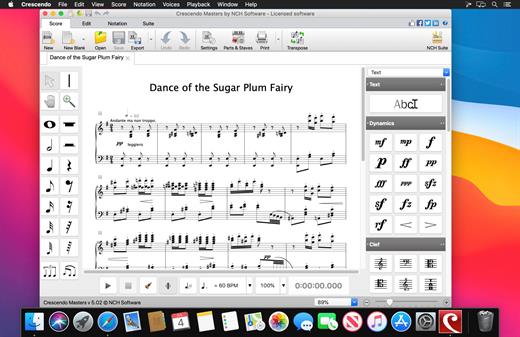
Crescendo Music Notation is the perfect software to start composing your music today. Using a free form sheet music layout, you can write your song, score, or composition your way. Create your arrangements with a variety of notation tools, where you can change the Dynamics, Clef, Key Signature, Time Signature, and more. Notes are easy to add and can quickly be transposed by key or by interval.

Once finished, you can easily print your sheet music or save your score to MIDI, PDF, and more.

Music Notation Software Features

  • Change the key signature and time signature
  • Add whole, half, quarter, eighth, sixteenth and thirty-second notes and rests (semibreve to demisemiquaver)
  • Create sheet music in Treble, Bass, Tenor or Alto Clefs
  • Display note name in notes to help beginner musicians
  • Write your own guitar tablature
  • Use drum kits and templates to write percussion notation
  • Assign sharp, flat and natural accidentals to notes
  • Add ties and slurs across notes
  • Create dotted notes, chords, add repeats, and more

Composing Program Features

  • Keyboard shortcuts toggle between notes and rests
  • Insert text to specify a title, tempo, dynamics or lyrics
  • Drag notes to change their pitch or placement
  • Copy, cut and paste measures to easily insert themes
  • Zoom in and out for easier editing
  • Brace staves together to compose scores for ensembles

Preview and Share Your Score

  • Listen to your composition with MIDI playback, or export MIDI music files
  • Create and playback guitar tabs
  • Supports VSTi instruments, such as piano or violin, for quality MIDI playback
  • Print completed music projects to share
  • Print blank music sheets for hand transcription

What’s New

Version 9.96:

  • Release notes were unavailable when this listing was updated.

Compatibility

macOS 10.10 or later


Release Name: Crescendo Masters 9.96
Size: 4.5 MB
Links: HOMEPAGE – NFO – Torrent Search

Download: FiKPERUPLOADGiGNiTROFLARERAPiDGATOR

6 Comments
Dec 24

Topaz Photo AI 2.2.1

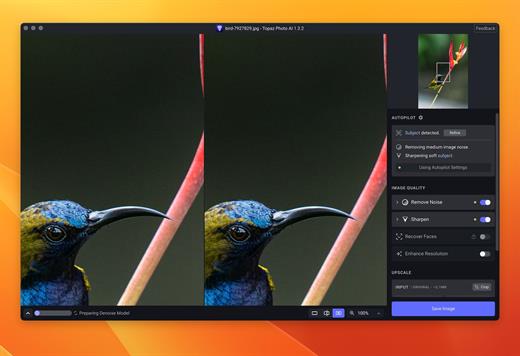
Sharpen, remove noise, and increase the resolution of your photos with tomorrow’s technology. Topaz Photo AI supercharges your image quality so you can focus on the creative part of photography.

Focus on your creativity rather than your tools.
AI is good at some things but bad at others. It can write sentences but can’t tell a story, and it can recommend songs but can’t compose music. But most importantly for us: AI is exceptionally good at improving image quality, but bad at knowing what to do with it.

We believe that stunning photography comes from artistic vision paired with world-class tools. AI will never replicate human creativity, so it’s still your job to provide the vision. But just like a sharper lens or better camera, Topaz Photo AI empowers you to create images that just aren’t possible with yesterday’s tools.

Your photos at their very sharpest.
You won’t always be able to retake a shot when your subject is blurry. Sometimes you won’t even know until you’re reviewing your photos on your computer.

In these cases, use Topaz Photo AI to ensure that your photos are the sharpest they can possibly be. Instead of artificially increasing edge contrast like traditional sharpening, the Sharpen AI module naturally reverses root causes of blurriness (camera shake, motion blur, misfocus) to create more natural results.

In the absence of blur, sharpness remains – crisp, clear detail that’s free of edge haloes or other artifacts.

What’s New

Version 2.2.1:

  • Release notes were unavailable when this listing was updated.

Compatibility

macOS 10.12 or later


Release Name: Topaz Photo AI 2.2.1
Size: 241.9 MB
Links: HOMEPAGE – NFO – Torrent Search

Download: FiKPERUPLOADGiGNiTROFLARERAPiDGATOR

4 Comments
Dec 24

iA Writer 7.0.5

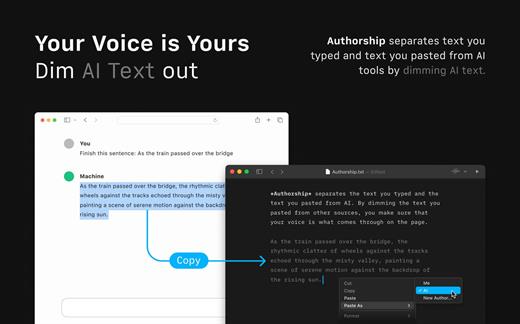
iA Writer (was iA Writer Pro) is a professional writing suite that gives you full control over your notes, drafts and edits.

  • Workflow: Note – Write – Edit – Read. Each stage has a task-specific typeface and color.
  • Syntax Control scans the syntax of English, French, German, Italian, and Spanish text and highlights your adjectives, nouns, verbs, adverbs, prepositions or conjunctions.
  • Precision Writing Tools:
    • Auto Markdown formats text on-screen — your hands stay on the keyboard
    • Syntax Control introduces syntactic markup for natural language text. It covers English, French, German, Italian, and Spanish. Patent pending.
    • Convert Markdown to Microsoft Word 2007 .docx, and back again

Features

  • Workflow states
  • Custom typefaces, carefully set for optimal readability
  • In-app preview
  • Reading time, plus sentence, word, and character count
  • Real-time iCloud sync
  • Ready for Retina displays
  • Full-screen

What’s New

Version 7.0.5:

  • Release notes were unavailable when this listing was updated.

Compatibility

macOS 10.11 or later.
Apple Silicon or Intel Core processor


Release Name: iA Writer 7.0.5
Size: 18.9 MB
Links: HOMEPAGE – NFO – Torrent Search

Download: FiKPERUPLOADGiGNiTROFLARERAPiDGATOR

3 Comments
Dec 24

Pixelmator Pro 3.5.3

Pixelmator Pro is an incredibly powerful, beautiful, and easy to use image editor designed exclusively for Mac.

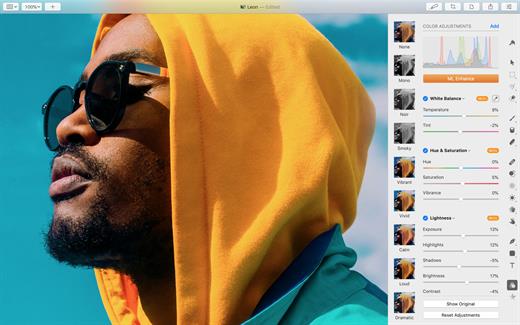
With a wide range of professional-grade, nondestructive image editing tools, Pixelmator Pro lets you bring out the best in your photos, create gorgeous compositions and designs, draw, paint, apply stunning effects, design beautiful text, and edit images in just about any way you can imagine. And thanks to its intuitive and accessible design, Pixelmator Pro is delightfully easy to use – whether you’re just starting out with image editing or you’re a seasoned pro.

The modern, single-window interface is designed exclusively for working with images on a Mac. An intuitive and accessible design makes it easy for anyone to edit images – from complete beginners to design professionals.

The new ML Super Resolution feature lets you increase the resolution of images without blurriness or reduced quality using state-of-the-art machine learning.

What’s New

Version 3.5.3:
Pixelmator Pro 3.5 brings full HDR support, letting you open, edit, and export images and videos with high dynamic range, adds support for macOS Sonoma, and includes a few smaller improvements and fixes.

Full HDR Support

  • You can now take advantage of the full support for HDR content in Pixelmator Pro and enjoy better contrast and true-to-life colors in your images and videos.
  • Open and edit images and videos in a wide range of different HDR file formats.
  • Enjoy full support for HDR layers and edit them just like any other layers, using all your favorite tools and features in Pixelmator Pro.
  • Share your edited designs using HDR image and video formats.

Supported HDR File Formats

  • Open ISO HDR formats like HEIC, AVIF, JPEG XL, PNG, and TIFF.
  • Work with popular video formats like MP4 and MOV, and video compression types such as HEVC and Apple ProRes that support HDR.
  • Unlock the full dynamic range in photos and videos taken with iPhone.
  • Seamlessly open and edit HDR images created using the Smart HDR feature in Photomator, as well as specialized HDR formats like OpenEXR, Radiance HDR, and 32-bit TIFFs from Adobe Photoshop and Adobe Lightroom.
  • Effortlessly work with RAW or Apple ProRAW photos in HDR.
  • To work with HDR content in Pixelmator Pro, your device must be running macOS Sonoma and be equipped with a compatible display. For the absolute best HDR editing experience, use Pro Display XDR or the latest MacBook Pro model with a Liquid Retina XDR display.

Seamless HDR Editing

  • Use HDR content in multi-layered compositions and work with HDR layers just like any other layers.
  • Work with selections or create new documents from Clipboard keeping all the HDR data.
  • Keep all the HDR data intact, even when you merge layers or convert RAW images into pixels.
  • Choose to always load HDR content or open images in SDR in Pixelmator Pro settings.
  • Enjoy HDR support everywhere in Pixelmator Pro, including thumbnails in the Layers sidebar, color adjustment presets, effect presets, the Zoom tool, and more.

HDR Content Sharing and Export

  • Export your designs to a wide range of HDR image formats including HDR JPEG, HDR HEIC, HDR AVIF, and HDR PNG.
  • For publishing HDR images on the web or sharing in Messages, use the one-of-a-kind HDR Still Image Video format.
  • Share moving compositions to HDR video formats like MP4 and MOV with HEVC or Apple ProRes compression.
  • Export HDR images for editing in other apps using specialized HDR formats like OpenEXR.

Streamlined macOS Integration

  • Edit images in HDR using the Pixelmator Pro extension in Photos.
  • Make the most of HDR support with Shortcuts and AppleScript and apply edits to multiple HDR images at once.
  • View HDR previews of your saved Pixelmator Pro documents in Quick Look.

Other Improvements and Fixes

  • Pixelmator Pro is now fully compatible with macOS Sonoma, taking advantage of the latest macOS capabilities.
  • Enjoy faster and smoother performance and better compatibility with many file formats, including Motion projects.
  • When saving new documents, Pixelmator Pro would sometimes suggest an incorrect save location. Fixed.

Compatibility

macOS 11.0 or later
Apple Silicon or Intel Core processor


Release Name: Pixelmator Pro 3.5.3
Size: 611.8 MB
Links: HOMEPAGE – NFO – Torrent Search

Download: FiKPERUPLOADGiGNiTROFLARERAPiDGATOR

4 Comments
Dec 24

PullTube 1.8.5.22

Sharing videos via online hosting services, such as YouTube or Vimeo is a common practice, yet streaming the content might not work as expected if you have a slow internet connection.
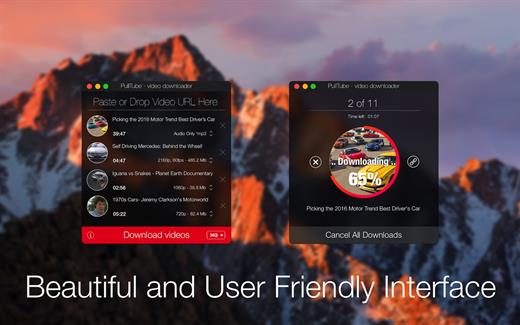
PullTube offers you the possibility to download videos from both sources (YouTube and Vimeo), while other platforms might be added at a later time. The app can handle playlists, allows you to select the output quality, and can even extract only the audio.

Video downloader that can import links with drag and drop and can detect playlists

The PullTube user interface is represented by a small window where you get to quickly paste the video URL. Note that you can also add a video by dropping the link on top of the PullTube window.

Worth mentioning is that, if PullTube detects that the video is part of a playlist, will offer to download the entire collection: will fetch the data for each entry and handle the downloads consecutively.

Download videos hosted on YouTube or Vimeo to different output sizes and formats

PullTube will start fetching the video data right away so you can see the video name, duration, and a small thumbnail. When configuring a download, you get to select the output quality (highest, 4K, HD or regular with different resolutions) or choose to export only the audio to an M4A or MP3 file.

Via the PullTube Settings panel, you can change the default download location and the default MP3 bitrate (320Kbps, 256Kbps, 128Kbps, 64Kbps). You can also add the quality info to the video’s name and choose to quit the app when all downloads are completed.

Get offline access to videos hosted online in just a few steps

PullTube proposes a streamlined workflow for quickly downloading videos from YouTube or Vimeo, provides control over the output quality, and enables you to extract the audio to MP3 or M4A files.

However, during our tests, we have noticed that PullTube has trouble completing the download when handling videos that are longer that 2 minutes. The process stops without any explanation, and you can eventually complete the task, but you need to add the link to download tool multiple times.

What’s New

Version 1.8.5.22:

  • Release notes were unavailable when this listing was updated.

Compatibility

macOS 10.12 or later


Release Name: PullTube 1.8.5.22
Size: 119.3 MB
Links: HOMEPAGE – NFO – Torrent Search

Download: FiKPERUPLOADGiGNiTROFLARERAPiDGATOR

6 Comments
Dec 24

FontLab 8.3.0.8734.0 Beta

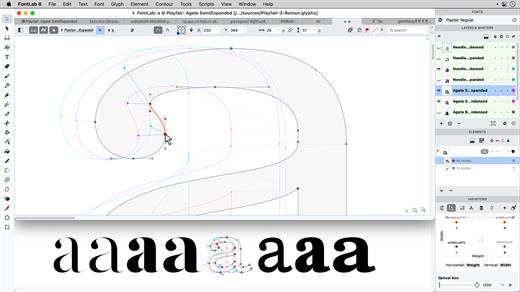
With FontLab (was FontLab Studio), you can create, open, modify, draw, space, kern, hint, and export desktop, web, color, and variable fonts. It is an all-around font editor, but also supports data interchange with other font creation tools, making it easy to integrate into your existing workflows. FontLab brought in the best of their classic apps, FontLab Studio and Fontographer, including many familiar keyboard FontLab shortcuts. But they reconsidered and streamlined every function.

FontLab VI also gives you groundbreaking new drawing tools and responsive contour operations to make your design process easier and more efficient, whether you’re an expert or a beginner. FontLab now supports color and variability, so you can explore these new possibilities and expand your creative reach.

Formats

  • Open and export:
    • OpenType-PS/CFF (OTF)
    • OpenType TT / TrueType (TTF)
    • Variable OpenType TT (TTF+gvar)
    • Color OpenType (TTF+SVG, +COLR, +CBDT, +sbix)
    • PostScript Type 1 (PFB/PFA)
    • Web fonts (WOFF2, WOFF, EOT)
    • FontLab (VFB, VFC, VFJ)
    • UFO
    • designSpace
  • Import only:
    • BitFonter Photofont (PHF+PNG, +SVG)
    • Fontographer (FOG)
    • Glyphs
    • Ikarus
    • and any of the above in ZIP files

What’s New

Version 8.3.0:

  • Release notes were unavailable when this listing was updated.

Compatibility

macOS 10.14 or later
Apple Silicon or Intel Core processor


Release Name: FontLab 8.3.0.8734.0 Beta
Size: 130.9 MB
Links: HOMEPAGE – NFO – Torrent Search

Download: FiKPERUPLOADGiGNiTROFLARERAPiDGATOR

4 Comments
Dec 24

Rectangle Pro 3.0.15

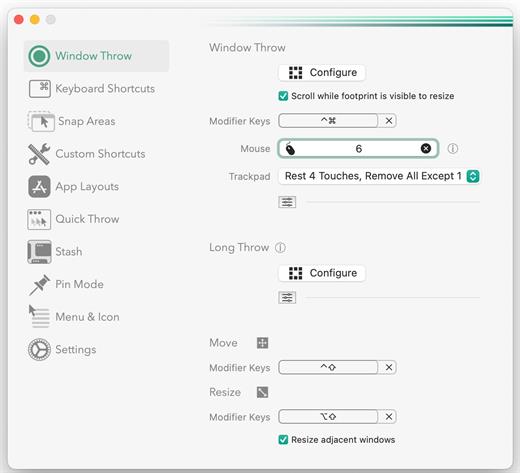
Snap windows faster in this featureful Rectangle superset. Toss windows in the right places with cursor movement, move multiple windows with one command, create custom shortcuts, and more.

One simple key combo
• 16 window sizes & positions
• No need to remember a ton of keyboard shortcuts, but those are all here, too

A Supercharged Rectangle Superset
• Keyboard shortcuts
• Drag windows to screen edges to snap

PRO
• Move and resize by holding a key and moving your cursor
• Snap windows under your cursor, even if not in focus
• Custom shortcuts for any size & position
• Sync your settings over iCloud

The Lightweight Gesture Champ
• Unlike touch gesture based window managers, Rectangle Pro only consumes CPU when configured modifier keys are pressed. Even then it’s minimal
• Rectangle Pro is a breeze to learn, and doesn’t conflict with any built-in macOS behavior
• Use it with any device that moves the cursor

Unmatched Customization and Actions
• Create keyboard shortcuts with any window size and location, and specify what happens on each repeated execution
• Fill left and right actions make it simple to maximize screen usage without overlap
• Match the keyboard shortcut window management of that other OS

Multiple Windows at Once
• Cascade windows
• Move all windows for an app to another display or screen half
• Tile top windows in a 2×2 or 2×3 grid

Additional Efficiency and Speed
• Each window action can be configured with a quick, simple cursor movement and modifier key combination
• Just press and release modifier keys while you move your cursor over the window you want to snap

*** You need to disable the System Integrity Protection (SIP) to perform the selected Application.

What’s New

Version 3.0.15:

  • Release notes were unavailable when this listing was updated.

Compatibility

macOS 10.12 or later
Apple Silicon or Intel Core processor


Release Name: Rectangle Pro 3.0.15
Size: 9.9 MB
Links: HOMEPAGE – NFO – Torrent Search

Download: FiKPERUPLOADGiGNiTROFLARERAPiDGATOR

3 Comments
Dec 24

Tuner for YouTube music 7.1

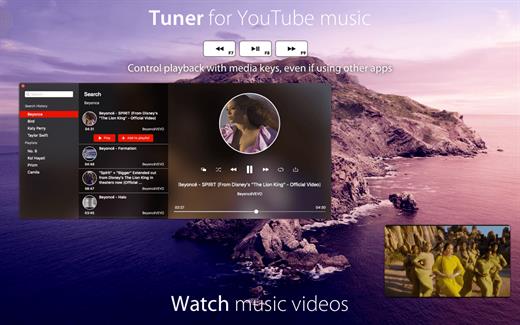
Want an unlimited music library? that’s why we developed Tuner, the YouTube music player for your Mac.
Tuner lets you stream music on YouTube, with a friendly UI.

Main features:

  • Stream music directly from YouTube.
  • Picture in picture, keep watching videos while using other apps.
  • Use media keys to control playback, even if Tuner is in background.
  • No YouTube account required.
  • Create your custom playlists.
  • Edit your local playlists.
  • Share your favorite songs with your friends on Facebook, Twitter, message or mail.

Tuner uses YouTube public API to access YouTube content & is fully compliant with the API terms of service.

What’s New

Version 7.1:

  • Release notes were unavailable when this listing was updated.

Compatibility

macOS 10.12 or later, 64-bit processor


Release Name: Tuner for YouTube music 7.1
Size: 4.9 MB
Links: HOMEPAGE – NFO – Torrent Search

Download: FiKPERUPLOADGiGNiTROFLARERAPiDGATOR

5 Comments
Dec 24

Easy Data Transform 1.46.0

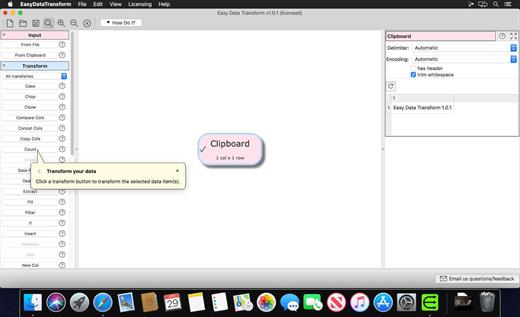
Transform your Excel and CSV files without programming with Easy Data Transform.

Features:

  • Clean, re-format, merge, dedupe, filter and analyze table and list data on your Mac.
  • Transform your data interactively, step by step using 36 built-in transforms.
  • Transforms thousands of rows in the blink of an eye.
  • No need to upload your sensitive data to a third party server.

What’s New

Version 1.46.0:

  • Release notes were unavailable when this listing was updated.

Compatibility

macOS 10.10 or later


Release Name: Easy Data Transform 1.46.0
Size: 82.4 MB
Links: HOMEPAGE – NFO – Torrent Search

Download: FiKPERUPLOADGiGNiTROFLARERAPiDGATOR

7 Comments