Feb 22

Aiseesoft iPhone Unlocker 2.0.36

Unlock iPhone iPad and iPod by wiping passcode. Remove Apple ID if you forgot Apple ID or password. Recover and remove Screen Time passcode without data loss.

iPhone Screen Locked? Wipe iPhone Passcode Instantly
Creating a passcode for iPhone can protect your privacy. But there are various reasons for you to lose control of the lock screen passcode. How to get into a locked iPhone? Aiseesoft iPhone Unlocker will remove the various lock screen passcode from 4-digit, 6-digit, Touch ID and Face ID, and unlock the locked iPhone easily.

Forgot iPhone Passcode
Change your iPhone passcode frequently and forgot it? Find an old iPhone, but fails to unlock it with the passcode in memory? Mix up the password for many devices at hand? Aiseesoft iPhone Unlocker can remove the iPhone screen passcode easily.

Attention: While removing the screen locked passcode on iPhone, all the data and settings will be erased.

Forgot Apple ID or Password? Remove Apple ID in Seconds
Apple ID is a pass to accessing App Store, Apple Music, iCloud, iMessage, FaceTime, and more. If you forgot the Apple ID or password, you will lose access to many Apple services. Even trying the security questions and rescue emails in iForgot, but still fail to recover the password, you should try iPhone Unlocker. It can remove the forgotten Apple ID and let you change a new Apple ID account to activate your iPhone.

After Removing Forgotten Apple ID, you will:

  • Fully control the iPhone without any limits.
  • Access Apple ID features and iCloud settings.
  • Not be disturbed by the old Apple ID sign-in.
  • Not be tracked or found by the old Apple ID.
  • Not be Erased remotely by old Apple ID.

What’s New

Version 2.0.36:

  • Release notes were unavailable when this listing was updated.

Compatibility

macOS 10.9 or later


Release Name: Aiseesoft iPhone Unlocker 2.0.36
Size: 64.2 MB
Links: HOMEPAGE – NFO – Torrent Search

Download: FiKPERNiTROFLARERAPiDGATOR

7 Comments
Feb 22

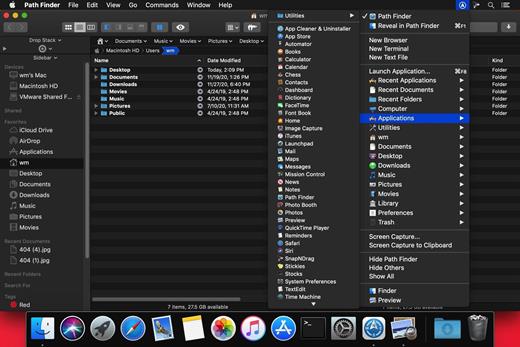
Path Finder 2168

Path Finder makes you a master of file management. Take full control over your file system. Save your time: compare and synchronize folders, view hidden files, use Dual Pane and full keyboard navigation to browse your file system. Work how you want: extreme customization allows you to access most tools in many different ways to suit your workflow. Work seamlessly with other platforms: don’t leave any hidden .DS_Store files on non-Mac volumes, delete files securely and completely with the powerful delete feature from any volume type, search any network volume.

Features

  • View and manipulate hidden files
  • Dual Pane View
  • Full keyboard navigation
  • Folder comparison and synchronization
  • Folder merging
  • Batch renaming
  • Powerful file filtering
  • One-click dual-pane copy
  • Bookmarks and Tab Presets
  • ACL editor
  • File tagging
  • Editable Path Navigator
  • Powerful low-level search
  • Smart sorting
  • Advanced selection
  • Integrated terminal
  • Integrated text and image editors

What’s New

Version 2168:

  • Release notes were unavailable when this listing was updated.

Compatibility

macOS 10.12 or later
Apple Silicon or Intel Core processor


Release Name: Path Finder 2168
Size: 26.9 MB
Links: HOMEPAGE – NFO – Torrent Search

Download: FiKPERNiTROFLARERAPiDGATOR

5 Comments
Feb 22

Aiseesoft AnyCoord 1.0.36

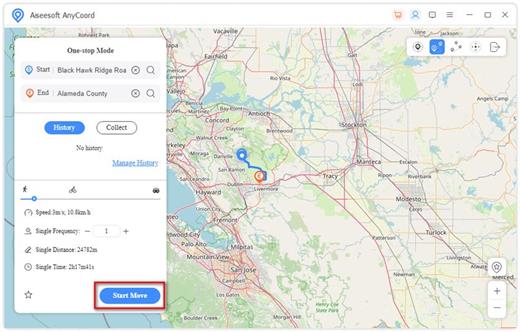
As the best location changer, Aiseesoft AnyCoord can let you change your GPS location to any other location in one click. You can use this product when you want to stop sharing location with others on Instagram, Facebook, etc. AnyCoord can also be used when you play AR video games.

The main function of Aiseesoft AnyCoord is changing the actual GPS location of your iPhone to a virtual location on Windows and Mac computers based on your needs. Just enter the location information you want into the software, then you will get a fake GPS location for your iOS devices. Besides, you can import a GPX file to set the location or track with AnyCoord. Exporting GPX files is also supported.

What’s New

Version 1.0.36:

  • Release notes were unavailable when this listing was updated.

Compatibility

macOS 10.10 or later


Release Name: Aiseesoft AnyCoord 1.0.36
Size: 111.3 MB
Links: HOMEPAGE – NFO – Torrent Search

Download: FiKPERNiTROFLARERAPiDGATOR

8 Comments
Feb 22

Final Draft 13.0.2

Final Draft allows you to use your creative energy to focus on the content; let Final Draft take care of the style. Final Draft is the number-one selling application specifically designed for writing movie scripts, television episodics, and stage plays. It combines powerful word processing with professional script formatting in one self-contained, easy-to-use package. There is no need to learn about script formatting rules – Final Draft automatically paginates and formats your script to industry standards as you write.

What’s New

Version 13.0.2:

  • Release notes were unavailable when this listing was updated.

Compatibility

macOS 10.14.0 or later


Release Name: Final Draft 13.0.2
Size: 110.9 MB
Links: HOMEPAGE – NFO – Torrent Search

Download: FiKPERNiTROFLARERAPiDGATOR

6 Comments
Feb 22

Texifier 1.9.26

Edit and typeset LaTeX, Plain TeX and Markdown on your Mac using Texifier, formerly known as Texpad.

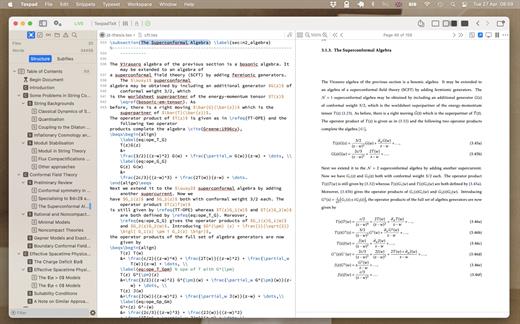
Texifier is a LaTeX editor designed for straightforward navigation, editing and typesetting of projects of any size. Open a LaTeX root file, and Texifier will scan it, open any referenced files, extract the document structure for display in the outline view, and configure the typesetter according to the packages and tools used by your document.

Texifier’s editor has syntax highlighting, a choice of themes, autocomplete of commands including those defined in your document, autofill for \cite and \ref commands, and many other features. The powerful sidebar’s document structure view allows you to navigate through large multifile projects with ease. Additionally, Texifier’s outline lists all labels, figures, tables, todos and the search pane can search and replace across your entire project using either normal text searches, or regular expression searches.

TexpadTeX – Texifier’s internal, no internet connection required, typesetter comes with PGF drivers, Native Fonts extensions, Unicode and more. These allow it to support almost any LaTeX package available. TexpadTeX also integrates a BibteX tool and a Makeindex compatible indexer for documents that require those tools. The integrated bundle manager takes care of downloading, installing and updating LaTeX packages for you, giving you access to almost the entire LaTeX ecosystem without using any more space on your device than needed.

TexpadTeX can run in Live mode, updating the output as you type, so you never need wait for a typeset to finish again.

For the rare cases of documents that are not compatible with TexpadTeX, you can use our free cloud typesetters. These are fully integrated into Texifier so press typeset, and Texifier will run the typeset in the Cloud, presenting the results just as if it had been typeset on your device.

After typeset, any errors in your document are organised in a table of issues. Tap on an issue to jump directly to the offending line of LaTeX source, or the line in the raw log if you wish to read the original output.

Texifier supports Markdown on an equal footing with LaTeX. Edit your document in Texifier’s syntax highlighting editor, browse the document by outline, then when you press Typeset, the document will be transparently converted and typeset by LaTeX, combining the informal ease of Markdown with LaTeX’s ability to create beautiful and high quality PDFs. Likewise Plain TeX users can edit and typeset their documents in Texifier.

Features:

  • Support for LaTeX, Plain Tex and Markdown
  • Navigate easily through even the largest projects using the Outline view
  • Search all files by string or regex with the global search view
  • Search by section title, label, filename, citation and more with the tag search
  • Browse the typeset errors and warnings either as a raw log, or with the errors and warnings table view.
  • Texifier’s editor autocompletes commands, and autofills commands such as \ref{…} or \cite{…}
  • Instant Live typeset using Texifier’s built in TexpadTeX typesetter
  • Free typesetting through our secure cloud servers gives you access to all packages in the latest TeXLive distribution without the need to install or maintain it yourself.

What’s New

Version 1.9.26:

  • Release notes were unavailable when this listing was updated.

Compatibility

macOS 10.12 or later, 64-bit processor


Release Name: Texifier 1.9.26
Size: 35.4 MB
Links: HOMEPAGE – NFO – Torrent Search

Download: FiKPERNiTROFLARERAPiDGATOR

6 Comments
Feb 22

Proxyman 5.0.0

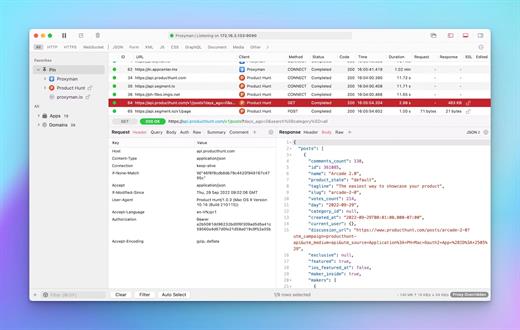
Proxyman is a high-performance macOS app, which enables developers to view HTTP/HTTPS requests from apps and domains.

Features

  •  Native macOS app. Written by Swift, Objective-C. Powered by Apple SwiftNIO for the high-performance network application.
  •  Fully support Apple Chip (e.g M1, M2, M1 Pro/Max).
  •  Built for macOS Monterey & Ventura.
  •  Hassle-free Intercept HTTP/HTTPS requests/response and WebSocket from Web Browsers, iOS, and Android devices.
  •  Modern and intuitive UI
  •  Multiple filters
  • Comprehensive Guideline to set up with iOS simulator and iOS and Android devices.
  • Basic debugging tools: Compose, Repeat, Wildcard/Regex Filter, Multiple Filters, Customize Columns, Toolbar…
  • Advanced Tools: Breakpoint, Map Local, Map Remote, Backlist, External Proxying, No Caching, Protobuf, Clear Cache, Custom Certificates, Scripting, Network Conditions, Reverse Proxy, Diff, Access Control etc
  • Automatic Setup for Backend Development: Auto capture HTTP(s) traffic from NodeJS, Ruby and Python.
  • macOS 10.15+

What’s New

Version 5.0.0:
 Features

  • Introduce the Proxy Advanced Setting
  • Support Wildcard domain on the Left Panel that allows developers to match different URLs
  • Auto break of URL and fill for fields on Map Remote (like we had in Charles Proxy)

 Improve

  • Able to edit SSL Proxying Entry
  • Make a clickable URL on the Comment Tab
  • Support M3U8 HLS Syntax highlighting
  • Improve New Menu Context from the Source List
  • Move some unnecessary settings from Settings -> General Tab to a different screen

 Bugs

  • Fixed: Custom pinned wildcard domains have blank labels and don’t show results
  • Fixed: [codegen] support dart/flutter
  • Fixed: URL path in the blocked list is ignored, if the domain is listed in the allowed wildcard
  • Fixed: Listening on localhost is not synchronized with UI
  • Fixed: Links are not clickable on the Body Tab
  • Fixed: SSL Proxy List can’t be edited
  • Fixed: [BUG] Proxyman Script doesn’t update the shared state if using abort()
  • Fixed: iOS app – misspelling in menu Tools > No Caching
  • Fixed: [BUG] Server Certificate shows incorrect data
  • Fixed: [Scripting] Scripting removes the = in the form body if the value is empty
  • Fixed: Delete single or multiple flows behavior doesn’t match with macOS UX.
  • Fixed: proxyman-cli import does not enable SSL proxying rules

Compatibility

macOS 10.15 or later


Release Name: Proxyman 5.0.0
Size: 33.4 MB
Links: HOMEPAGE – NFO – Torrent Search

Download: FiKPERNiTROFLARERAPiDGATOR

6 Comments
Feb 22

BlueHarvest 8.3.0

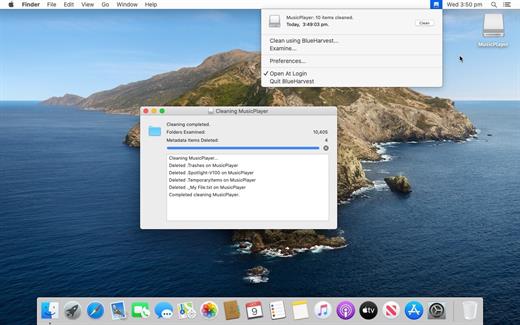
BlueHarvest is an exterminator for your Mac’s unnecessary Desktop Service Store (DS_Store) and resource fork (_AppleDouble) files.

Whether you manage a version control system or just want to maximize your available memory, DS_Store and _AppleDouble files are a nuisance. Get BlueHarvest, and give those superfluous files the boot.

A clean Mac is a happy Mac

  • Keep it clean. Blue Harvest does more than remove existing files — it blocks new ones from being created.
  • Easy interface. With BlueHarvest, a less cluttered Mac is only two clicks away.
  • Instant access. Want to clean up a folder without launching BlueHarvest? Simply control-click.

What’s New

Version 8.3.0:

  • Users can now “Force Eject” a disk if it is busy when using “Clean and Eject”.
  • Fixes a bug where disks were only being unmounted when using “Clean and Eject”. Now they are being unmounted and ejected.

Compatibility

macOS 10.15 or later, 64-bit processor
Support M1 Apple silicon.


Release Name: BlueHarvest 8.3.0
Size: 6.8 MB
Links: HOMEPAGE – NFO – Torrent Search

Download: FiKPERNiTROFLARERAPiDGATOR

6 Comments
Feb 22

PhotoSweeper X 4.8.5

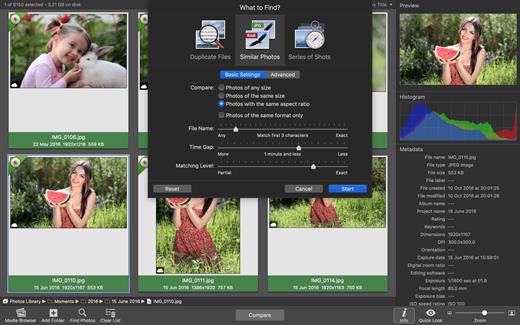
PhotoSweeper is a fast, precise & super efficient tool to eliminate similar or duplicate photos even in huge photo collections. It works with photos from iPhoto, Aperture and Adobe Lightroom libraries as well as photos from your hard drives and external storages.

PhotoSweeper will help you if:

  • You take a series of shots of the same scene trying to get the perfect one.
  • You edit photos with software like Photoshop, Pixelmator etc., and make backups just in case.
  • You have photos scattered on external hard drives and local disks, in iPhoto, Aperture or Lightroom libraries.
  • You have a mess in your photo collection or just want to free disk space by removing junk photos.

Features:

  • Easy search of photos – Just drag and drop folders from your Mac to allow PhotoSweeper to find all photos inside. Add more photos from your iPhoto, Aperture or Lightroom library via the Media Browser window.
  • Flexible comparison settings – Powerful multi-settings to easily find duplicates, similar photos, series of shots. The app finds duplicate photos, even those edited in external programs such Photoshop, regardless of image size or format.
  • High speed and quality – PhotoSweeper was developed as a tool for extremely fast comparison of a huge number of photos. Cutting-edge technologies and unique algorithms make searching duplicates incredibly fast and gives excellent comparison results.
  • Efficiency – You can regroup the results without re-comparing photos by changing matching level with a slider. Using caches makes the next comparison much faster.
  • Marking duplicates automatically – Mark photos you want to get rid of manually, or use the “Auto Mark” feature to mark duplicates automatically based on the list of rules you can adjust to your needs in the Preferences.
  • Comfortable viewing results – PhotoSweeper provides 3 modes for reviewing results: “One by One”, “Face-to-Face” – one or two large photos with an opportunity to mark a photo with just a click, “All in One” – all groups of duplicates in one list.
  • Great photo browsing – PhotoSweeper also serves as an up-to-date photo browser with a built-in search of photos by metadata, Quick Look preview, the “Info” panel with a detailed photo description, including histogram and image metadata (EXIF, IPTC etc.)

What’s New

Version 4.8.5:

  • Release notes were unavailable when this listing was updated.

Compatibility

macOS 10.12.2 or later.


Release Name: PhotoSweeper X 4.8.5
Size: 51.1 MB
Links: HOMEPAGE – NFO – Torrent Search

Download: FiKPERNiTROFLARERAPiDGATOR

6 Comments
Feb 20

Master Packager Pro 24.2.8812

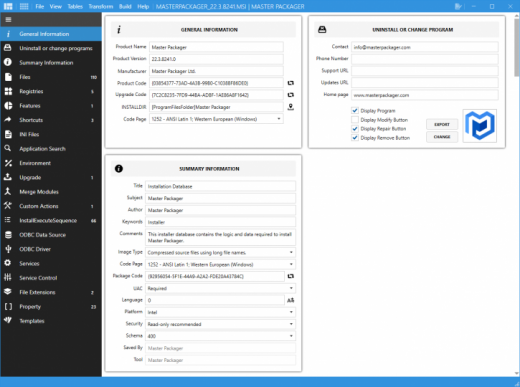
Create and edit Microsoft Windows Installer (MSI) files.

Create And Modify
Create MSI and MST files from scratch or modify Vendor Microsoft Windows installers.

Simple
Design that is created to be as friendly as possible. Self-explanatory user interface.

Fast
Work with MSIs having over 100 000 files or registries and experience impressive load time and UI responsiveness.

User interface
Don’t miss anything. Interface that lets you use your display’s full potential – All menus in one view.

Templates
Store properties, registries, summary information or custom actions and apply them instantly with predefined templates.

Repackager
Repackage extremely complex EXE installations to MSI with no or minimal modifications and full automation capabilities.

Release Name: Master Packager Pro 24.2.8812
Size: 26.1 MB
Links: HOMEPAGE – NFO – Torrent Search

Download: FiKPERNiTROFLARERAPiDGATOR

6 Comments
Feb 20

Pazu Spotify Music Converter 4.8.2 Multilingual

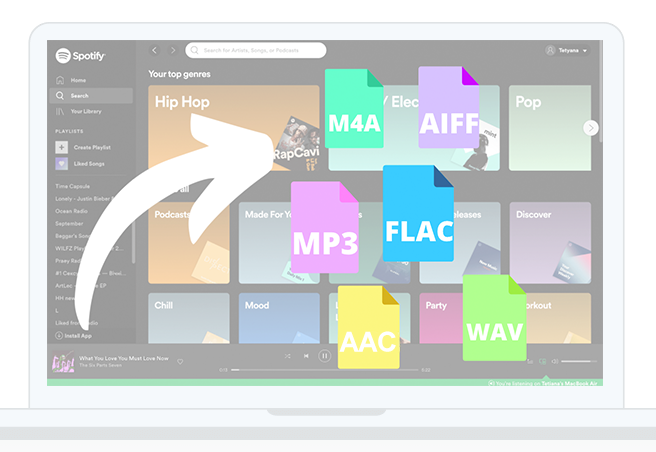
Description: Pazu Spotify to MP3 Converter for Windows allows you to download and convert Spotify music to MP3, M4A, AAC, FLAC, WAV and AIFF in high quality. Use it to download Spotify songs, albums, playlists, podcasts and audiobooks with either Spotify free or premium account. Then you can transfer them to any device, such as MP3 player and play them without restrictions.

Features:

  • Download Spotify playlists and songs to MP3, M4A, AAC, WAV, FLAC and AIFF.
  • Download music, album and playlist from Spotify.
  • Support Spotify Free and Premium.
  • Download and convert podcasts offline.
  • 10X conversion speed & retain ID3 tags.
  • Zero quality loss. No need to install Spotify app.

Release Name: Pazu Spotify Music Converter 4.8.2 Multilingual
Size: 334 MB
Links: HOMEPAGE – NFO – Torrent Search

Download: FiKPERNiTROFLARERAPiDGATOR

7 Comments