Oct 25

Windows 11 Pro Insider Preview 21H2 Build 22483 (Dev Channel) (x64) Untouched Incl. Activator

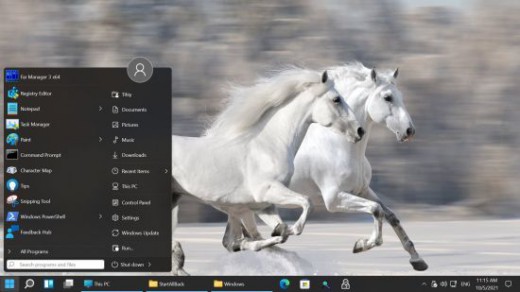
Description: Hello Windows Insiders, we are excited to release the Windows 11 Insider Preview build to the Dev Channel! As we finalize the product over the coming months, we will work with you to validate the experience. You will get to try many, but not all, of the new features we showed last week in this early preview. We will bring more features such as Chat with Microsoft Teams and Android apps in the Microsoft Store over the coming months as they are ready for you – we are just getting started on this journey together!
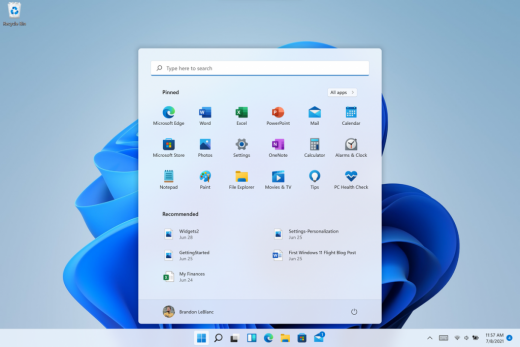
What’s New in this Build ?

  • Right-clicking on Recycle Bin on the desktop now uses the new modern context menu.
  • New modern context menu when you right-click on Recycle Bin on your desktop.
  • Added an option when right clicking a network share in File Explorer to pin it to Quick Access without having to click Show more options.
  • They have begun releasing an updated version of the Korean IME with adjustments made based on Windows Insider feedback. They believe this will provide a more reliable input experience for Korean on Windows 11. The updated version of the Korean IME follows the new visual design of Windows 11 with acrylic in the candidate window, a new selection visual, and dark mode support. It also improves improved performance and compatibility. The updated Korean IME is rolling out to a subset of Insiders in the Dev Channel first, to help us quickly identify issues that may impact performance and reliability. Over time, it will roll out to everyone in the Dev Channel. Please file feedback via Feedback Hub under Input and Language > Text Input.

Fixes :

  • [General]
    They fixed the issue that was causing PCs with Windows Defender Application Guard (WDAG) enabled to bugcheck continuously. PCs with WDAG enabled should now receive Build 22454.
  • [Start]
    Windows Terminal is listed again when right-clicking on the Start button (WIN + X).
    Narrator should announce the Start launch more reliably now.
  • [Taskbar]
    The Desktops flyout should now dismiss properly for Narrator users when scanning with item navigation across the Task View button.
    Fixed an issue where the preview thumbnails for Desktops They re not rendering correctly for certain aspect ratios.
    Fixed a rounding issue that was making the volume icon tooltip show the wrong number in some cases.
    The input indicator, Quick Settings, and notification center icon tooltips will no longer display behind the flyouts when they’re open.
    Addressed an underlying issue that was resulting in the volume icon in the Taskbar displaying sound was muted when that was not the case.
    Fixed an issue that could cause the Taskbar to unexpectedly get stuck on top of full screen applications, such as PoThey rPoint presentations, after interacting with the Taskbar previews.
    Taskbar icons should no longer flicker when you mouse over them while using a contrast theme.
    Fixed an issue where app icons would occasionally unexpectedly animate onto the Taskbar from somewhere other than from below.
    Shift + Click on an app icon in the Taskbar to launch a new instance of that app (for apps that support multiple instances) is now working again.
    Did some work to address an issue where app icons could get stuck in an alert state in the Taskbar even if the app in question was closed.
  • [Input]
    Fixed an issue that was causing the text candidates to not appear after the first time the handwriting panel was invoked.
    Mitigated a stutter in the animation when tapping a text field to invoke the touch keyboard.
    Fixed a bug that was causing clipboard history to not render for some people.
    Displaying 3rd party IME icons in the input indicator should be more reliable now.
    Addressed an explorer.exe crash that could happen when changing window focus while using the touch keyboard.
    Fixed an issue for people who’d opted into the previous version of the Japanese IME that was causing certain games to crash.
    Fixed an issue where the tip for voice typing when using the touch keyboard wouldn’t be connected to the microphone button.
    Addressed an issue where the touch keyboard could get into a state where the key labels would be invisible due to the wrong background color being used.
    Mitigated an issue that was leading to the touch keyboard settings flyout having white on white text sometimes.
    Did some work to address an issue where interacting with the expressive input button in the touch keyboard could result in the candidate area having a broken layout.
  • [File Explorer]
    Improved the reliability of context menu invocation.
    Mitigated a couple of issues that They re causing leaks when using File Explorer.
    The context menu will now not immediately dismiss when the option to open things with a single-click is enabled in File Explorer.
    If you press F11 to full screen File Explorer, then use WIN + Shift + Left/Right to change what screen the window is displaying on, pressing F11 again will no longer jump the window back to the original screen.
  • [Settings]
    Mitigated an issue when typing with certain 3rd party IMEs into the search box in Settings that could result in the candidate window being rendered elsewhere on-screen (not attached to the search box) and/or characters inserted into the search box not displaying.
    They did some work to help address an issue that was making the Windows Insider Program page in Settings appear blank sometimes.
    The mouse pointers under Accessibility > Mouse pointer and touch are no longer invisible for Arabic and Hebrew display languages.
    System > Storage > Show more categories > Other should no longer always say it’s managed by group policy even when it isn’t.
    Added some links to “Find my device” in Settings to help you learn more about the privacy resources.
    Start time and end time pickers under Focus Assist > During these times are now visible when focus is set while using a contrast theme.
    Addressed a crash that could happen when using Sound Settings.
    Fixed an issue with the volume slider in Quick Settings that was causing the volume to sometimes to save at a slightly different level than what was actually set.
  • [Logging in and Authentication]
    Fixed a crash that could happen when the network icon updated states on the login screen.
  • [Windowing]
    Made a change to address an issue where title bar options including close, minimize and maximize where not appearing as expected in certain apps when moving the mouse to top of the screen while the app was maximized.
  • [Other]
    Improved icon rendering for certain apps in the Search hover flyout.
    Addressed an issue that was causing overlapping text in the Share window for certain languages.
    Made some performance improvements when switching to the Details tab of Task Manager.
    If the Windows Security app is open when switching to dark mode, the UI elements should respond better now and not have unreadable text.
    If there are a large number of exclusions listed under Virus and Threat Protection in the Windows Security app, it will now display a progress indicator when loading them.
    Fixed some text clipping in the Windows Security app when using the option in Accessibility Settings to increase the text size.
    Mitigated an issue that was causing the WM_CTLCOLORSTATIC message used in certain apps to be ignored, so the colors in some places wouldn’t appear correctly.
    Fixed a leak when the desktop background was set to a slideshow, impacting performance over time until explorer.exe was restarted.
    Mitigated an issue that was causing some PCs to bugcheck while in modern standby.
    Fixed an issue that was causing sloThey r Wi-Fi speeds after enabling Hyper-V and creating an External V-Switch.
    When animations are disabled in the system, there should no longer be a fade animation in UWP apps like Settings or the Feedback Hub when transitioning from the splash screen to the app content.

Known issues :-

  • [General]
    They ’re working on a fix for an issue that is causing some Surface Pro X’s to bugcheck with a WHEA_UNCORRECTABLE_ERROR.
  • [Start]
    In some cases, you might be unable to enter text when using Search from Start or the Taskbar. If you experience the issue, press WIN + R on the keyboard to launch the Run dialog box, then close it.
    System is missing when right-clicking on the Start button (WIN + X).
  • [Taskbar]
    The Taskbar will sometimes flicker when switching input methods.
    They ’re investigating an issue in this build where app icons in the Taskbar are getting cut off by the “show hidden icons” button and aren’t centered.
  • [Search]
    After clicking the Search icon on the Taskbar, the Search panel may not open. If this occurs, restart the “Windows Explorer” process, and open the search panel again.
    Search panel might appear as black and not display any content below the search box.
  • [File Explorer]
    If you right click files in OneDrive locations in File Explorer, the context menu will unexpectedly dismiss when you hover over entries that open sub-menus, such as “Open with.”
  • [Widgets]
    The widgets board may appear empty. To work around the issue, you can sign out and then sign back in again.
    Widgets may be displayed in the wrong size on external monitors. If you encounter this, you can launch the widgets via touch or WIN + W shortcut on your actual PC display first and then launch on your secondary monitors.
  • [Windows Sandbox]
    They ’re investigating an issue in which Windows Sandbox may not launch for some Insiders after upgrading to this build.
  • [Microsoft Store]
    They continue to work to improve search relevance in the Store.
  • [Windows Subsystem for Linx (WSL) & Hyper-V]
    [ADDED 9/10] They ’re investigating reports of both WSL2 and Hyper-V not working on this build on ARM64 PCs such as the Surface Pro X.

How To Install?

  • Download the build.
  • Create a bootable drive or Install from ISO.
  • Select the Windows type you want to install.
  • Skip the activation for now.
  • Let the windows installation get finished.
  • After installing, run the activator as admin.
  • Use the activator to activate your windows.
  • Boom! Enjoy the activated Build.

Release Names: Windows 11 Pro Insider Preview 21H2 Build 22483 (Dev Channel) (x64) Untouched Incl. Activator
Size: 3.29 GB
Links: HOMEPAGE – NFO – Torrent Search

Download x64 & Activator : UPLOADGiG – NiTROFLARE – RAPiDGATOR

4 Comments
Oct 24

Registry Finder 2.52

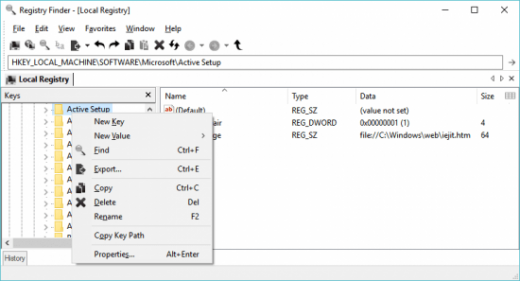
Starting with version 2.0 Registry Finder is not just a finder. It is a simple registry editor. It has basic facilities of the system RegEdit that is enough in most simple use-cases. Registry Finder allows you to browse the local registry; create, delete, rename keys and values; modify values as its natural data type (string, multistring, DWORD) or as a binary data. It is allowed to open multiple Registry windows. Next time you start Registry Finder, those windows will be reopened on the same keys as before.
The Find operation is efficient and quick. All found items are displayed in a separate window as a list. Each line represents a single match with the search criteria. The icon shows where the match occurred: key name, value name or value data. Matched text is highlighted with red.
You can jump to any found item in the Registry window or edit/delete items right in the Find Results window.
Items in the Find Results window can be saved to file in comma separated values (CSV) or reg file format.

With the Replace feature you can easily replace all or particular occurrences of one string with another. The replacement is performed only in items that are in the Find Results window. In the Replace dialog you specify either all items or just selected ones. After replacement is done, items in the window are updated. If some item do not match the search criteria any more it still remains in the list.

All operations that alter the registry including deletion and replacement can be undone and redone. The operations are listed in the History window. To open it, click View|History in the main menu. The last performed operation is marked with a yellow arrow.

Current key path can be copied to clipboard.

Release Name: Registry Finder 2.52
Size: 4.61 MB
Links: HOMEPAGE – NFO – Torrent Search

Download: UPLOADGiG – NiTROFLARE – RAPiDGATOR

5 Comments
Oct 24

FAST VIDEO DOWNLOADER V4.0.0.18 MULTILINGUAL PORTABLE

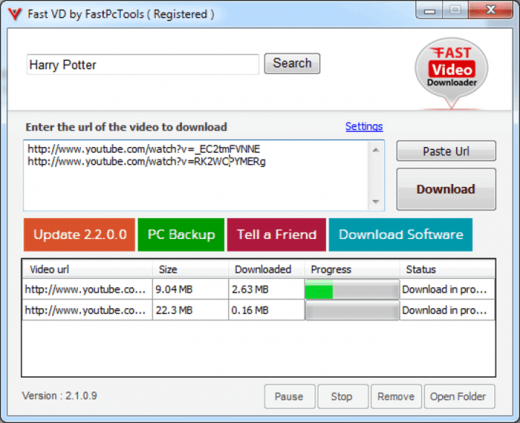
Description: Fast Video Downloader is software, which allows you to download videos from youtube, dailymotion, vimeo, metacafe, facebook, bing and many more video sites and convert them to iPhone, iPad, iPod, Android, psp device compatible format. You may schedule your download list.

Included :

  • Download from
    Download videos from Youtube, Dailymotion, Vimeo, Metacafe, Facebook, Bing & more video sites.
  • Multiple download
    Download one or more video simultaneously on same time.
  • Download HD Video
    Download high resolution, Full HD (1080p), HD(720p) videos from YouTube and other videos sites (if video site supports High Definition Videos).
  • Download schedule
    Schedule your download video.
  • Video Search
    This is very smart feature. You may search videos & add to download list in a single click.
  • Paste Video URL
    Automatically paste video URL which you copied.
  • Convert Videos
    Convert downloaded videos to Iphone, Ipad, Ipod, Android, psp device compatible format. You can also convert videos to 3gp, AVI format.
  • Convert Video Resolution
    Change resolution of the video without changing format.
  • Convert Video Format
    Automatic convert videos when download complete. Convert for iPhone, iPad, iPod, Android, PSP device compatible format. You can also convert videos to 3GP, AVI format.
  • Fast Speed
    Application does not apply any restriction on download speed of the videos. So video download will complete in less time.
  • Proxy Setting
    If you use proxy for connecting to internet then you can specify that proxy to download videos.

How To Install?

  • Install the program from given setup.
  • Wait for it to get installed fully.
  • Boom! Now you can use the program without any interruptions.(It’s Pre-Cracked lol)
  • That’s it, Enjoy now

Release Name: FAST VIDEO DOWNLOADER V4.0.0.18 MULTILINGUAL PORTABLE
Size: 106 MB
Links: HOMEPAGE – NFO – Torrent Search

Download: UPLOADGiG – NiTROFLARE – RAPiDGATOR

7 Comments
Oct 24

YAMICSOFT WINDOWS 11 MANAGER V1.0.1 (X64) MULTILINGUAL PORTABLE

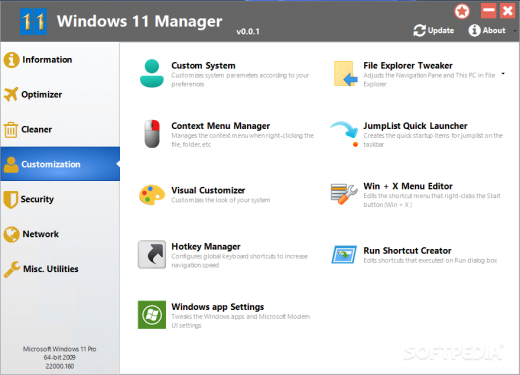
Description: Windows 11 Manager is an all-in-one utility for Microsoft Windows 11 specially, it includes over forty different utilities to optimize, tweak, clean up, speed up and repair your Windows 11, helps make your system perform faster, eliminate system fault, increase stability and security, personalize your copy of Windows 11, and meet all of your expectations.?

Features:
Information
Creates the system restore point manually; Gets detailed information about your system and hardware, helps you find out the Micrsoft product key such as Microsoft Windows and Microsoft Office; Shows and manages all running processes and threads; Repair Center helps to diagnose and fix the various system problems; Cleans up your system just one clicking; Optimization Wizard is useful to the user who is unfamiliar with computers.

Optimizer
Tweaks your system to improve performance and increase speed; Manages and configures the Windows boot menu to your preference; Startup Manager controls all the started programs with Windows start, checks and repairs the advanced starup items to restore the malicious change by viruses; Manages and optimizes system services and drivers to improve performance; Manages and optimizes the scheduled tasks to speed up your system.

Cleaner
Disk Analyzer can analyze and view the disk space usage of all programs, files and folders find out which engross your disk space and shown with a chart; Cleans up WinSxS folder securely to reduce the component store size; Smart Uninstaller can fully delete programs from your system without residual files and Registry entries; Desktop Cleaner can analyze and move unused shortcuts, files and folders on desktop to specified folders; Searches and deletes junk files to save disk space and improve performance; Searches and deletes the duplicated files to save your disk space; Registry Cleaner searches Registry to find out and delete the invalid items; Registry Defrag rebuilds and re-indexes your Registry to reduce registry access and therefore improve application responsiveness and eliminate mistakes and corruption in Registry.

Customization
Customizes system parameters according to your preferences by tweaking File Explorer, Desktop, Start, Taskbar and Notification area; Adds files, folders and system items to This PC, and Desktop; Pins the files or folders to your Desktop, Taskbar or Start; Creates the quick startup items for jumplist on Taskbar; Manages the context menu when right click the file, folder, etc; Edits the shortcut menu that right-click Start button (Win + X shortcut); Customizes the look of your system; Edits and adds the shortcuts that executed on Run dialog box; Tweaks the Windows Apps and Microsoft Modern UI settings.

Security
Tweaks system, components, UAC, Sign in settings, adjusts various settings and restricts access to drives and programs to improve system security; Safeguard your sensitive files and folders security, encrypt files, move system folders to safe locations; Privacy Protector ensures privacy and keeps sensitive information secure by eliminating tracks; File Undelete recovers and restores deleted or formatted files on logical disks; Locks some system features to improve security.

Network
Optimizes and tweaks your internet connection and network settings; Tweaks Microsoft Internet Explorer browser settings; IP Switcher can switch between different network settings easily; Edits the Hosts file to speed up system surfing internet; Wi-Fi Manager can view and manage all your wireless network.

Misc. Utilities
Creates scheduled tasks or the monitorings that trigger tasks; Shows and run the useful collection of utility that built-in your Windows; Splits a file into several smaller files or merges back to the original file; Super Copy is the powerful tool to copy files or backup automatically; Operates your Registry easily using the Registry Tools.

What’s New:
– Windows 11 Manager v1.0.0 released!

Operating System:
– Windows 11 All Editions (x64)

Treatment: Run, Install, Enjoy, No Activation Required!

Release Name: YAMICSOFT WINDOWS 11 MANAGER V1.0.1 (X64) MULTILINGUAL PORTABLE
Size: 26 MB
Links: HOMEPAGE – NFO – Torrent Search

Download: UPLOADGiG – NiTROFLARE – RAPiDGATOR

6 Comments
Oct 24

STARTALLBACK V3.0.1.4011 MULTILINGUAL PRE-ACTIVATED

Description: Introducing StartAllBack: Windows 11 from better timeline, Embrace, enhance, unsweep classic UI from under the rug.

Restore and improve taskbar
• Show labels on task icons
• Adjust icon size and margins
• Move taskbar to top, left or right edges
• Drag and drop stuff onto taskbar
• Center task icons but keep Start button on the left
• Split into segments, use dynamic translucency
• Separate corner icons with Windows 7/10 UI

Restore and improve File Explorer UI
• Ribbon and Command Bar revamped with translucent effects
• Details pane on bottom
• Old search box (the one which works)
• Dark mode support for more dialogs

Restore and improve context menus
• All new look with rounded acrylic menus
• Fast and responsive taskbar menus
• New fonts, better touch support

Restore and improve start menu
• Launch apps and go to system places in one click
• Navigate dropdown menus like a boss
• Enjoy fast and reliable search

Finally, lightweight styling and UI consistency
• Enjoy Windows 7, Windows 10 and third-party taskbar and start menu styles
• Fix UI inconsistencies in Win32 apps
• Don’t be blue: recolor UI in all windows apps
• Negative resource usage: fewer RAM used, fewer processes started

What’s new
• official site does not provide any info about changes in this version

Release Names: STARTALLBACK V3.0.1.4011 MULTILINGUAL PRE-ACTIVATED
Size: 1.52 MB
Links: HOMEPAGE – NFO – Torrent Search

Download : UPLOADGiG – NiTROFLARE – RAPiDGATOR
4 Comments
Oct 24

ARTICULATE STORYLINE V3.13.26122.0 MULTILINGUAL PORTABLE

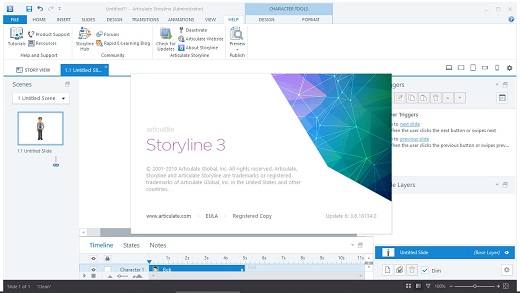
Description: Articulate Storyline is the industry’s favorite software for creating interactive courses. It’s simple enough for beginners, yet powerful enough for experts. And it lets you create virtually any interaction you can imagine, in minutes. With the new perpetual version of Storyline, you’ll be able to deliver mobile and accessible courses with enhanced interactivity faster.

Deliver a responsive multi-device experience
Simply create your course in Storyline 3 and click publish. The new responsive player dynamically adapts to tablet and smartphone screens, providing an optimal view of your course on every device—without you tweaking a thing. It supports touchscreen gestures, hides sidebar menus, eliminates browser chrome, and delivers mobile-friendly playback controls.

Add closed captioning
Make your courses more accessible for all of your learners by adding closed captions. Simply import a caption file for each audio track and video in your course, then style captions using any font you want. You can even use triggers to toggle captions on and off when you’ve disabled player chrome.

Dial up the interactivity
Let learners manipulate data and slide content with dial interactions. Customize prebuilt dials or create your own from any object, graphic, or image. Use dials to simulate real-world objects and tasks or let learners explore cause-and-effect relationships.

Get your game on
Create game-like interactions easily with new triggers and motion path features. You can now trigger events when objects intersect, stop intersecting, enter the slide, or leave the slide. And take motion path animations to a whole new level by orienting moving objects to the paths they’re traveling.

Publish high-performance HTML5 courses
HTML5 output looks better, runs faster, and supports more features than ever before. All accessibility features, including closed captions and custom tab order, are supported in HTML5 output. And you can choose to publish HTML5-only or HTML5-first courses.

Work more efficiently
Let Storyline do more of the work for you. With productivity enhancements, Storyline 3 finds and replaces fonts in seconds, automatically scales and crops images to fit any placeholder shape, and maintains triggers when you swap out placeholder images. You can also now name your motion paths, duplicate and set properties for multiple slide layers at once, and publish a single slide or scene.

Release Name: ARTICULATE STORYLINE V3.13.26122.0 MULTILINGUAL PORTABLE
Size: 740 MB
Links: HOMEPAGE – NFO – Torrent Search

Download: UPLOADGiG – NiTROFLARE – RAPiDGATOR

7 Comments
Oct 24

4K VIDEO DOWNLOADER V4.18.2.4520 MULTILINGUAL PORTABLE

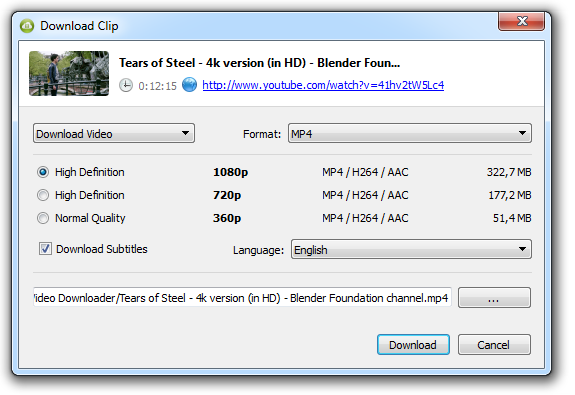
Description: 4K Video Downloader allows to download video, audio and subtitles from YouTube in high-quality and as fast as your computer and connection will allow. If you want that video on your iPad, iPhone or other device we’ve got you covered. Downloading is simple and straightforward: just copy the video link from your browser and click ‘Paste Url’. Done!

Feature :

  • Download entire playlists and channels from YouTube and save them in MP4, MKV, M4A, MP3, FLV, 3G, generate .m3u file for playlists.
  • Download video in HD 1080p, HD 720p or 4K quality and enjoy high dimension video on your HD TV, iPad or other devices.
  • Advanced subtitles download, select if you would like to have .srt file or embedd subtitles in video file to watch it on your Mac for example.
  • Activate “Smart Mode” in order to apply the selected settings to all your downloads, easy and fast.
  • Download video in 3D format, you will find a small special icon among available formats after video parsing. It’s really impressive to watch live shows and cartoons in 3D.
  • Subscribe to YouTube channels within 4K Video Downloader and the new videos will be downloaded automatically to your computer just right after they’re uploaded on a channel by its owner.
  • Support of 360° videos – the videos that were created with a camera that simultaneously records all 360 degrees of a scene, change the viewing angle by dragging video with the mouse and enjoy this mindblowing novelty!
  • Download embedded YouTube videos from any web pages, just copy/paste link and the program will find the source of download.
  • Download video and audio from Vimeo, SoundCloud, Flickr, Facebook and DailyMotion.

Use 4K Video Downloader on your PC, Mac or Linux, doesn’t matter what OS you prefer.

Release Names: 4K VIDEO DOWNLOADER V4.18.2.4520 MULTILINGUAL PORTABLE
Size: 289 MB
Links: HOMEPAGE – NFO – Torrent Search

Download: UPLOADGiG – NiTROFLARE – RAPiDGATOR
7 Comments
Oct 24

Blackmagic Design Fusion Studio v17.4 Build 23 (x64) Pre-Cracked

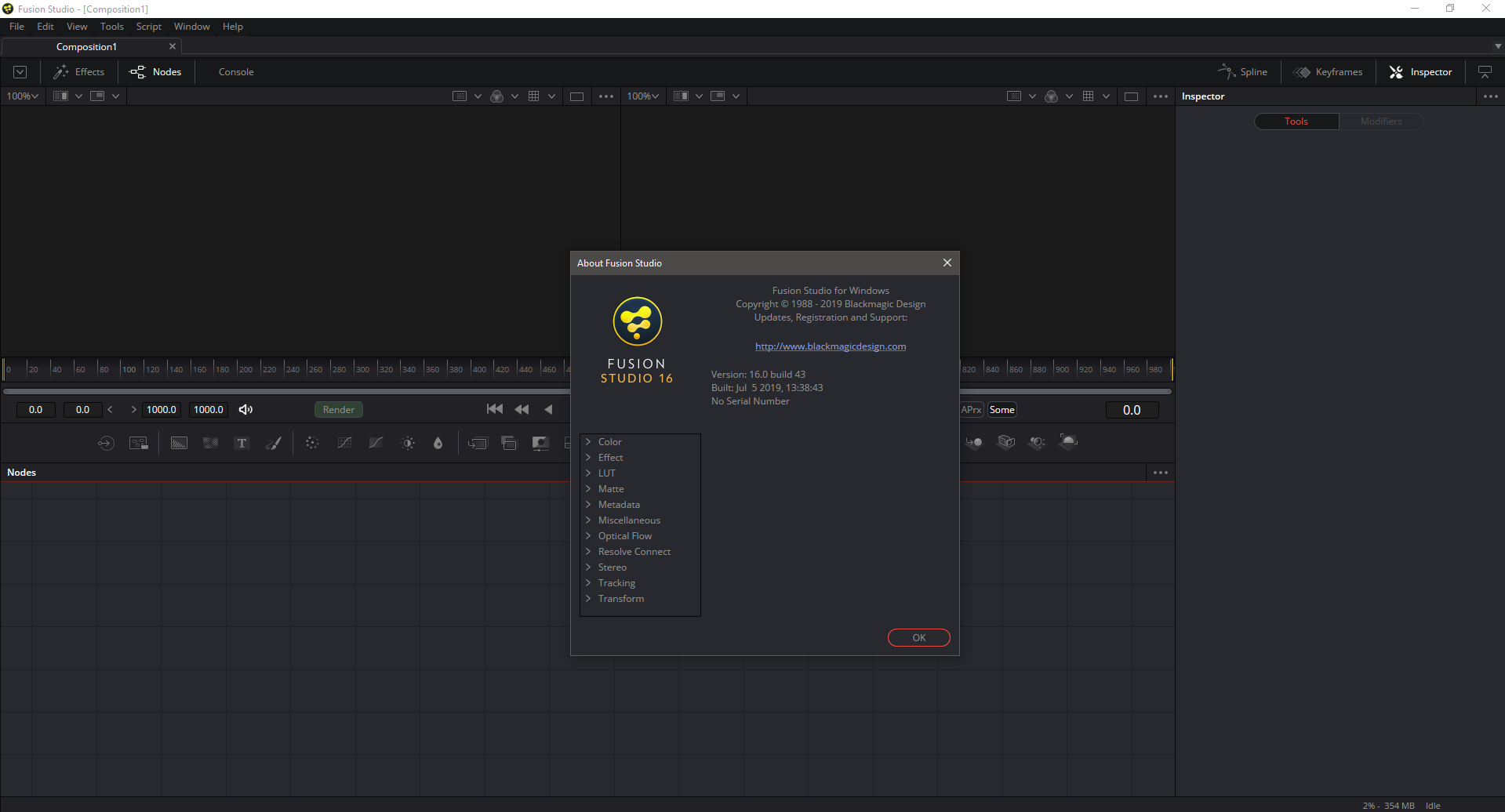
Description: Blackmagic Design announced Fusion 16 Studio Beta 6 Release Candidate. Last major release version 16 present all of the improvements made to Fusion built into DaVinci Resolve available to VFX artists using the stand alone version of Fusion Studio.

Feature :
Fusion Studio 16 is a major upgrade that brings all of the improvements made to Fusion inside of DaVinci Resolve to the stand alone version of Fusion. You get an updated and more modern user interface, along with dramatically faster performance. All 3D operations are GPU accelerated, making Fusion much more responsive and interactive. In addition, there are dozens of GPU accelerated tools such as time effects, dissolves, stereo tools, vector motion, corner pinning, color tools and more! B-spline and bitmap mask operations are accelerated, as are the planar and camera trackers. Improved memory management makes large compositions with high tool counts more reliable, making Fusion 16 dramatically faster and more stable than ever before!

Release Names: Blackmagic Design Fusion Studio v17.4 Build 23 (x64) Pre-Cracked
Size: 640 MB
Links: HOMEPAGE – NFO – Torrent Search

Download: UPLOADGiG – NiTROFLARE – RAPiDGATOR
7 Comments
Oct 24

Microsoft Toolkit v2.7.2 (Activate Microsoft Office and Windows)

Description: This is a set of tools and functions for managing licensing, deploying, and activating Microsoft Office and Windows. All output from these functions is displayed in the Information Console. All functions are run in the background and the GUI is disabled to prevent running multiple functions, as they could conflict or cause damage if run concurrently. The Microsoft Office Setup Customization Functions (Customize Setup Tab), AutoKMS Uninstaller (if AutoKMS is installed), AutoRearm Uninstaller (if AutoRearm is installed), Office Uninstaller and Product Key Checker work even if Microsoft Office or Windows is not installed/supported. For information about individual functions, read further.

This Pack Contains:

  • HEU KMS Activator 10.0.0
  • KMSAuto Lite v1.3.5.1
  • Windows 10 Permanent Activator Ultimate v2.4
  • KMSAuto Net 2016 1.5.3
  • KMSpico 10.2.0 Final
  • KMSpico 10.2.0 Portable
  • Microsoft Toolkit 2.6.3 Final
  • Office 2013 KMS Activator Ultimate 2015 1.5
  • Office 2013 KMS Activator Ultimate 2015 1.5 Portable
  • PIDKey 2.1.2.1016 Portable
  • Re-Loader Activator 2.6 Final
  • Windows KMS Activator by AR_Alex 3.1.0
  • Windows 10 KMS Activator Ultimate 2016 v1.6
  • Windows 10 KMS Activator Ultimate 2016 v1.6 Portable
  • Windows KMS Activator Ultimate 2018 4.0
  • Windows Loader 2.2.2 By DAZ + WAT Fix
  • Office 2016 Permanent Activator Ultimate 1.7
  • Ratiborus KMS Tools 15.12.2017
  • Windows 10 Pro Permanent Activator Ultimate v2.2
  • AAct v3.8.5
  • AAct Network v1.0.3
  • Office 2013-2016 C2R Install 6.0.1
  • Office 2013-2016 C2R Install Lite 6.0.1
  • Office 2013-2016 C2R License Setup v1.05
  • KMS Server v1.2.4
  • KMS Server Service 2.0.4
  • Garbage Collector v1.3.4
  • Windows KMS Activator Ultimate 2017 v3.8
  • Ra1n Act1vat0r 1.0 RC 8
  • KMS Tools Portable 01.03.2018
  • PIDKey Lite v1.62.1
  • Windows 10 Permanent Activator Ultimate 2.5
  • KMS Lite 1.3.5.2

Release Name: Microsoft Toolkit v2.7.2 (Activate Microsoft Office and Windows)
Size: 13 MB
Links: HOMEPAGE – NFO – Torrent Search

Download: UPLOADGiG – NiTROFLARE – RAPiDGATOR
7 Comments
Oct 24

pdfFactory Pro v8.02 + Fix

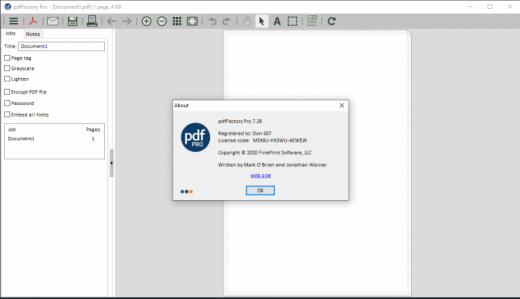
Description: pdfFactory offers award-winning PDF creation features at an affordable price. pdfFactory Pro has all the features of pdfFactory and adds bookmarks, job ordering, letterheads, and automated email functions. Only pdfFactory allows printing to paper or PDF without printing twice. Acrobat is not needed for printing. Increases the convenience of document delivery by having a single PDF that contains material from different sources. Just keep printing documents to pdfFactory and they will automatically be combined. Allows quick, accurate previewing of the PDF, including up to 400% zoom, without saving the file first and without opening Acrobat.

Features :

  • Create PDF or print to paper
  • Combines multiple documents into a single PDF
  • Preview
  • Protect your PDFs
  • Font embedding
  • Page insertion and deletion
  • Send via email
  • AutoSave
  • Live URL Links
  • Easy server deployment
  • Create PDFs on letterhead
  • Add page numbering, headers, footers, watermarks
  • Bookmarks and Table of Contents
  • Integrated Jobs Tab
  • Custom Drivers
  • Set Initial Acrobat Display Properties

How To Install?

  1. Install the program from the given setup.
  2. Run the application.
  3. Extract the “Key Fix.zip” to any directory.
  4. In the application, enter the key from “key.txt” file
  5. Block program in Firewall!!
  6. Boom! Now you can use the program without any interruptions.
  7. That’s it, Enjoy now

Release Name: pdfFactory Pro v8.02 + Fix
Size: 14 MB
Links: HOMEPAGE – NFO – Torrent Search

Download: UPLOADGiG – NiTROFLARE – RAPiDGATOR

5 Comments